
A sales cadence is a planned, time-based sequence of prospecting touches across channels, with written rules for when it continues and when it stops. Most B2B teams structure cold outbound around 8 to 12 touches across 14 to 21 days because securing a first meeting with a new prospect takes an average of 8 touchpoints.
If you've just stepped into an SDR manager role, you already know what prospecting looks like without one. One rep sends two emails and moves on to a fresher list. Another rep follows up five days in a row and accidentally emails a VP who already asked for a Thursday call.
When you start figuring out what is a sales cadence that books pipeline, the answer isn't a magic template copied from a blog post. It's a rule set that reacts to buyer behavior, running default touches for silent accounts while state and stop rules control what happens after every reply, bounce, pause, or opt-out. You don't need separate tools to plan LinkedIn and email touches: Flowkon lets you organize both in one multichannel campaign, with timing and logic in a single workflow.
Sales Cadence at a Glance
| Element | Practical starting point |
|---|---|
| Purpose | Coordinate follow-up across channels without repeating the same pitch |
| Typical cold outbound range | 8 to 12 touches over 14 to 21 days, adjusted to buyer response |
| Channels | Email, phone, and manual LinkedIn outreach |
| What each touch adds | A new insight, proof point, question, or channel |
| Stop or pause when | A prospect replies, books a meeting, opts out, bounces, or sends an out-of-office reply |
| What to measure | Positive replies, meetings booked, opt-outs, and results by step |
What a Sales Cadence Is and Why Teams Use One
Think of a sales cadence like a structured training plan. A training plan sets how many sessions happen each week, how far apart they fall, and what each session works on, so nobody wakes up and decides by mood whether to train.
Prospecting needs the same discipline because B2B buyers rarely reply on the first attempt. In the RAIN Group Top Performance in Sales Prospecting study summarized by Convex, which surveyed 489 sellers and 488 buyers across 25 industries representing roughly $4.2 billion in purchases, it took an average of 8 touchpoints to book an initial meeting with a new prospect, while top-performing sellers needed about 5 touches. That gap tells you something important: cadence design isn't about blasting more volume. It's about consistent, coordinated follow-up paired with relevant messaging.

You don't need to buy separate tools just to plan LinkedIn and email outreach. Flowkon lets you plan LinkedIn connection requests, follow-ups, and email touchpoints in one multichannel campaign with clear timing and logic. It can also create, schedule, and track email campaigns, so your team can manage both channels in one workflow rather than coordinate two separate outreach tools. Review LinkedIn platform rules before choosing how to execute any LinkedIn step.
The Four Elements Every Cadence Sets
Before a single message goes out, a working cadence locks in four operating decisions:
Touch count: The total number of outreach attempts planned before the sequence closes out.
Spacing: The exact number of days between attempts so the rep stays visible without crowding the buyer.
Channel mix: The deliberate combination of email, phone calls, and LinkedIn touches rather than leaning on one inbox.
Exit conditions: Written rules that stop or pause the sequence when a prospect replies, books time, unsubscribes, or bounces.
Single Email vs Ad Hoc Follow-Up vs Sales Cadence
Many early-stage teams think they have a cadence when they have reps improvising from reminders. Comparing the three setups side by side makes the operational difference obvious.
| Element | Single email | Ad hoc follow-up | Sales cadence |
|---|---|---|---|
| Structure | One message | Follow-ups sent when a rep remembers | Planned set of touches, each with a defined purpose |
| Timing | None | Irregular | Fixed spacing, usually 1 to 5 days between touches |
| Channels | One | Usually one | Email, LinkedIn and calls combined on purpose |
| Stop rules | None | Rep judgment | Written exit conditions such as a reply, an unsubscribe or a booked meeting |
| Measurement | Replied or did not reply | Hard to attribute | Reply and meeting rate by step and by version |
Revenue teams adopt a formal cadence for three practical reasons. New hires follow the same baseline playbook on day one instead of guessing. Managers can inspect exactly which step loses prospects instead of blaming vague effort. Finally, you can test two sequences against each other fairly because timing and channel order stay controlled.
A Typical B2B Cadence, Touch by Touch
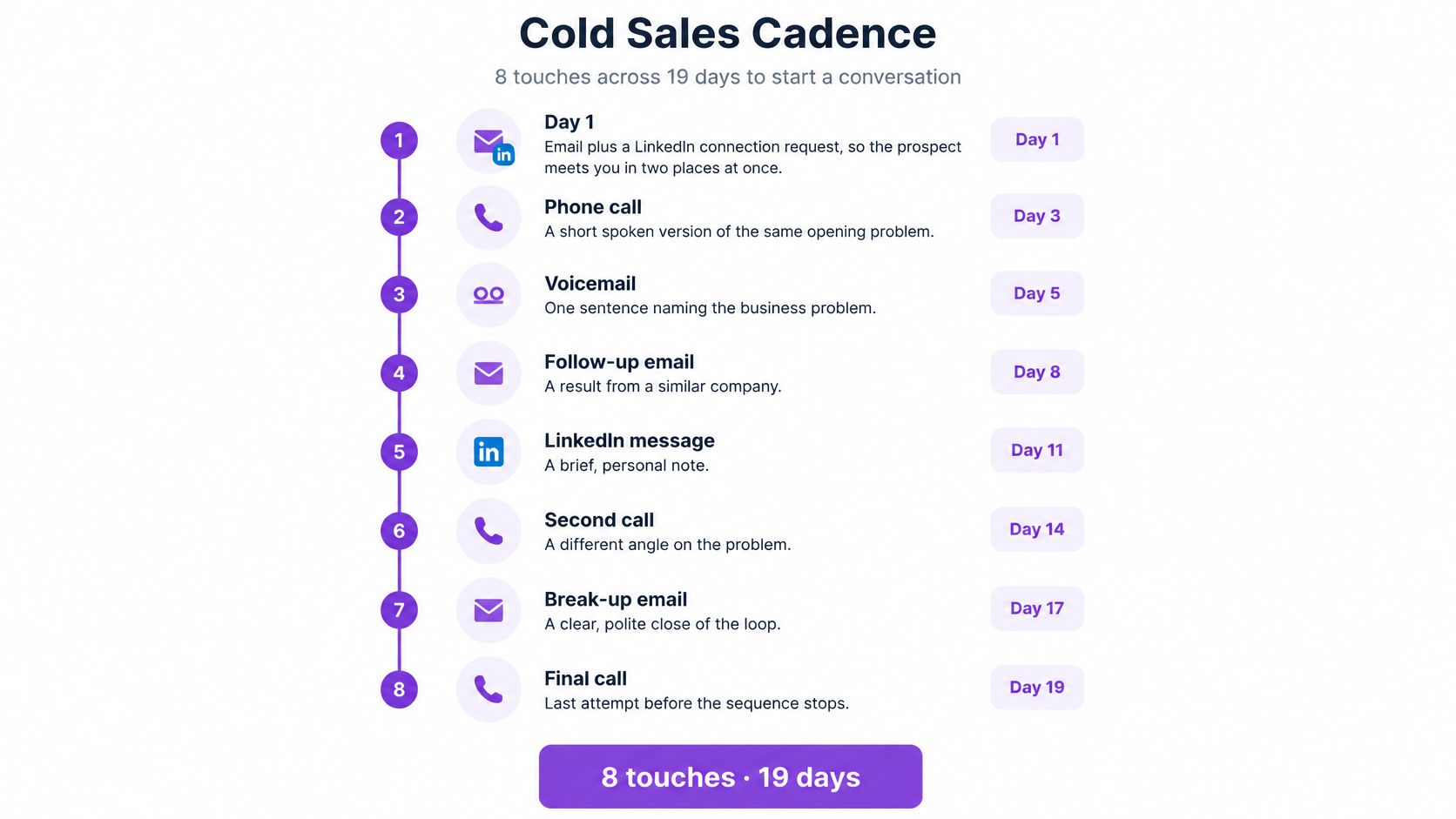
A practical starting model for cold B2B outbound pairs email, phone, and manual LinkedIn actions across 8 touches over 19 days. Every LinkedIn step below is performed by a person directly inside LinkedIn, with the connection request and messages sent by hand and the Day 3 note skipped if the request isn't accepted. Automating LinkedIn actions carries separate platform risks that this baseline schedule doesn't assume.
| Day | Channel | Touch purpose |
|---|---|---|
| Day 1 | Email plus LinkedIn connection request | Introduce one business problem |
| Day 3 | LinkedIn message, only if accepted | Add a specific example from a similar account |
| Day 5 | Call with voicemail | Reach the buyer on a channel other than email |
| Day 8 | Email 2 | Share one proof point, such as a customer result |
| Day 11 | LinkedIn message 2 | Ask one question about a trigger event |
| Day 14 | Email 3 | Answer the most likely objection |
| Day 19 | Breakup email | Offer an easy no or a later date |
Walking Through the Schedule
Day 1 combines two touches, an email and a LinkedIn connection request, so the prospect encounters your name and the same business problem in two separate places. Keeping both anchored on one problem builds recognition faster than sending two unrelated pitches.
On Day 3, the rep sends a short LinkedIn message only if the prospect accepted the connection request. If the request is still pending, skip the step cleanly instead of stalling the workflow or forcing a message nobody can read.
Day 5 shifts to a phone call and a brief voicemail. Multichannel data backs up using voice alongside email: in its 2025 outreach analysis cited by MarketSplash, Belkins reported that calls accounted for 33.6% of appointments, while email accounted for 50%. Adding a spoken touch reaches buyers whose inboxes are heavily filtered or overflowing.
Days 8, 11, and 14 each deliver one new unit of information. Day 8 shares a concrete proof point from a comparable company, Day 11 asks a focused question tied to a company trigger event on LinkedIn, and Day 14 addresses the objection reps hear most often on discovery calls.
Day 19 closes the loop with a polite breakup email. Giving a silent buyer an easy exit or permission to revisit next quarter often triggers an honest reply without burning goodwill. For teams wiring these channels into one workflow, our guide to combining LinkedIn and email outreach breaks down channel order and handoffs in detail.
Why Spacing Tightens Early and Widens Later
Cold outbound benchmarks summarized by Skipcall point to 8 to 12 touches over 17 to 21 days as a common operating range, with denser touches during the first week and wider gaps after day eight. Early proximity helps the buyer connect your second and third touches back to the first one. Wider spacing in week two and week three lowers fatigue while keeping the door open for a busy executive who missed earlier messages.
Be honest about what benchmarks don't prove, though. Published averages won't tell you whether your specific ICP tolerates 12 touches or starts unsubscribing at touch 7. Pushing attempt counts higher widens response coverage, yet it also raises opt-outs, spam complaints, and platform friction.
Treat any 19-day schedule as a control version to test against your own buyers. Inside your outreach software, you set delays between sequence steps, and prospects who reply exit the sequence automatically so reps never have to pull active conversations out by hand.
Practical rule: If a planned step doesn't introduce new information, a new channel, or a fresh angle, cut it from the cadence instead of moving it two days later.
What Each Touch Has to Do
Every touch in a cadence has to earn its place by adding one concrete piece of information. That unit might be a specific operational problem, the cost of leaving it unsolved, a peer result, an implementation detail, or a low-friction question.
A follow-up that only says you're checking in gives a busy buyer zero new reason to answer. Later steps matter far too much to waste on empty bumps. In Belkins' 2025 analysis of 7.5 million B2B outbound emails reported by Statistics Global, follow-up emails generated 58.6% of all replies. Similarly, an analysis of more than 20 million cold emails compiled by Nerdy Joe found that sequences containing 4 to 7 messages produced roughly a 27% reply rate, compared with about 9% for sequences of 1 to 3 messages.
Three Sample Messages From the Eight-Touch Cadence
Each example below maps directly to a row in the 19-day sequence. Notice how short each message stays and how every touch carries one job.
Row 1, Day 1 Email (Touch 1)
Subject: Handover delays on [Company Name] enterprise onboarding
Hi [First Name],
Teams running [Industry] implementations at your headcount often lose two weeks between contract signature and kickoff because account details sit across email threads and spreadsheets. We've helped [Peer Company Type] cut that handoff gap without replacing their current CRM.
Is post-sale handoff friction something your ops team is working on this quarter?
Row 2, Day 3 LinkedIn Message (Sent Only After Acceptance)
Hi [First Name], thanks for connecting. Saw [Company Name] opened three new [Role] roles in [City] this month, which usually puts extra load on [Specific Process]. Curious how you're keeping quality steady while scaling that team.
Notice there's no meeting link and no product pitch here. The message proves a human read the account before writing. When reps pair social research with phone calls on Day 5, capturing exact prospect details in a structured sales call notes template from VoxNote ensures the next email references real context rather than repeating the opening pitch.
Final Row, Day 19 Breakup Email (Touch 8)
Subject: Closing the loop on [Problem Area]
Hi [First Name],
I haven't heard back, so I'll stop sending notes here. If [Problem Area] isn't a priority right now, no need to reply. If it makes more sense to revisit in [Quarter], reply with a quick month and I'll check in then.
The Three-Point Pre-Launch Check
Before activating any step in a live sequence, review the draft against three questions:
New value: Does this touch add one fact, proof point, or perspective the previous touch didn't include?
Single ask: Does it invite one clear, low-friction response instead of stacking three questions?
Real relevance: Could this draft only go to this persona and account, or does it read like a blast written for an entire database?
Compliance and Platform Rules Every Cadence Needs
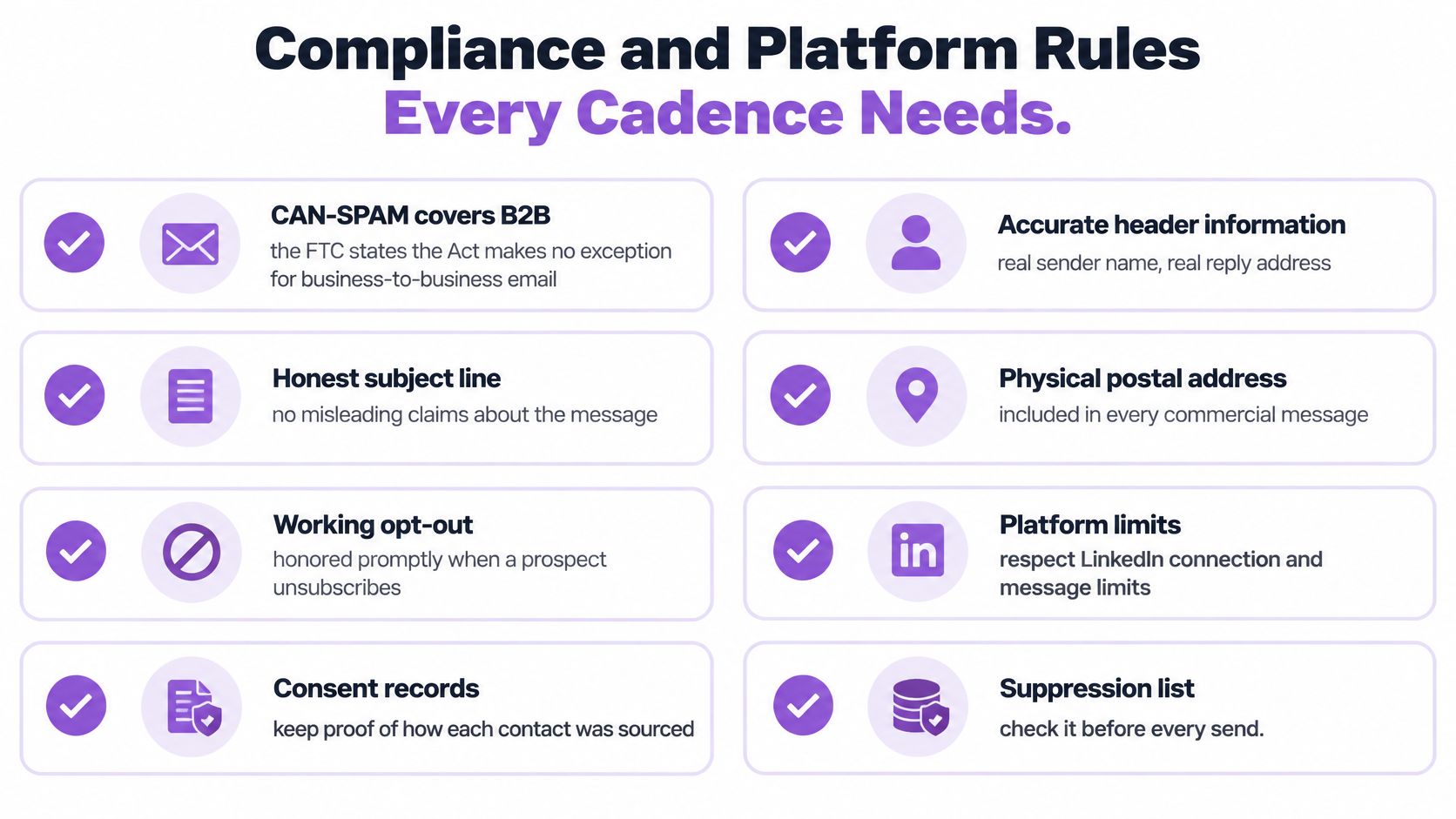
Automation turns cadence design into a legal and data-governance problem the moment a sequence scales beyond one rep's inbox. A cadence is a rule set that reacts to buyer behavior, so compliance has to be part of the state logic: who gets touched, what triggers the next step, what stops the sequence, and who can prove why the contact was there in the first place. Treating compliance as a footer chore is how teams end up with deliverability crashes, duplicate suppression gaps, and restricted LinkedIn accounts.
Email Rules You Can't Ignore in B2B
Business email is still commercial email. According to the FTC CAN-SPAM Act compliance guide, the law makes no exception for business-to-business email. Every commercial message in your cadence must meet clear legal standards:
Accurate header details: Use truthful From, To, Reply-To, and routing information that identifies the actual sender.
Honest subject lines: Never disguise a cold pitch with misleading text that implies a prior order or existing thread.
Advertisement disclosure: Identify commercial outreach clearly as an advertisement where required.
Valid physical postal address: Include your real street address, registered P.O. box, or registered private mailbox in every commercial email.
Working opt-out mechanism: Provide a clear way to decline future messages, and keep that opt-out method capable of processing requests for at least 30 days after the email is sent.
The stop rule has to be faster than the legal deadline. Under the CAN-SPAM timing rules published via GovInfo, once a recipient opts out, neither the sender nor anyone acting on the sender's behalf may initiate another commercial email more than 10 business days later. Waiting anywhere near that window is sloppy operations. Your system should suppress the contact immediately across every connected tool, including the email platform, CRM, LinkedIn workflow, and agency workspace, checking one shared suppression list before every send instead of trusting an SDR to remove a row manually.
Suppression is a state change, not a deleted spreadsheet line. Guidance on GDPR sales automation from Tomba stresses documenting each contact's data source, lawful basis, retention window, and unified do-not-contact record so suppressed prospects do not get re-imported from a fresh CSV next quarter. If your team prospects into Europe or the UK, review practical rules for keeping prospect lists GDPR-compliant from HarvestMyData before campaigns launch, while sourcing and suppression are still cheap to fix.
LinkedIn Rules and Honest Risk Boundaries
LinkedIn outreach sits under platform rules that email does not. LinkedIn's help documentation on automated activity explicitly states that LinkedIn does not permit third-party software or browser extensions that scrape data, modify the site's appearance, or automate activity on LinkedIn's website, and treats those tools as violations of its User Agreement.
The LinkedIn User Agreement goes further, prohibiting bots or unauthorized automated methods from accessing the service, adding or downloading contacts, sending or redirecting messages, or driving inauthentic engagement like automated comments, likes, or shares. Spreading touches across three weeks may reduce obvious spikes, but it does not rewrite the terms.
Pacing, account warm-up, and conservative daily caps can lower the odds of sudden flags, yet they guarantee nothing and never constitute LinkedIn approval. Review realistic sending behavior in our safe LinkedIn invite sending guide, and score each LinkedIn step on its own risk instead of treating the whole multichannel workflow as one low-risk bucket. In Flowkon, connection requests, follow-ups, and email messages are planned as one campaign, with delays between steps and automatic exit when a prospect replies; that makes the stop rule clean, while the platform-risk decision for each LinkedIn action still belongs to the team running it.
Governance Checklist Before Launching a Cadence
Action ownership: Document which steps a human performs directly and which steps rely on third-party software.
Data provenance: Record where each prospect's email and profile originated and why the contact fits your targeting criteria.
Shared suppression: Verify that a single do-not-contact list blocks re-enrollment across every rep, channel, and agency workspace.
Audit visibility: Define who can inspect suppression logs and send histories if a buyer asks how you got their information.
Restriction plan: Write down what happens immediately if a LinkedIn profile gets restricted or an email domain dips in sender reputation.
Adapting the Cadence to Buyer Behavior
One fixed sequence is easy to launch and simple to report on, which is why many teams default to it. The problem is that a static calendar treats a completely cold account the same way it treats a buyer who clicked your pricing breakdown twice yesterday.
In an independent analysis of 33 million tracked email activities across eight high-growth technology companies published by Yesware, effective cadences typically ran for two to four weeks, with at least one day and no more than five days between attempts. That window gives you a sound baseline rhythm, yet what happens inside the window should change as soon as the prospect gives you a signal.
Buyer expectations confirm why rigid outreach underperforms. The Demandbase State of the B2B Buyer Report highlights that vendor-engagement preferences vary sharply: some buyers welcome direct outreach, while others prefer autonomy with minimal hand-holding. Running an eight-touch cold sequence at an active buying committee or a warm referral doesn't show persistence. It annoys the exact people closest to signing.
A high-frequency cadence can look spotless on an activity dashboard while quietly pushing warm buyers toward a competitor.
State-Based Branching Rules
Instead of treating a cadence as a rigid countdown, treat it as a decision table. Check the prospect's current state before the next scheduled touch fires.
| Prospect state | Next move | When to stop |
|---|---|---|
| Cold, no engagement | Run the full sequence | After the breakup email, or on day 19 |
| Opened or clicked, no reply | Send a new angle, not a repeat | After two unanswered new angles |
| Accepted connection, no reply | Send one short LinkedIn message | On any reply or decline |
| Positive reply | Exit the cadence and hand to the rep | Immediately |
| Unsubscribe or opt-out | Suppress every channel | Immediately, across all tools |
| Out-of-office reply | Pause until the return date | Resume on the return date |
| Referral or inbound | Shorter, warmer sequence | After a meeting is booked or two touches |
How to Apply Branches Without Overcomplicating Ops
Start with three core branches before building intricate decision trees. Separate cold silent accounts, engaged non-responders (clicks or connection acceptances), and warm inbound or referred buyers.
When an unengaged cold prospect clicks a case study link twice without replying, don't let the default Day 8 email go out unchanged. Shift them to a tighter follow-up relevant to the topic they just read, using proven messaging patterns from our sales email follow-up guide. When an out-of-office reply lands, pause the sequence automatically and resume a day or two after the return date so your note doesn't get buried under 300 vacation emails.
Track every branch separately in your reporting. If you lump warm referrals and cold accounts into one aggregate reply rate, strong inbound numbers will disguise a broken outbound sequence.
Where Sales Cadences Fail and How to Fix Them
Most underperforming cadences break in predictable ways. Looking at the sequence from the buyer's inbox usually exposes the flaw in seconds.
Six Failure Modes and Direct Fixes
Repetitive bumps every two days: Sending six messages that all read like "just following up" teaches the buyer that nothing new is coming, so they archive your name on sight. Fix it by assigning every touch a distinct job from your schedule rather than just picking a new date.
Automated touches firing after a reply: Nothing destroys an SDR's credibility faster than receiving a cheery follow-up two days after sending a meeting time or an out-of-office notice. Fix it by turning on automatic exit and pause rules before launch and testing them with a real reply from a teammate's inbox.
Single-channel dependence: If your cadence relies strictly on email and the prospect's security gateway filters your domain, all eight touches fail together in silence. Fix it by pairing email with an independent channel like phone calls or manual LinkedIn outreach, then verifying that prospects see those touches.
Broken spacing rhythm: Cramming touches less than 24 hours apart feels pushy, while leaving gaps longer than five days erases memory of the prior message. Fix it by spacing early touches closer together and widening intervals gradually toward the breakup email.
Judging success by raw reply rate: A high reply rate can mask a surge of angry opt-outs, while a modest reply rate on a senior persona might generate your highest pipeline value. Fix it by splitting positive replies, booked meetings, and unsubscribes into separate columns.
Running one sequence across every persona and industry: A CFO at a mid-market manufacturer doesn't respond to the same trigger or tone as a Head of Growth at a SaaS startup. When performance drops, diagnose list fit first, then message content, timing, and channel mix in that exact order.
Before rewriting a single subject line, audit twenty random accounts in the campaign list. Half of all cadence failures are actually targeting failures in disguise.
Measure Each Step Before You Scale the Cadence
Teams usually ask the most important question three months too late: is this cadence creating pipeline, and which specific step should change first? Looking only at total campaign reply rate hides the exact leak.
Step-Level Metrics That Tell the Truth
Instrument every step in the sequence individually so you can see where momentum builds and where buyers walk away:
Email delivery and bounce rates: High bounces signal bad enrichment data or domain health issues before messaging even gets read.
LinkedIn connection acceptance rate: Low acceptance usually points to an irrelevant persona, weak profile positioning, or an overly pitchy connection note.
Reply rate and positive reply rate: Track both separately so you never confuse polite rejections or unsubscribe requests with buying interest.
Meeting-booked rate and CRM opportunities: Measure which touches convert replies into actual discovery calls and qualified pipeline.
Opt-out and complaint rate: Watch this closely by touch number to spot the exact step where persistence crosses into irritation.
How to Test Without Polluting the Data
Compare a new sequence version against your existing control version during the same calendar window with the exact same persona. Group results by channel order and touch number so you can tell whether Touch 5 earns meetings or just generates opt-outs.
Follow one simple optimization rule: if Touch 1 earns steady replies while Touch 4 produces silence, rewrite Touch 4 before changing your spacing or adding more steps. In Flowkon, you build a multi-step sequence by dragging steps onto a visual canvas, such as a connection request, profile view, first message, and timed follow-ups, while team performance is tracked from one dashboard and every reply syncs into the CRM. That structure keeps version comparisons clean across reps without manual spreadsheet stitching.
One test for this week: Pick one active cadence, write each touch's job in a single sentence, rewrite only your weakest-performing step, and hold the timing constant until you have enough sends to compare versions fairly.
Keep a dated change log every time you edit a subject line, delay, or channel step. Whether you run outbound in a dedicated platform or track early experiments in a spreadsheet, tying performance shifts to specific dated edits is the only way to turn guesswork into a repeatable sales process.