Chat With Leads Directly Without Opening Anything Else
Have real-time conversations with your prospects directly from Flowkon. No more jumping between apps - your leads, your messages, and your campaign context are all in one place.

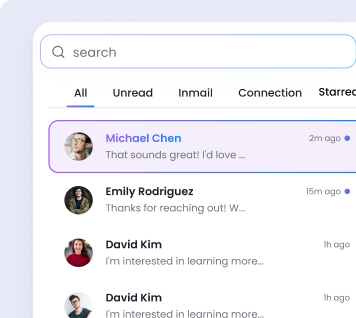
One Unified Inbox
for Every Conversation
Stop switching between Flowkon and other platforms - manage all your conversations from one unified inbox and save hours every week.

Turn every reply into a closed deal
Campaign Context Built-In
Quick Reply Templates
CRM Sync
Real-Time Messaging


Frequently Asked Questions
What is a multichannel campaign in Flowkon?
A multichannel campaign lets you combine LinkedIn outreach and email follow-ups into one automated sequence. You build the flow once and Flowkon handles the delivery, timing, and follow-up across both channels automatically.
Can I personalize messages in my campaigns?
Yes. Every LinkedIn message and email can include dynamic fields like first name, company, job title, and more. Personalization happens automatically at scale.
How does campaign cloning work?
You can duplicate any existing campaign with one click. The entire sequence - steps, delays, and messages - is copied instantly so you can reuse what works for a new audience or offer.
Will my LinkedIn account stay safe?
Yes. Flowkon controls daily outreach volumes within limits and adds natural delays to keep your account safe.
How do I track campaign performance?
The analytics dashboard shows real-time data across all active campaigns - connection acceptance rates, email open rates, reply rates, clicks all in one view.
How do I reply to LinkedIn leads without leaving my outreach platform?
Flowkon's Chat with Leads panel shows the full conversation thread alongside campaign history. Type a reply directly, choose a saved template, or let an AI draft a personalised response — all without switching to LinkedIn.
How do I see a lead's full campaign history when replying to their message?
When a lead's message appears in your Flowkon inbox, a side panel shows every step they passed through — connection request, messages sent, delays, opens, and clicks. This context lets you craft a reply that references exactly where they are in the sales process.
How do LinkedIn chat replies get synced to a CRM like HubSpot or Zoho?
Flowkon's native integrations with HubSpot, Salesforce, Zoho, and Monday.com push conversation updates automatically. When a lead replies, the CRM contact is updated with the latest message and a timestamp, keeping pipeline records accurate without manual data entry.
How do I make sure I never miss a reply from a LinkedIn lead?
Flowkon's unified inbox shows unread replies across all campaigns with visual indicators. You can set browser notifications or integrate with a Slack webhook so replies land in your team channel the moment they arrive.
.webp)