.webp)
 Read-only · Zero edit access
Share Campaign Data Without Losing Control
Everything Visible, Nothing Editable

Campaign Visibility
Viewers can access all campaigns, performance, and activity without the ability to edit or make changes.

LinkedIn Account Data
Viewers can see LinkedIn account settings and performance metrics — SSI score, invites sent, acceptance rate, and reply rate.
.png)
Search View
Viewers can see saved searches and lead lists without the ability to add, edit, or delete any search data.

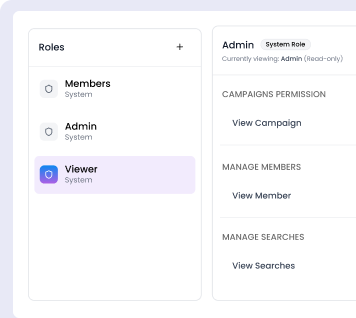
Team and Role Visibility
Viewers can see who is in the workspace, what roles are assigned, and how the team is structured without the ability to add members, update roles, or remove anyone from the workspace.
6
Permission categories - all set to view-only for complete stakeholder transparency
Zero
Accidental changes - Viewers can see everything but cannot modify anything
1
Click invite any client as a Viewer



.png)
100%
Safe sharing
100%
Visibility into campaigns, accounts, and workspace

Explore what else you can do with Flowkon
Discover other award-winning features of Flowkon, the most trusted LinkedIn automation tool






.svg)

