.webp)

The practical ceiling is roughly 100 LinkedIn connection invites per rolling seven-day window for established accounts, with most practitioners staying closer to 60 to 80 per week to reduce restriction risk. The rolling window matters more than the calendar week, because LinkedIn counts recent invites as they age out rather than resetting everyone on Monday morning.
That distinction catches teams off guard. An SDR can send a large batch on Monday, see quick acceptance activity, and still have no meaningful capacity left later in the week. A safer operating model treats invitations as a rate-limited queue, adjusts volume for account maturity, and measures qualified conversations instead of raw activity.
The Real Week That Got Your Account in Trouble
A founder I worked with opened a fresh LinkedIn profile for outbound prospecting. The profile was complete, a webinar lead magnet had produced a useful list, and a few prospects had already viewed the profile. On the third day, the founder sent 80 connection invitations in a single push.
The short-term result looked encouraging. 35 people accepted within 48 hours, which created the impression that the campaign was working. Then profile views became noticeably quieter. Follow-up messages stalled because the expected new connections weren't arriving, and connection requests stopped delivering normally.
The account eventually displayed a notice that invitation volume had been temporarily limited. LinkedIn's Help Center guidance on invitation limits says reaching the limit can temporarily restrict further invitations, typically for one week. The visible warning arrived after the activity spike, but the operational damage had started earlier. The team had treated a new profile like an established sales account.
Practical rule: A good acceptance burst doesn't prove that your sending pattern is safe. It only proves that some recipients accepted.
The answer to how many LinkedIn invites per week is therefore not just “100.” Industry coverage commonly places the practical boundary at about 100 connection requests over a rolling seven-day period, while conservative practitioners often stay closer to 60 to 80. Current 2026 guidance on LinkedIn invitation limits also describes the cap as a moving window that can vary with account trust and activity.
The risk lives in batch behavior, weak targeting, and account history. Teams that want a fuller diagnostic should review these signs of LinkedIn account restriction risk, especially after a sudden change in delivery or acceptance behavior.
Why LinkedIn Uses a Rolling Seven-Day Window
A rolling window looks backward from each sending moment. LinkedIn counts the invitations sent during the preceding seven days, so the available capacity changes as older invitations leave that window.
Suppose an established account sends 100 invitations on Monday. It has effectively used the commonly reported practical allowance, and it won't regain full capacity just because Tuesday arrives. The Monday invitations begin aging out around the following Monday, based on when they were sent. Industry explanations of the 2026 rolling limit describe this as a seven-day cycle rather than a fixed calendar-week reset.
A steady schedule behaves differently. Sending 14 invitations per day spreads activity across the week and keeps the queue from looking like a single abnormal burst. The total can approach 100 invitations across seven days, but each new send replaces an older one only as the rolling window permits.
DayBatch Sender (Invites)Steady Pacer (Invites)Rolling 7-Day Total (Batch)Rolling 7-Day Total (Steady)Monday1001410014Tuesday01410028Wednesday01410042Thursday01410056Friday01410070Saturday01410084Sunday01410098
LinkedIn doesn't present a clean public weekly number that applies identically to every account. Practitioner coverage describes the figure as behavior-sensitive, with account history, acceptance behavior, and trust signals affecting practical access. Sales outreach guidance on the connection-request limit makes the important operational point that subscription upgrades don't reliably purchase a higher connection ceiling.
Some older, well-established accounts may experience different practical allowances, but that isn't a target worth building a forecast around. Brand-new accounts can be restricted well before the commonly cited boundary, particularly when they combine sparse profile activity with a sudden burst of outbound invitations.
The pattern is especially visible in distributed SDR teams. If an offshore team queues most sends at the start of its Monday shift, the account creates a concentrated activity spike, then spends the rest of the week with little headroom. Pacing isn't a workaround. It's basic queue management.
Which LinkedIn Plan Actually Gets More Invites
Premium changes access to certain messaging and discovery features. It doesn't reliably turn the standard connection-request system into a larger outbound pipe.
LinkedIn describes the practical invitation ceiling as applying across Free, Premium, and Sales Navigator accounts. A current explanation of plan-independent invitation limits separates connection requests from other messaging permissions and explains why teams shouldn't confuse InMail capacity with connection capacity.
Plan1:1 Connection Invite CapInMail Credits (per month)Practical Effect on Invite VolumeFreeAround 100 per rolling seven days in common practiceVaries by plan and accountNo dependable increase in connection capacityPremium CareerAround 100 per rolling seven days in common practiceVaries by plan and accountMore messaging options, not a reliable invite increasePremium BusinessAround 100 per rolling seven days in common practiceVaries by plan and accountBetter prospecting context, same core constraintSales Navigator CoreAround 100 per rolling seven days in common practiceVaries by plan and accountBetter search and lead selection, not guaranteed extra invitesSales Navigator AdvancedAround 100 per rolling seven days in common practiceVaries by plan and accountTeam workflow and targeting benefits, not a dependable cap expansion
The useful Sales Navigator advantage is selection quality. Better filters and lead suggestions can help a sales team prioritize prospects who fit the role, company, geography, or buying context. That can improve the quality of the queue indirectly, because fewer invitations go to people who have no reason to accept.
A newly created account with a Premium subscription can still be treated as a new account. Paying for the plan doesn't erase account history, sudden activity changes, or poor recipient response. The cap sits on the account's participation in the social graph, not only on the billing tier.
Recruiter seats and Recruiter Lite should be evaluated separately. Their InMail-credit workflows aren't the same as standard 1:1 connection invitations, so a recruiter shouldn't add InMail capacity to a connection-request forecast. Those are different channels with different mechanics.
Weekly Invite Caps by Account Age and Warm-up Stage
Account age isn't a permission slip, but it is a useful pacing variable. A profile that's been active for less than 90 days should earn volume gradually through consistent activity, complete information, and healthy recipient response.
The following framework is deliberately conservative. It uses the stages teams can manage, not a promise about what LinkedIn will allow.
Account StageDays ActiveDaily InvitesWeekly CeilingAcceptance ThresholdPromotion TriggerBrand newUnder 30 days5 to 1025 to 50Qualitative review, no sudden rejection patternComplete profile, consistent activity, stable acceptanceWarming30 to 90 days15 to 2060 to 80Above 35% to 40%Acceptance remains above threshold with no restrictionsMature90+ daysPacing based on history60 to 80 preferredStable, relevant acceptanceMonths of clear rolling windows and consistent activity
The brand-new stage should prioritize credibility before throughput. Complete the profile, publish or engage naturally, build relevant first-degree connections, and keep invitation batches small. A team that sends 5 to 10 per day can inspect recipient quality before it increases the queue.
At the warming stage, 15 to 20 daily invitations may be reasonable when acceptance stays above 35% to 40% and the account hasn't received a temporary restriction. That acceptance threshold is a management gate, not a guarantee. If the audience is poorly matched, reducing volume is more sensible than trying to “push through” the weak response.
A new account should graduate because its behavior is stable, not because the calendar says it has graduated.
Mature accounts can work toward the commonly preferred 60 to 80 weekly range. Touching 100 should be an exception, not the default operating target, and only makes sense when the rolling window has remained clear over time. LinkedIn outreach-limit guidance describes the historical shift toward conservative pacing and explains why acceptance quality now matters more than raw sending volume.
Step down immediately when acceptance drops sharply, recipients begin reporting the invitations, delivery changes, or LinkedIn sends a warning email. A warning isn't something to test. Pause new requests, review the last seven days, and resume below the prior level only after the account's activity pattern is stable. A dedicated warm-up process for new LinkedIn accounts can help teams formalize those gates.
Connection Invites vs Event and Page Invites
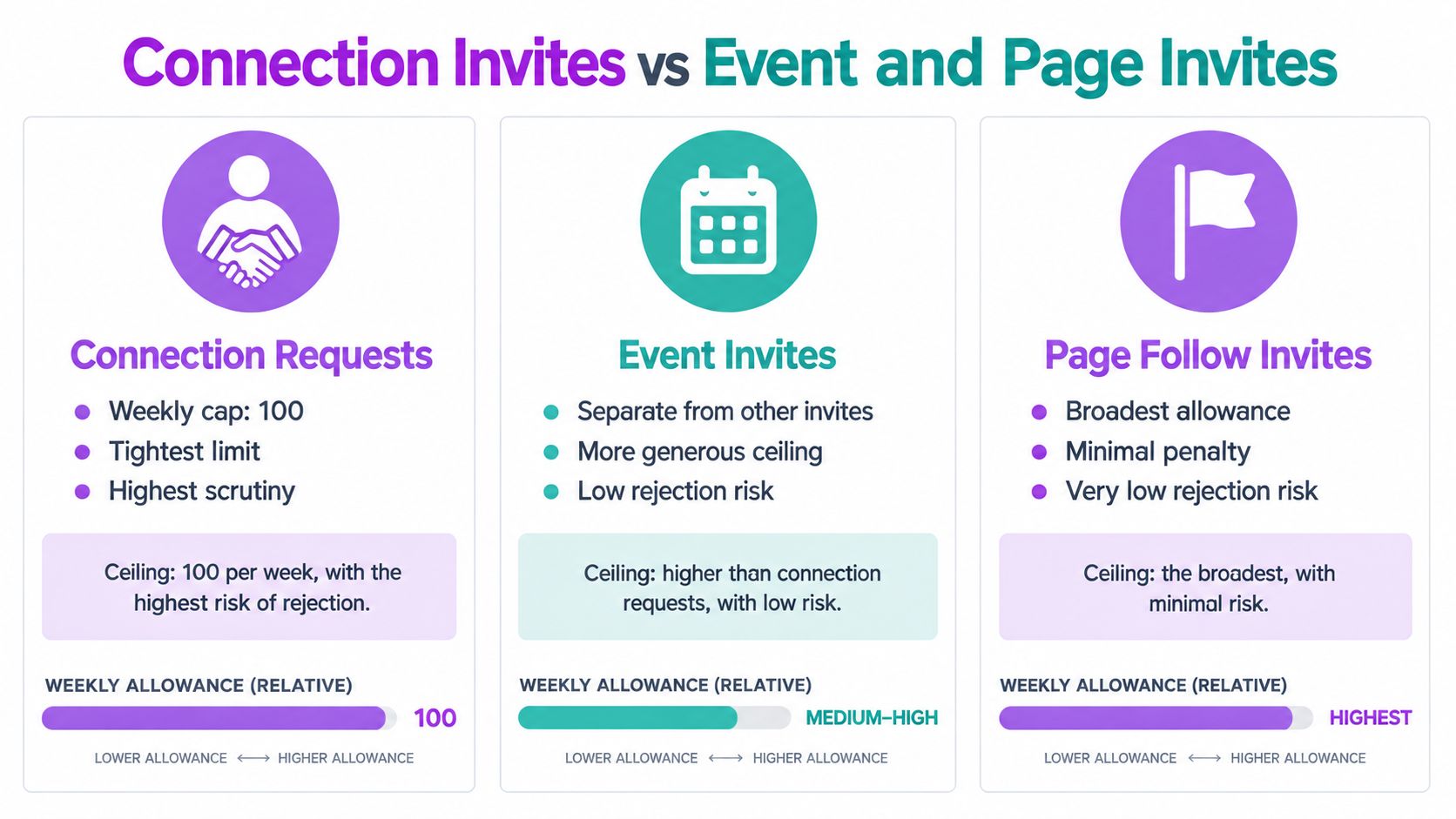
LinkedIn has more than one invitation surface, and teams often mix them together in reporting. Personal connection requests, event invitations, and Page-admin invitations serve different purposes and shouldn't be treated as interchangeable capacity.
Personal connection requests are the most direct route to a sales conversation. They also sit under the tightest scrutiny, with practical coverage commonly placing them around 100 per rolling seven-day window. Event invitations are a separate workflow. LinkedIn's official event invitation guidance states that event organizers, Page admins, and attendees can send up to 1,000 event invitations per week, and that this allowance applies across events rather than multiplying for each event.
The channels fit different jobs:
ChannelBest UseMain Trade-offConnection requestStarting a direct relationship with a specific prospectLimited capacity and higher scrutinyEvent invitationBuilding attendance and creating a permissioned audienceLess immediate buying intentPage invitationIncreasing awareness of a company presenceLower personal response quality
Event invitations can complement outbound prospecting, but they don't expand a personal account's connection-request allowance. A founder might invite a relevant audience to a webinar, then follow up with a smaller, relevant connection queue. That keeps the two activities conceptually separate.
Page-admin invitations can support low-effort awareness, but they shouldn't be counted as booked-meeting activity. The recipient may follow a Page without wanting a sales conversation.
Teams should also avoid stacking aggressive behavior across channels on a newer profile. A high event push combined with concentrated 1:1 requests can create an activity pattern that looks abnormal, even though the systems have different ceilings. Separate the campaigns, keep the audience relevant, and monitor the account rather than assuming a larger event allowance makes all activity safe.
Why Sending More Invites Usually Kills Your Reply Rate
Sales teams often measure the wrong output. The dashboard shows invitations sent, so managers increase the number until the account approaches its apparent limit. That creates activity, but it can reduce the quality of the resulting conversations.
Consider two operating patterns:
MetricBlast Week (100 invites)Paced Week (60 invites)DifferenceInvitations sent1006040 fewer in paced weekAcceptance rate25%50%25 percentage points higher in paced weekAccepted connections25305 more in paced weekConversation qualityBroad and mixedNarrower and more relevantBetter qualification potential
These figures are a planning example, not an industry benchmark. They show the trade-off clearly. A team can send fewer invitations and still create more accepted connections when it improves targeting and relevance.
The blast week usually starts with a loose list. Some prospects match the title but not the market, some aren't active buyers, and others receive a generic note. Profile views may spike in a way that looks automated, while the people who accept receive a follow-up that doesn't reflect why they connected.
The paced week begins with a smaller segment. The sender knows why each prospect belongs in the queue, ties the note to a visible business context, and gives the account time to process responses. That approach won't rescue a weak offer, but it prevents volume from hiding a targeting problem.
Measure this instead: qualified replies per rolling week, not invitations sent per login session.
LinkedIn's systems respond to account behavior, and low acceptance or reply quality gives the team a reason to slow down even before a restriction appears. The operational objective is qualified conversations per available invitation, not maximum invitations at any cost. Teams working across LinkedIn and email should also review why single-channel outreach can damage reply performance.
A Practical Weekly Pacing Checklist Before You Send
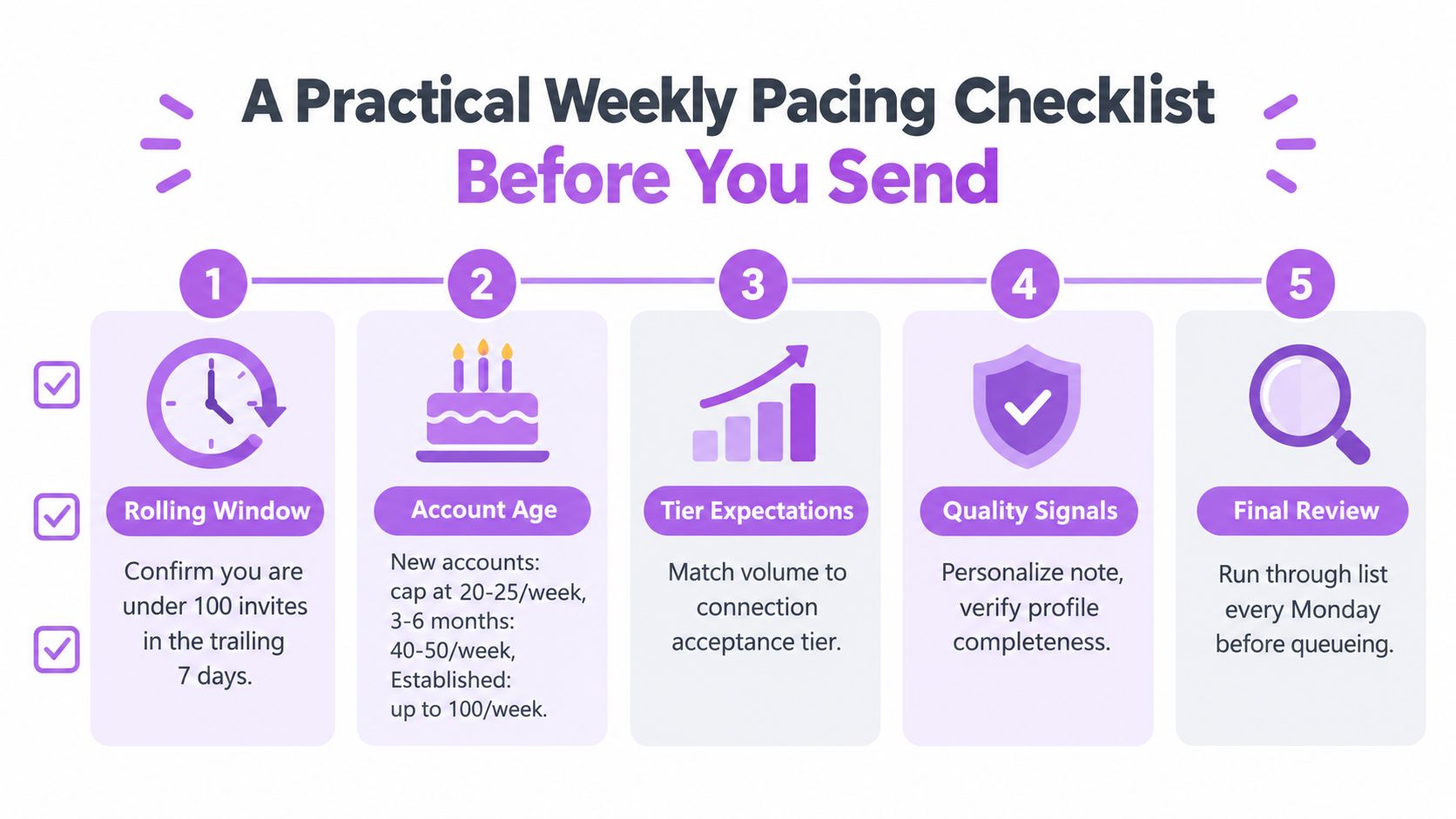
A good Monday review should take minutes, not become a strategy workshop. The point is to confirm that the next queue fits the account's age, recent behavior, and available rolling capacity.
Check the trailing seven days first
- Count recent invitations. Look at the previous seven days, not the Monday-to-Sunday calendar. If the account is near the conservative 60 to 80 range, reduce the queue. If it has reached 100, pause until older invitations leave the window.
- Look for warning signals. Check for restriction banners, delivery changes, warning emails, or stalled requests. LinkedIn says a limit-related restriction typically lasts one week, so don't respond to a warning by trying repeated sends.
- Confirm the account stage. Under 30 days, keep the account around 5 to 10 daily invitations. From 30 to 90 days, consider 15 to 20 daily only when acceptance remains above 35% to 40% and the account has stayed clear.
Make the queue worth the capacity
- Verify profile readiness. Review the headline, role, company context, profile photo, and recent activity. A complete profile gives recipients a reason to accept, while an empty profile makes even a relevant invitation look suspicious.
- Segment by intent. Separate active prospects, warm webinar contacts, partner candidates, recruiters, and low-intent names. Send the most relevant segment first. Don't use the same note for every group.
- Choose the right invitation channel. Use a connection request for a direct relationship, an event invitation for attendance or list building, and a Page invitation for broad awareness. LinkedIn's event workflow has a separate allowance of up to 1,000 invitations per week, but it doesn't increase the personal connection-request ceiling.
Add control points during the week
- Personalize the note. Tie the request to a recent post, shared event, role change, market responsibility, or credible mutual context. Keep the message specific enough that the recipient understands why you're reaching out.
- Review on Thursday. Compare acceptance behavior with the account's stage threshold. If acceptance has fallen below 35%, pause new requests, inspect the segment, and remove weak-fit prospects from the queue.
A structured tool can make these checks easier by tracking sent invitations, applying account warm-up rules, pacing actions, and combining LinkedIn with email follow-up. Flowkon provides campaign pacing, account warm-up, usage monitoring, centralized conversation management, and CRM synchronization for teams that need one operating view across outreach channels.
The checklist won't guarantee that LinkedIn never restricts an account. It gives a sales leader something more useful, a repeatable decision process that catches risky behavior before the platform does.
If your team is losing time to manual pacing, scattered follow-ups, or unclear account-level limits, visit Flowkon to see how structured LinkedIn and email campaigns can manage daily sending, warm-up controls, conversation handling, and CRM updates in one workflow. Start by mapping each account to its age and recent acceptance behavior, then build the campaign around the capacity it can safely support.





.svg)

