You've sent a relevant sales email, waited, and heard nothing. Now you're deciding whether to send another message, switch to LinkedIn, or leave the prospect alone. The next step should follow the prospect's signal, not just the date on your calendar.
For email follow-up sales teams can use consistently, start with a simple distinction: answer explicit interest promptly, give cold prospects more space, and stop automation when a person responds. Persistence helps only when each message gives the buyer a new reason to engage.
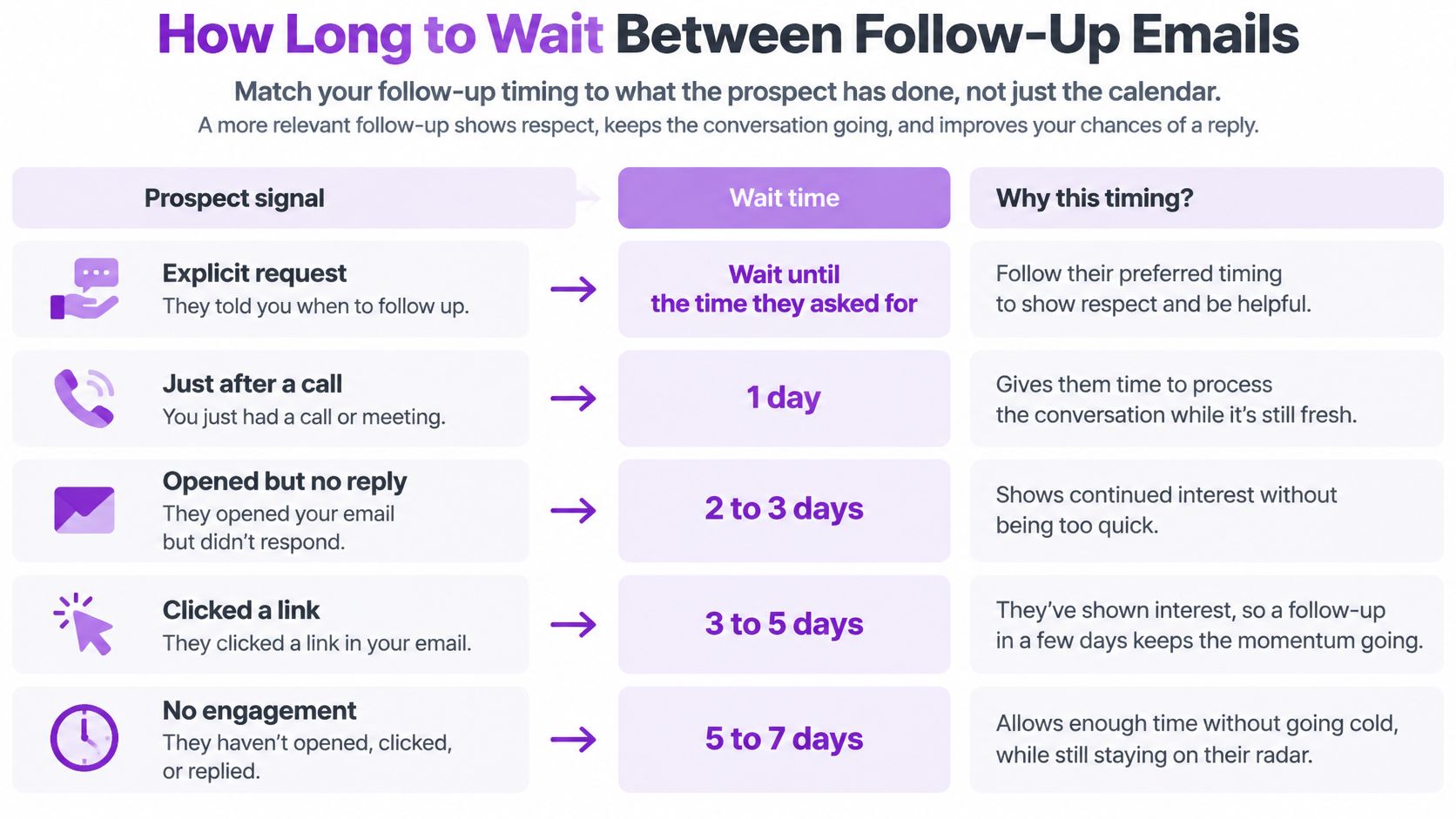
How Long to Wait Between Follow-Up Emails
Follow-up timing by lead signal
| Lead signal | Next touch | Wait before next step | Channel |
|---|---|---|---|
| Asked for pricing or a call | Reply the same day | Within hours | Email or phone |
| Warm lead, no reply to first email | Follow-up email | 2-3 days | Email, then LinkedIn |
| Cold prospect, no reply to first email | First follow-up | About 5 days | |
| Cold prospect, no reply after first follow-up | Second follow-up | About a week | Email or LinkedIn |
| Opened or viewed, no reply after three touches | Move to nurture | Longer pause set by your team | Low-frequency email |
| Replied with objection or unsubscribed | Stop or adjust | Immediately | None |
Use these as starting intervals, not promises: Optif's published B2B benchmark recommends approximately two to three days for warm leads and five to seven days for cold prospects. The practical distinction is whether the person has given you a reason to expect a conversation.
A pricing request deserves an answer, not enrollment in a delayed cadence. If the prospect asks you to reconnect at a particular time, honor that request instead of applying your default interval.
The timing chart provides a visual reference, but a buyer's stated preference should always override an engagement-based estimate.
Separate active intent from silent interest
For inbound requests, don't confuse patience with responsiveness. A summary of Harvard Business Review's 2011 audit of 2,241 U.S. companies reports that only 37% responded within one hour, while companies contacting a lead within that window were nearly seven times more likely to qualify it than companies waiting longer.
Cold silence is different. Yesware's analysis of more than 500,000 sales emails from 2018 found that 91% of emails eventually opened were opened within one day, and an unanswered first email still had a 21% chance of a reply to a second email.
Those findings support another relevant attempt, not rapid-fire reminders. An open or profile view isn't permission to accelerate every remaining step.
Practical rule: Use explicit requests to accelerate, silence to create space, and clear disinterest to exit.
Schedule messages in the recipient's local time. Pause pending sends immediately when a reply, meeting booking, unsubscribe, or bounce arrives.
For an initial operating rule, move contacts with no meaningful engagement after three touches into a longer pause rather than continuing the same rhythm. Pick an interval, run it for two weeks on a clean list, and change it only when step-level reply results give you a reason.
How to Write Each Follow-Up Step
Every follow-up must add something the previous email didn't. A reminder can restore context, but context alone isn't a reason to reply.
The investment is justified: NextReply's summary of Belkins' 2025 analysis of 7,530,489 cold emails reports that follow-up emails, steps two through six, generated 58.6% of all replies, compared with 41.4% from the initial email. That's a reason to write the later steps carefully, not an instruction to send every prospect the same sequence.
Build the message around a business reason
Choose a specific trigger. Start with a relevant hiring post, product launch, funding announcement, or operational change. Explain the connection to the buyer's work rather than treating the event as an excuse to pitch.
Give the next email a different angle. If the opening message focused on missed replies, the follow-up might explain how to assign ownership when several reps contact the same account. Add a credible proof point only when you can substantiate it.
Make the later touch easier to answer. Replace a broad request for a demonstration with a focused question about ownership, timing, or priority. Don't ask the prospect to diagnose their entire sales process by email.
Describe the message in the subject line. Use a subject such as “Reply ownership during SDR hiring,” not a manufactured urgent alert. Don't add a fake “Re:” to a new thread or imply a conversation that never happened.
Personalize the business consequence. A head of revenue operations needs a different explanation from an agency founder, even when both have the same workflow problem. Use a fact about the person's responsibilities, not a collection of compliments.
The common failure is resending the opening pitch with a line about bumping it to the top of the inbox. That asks the buyer to do the same work again without offering anything new.
A sample follow-up with a clear purpose
Say a head of revenue operations has published a hiring post for SDRs. A follow-up could read:
Subject: Reply ownership during SDR hiring
Hi Dana,
Your SDR hiring post prompted another thought about reply ownership as the team grows.
Before adding more outreach, I'd check whether a LinkedIn reply cancels the email already queued for that prospect. That's a useful handoff to test across your sales inboxes.
Would a 15-minute review of that handoff be useful?
Best,
Alex
This message offers a concrete diagnostic rather than asserting that Dana's process is broken. It also makes the proposed review specific enough to accept or decline.
If the prospect doesn't respond, the next message shouldn't repeat the same invitation at greater length. Ask whether reply ownership sits with RevOps or the SDR manager, or offer the checklist without requiring a meeting.
Keep one core structure: trigger, consequence, useful addition, next step. Swap the trigger and supporting material by segment, then read the finished message as a complete email. Dynamic fields don't rescue a template whose underlying argument doesn't fit the recipient.
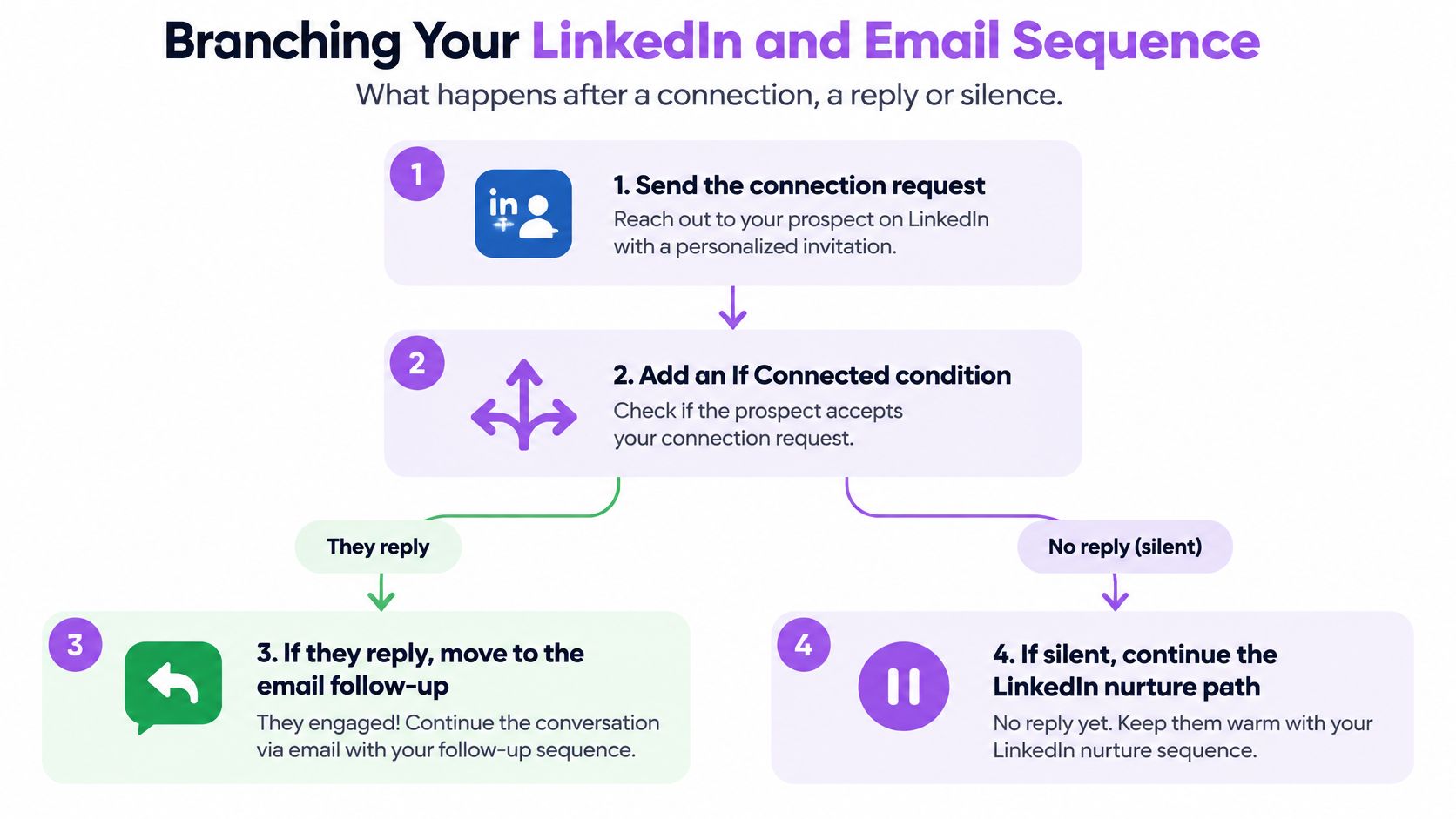
Branching Your LinkedIn and Email Sequence
After a connection request, you need different paths for acceptance, silence, and a reply. Connection acceptance permits the connected path to run; it doesn't establish buying interest.
This flow illustrates the channel decisions. Treat any move to email after a reply as a human-led conversation, not permission to restart automated prospecting.
Make each branch continue the same conversation
Send the connection request. Keep its purpose relevant to the person's role. Don't place your full email pitch inside the request.
Add an If Connected condition. Connected-only actions belong behind that gate. Our company follow invite only triggers when the person is already connected with you, so we typically place it after an If Connected condition.
Use a deliberate delay before the message. For a starting test, wait two to three days after acceptance. In a hypothetical hiring campaign, the note could read: “Hi Dana, saw your team is hiring two RevOps analysts. Would a 15-minute look at how you track follow-up replies be useful?”
Use email to develop the point if there's no reply. Try: “Following my LinkedIn note about the RevOps hiring push, I wanted to make it easy to decline or share a time. I can also send the reply-handoff checklist if that's more useful.”
Exit when the prospect responds. We set delays between sequence steps, and prospects who reply exit the sequence automatically. Stop pending email follow-ups to that conversation and let the owner handle the response.
The delay gives the prospect time to notice the initial touch. Referring to the LinkedIn note also prevents the email from reading like unrelated outreach from another team.
For a walkthrough of the channel setup, use this sequence demonstration.
Choose channels without multiplying pressure
If your audience rarely accepts connection requests, lead with email rather than leaving everyone stranded behind the connection condition. The guide to combining LinkedIn and email outreach in one sequence provides additional implementation context.
Switching channels isn't a workaround for a rejection. A person who declined on LinkedIn shouldn't receive a fresh automated pitch by email.
LinkedIn automation carries account-restriction risk. Check LinkedIn's current terms and keep pacing conservative; no branching arrangement guarantees safety or official approval.
Branch decisions by prospect signal
| Prospect signal | Next action | Exit condition |
|---|---|---|
| Connection request not accepted | Stop LinkedIn steps, send one email if email is known | Email reply or opt-out |
| Accepted connection, no LinkedIn reply | Send LinkedIn message after 2-3 days | Any reply |
| Connected but no reply on either channel | Send email that references the connection | Any reply or bounce |
| Replied on LinkedIn | Stop email to the same thread and move to conversation | Reply detected |
| Email bounced | Verify or remove the address; continue on LinkedIn only if appropriate | Hard bounce confirmed ends the email branch |
| Unsubscribe or not interested | Stop all channels | Immediately |
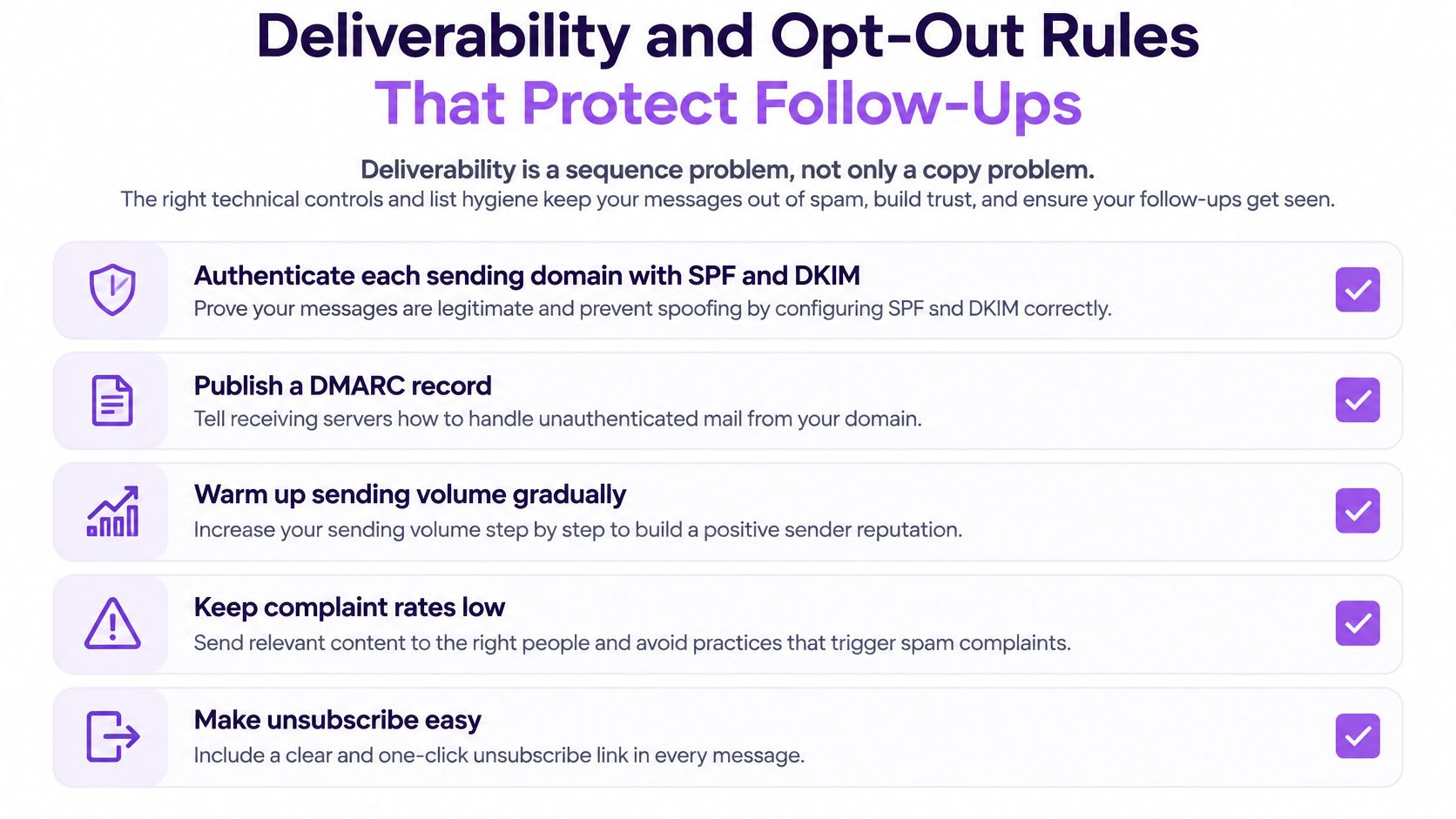
Deliverability and Opt-Out Rules That Protect Follow-Ups
Deliverability is a sequence problem, not only a copy problem. Better wording won't fix a workflow that keeps sending after a bounce or puts unsubscribed contacts back into a campaign.
Google's sender guidance sets additional requirements for bulk senders reaching roughly 5,000 messages a day to personal Gmail accounts, including authentication, avoiding unwanted messages, and an easy unsubscribe mechanism. Have your email administrator validate the applicable requirements before increasing volume.
Put controls around the entire sending process
Authenticate every sending domain. Have your administrator check SPF and DKIM, publish a DMARC record, and confirm the required domain alignment with the From address. Don't assume connecting a mailbox completes the authentication work.
Maintain shared suppression. Use a suppression list across mailboxes, workspaces, and CRM imports. Match records by prospect identity so changing the assigned rep doesn't restart unwanted outreach.
Cancel automation on replies and opt-outs. Test queued messages as well as future enrollment. A reply event is useful only if the sending system acts on it before the next scheduled message.
Suppress hard bounces before another step runs. Remove the address from active campaigns and re-import sources. The email verification practices for B2B outreach teams can help you define the checks before enrollment.
Review complaints before raising volume. Investigate changes by list source, campaign, and sending identity. Increasing sends while relevance is deteriorating makes diagnosis harder.
Keep unsubscribe mechanisms working. Test them from a recipient's view and verify that the resulting suppression reaches every relevant system. Don't make someone repeat the request to each rep.
Use this checklist during campaign approval, not just when a mailbox develops problems.
Treat prospecting as commercial communication
The FTC's CAN-SPAM compliance guide requires commercial emails to provide a clear, conspicuous opt-out, honor opt-out requests, and avoid deceptive subject lines or misleading header information. A prospecting sequence promoting a product or meeting should be treated as commercial email whether an SDR, founder, agency, or automation platform sends it.
Transactional and relationship messages can receive different treatment. Don't assume that calling a promotional message a personal follow-up changes its purpose.
CAN-SPAM is a U.S. law, so international campaigns need separate jurisdiction checks. Your operational policy should also distinguish an automated acknowledgment from a personalized sales response and a promotional follow-up from a necessary service message.
Responsible scaling means controlling identity and suppression, not merely lowering the send count. Fewer messages won't correct a broken opt-out process, and more mailboxes won't remove the need for centralized governance.
Metrics That Show Whether Follow-Ups Work
Follow-up metrics and how to calculate them
| Metric | How to calculate | What it tells you |
|---|---|---|
| Step reply rate | Unique repliers divided by unique recipients at that step | Whether the step still earns responses |
| Positive reply rate | Positive replies divided by unique recipients | Interest, not just any response |
| Meetings booked by step | Meetings tied to each sequence step | Which step creates conversations |
| Bounce rate | Bounces divided by emails sent | Data quality and deliverability |
| Unsubscribe rate | Unsubscribes divided by delivered emails | Relevance and fit of the message |
| Opportunities and revenue by step | Opportunities created and revenue tied to each step | Pipeline, the outcome that matters |
Judging the whole campaign by open rates is the wrong starting point. A tracking event doesn't establish that the buyer wants a conversation.
Reform's follow-up timing benchmark guide recommends judging downstream conversions rather than opens and keeping denominators consistent when comparing sequence steps. Use opens as a diagnostic signal, not the outcome your team optimizes.
Keep the denominator and reply categories stable
If you define step reply rate using unique recipients who received that step, preserve that definition throughout the report. Don't compare it with another step calculated from total sends.
Also separate all replies from positive replies. A rejection, referral, out-of-office message, and meeting request shouldn't sit in the same qualification bucket.
Use a short disposition list that reps can apply consistently:
Positive interest: The prospect wants to discuss the offer or evaluate a relevant next step.
Referral: The person directs you to another owner.
Later timing: There's a specific reason to reconnect later.
Negative or opt-out: The prospect declines or asks for outreach to stop.
Administrative: The response is automated or doesn't indicate commercial interest.
Attribute meetings without overstating the step
Exaclose's summary of Belkins' 2025 analysis reports that the third email generated 35.6% of meetings booked from email, making it the strongest individual meeting-generation step in that dataset. Don't remove a later step merely because your opening email looks stronger on replies.
That finding isn't a forecast for your campaign. Audience, offer, list quality, and attribution rules affect what you'll measure.
Choose a documented attribution rule for meetings and opportunities, then keep it stable. A meeting booked after a later email may still have been influenced by earlier messages or LinkedIn activity.
The dashboard and analytics overview is useful when deciding how to organize campaign reporting. Keep the campaign view connected to CRM outcomes rather than treating engagement reporting as a separate scorecard.
Review steps after two weeks of sends, comparing cohorts that started on the same date and have had equal time to progress. Change one variable at a time, and examine bounces and unsubscribes alongside replies before declaring a winner.
Confirm Your Sequence With a Small Test Before You Scale
A full-list launch is an expensive way to discover that your branch logic is wrong. Start with a small, coherent segment so you can distinguish a timing problem from an audience problem.
Say you're targeting companies with a relevant RevOps hiring post. Keep the role, offer, list source, and message structure consistent, then split the segment into timing variants.
Write the test before enrolling contacts
For a hypothetical timing test, compare a two-to-three-day wait with a five-day wait. Start both groups on the same date and use the same recipient-local sending window.
Don't label the faster group warm merely because you want faster replies. Record the actual signal that qualified each contact, and exclude explicit inbound requests that need direct handling.
Your test sheet should identify:
The decision: Whether shortening the wait produces more qualified conversations for this segment.
The controlled elements: The audience criteria, sender setup, message, offer, and channel order.
The changed element: The interval before the follow-up.
The review point: The scheduled campaign review after both groups have had equal exposure.
The failure condition: A broken exit, suppression error, or unexpected complaint pattern that requires pausing the test.
A small test won't always produce a decisive winner. If replies are sparse, keep the result inconclusive rather than presenting a minor difference as a dependable improvement.
Approve the workflow as a team
Before launch, walk through the campaign as if you were the prospect. Read each message in order, trigger each branch, and confirm what happens when the person accepts, ignores, replies, declines, or bounces.
Check that the timing matches the signal, each step adds a new angle, every branch has an exit, and suppression covers all sending identities. Assign a named owner for exceptions so reps don't improvise conflicting fixes.
One shared campaign plan keeps the team's steps consistent. Reps can personalize the business context without inventing their own cadence or continuing outreach after another rep has received a response.
A follow-up is only useful when it reacts to what the prospect did.
For a team running LinkedIn and email together, Flowkon can hold those branches in one visual flow; validate the required exit and suppression behavior before relying on the live campaign.
Use the first review to decide what to retain, revise, or stop. If timing changes don't improve qualified conversations, inspect the offer and relevance before adding more touches.
Map a single sequence on paper using the timing table, then build it in a trial workspace and test it on a small segment. Scale only after you've checked both the buyer-facing messages and the events that stop them.
Flowkon combines LinkedIn and email outreach in one campaign builder, with a shared inbox, reply detection, and behavior-based branching. Visit Flowkon to build your signal-driven follow-up sequence and test its delays and exit paths before expanding outreach.