Waalaxy pricing is listed at €19 for Pro, €49 for Advanced, and €69 for Business per user per month, charged per LinkedIn account.
Five accounts therefore runs about €95, €245, or €345 monthly, respectively, before taxes or promotions. Check the published Waalaxy pricing summary.
What Waalaxy Pricing Looks Like Right Now
If you run outbound, the seat price is not your decision. What that seat lets a rep send, find, and reply to is.
Waalaxy runs on a freemium subscription model, with three main paid tiers for LinkedIn prospecting. Price is only half the story — the limits are what decide campaign volume.
Waalaxy Paid Plans at a Glance
Here is how the headline monthly price lines up with invitations, email-finder credits, and cold email access. Use this to shortlist a tier before you check the billing toggle.
| Plan | Monthly list price per LinkedIn account | LinkedIn invitations per month | Email-finder credits per month | Cold email included |
|---|---|---|---|---|
| Pro | €19 | 300 | 25 | No |
| Advanced | €49 | Up to 800 | 25 | No |
| Business | €69 | Up to 800 | 500 | Yes |
Those are reported figures, not a checkout quote. Waalaxy's own published plan comparison ties those headline rates to annual billing and shows higher month-to-month rates.
Always confirm the billing toggle before you budget.
The screenshot below lays out those plan differences side by side for a quick review.
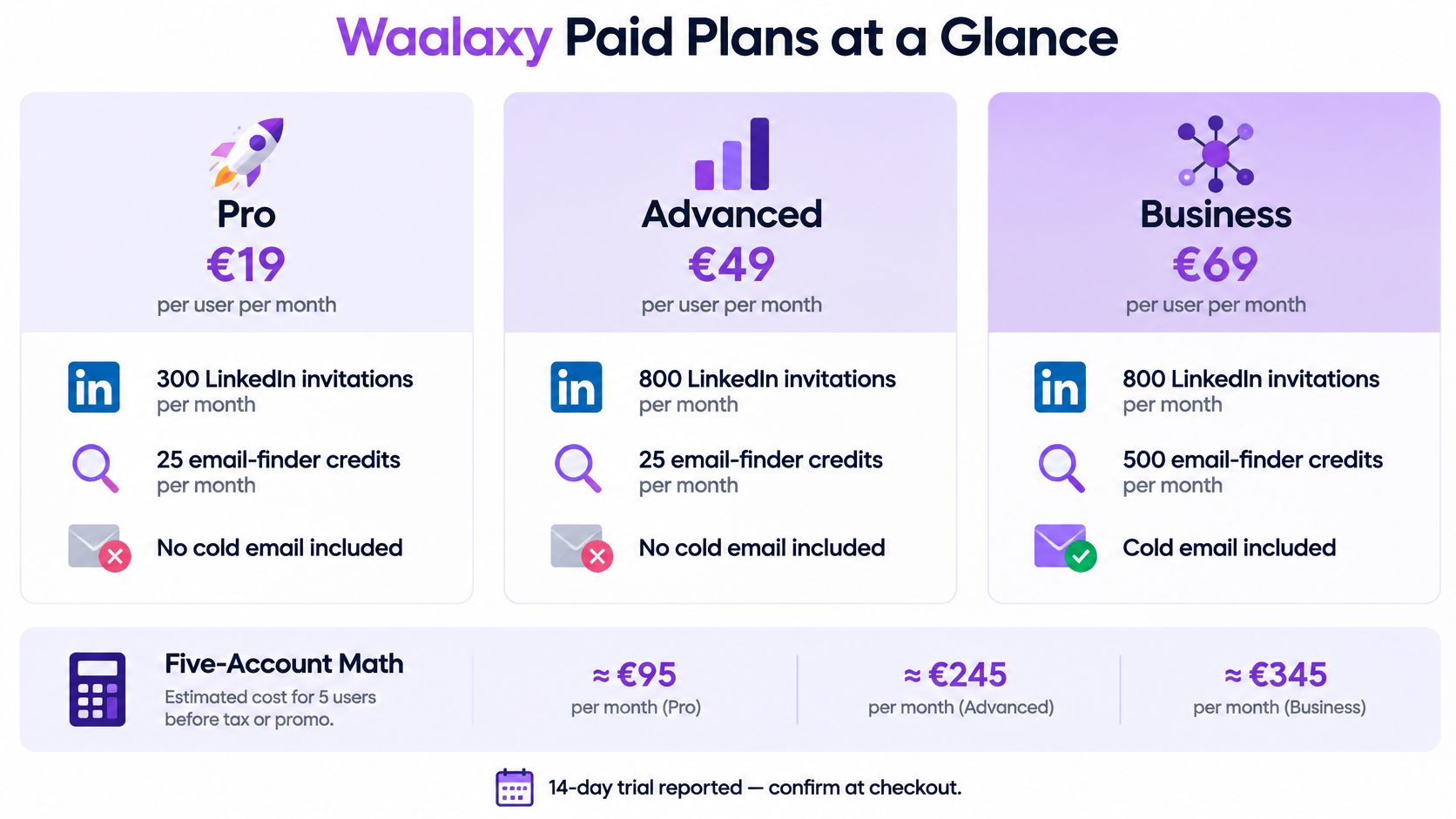
It comes down to capacity versus channel access, not just paying more for "better."
Pro gets you the smaller invitation allowance for light LinkedIn work.
Advanced bumps up invitations, but still no cold email.
Business unlocks email outreach plus a much larger discovery allowance.
Turn the Plan Cards Into a Budget
Say your agency runs five client accounts. You need five subscriptions, then you match each client to actual work.
LinkedIn only? Or LinkedIn plus email? That answer picks the tier for you.
Business changes the channel mix. Advanced mostly just changes invitation capacity.
An invitation allowance is a software entitlement, not a guarantee that LinkedIn will permit that activity.
Before you approve spend, run through three quick checks:
Count the LinkedIn accounts you'll actually operate.
Estimate invitations and email discovery needs separately.
Confirm billing terms, trial conditions, and reply-management costs.
Published summaries mention a 14-day trial, but double-check availability and terms at checkout. Don't treat an old trial description as your contract.
For broader budgeting context, compare lead acquisition channels and costs before picking a channel just because the subscription looks cheap.
Price your actual account count at checkout next. The headline rate is only the starting point: inbox access, billing term, and how many accounts you run can all shift the real cost.
Waalaxy Pricing Only Works If It Covers Your Real Prospecting Week. Forget the cheapest seat for a minute and start with what each person actually has to get done.
How Each Waalaxy Plan Changes The Work

Pro is the solo starting point. You get a reported 300 monthly invitations, which can work for a founder with a tight list, careful research, and time to answer replies, according to this plan breakdown.
Example: you plan 50 invites a week for four weeks. That's 200 total. Pro covers that without paying for volume you'll never use.
Good fit is a short prospect list, thoughtful research, and real time set aside for replies.
Poor fit is multiple hiring searches or an SDR push that needs well over 300 invites a month.
That same breakdown also lists 25 email-finder credits on Pro. Treat that as a small testing allowance, not fuel for a campaign that needs hundreds of fresh addresses.
Buying Pro to save money backfires fast when you hit the invite ceiling in the middle of a live campaign.
Choose Capacity Before Adding Channels
Advanced is the next step for LinkedIn-first work. The reported limit jumps to 800 invitations, while email discovery stays limited. Double-check the exact credit number before you buy, because published reporting is unclear.
Advanced is a bigger fuel tank, not a second car. It fixes an invite bottleneck, but it won't help if you need cold email sequences.
Business changes the channel mix. You keep the 800 invitations and add 500 email-finder credits plus cold-email sequences, as laid out in the Business feature breakdown. Waalaxy's own comparison guide also points to Business as the email-ready tier.
Here is how that maps to typical monthly workloads:
| Workload | Practical Starting Point |
|---|---|
| One SDR planning 600 invitations, without email | Advanced |
| One SDR planning 600 invitations and 400 email discoveries | Business |
| Three SDRs each running that multichannel workload | Three Business seats |
That three-person pod would need 1,800 invitations and 1,200 email discoveries in total. Plan each seat on its own. One rep can't dip into another rep's leftover allowance.
Check The Workflow Around Each Seat
Before you pick a tier, get clear on who does what:
Assign prospect ownership and clean out overlapping lists.
Estimate invites and email discoveries per sender.
Decide who answers replies and keeps an eye on campaign progress.
If you're running shared books, compare Flowkon's team and workspace controls against how you need to split ownership.
Tool limits aren't LinkedIn permission. No automation setup protects you from restrictions or counts as official approval.
Write out next month's workload per account first, then match the tier to that number before you commit.
Separate the monthly equivalent from the cash commitment. A lower annual rate looks good on paper, but it doesn't mean your card gets charged less each month.
Monthly and Annual Waalaxy Pricing Compared

Here's where teams get tripped up. Published breakdowns don't use the same billing basis.
MarketBetter’s breakdown lists €19, €49, and €69 as monthly prices and talks about 50% annual savings.
Waalaxy’s own comparison, on the other hand, calls those same numbers yearly equivalents, with higher rates if you pay month to month. So don't halve an already discounted price in your head.
| Plan | Reported Monthly Baseline | Conditional 50% Equivalent |
|---|---|---|
| Pro | €19 | €9.50 |
| Advanced | €49 | €24.50 |
| Business | €69 | €34.50 |
Treat those equivalents as one third-party discount math, not a confirmed checkout offer. Other sources mention 20% off quarterly billing and 50% off yearly billing, so which promo actually applies makes all the difference.
An effective monthly rate is a budgeting calculation, not necessarily your payment schedule.
Most annual plans mean you pay the full year upfront. Have finance note both numbers — the monthly equivalent you see advertised, and the total charge — before anyone clicks buy.
Calculate the Business Commitment
Take the reported €69 monthly baseline. That’s €828 across twelve months if you paid month to month.
Apply a true 50% discount to that baseline and you land at €414 annually, or €34.50 monthly. That lines up with the published annual scenario.
Now scale it. For a three-seat agency as an example, that’s €1,242 upfront versus €207 paid each month. And that math only works if checkout really applies that discount to that baseline.
Before you compare vendors, write down these three:
Recurring rate, with the billing period and renewal terms.
Total commitment, with seats, taxes, and any required extras.
Cash due today, kept separate from the monthly equivalent.
For a like-for-like check, use our Expandi pricing guide to compare commitments on the same basis.
Keep Flexibility Until Seats Stabilize
While headcount, client mix, or message volume is still shifting, stay monthly. An agency testing a new client offer shouldn’t lock into twelve months just because the discount looks tempting.
Choose monthly while you’re testing workloads and who owns replies.
Consider annual once seat counts and campaign needs are steady.
A steep discount won’t fix a bad fit, especially if credits run out fast or you end up needing the paid inbox add-on.
For contrast, Flowkon lists a 20% annual discount, with Growth at $30 and Professional at $47 per user monthly.
Save the checkout quote and confirm the annual cash commitment before approving seats.
The sticker price on the plan is never the full story. With Waalaxy, two extras decide what you actually pay — whether you get inbox access, and how many email-finder credits your sequences burn through.
Current breakdowns put that optional LinkedIn Inbox add-on at €20 per month, billed on top of whatever plan you pick, as noted in this pricing breakdown.
Stack that against Business. €69 plus €20 is €89 a month, or €1,068 over twelve months before any annual discount. If your team works replies inside the tool, that second number is your real baseline — not the plan card alone.
The Feature Gates in Plain Ratios
Skip the feature checklist for a minute. Ratios tell the story faster:
Email-finder credits sit at 25 a month on Pro and Advanced, versus 500 on Business — a twenty-times gap.
Invitations move from 300 to 800, roughly a 167 percent increase.
A twenty-times jump in credits is not an upgrade, it is a different product. If email discovery matters, the lower tiers won't carry the workload.
Think of it like a phone plan where calls are unlimited but data is capped at almost nothing. Technically you have service. Practically, you can’t use it the way you wanted to.
Why Agencies Feel This First
This is where it stings for agencies. Every extra LinkedIn account can trigger another per-seat charge.
Five seats plus five inbox add-ons is a different budget from five seats of software alone.
For a five-person team on Business, the inbox add-on adds €100 a month, per the same reported figures. That’s €1,200 a year that never shows up on the plan card.
List Cost With and Without the Inbox Add-On
Here’s what those stacks look like side by side if you pay month-to-month for a full year:
| Stack | Monthly list price | Twelve-month list total | What is still limited |
|---|---|---|---|
| Pro alone | €19 | €228 | 25 credits, no cold email |
| Business alone | €69 | €828 | No inbox access |
| Business plus inbox add-on | €89 | €1,068 | Credits capped at 500 |
These are list totals, with no discount applied, so treat them as your ceiling rather than your quote.
Budget Credits Like You Budget Seats
Don’t treat credits as a technical detail. Treat them like headcount.
They’re a consumption cost, so forecast them the same way you forecast seats. A separate, stated credit price is much easier to model than a feature locked behind a higher tier.
Flowkon takes that approach, with a verified pack of 10,000 credits at $90 total priced as its own line instead of hiding it inside the plan. That is the kind of number a finance team can put in a spreadsheet without guessing.
Before you approve any stack, write down seats, inbox, and credits as three separate rows. Add those three rows together. That total — not the sticker price — is your real Waalaxy pricing.
Choose the lowest tier that covers your planned workload, then look at the reply workflow before you approve spend. Waalaxy pricing should follow your operating plan, not the feature list that looked best in the demo.
How To Choose The Right Waalaxy Plan

Bring a workload estimate for each sender to the buying meeting. Split out invitations, email discovery, and reply handling so a big allowance doesn't hide a missing channel.
| Buyer | Starting Recommendation | Trade-Off |
|---|---|---|
| Solo founder | Pro for a careful weekly cadence | Limited email discovery |
| LinkedIn-focused SDR | Advanced for invitation capacity | Email discovery remains tight |
| Multichannel team | Business for LinkedIn and email | Budget reply management separately |
| Agency | Price Business per client account | Verify team controls before committing |
| Recruiter | Match searches and follow-ups to capacity | Ignore sales-oriented plan labels |
For founders, Pro's reported 300 invitations can be enough if you qualify carefully. Don't buy Business just to feel covered. Buy it when email is actually part of the workflow.
Example outreach flow that fits Pro: 40 targeted invites/week to Series A RevOps leads + 2-step follow-up for accepts only + founder handles all replies daily. No email step needed.
For full-time SDRs, Advanced's reported 800 invitations makes it the better starting point for LinkedIn-heavy work. Confirm discovery credits before you pay because the published allowance breakdown leaves Advanced's credit count unclear.
Run A Purchase Checklist
For teams mixing channels, Business is the email-enabled tier. If replies will be worked inside Waalaxy, confirm the separately reported inbox charge instead of assuming it is bundled.
Use this checklist to leave the meeting with a decision:
Seats needed today and after planned hiring or client onboarding.
Invitations actually planned, not the maximum available.
Emails to find, counted separately from messages to send.
Inbox inclusion, checked against the written quote.
Monthly versus annual cash, including the upfront commitment.
Reply ownership, with a named person for every account.
A recruiter running several searches, for example, should estimate candidate outreach and follow-ups per account. A sales label tells you less than whether the subscription supports that workload.
Buy capacity you can use and conversations you can manage. Unused allowances aren't a return on investment.
Avoid Three Expensive Buying Mistakes
Buying annual immediately. Prove message quality and workload before you lock into a longer term.
Comparing the smallest monthly number. Normalize billing periods, seats, credits, and inbox costs.
Treating upgrades as protection. Higher tiers don't remove LinkedIn account risk.
Good pacing and relevant messages reduce sloppy automation patterns, but they don't guarantee you avoid restrictions.
Match the tier to the channel mix and the seat count you will have in ninety days, not the demo you liked today.
If your Waalaxy pricing comparison now includes inbox charges and manual CRM updates, compare the complete workflow instead. Stay put when a single user only needs a light LinkedIn cadence and the lower price covers the work.
When A Bundled Alternative Makes More Sense
A bundle makes sense when you're piecing together separate tools just to finish one job. The real question isn't which subscription lists more features.
It's which one removes work your team is already doing by hand.
Compare the cost of running a conversation from first touch through CRM handoff, not just the cost of sending invitations.
Take Flowkon as an example. You get LinkedIn and email in one sequence, plus a shared inbox, verified email discovery, and workspace controls. Its native CRM sync works with HubSpot, Salesforce, Pipedrive, Zoho, and Monday.com, according to its platform overview.
Say you're an agency onboarding a new client. Can you keep that client's data separate, control who can access it, handle replies in one place, and sync activity without another manual export?
Keep the existing tool if those tasks aren't causing friction yet.
Evaluate a bundle if inbox costs and disconnected workflows are already slowing down delivery.
Compare Subscription Costs Against Operational Needs
Flowkon's published plans give you these starting points. Annual billing carries a 20% discount, with the monthly equivalents below.
| Plan | Monthly per User | Annual Monthly Equivalent | Support |
|---|---|---|---|
| Growth | $37 | $30 | |
| Professional | $60 | $47 | Email and call |
| Custom | Quoted | Quoted | Dedicated manager |
Every plan includes a 7-day trial and unlimited campaigns. Custom is built for teams of 10 or more, enterprises, and agencies, with unlimited seat management, dedicated onboarding, and priority support.
Professional and Custom support multiple workspaces with separate data and access controls. For an agency adding clients, that's the practical difference — not just having more campaigns to run.
On reporting, you get campaign and workspace dashboards, LinkedIn metrics, an engagement funnel, and channel performance. The meeting scheduler is coming soon, so leave it out of today's decision.
Before you switch, run this trial checklist:
Build one representative LinkedIn and email sequence.
Verify reply ownership and client workspace access.
Check CRM synchronization and reporting against your actual process.
For a broader shortlist, read our guide to Waalaxy alternatives. Then test one real workflow during the trial and make a move only when the operational fit justifies the total subscription cost.
Buy the Workflow, Not Just the Seat. These four answers turn Waalaxy pricing into a clear buying call.
Waalaxy Pricing Questions Buyers Still Ask
How Much Does Waalaxy Cost per User?
The published third-party breakdown puts Pro at €19, Advanced at €49, and Business at €69 per LinkedIn account monthly, with annual deals advertised up to 50% off upfront.
But Waalaxy’s own comparison describes those numbers as annual equivalents. So don't apply another half-price cut on top.
- Verify before purchase on the live pricing page which billing toggle is active, what renewal actually costs, and current trial terms.
Is the Cheapest Plan Enough for Sales Teams?
For light personal outreach, maybe. Pro is reported to include 300 invitations and 25 discovery credits, which works for a founder testing a tight list.
It falls short fast for an SDR who needs hundreds of fresh emails each month. For LinkedIn plus email sequences, model Business and the €20 inbox add-on, using the reported feature breakdown.
Sample SDR cadence that needs Business: Day 1 LinkedIn connect + Day 3 email with case study + Day 7 LinkedIn message to openers + Day 10 email breakup. You need both channels live in one list.
- Verify before purchase on the live plan cards your invite limit, credit allowance, email access, and whether reply handling costs extra.
Check Commitment and Account Risk Before Paying
Does Annual Billing Always Save Money?
Not automatically. At the reported €69 baseline, Business comes to €828 over twelve months, versus around €414 if a real 50% discount applies to that baseline.
That math only holds if the discount is live at checkout. A change in seats, too few credits, or missing inbox access can still make the cheaper annual plan the wrong buy.
A cheaper commitment isn’t a better deal if it funds the wrong workflow.
- Verify before purchase on the live pricing page the upfront charge, renewal price, add-ons, and seat-change rules.
Is LinkedIn Automation Safe or Officially Approved?
No, it isn't officially approved. No vendor can promise you won't face limits or restrictions.
Steady volume, relevant messaging, and staying inside platform limits lower risk, they don't remove it. What experienced teams do: start low, warm up new accounts, keep lists tight, and pull back if acceptance rates drop or warnings appear.
- Verify before purchase on the pricing page what controls each tier offers. Don't confuse a tool's allowance with LinkedIn's permission.
Bring that finished quote to Flowkon and run one real workflow during its seven-day trial before you lock in team budget.