
A sequence can run cleanly while still targeting the wrong people. Unverified email addresses, prospects re-enrolled after replying, and duplicate CRM records all undermine outreach before a subject line gets a chance to work.
Teams trying to improve outbound automation often start with a writing brief about subject lines or personalization. List quality and campaign rules deserve attention first. Outbound sales automation is a list-quality and governance problem first, and a copy problem second. It should remove repetitive work so reps can focus on relevant conversations. Without sound lists and clear rules, automation repeats mistakes at scale.
What Outbound Sales Automation Covers
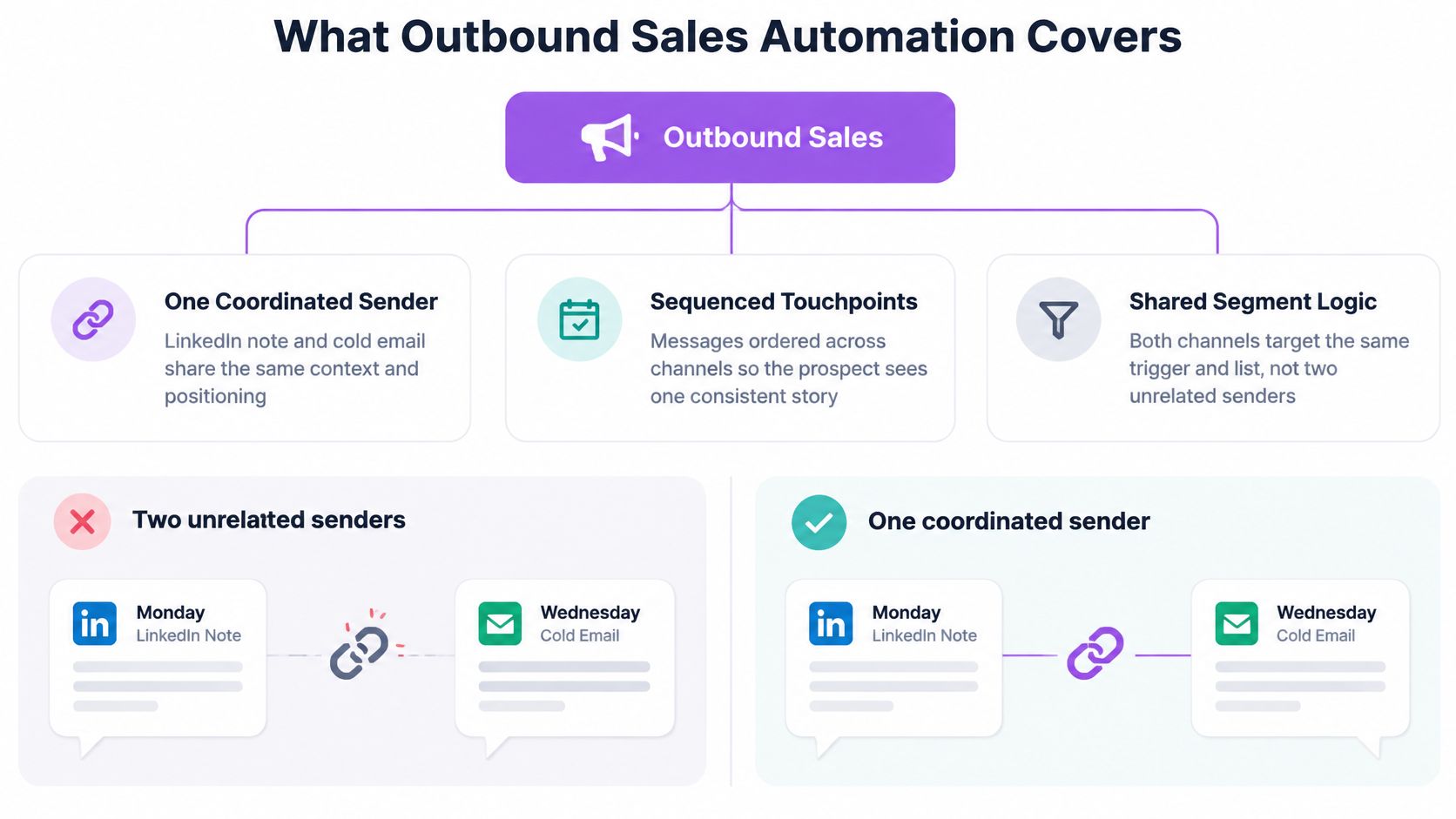
A rep sends a LinkedIn note on Monday. Their colleague on the same account sends a cold email on Wednesday that reads like it came from a different company, because it did: different tool, different list, different message. The prospect sees two unrelated senders and ignores both. That gap between channels is where most automation projects fail, far more often than in the copy itself.
Outbound sales automation is software that runs the repeatable parts of prospecting while humans handle live conversations. Concretely, it builds contact lists, sends ordered touches across LinkedIn and email, stops the sequence when someone replies, and writes each activity back to the CRM.
Three terms get used loosely, so learn them cleanly:
Sequence is the ordered set of steps written for one audience. Example: connection request, then email, then a follow-up message after acceptance.
Cadence is the gap between steps. Example: 3 business days, then 4, then 5.
Channel orchestration is the rule deciding which channel fires next and whether the other one waits.
Say you pull 300 accounts in a RevOps segment. You run two sequences split by company size, each with an exit rule that ends the flow on any reply. That's an automated system. It's also identical in volume to what the manual team was sending, which is the point: automation isn't volume. It's consistency in timing, targeting and follow-up. The volume claim is the least interesting thing about it.
| Component | What it does | Typical setup | Common failure |
|---|---|---|---|
| Prospect lists | Defines who gets contacted | Filter by title, company size and trigger signal | Stale or unverified records bounce or misfire |
| Sequences | Ordered steps across channels for one audience | 5 to 7 touches over 3 to 4 weeks | Too many touches for one prospect |
| Cadences | Time gaps between steps | Gaps of 2 to 4 business days for most steps | One gap used for every segment |
| Channel orchestration | Decides which channel fires next | LinkedIn for first contact, email for the offer | Duplicate messages from both channels in one day |
| Exit rules | Stops the sequence on reply, bounce or opt-out | Automatic exit on any human reply | Sequence keeps running after a reply |
| CRM sync | Writes replies, meetings and stage changes to the record | Push activity to the CRM on each event | Duplicate contacts and conflicting owners |
| Reporting | Shows results by step and by channel | Reply, meeting and opt-out counts per step | Tracking opens instead of replies |
Seven components, and three of them often run as a habit rather than a system. Mapping your process against this table is the fastest way to see where money leaks; if you want to see where sales automation pays back across those components, that breakdown is a useful second opinion.
Your next move: list every step your team runs by hand this week. That list is your automation backlog, and it's usually shorter than you expect.
Why Teams Automate and Where the Time Goes
For an outbound team, time spent copying details into a CRM is time not spent speaking with prospects. Sales representatives spend about 34% of their time selling, while administrative work, meetings and information searches take up the rest, according to SuperOffice's CRM statistics roundup. The same roundup estimates manual data entry at about 13 hours a week, or roughly a third of a standard 40-hour week.
For five reps, that adds up to 65 hours a week of data entry. Before automating, check what those hours contain: duplicate records, missing fields, follow-up tasks, or updates that never reach the CRM. Each points to a different process problem.
Quick check: total your team's data-entry hours from last week and multiply by 52. Compare that annual total with the cost of the work and the cost of fixing the workflow.
The roundup also reports that 91% of companies with more than 11 employees use CRM software, and that roughly 50% of CRM use cases are tied to sales-force automation. Having a CRM, though, does not mean the process is connected. SuperOffice reports that properly integrated CRM systems have been associated with a 26% productivity improvement.
Start with the repetitive handoffs: contact updates, task creation, scheduled follow-ups, lead routing and campaign reporting. Automation can keep these steps moving, but it cannot decide whether a prospect belongs on the list or whether an exception needs a rep's attention. A forgotten follow-up may point to a missing workflow; repeated outreach to poor-fit contacts points to a list-quality problem. Define the ideal customer profile for sales before automating the next batch.
Automation has limits. It will not fix a weak list, an unclear offer or one sequence sent to every prospect. For a small number of high-value enterprise accounts with multiple stakeholders, a rep-led plan can be more appropriate because each contact and next step requires judgement.
A practical order of work is CRM write-back, list verification and deduplication, follow-up scheduling, lead routing, then reporting. Prioritise the tasks that touch the most records, while keeping a human review path for poor-fit leads, unusual replies and high-value accounts.
Guardrails for LinkedIn and Email Before You Launch
Here's the part most vendors skip. LinkedIn doesn't approve automation of its site. Its User Agreement prohibits third-party software that automates activity there, naming bots, browser extensions, crawlers and other tools that scrape data or automate actions. The prohibited list includes adding or downloading contacts, sending or redirecting messages, creating or interacting with posts, and generating inauthentic engagement.
So no tool can promise you're safe, risk-free or officially approved. The platform states it keeps improving technical defenses against scraping and automation. Anyone selling you a guarantee is selling you something they can't deliver.
Two categories of tooling get confused, and the distinction matters:
Workflow support: organising prospect lists, drafting messages, reminding a rep to follow up. A human takes the LinkedIn action.
Direct automation: software clicking through LinkedIn on your behalf, sending messages and downloading contacts.
The second category carries account risk you can't outsource. If you use it, treat it as a business decision with a downside attached, not a setting to switch on. A practical checklist before any LinkedIn campaign goes live: explicit consent from the account owner, controlled pacing with daily limits, human review of message copy, monitoring for platform warnings, and a documented process for pausing every campaign when enforcement changes. That last one is the one nobody writes down until the morning it's needed.
Email has clearer law attached. Under the FTC's CAN-SPAM compliance guidance, commercial email must use accurate subject lines that reflect the message content, identify the message as an ad where applicable, include a valid physical postal address, provide a clear opt-out, honor that opt-out within 10 business days, and avoid deceptive header information. Those obligations apply even when a third party sends on your behalf. The advertiser stays responsible.
The UK adds a classification step. Under PECR, sole traders and some partnerships count as individual subscribers, so unsolicited marketing to them generally needs specific consent unless the soft opt-in conditions are met, while the email-consent restriction doesn't generally cover corporate subscribers like limited companies, as the ICO's lawful basis guidance explains. Classify records before you send, not after someone complains.
Governance rule: one named human owns each campaign and each account, one suppression list is shared across every channel, and every consent record has a date attached. If you can't answer who owns a prospect record when LinkedIn and email disagree, you don't have a governance model yet.
The practical guide to safe LinkedIn automation covers the operational side of this in more depth, including how to pace activity and what to watch for.
How to Build One Sequence Across LinkedIn and Email
Short on time? Here's the build in video form, then I'll walk the steps.
1. Pick one segment with a shared trigger. A recent funding round, a hiring spike for a named role, a product launch. One trigger, one audience. Keep the first run under a few hundred contacts, because you're testing the machine, not hitting quota.
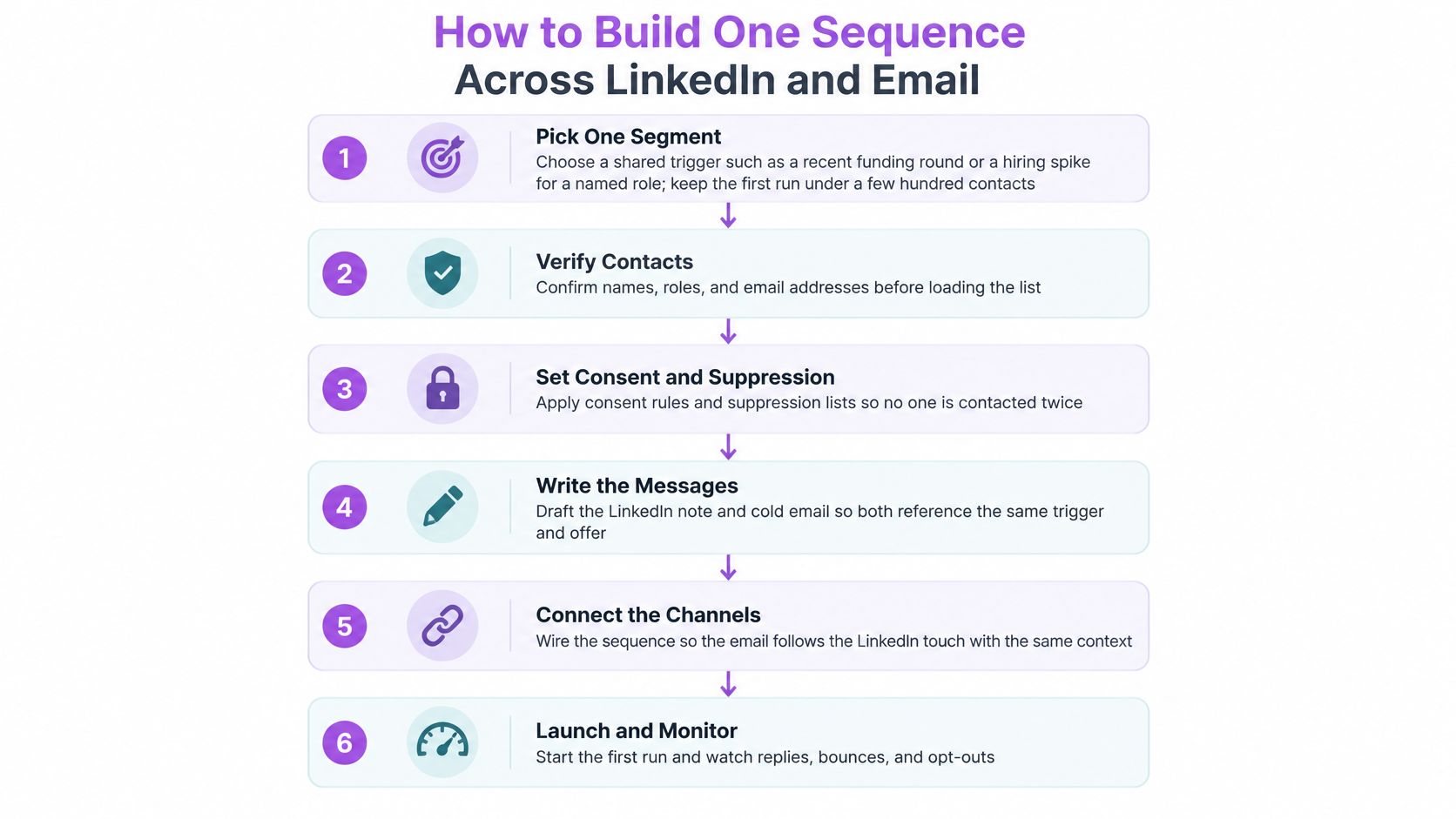
2. Verify before you load. Check names, roles and email addresses against a verifier, and drop anything that doesn't pass. A bounce isn't a data point, it's damage to your sending reputation that follows every later campaign.
3. Set consent and suppression. Apply the lawful basis rules and one shared suppression list before launch. This is the step teams skip when they're in a hurry, and it's the one that produces the 8am panic email.
4. Assign channels by job. LinkedIn carries the connection and a reason to talk. Email carries the offer and the proof. Don't duplicate the same message on both channels on the same day.
5. Write one idea per step. Keep the first LinkedIn note short enough to read on a phone screen without scrolling. If a step has two ideas, it needs to be two steps.
6. Set exit rules and CRM sync. Any reply, bounce or opt-out ends the sequence for that contact and hands the thread to a human. Connect sync so replies and meetings land on the existing record, and merge duplicates before launch.
7. Test on 50 contacts. Review reply and exit counts per step. Rewrite the weakest step first, not the whole sequence.
Why these rules matter: a prospect touched twice in a day by two channels feels chased, not served. A reply that lands in an inbox nobody watches makes attribution impossible, and you'll conclude the campaign failed when the follow-through did.
| Step | Day | Channel | Action |
|---|---|---|---|
| 1 | Day 1 | Connection request with no pitch | |
| 2 | Day 3 | Short note tied to one business trigger | |
| 3 | Day 6 | Message after acceptance with one question | |
| 4 | Day 9 | One customer example and one link at most | |
| 5 | Day 14 | Share one relevant insight, no offer | |
| 6 | Day 21 | Closing email that asks for a yes or no |
Six touches over three weeks, and the sequence exits on any reply. That map fits on a whiteboard in five minutes, which is the test for whether your team will follow it. For a deeper look at message-level construction and profile setup, this LinkedIn outreach strategy guide is worth reading alongside the cadence above.
Personalization That Helps Instead of Creeping Out
"Saw you're hiring SDRs, congrats on the growth." Sent to a prospect whose job post went up three months ago and has since been filled. The rep didn't research anything, they read a cached signal. The prospect reads surveillance or laziness, and the thread ends there.
Compare two messages. First, a LinkedIn note: "Your team launched [product] in March. Most RevOps leads I speak to at your stage are rebuilding routing because the old rules break at 20 reps. Is that on your list this quarter?" Second, a follow-up email: "One thing from the [company] announcement: you're hiring across three regions. The teams I work with usually hit the same wall at that point, territory rules that were fine at one region. Here's how one of them handled it."
Neither message knows anything about the person's family, health or neighbourhood. Both reference one dated business fact and connect it to a problem the role owns.
Signal rule: use explicit business events with dates, suppress personal or sensitive attributes, attach an expiration window so stale signals drop out, and route high-risk personalization to a human reviewer before launch.
The evidence supports restraint. A 2025 Gartner-referenced finding reported that 53% of B2B buyers felt personalization had harmed their experience in their most recent purchase journey, according to Autobound's analysis of signal-driven personalization. That's a majority of buyers. A wrong or stale detail doesn't just fail to persuade, it signals that the sender is running a process rather than paying attention.
Before every send, run one test: if the rep can't explain in one sentence why this prospect received this message, remove that variable. Personalization isn't a dial you turn to maximum. It's a set of decisions about which signals are safe, current and worth mentioning. Selective restraint beats maximum message variation, and it's easier to audit when someone asks what your team is doing with buyer data.
KPIs That Show Whether the Sequence Works
The benchmark you should hold in your head: a 2026 summary of a large email-response dataset puts the median cold-email reply rate at 5.9%, down from 6.3% in 2025 and 7.1% in 2024, per Marketful's B2B email statistics. Inbox competition is rising and reply rates are sliding. That's the tide, not your team's failure.
The same source reports 11.4% replies for personalized messages against 2.8% without personalization, a 307% relative lift on the same send volume. List size shows the same pattern: campaigns to fewer than 50 recipients averaged about 5.8% replies, against 2.1% for campaigns over 1,000 recipients.
At scale, small rate differences compound. On 10,000 delivered emails, a 2.8% rate produces roughly 280 replies. An 11.4% rate produces about 1,140, an extra 860 conversations before a single qualification call.
| KPI | How to calculate | How to read it |
|---|---|---|
| Reply rate | Replies divided by delivered messages | Compare per step; a step with no replies is the weak link |
| Positive reply rate | Interested replies divided by delivered messages | Separates real interest from polite declines |
| Meeting rate | Meetings booked divided by new contacts | Shows whether replies become conversations |
| Negative reply and opt-out rate | Unsubscribes and stop replies divided by delivered messages | A rise points to targeting or message problems |
| Bounce rate | Hard bounces divided by delivered emails | A rise points to list quality, not copy |
| Stale-data rate | Records with an outdated title or company divided by total records | Track monthly to trigger re-verification |
| Pipeline per 100 contacts | Qualified opportunities divided by contacts, times 100 | Measures quality, not send volume |
Read them in this order. Check bounces, stale data and opt-outs first, because a list problem makes every other number a lie. Then read reply rate by step to find the weak message. Then judge positive replies and meetings, which show whether interest becomes a conversation. Ignore opens as a measure of engagement in cold outreach; a bloated number driven by privacy settings and image loading tells you nothing about interest.
The monthly question for the sales leader: which step lost the most prospects, and was it the message or the list? Answer that before approving another batch of contacts.
A 90-Day Rollout and What to Check in Tools
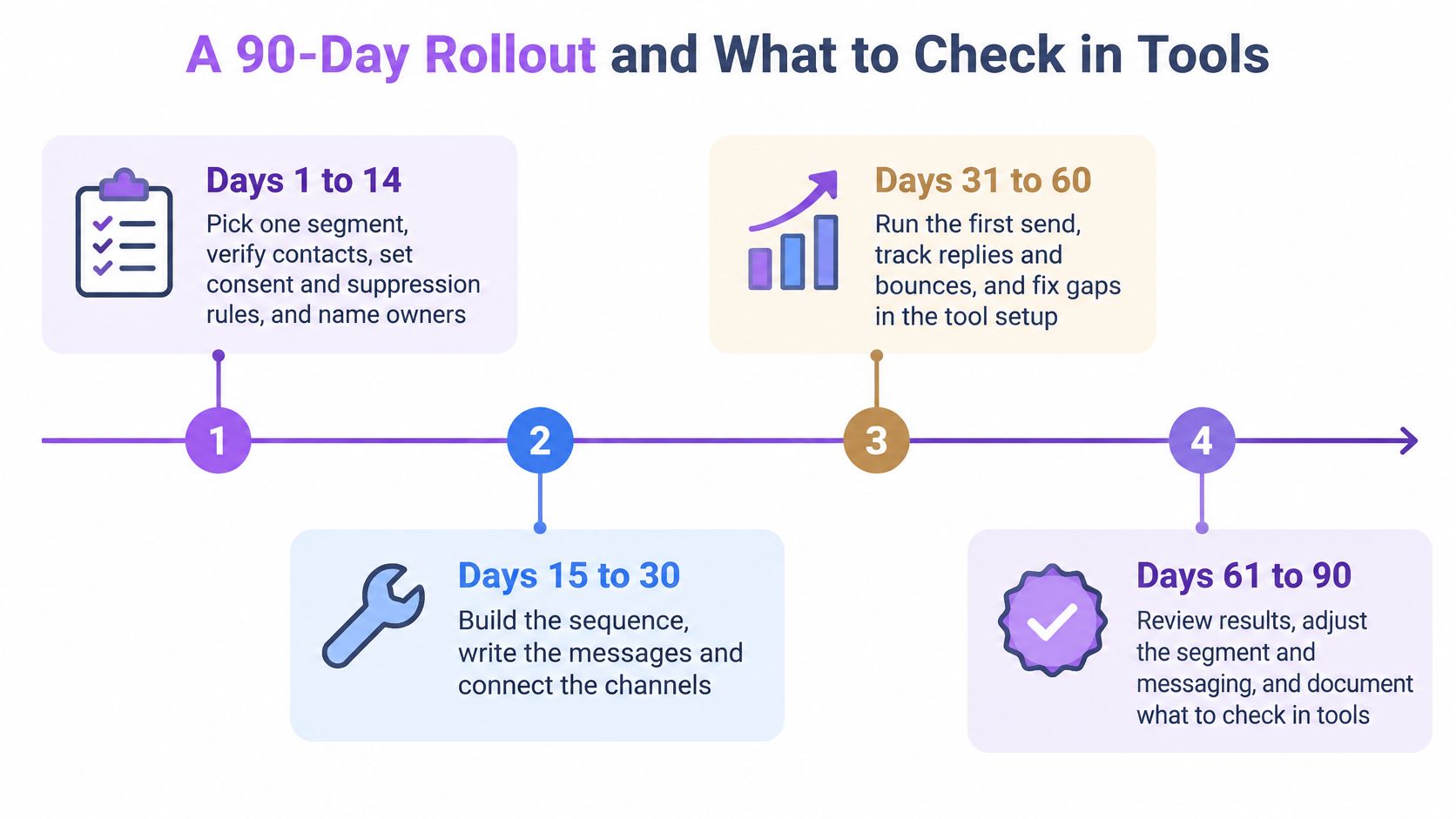
Days 1 to 14: narrow the scope. Pick one segment, verify the contacts, set consent and suppression rules, name the campaign owner and the account owner. Resist adding a second segment here.
Days 15 to 30: build and wire. Write the sequence, draft the messages, connect CRM sync, merge duplicate records. Nothing goes live yet.
Days 31 to 45: pilot. Run 50 to 100 contacts per channel and review the per-step numbers against the KPI table above. Look at exits, not just replies.
Days 46 to 75: improve one step. Rewrite the weakest message, then add a second segment only if the first one cleared your bounce and opt-out thresholds.
Days 76 to 90: decide. Scale, keep, or stop, and document the playbook so the next hire runs it the same way.
Then shortlist two or three tools against these checks:
LinkedIn scope: workflow support with a human sending, plus a written vendor statement about what the tool does on the platform. Red flag: automated prohibited actions with no disclosure.
CRM sync: writes replies and meetings to the existing record and merges duplicates. Red flag: a new contact created on every event.
Email verification: verifies addresses before send and suppresses invalid ones. Red flag: no verification step at all.
Volume controls: daily caps and pacing set per account. Red flag: fixed high volume with no limits.
Exit rules: stops on any reply, bounce or opt-out. Red flag: keeps sending after a reply.
Reporting: results by step and by channel, including negative replies and opt-outs. Red flag: only opens reported.
Access: role-based access for teams and agency clients. Red flag: shared logins across accounts.
Flowkon is one platform that combines LinkedIn and email in a single sequence with exit rules and CRM sync. Test that against your own segment in a trial rather than taking it on trust, and hold any vendor to the checklist rather than the demo. Email verification is the check that often fails first, so this piece on email verification best practices for B2B outreach teams is a good place to set the bar.
Start With One Sequence This Week
Choose one segment and build a three-step sequence from the cadence table. Set the exit rules and shared suppression list, then schedule a 30-day review before sending. Keep the first test narrow enough to identify which step needs attention.
At review, use the results to choose what to change. If one step gets weak replies, rewrite that step first. If bounces or opt-outs rise, pause the sequence and fix the list before changing the copy. List quality comes before message polish.
Use both LinkedIn and email in the sequence to see which channel prospects respond to. If email outperforms LinkedIn for a segment, adjust the next campaign around that result rather than applying the same channel mix to every prospect.
Flowkon runs LinkedIn and email in one campaign, with configurable delays and automatic sequence exit when a prospect replies. Native CRM sync keeps contacts and activities in HubSpot, Salesforce, Pipedrive, Zoho and monday.com. Review the campaign builder and setup flow against your own workflow, then decide which segment goes first and who owns it on Monday morning.
Flowkon fits a process built around fewer, well-governed actions rather than higher volume. Visit Flowkon to try the campaign builder with a pilot of 50 contacts.