
You've got a prospect list, a half-written sequence, and reps asking whether they can use ChatGPT to get outreach out faster. Yes, but the useful version of ChatGPT for sales starts with account evidence and ends with a rep's approval, not a polished email generated from a company name.
The question is whether drafting time saved exceeds the time spent checking, correcting, and managing the output. Start with a narrow workflow, keep the CRM authoritative, and measure buyer responses rather than how much copy your team produces.
Where ChatGPT Fits in a Sales Workflow
A rep pastes a prospect's name into ChatGPT, asks for a compelling email, and gets a confident paragraph about growth challenges. Nothing ties the message to that buyer, but it sounds professional enough to send.
ChatGPT is strongest when it transforms text you supply. It's weakest when you expect it to remember current facts about a prospect. Give it a discovery transcript, approved positioning, and account notes, and you have something useful to work with.
McKinsey's May 2024 global survey found that 65% of respondents said their organizations regularly used generative AI in at least one business function, with marketing and sales among the most common, as summarized alongside Salesforce's sales AI findings. Salesforce's 2024 State of Sales research surveyed 5,500 sales professionals and found that 81% of sales teams were experimenting with or had implemented AI.
Sales Tasks ChatGPT Handles Well
| Task | Input you provide | Output | Check before use |
|---|---|---|---|
| Cold email and LinkedIn note drafts | Persona, offer, one proof point and prospect role | Three short variants | Names, facts and claims match the account record |
| Objection replies | Objection in the prospect's words, deal stage and product fit notes | Two or three reply options | Pricing, terms and competitor claims confirmed by the account owner |
| Account research summary | Public company pages and rep notes | Facts and hypotheses listed separately | Every fact traced to a source |
| Call prep brief | Account notes, stakeholder roles and last activity | Questions and likely concerns | Dates and contacts confirmed in the CRM |
| Call notes cleanup | Raw transcript or rough notes | Structured summary with next steps | Action owners and dates checked against the recording |
| Pipeline export review | CSV of open opportunities | Stalled deals by stage and rep, with row references | Key numbers spot-checked against the CRM |
For inbox-based workflows, decide what the assistant may read before connecting it. Sickle's resource to give agent access to inbox is relevant when planning that connection, but access should follow a defined task, not become permission to inspect every conversation.
Practical rule: The more an output depends on facts about a specific account, the more review it needs.
Adoption alone doesn't establish revenue impact. Choose tasks where the input is available, the expected output is clear, and a rep can check the result without repeating the entire job.
Team Setup, Data Rules and Automation Limits
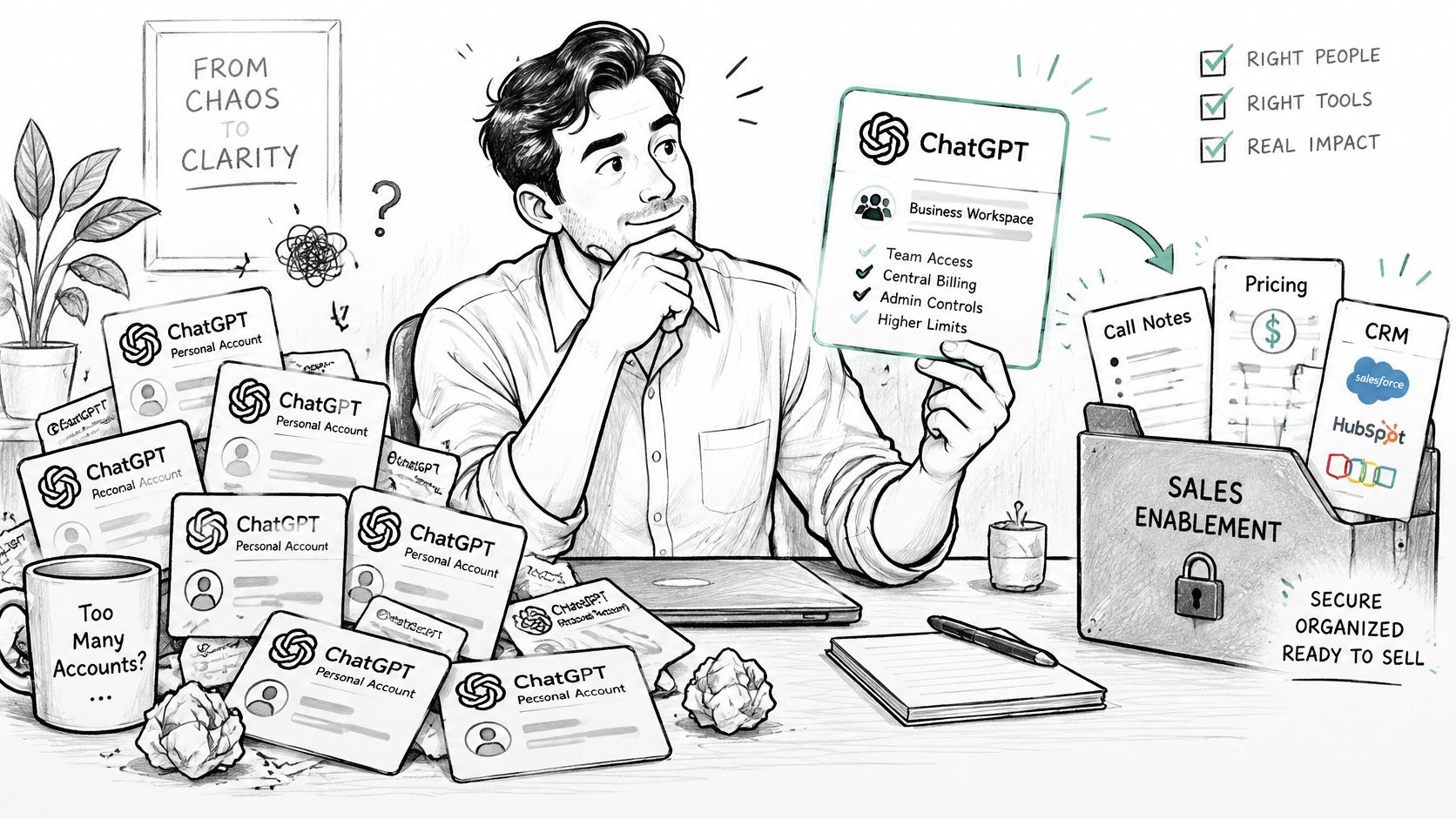
The setup mistake that causes trouble is treating every ChatGPT account as equivalent. Don't build a confidential sales workflow around whichever personal account a rep already uses.
Use a managed business workspace for approved call notes, pricing, account plans, and CRM exports. The ChatGPT Business documentation states that business workspace data isn't used to train models and that API usage is billed separately from a Business subscription. Have an administrator check access, retention, and training controls before the first upload.
ChatGPT Options for Sales Teams
| Option | Best for | Data and access notes | Limits to plan around |
|---|---|---|---|
| Business workspace | Shared drafting and analysis across a team | Workspace data isn't used to train models; administrators manage access | Remove unnecessary personal data before uploading |
| Projects | One workspace per account or sales motion | Keep approved guidance and files together | Assign an owner and refresh date |
| Deep research | Preparation for high-value accounts | Request cited output; connected sources require suitable access | Budget research allowance for priority accounts |
| Spreadsheet analysis | Pipeline reviews and stalled-deal lists | Upload only the fields needed | Test file capacity with your actual export |
| API for automated workflows | CRM enrichment and drafts written back to systems | Separate billing from Business | Needs engineering time and a review step |
Projects documentation describes organizing files and context for recurring work. For pipeline analysis, the data analysis guide documents spreadsheet uploads and notes that file limits depend on the upload type, plan, and other account conditions.
Keep Automation Behind an Approval Gate
Pass selected CRM fields and campaign events into a controlled prompt. Require structured output containing intent, pain_points, qualification_score, recommended_channel, draft, and evidence. Make every recommendation point to the input that supports it, then write only approved drafts back.
For process design, Sprints & Sneakers' guide to a predictable pipeline for SaaS scale-ups is a useful companion to defining ownership and handoffs.
Flowkon's multichannel campaigns let teams plan LinkedIn connection requests, follow-ups, and email touchpoints in one flow with defined timing and logic. Flowkon MCP lets AI assistants query live campaign data. Keep ChatGPT-generated drafts behind a human approval gate before release rather than letting the model send autonomously; use the approval matrix below to define those gates.
How to Write Outreach Copy Reps Would Send
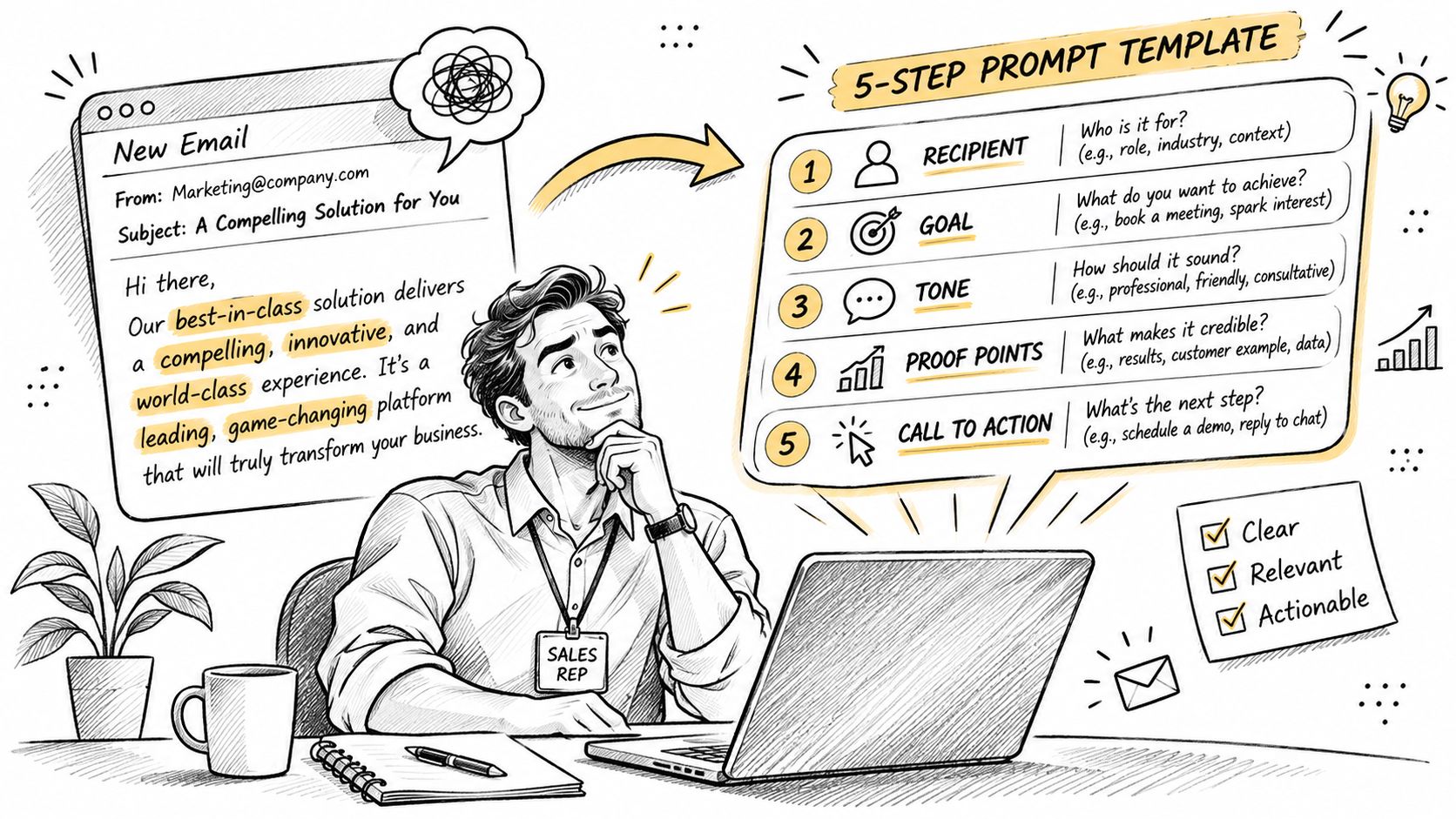
A request for a compelling email doesn't explain why this buyer should care. Without that context, you'll get flattering openings, vague benefits, and claims your rep has to remove.
Build the prompt around a sales decision: what makes this offer relevant to this person now? Start with the message you'd be comfortable defending on a call.
Give the Draft Clear Boundaries
Role and persona: Identify the sender, buyer, and responsibility you're addressing.
Trigger: Supply the actual hiring post, launch announcement, or account event.
Offer: Choose a single useful next step.
Allowed proof: Include an approved example, demonstration, or customer claim. If there's none, say so.
Limits: Specify length, banned phrases, channel, and a single question as the call to action.
Say you sell an outreach operations service, and a prospect has published an SDR hiring post. A filled-in prompt could look like this:
Act as an SDR writing to a sales leader. Use only this scenario: the prospect has published an SDR hiring post, and our service reviews outreach handoffs before new reps start. Offer a sample handoff checklist. Our approved proof asset is a sample workflow showing account ownership, reply routing, and follow-up tasks; no customer outcome claims are authorized. Draft a brief LinkedIn connection note and a short cold email. Avoid superlatives, invented pain points, and meeting requests. End each with a single question.
Sample Outreach From That Scenario
LinkedIn connection note
Hi Maya, noticed your SDR hiring post. I work on outreach handoffs as teams add reps. Would it be useful to connect and share a sample handoff checklist?
Cold email
Subject: Handoffs for the SDR hires
Hi Maya,
Your SDR hiring post caught my attention. Before new reps start, it may be worth checking who owns account assignment, replies, and follow-up tasks across the team.
We review those handoffs and turn them into a working checklist. I can send a sample workflow showing how ownership and reply routing are documented, so you can judge whether it's relevant without booking a call.
If your current process already covers this, there's no reason to change it.
Would you like me to send the sample?
Alex
These are hypothetical messages, not permission to claim that every growing team has a handoff problem. Use B2B sales email templates as starting structures, then supply account-specific evidence.
Before sending, remove claims you can't verify, replace vague adjectives with an approved name or concrete detail, and ensure the email adds something beyond the connection note. Read the draft aloud. If your rep wouldn't say it to the buyer, don't send it under their name.
Handling Objections and Personalizing Accounts
Prepare for these outbound replies: no budget this year, bad timing, we already use a tool, and send me something to review. Don't treat them as interchangeable objections to overcome.
A reply should acknowledge the buyer's position, clarify what matters, and leave them room to decline. ChatGPT can help you phrase that response, but it shouldn't decide what the prospect secretly means.
Match the Reply to the Uncertainty
| Prospect response | What you need to clarify | What the reply should do |
|---|---|---|
| No budget this year | Is funding unavailable, or is this not a priority? | Acknowledge the constraint and ask whether revisiting it later would be useful |
| Bad timing | Is there a relevant event or review window? | Ask about timing without manufacturing urgency |
| We already use a tool | Is there an unmet need? | Respect the incumbent and explore gaps rather than arguing for a switch |
| Send me something to review | What information would help them evaluate? | Offer a relevant asset instead of sending a generic deck |
Use a bounded prompt:
Draft a response to the prospect's verbatim objection supplied below. Deal stage: outbound reply, no discovery completed. Offer: a review of outreach ownership and follow-up processes. Use no defensive language and no invented statistics. Acknowledge their position, ask a single relevant question, and don't assume dissatisfaction with their current tool.
For a prospect who already uses a sequencer, a useful reply is:
That makes sense. I'm not suggesting a switch if your current setup works. Is there anything your team still handles manually around reply ownership or follow-up, or is that already covered?
The last clause matters. It allows a genuine answer instead of disguising a pitch as discovery.
Research Accounts to Improve the Question
For priority accounts, use a repeatable brief rather than asking for everything about the company:
Company priorities: Identify stated initiatives and their sources.
Recent announcements: Capture the event date and its relevance.
Tools in use: Separate confirmed tools from suspected ones.
Problem owner: Name the likely function, marking uncertain ownership as a hypothesis.
Open questions: List what the rep still needs to learn.
The deep research documentation describes cited, multi-source research and says fixed monthly allowances reset every 30 days from first use. Access to connected sources also depends on plan, region, workspace settings, and enabled capabilities.
Reserve that effort for accounts where better preparation could change your approach. Apply these sales best practices to the conversation itself: ask about the buyer's situation rather than presenting a researched hypothesis as established fact.
Verification Rules Before a Message Goes Out
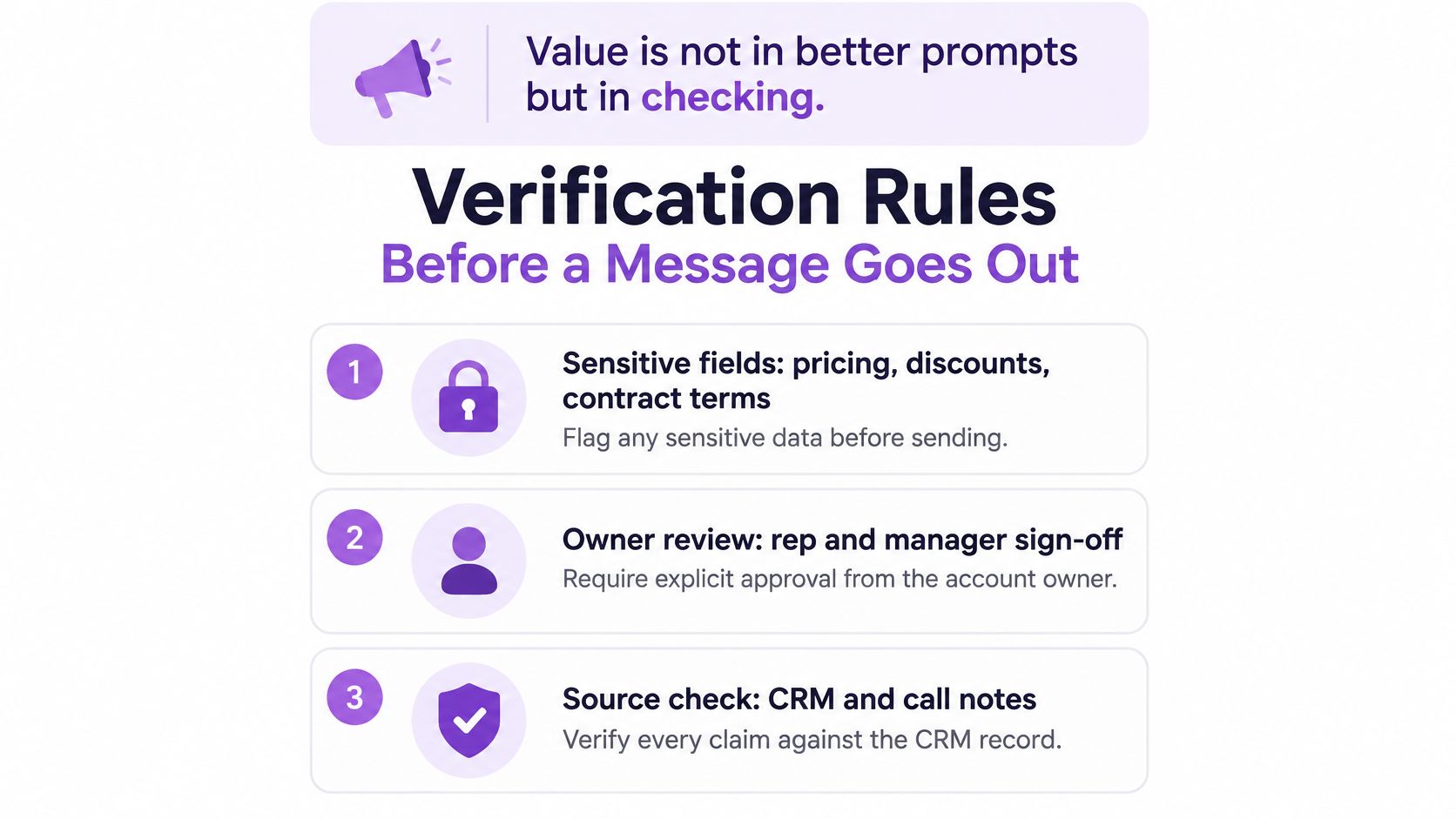
Better prompts aren't the main operating advantage. The hidden cost is checking, especially when plausible wording conceals an unsupported claim.
HubSpot's guide to AI in B2B sales reports that 65% of generative-AI users and experimenters are concerned that results may be inaccurate. Treat verification as part of the workflow, not an optional final glance.
Define Access, Approval, and Recordkeeping
First, specify which fields the model may read. A drafting task might need role, company, approved trigger, offer, and prior interaction, but not the full customer history.
Next, assign an approver based on the decision involved. Finally, decide where the source record, generated draft, and final version will live so another rep can reconstruct what happened.
Approval Rules for ChatGPT Outputs
| Task | Can run without approval | Human check required | Log in CRM |
|---|---|---|---|
| Reformatting and summarizing call notes | Yes, with source text attached | Spot-check a sample each week | Summary linked to the call record |
| Personalization from approved CRM fields | Yes, inside approved templates | Review the first use of each template | Draft saved with the record ID |
| Factual claims about a prospect's company | No | Every claim traced to a source | Source link stored with the note |
| Pricing, discounts and contract terms | No | Always reviewed by the account owner | Final figure entered by the rep |
| Lead segmentation and scoring | Suggest only | Owner approves the criteria | Score logged with its inputs |
| Compliance and unsubscribe language | No | Always reviewed by the sales lead | Reference to the approved version |
| CRM field updates | Suggest only | Rep confirms before saving | Previous value and correction kept |
Reformatting is low-risk only while the source remains accessible. If a summary introduces a deadline or commitment, check that detail before treating it as an agreed next step.
Approved-field personalization means inserting supported information into a reviewed structure. It doesn't authorize turning a job title into an assumed business problem. Similarly, a suggested qualification score isn't a reason to change routing until the owner approves its criteria.
Pricing and contract language need explicit ownership because a small wording change can alter what the buyer believes you've offered. Compliance language should come from an approved version, not a fresh rewrite generated for tone.
Keep the source text, prompt version, and final edited message together. When a claim is wrong, you need to correct its origin, not just delete the last email.
Attach timestamps to source records and resolve contradictions before sending. When a rep corrects a CRM value, preserve the previous value and the reason for the change.
Where ChatGPT Fails in Sales Work
The failures worth planning for aren't always obvious spelling mistakes. They're messages and summaries that sound reasonable enough to escape a quick review.
Consider these failure scenarios before choosing what to delegate.
Plausible Output, Wrong Sales Decision
An invented announcement: A company summary mentions a funding round without a supplied source. The model has filled an information gap with plausible text, leaving the rep with a false reason to reach out.
An irrelevant pain point: A sequence focuses on manual reporting, but the buyer has already solved it. Without current account context or connected CRM access, the draft doesn't reflect the buyer's situation.
Polished but unnatural copy: A procurement lead receives elaborate praise and vague efficiency claims. The language may be grammatically clean while sounding nothing like a credible vendor conversation.
A missing objection: A call summary captures the next meeting but omits a raised implementation concern. A text transcript doesn't preserve every tonal cue, and summarization can exclude a detail the account owner considers decisive.
Avoid the Expensive Shortcuts
Don't paste full customer exports into personal accounts, reuse identical prompts across unrelated industries, or treat an uncited answer as completed account research. Keep product positioning specific to the buyer's responsibilities rather than merely swapping industry names.
LinkedIn automation also requires a separate risk decision. Conservative pacing and approval controls don't guarantee that an account will avoid restrictions, and generated copy doesn't make an automated action officially approved.
Decision test: Use ChatGPT when the input is complete and the check is quick. Write by hand when a single wrong fact could damage the relationship.
Drafting speed matters less on a delicate executive follow-up than judgment and precision. If explaining the relationship to the model takes longer than writing the message, skip the model.
Measure Revenue Impact and Run a Controlled Pilot
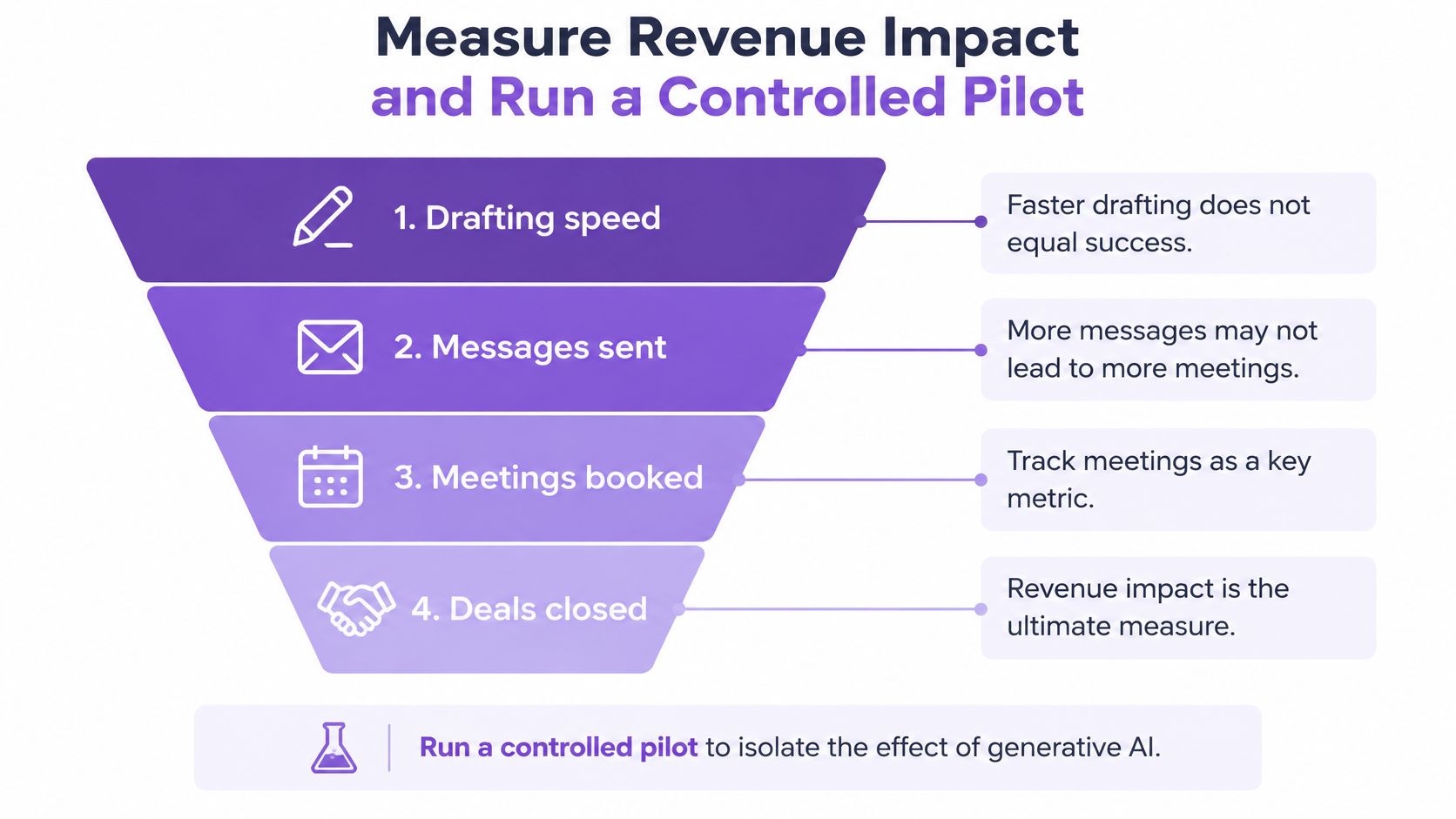
Faster drafting and more messages can look like progress without producing better meetings or closed deals. Time saved and revenue created are separate outcomes.
A field-experiment paper on generative AI in sales found effects ranging from no detectable impact to a 16.3% increase in sales, depending on the tool's contribution beyond existing company practices. That's a reason to test your workflow, not borrow an expected lift.
Compare Like With Like
Split a defined segment into AI-assisted and non-assisted groups. Match role, channel, offer, and send volume, and balance rep experience so a strong seller doesn't become the apparent AI effect.
Use the same qualification definitions in both groups. Track review time separately, including fact-checking and corrections.
| Stage | Metric | What it tells you |
|---|---|---|
| Acceptance | Connections accepted divided by requests sent | Whether the opening approach earns attention |
| Reply | Replies divided by messages delivered | Whether the message invites a response |
| Positive reply | Positive replies divided by total replies | Whether replies show real interest |
| Meeting booked | Meetings divided by positive replies | Whether interest turns into calendar time |
| Opportunity created | Opportunities divided by meetings | Whether calls produce qualified pipeline |
| Closed-won | Won deals divided by opportunities | Whether results extend to revenue |
| Review time | Minutes per message including checks | Whether time saved holds after review |
Inspect these rates alongside raw counts. A higher share of positive replies isn't useful if the campaign produces fewer positive replies overall, and a won deal alone doesn't establish causation.
Use campaign dashboards and analytics to keep activity records consistent, then reconcile opportunity outcomes in the CRM.
Run the Pilot With a Stop Rule
Choose the task. Start with one segment and one use case, usually outreach drafts or call-note cleanup. For cleanup, prioritize time and summary accuracy rather than pretending it directly causes replies.
Write the prompt, approved inputs, and approval rules. Freeze the starting version so you know what you're testing.
Split the segment into assisted and control groups, keeping account assignment consistent.
Run for several weeks. Track the relevant funnel and review effort, and allow later-stage outcomes time to mature. For example, during an outreach-draft pilot, use Flowkon MCP to let an AI assistant query live campaign data for the assisted group. Compare reply rates with the control group, then reconcile meetings and opportunities in the CRM. Have a rep review the figures and account context before deciding whether to change the prompt.
Keep, change, or stop based on the outcome that matters, not the number of drafts generated.
Set the stop rule before launch: pause if positive replies deteriorate or checking takes longer than writing manually. Watch for early novelty, unequal rep skill, and attempts to count sent drafts as wins.
Pius described Flowkon on G2 as “A Reliable Solution for Consistent and Personalized Client Outreach.” That's a customer assessment, not a guaranteed result for your pilot.
Flowkon brings LinkedIn and email outreach into a managed sequence, with conversation management and campaign reporting to support a controlled test of approved drafts. Visit Flowkon to book a free demo and walk through how you'd set up the sequence, review process, and measurement before choosing a plan.