.webp)

The strongest LinkedIn connection messages are short, specific, peer-like, and free of a pitch. In one Flowkon campaign, a sequence that liked a prospect's post before sending a request recorded 86.67% acceptance, while a separate founder campaign using a connect-then-profile-view sequence recorded 70% acceptance.
A generic LinkedIn message for a connection request often reads like a sales template because it asks for attention without giving the recipient a reason to care. In practice, the better examples pair a concise note with one real profile detail, then use a deliberate follow-up to start a conversation instead of squeezing the entire pitch into the invitation.
The right approach depends on the prospect. A recent post can give you a genuine opening; a founder-to-founder note can establish peer context; and a no-note request can serve as a useful control when a profile offers little to personalize. The basic rule is simple: refer only to details you can verify, and don't make a connection request sound like a promise of a sales call.
These eight approaches pair the message with the sequence around it. For more ways to open a conversation naturally, see these Chicago Brandstarters conversation starters.
1. Like-Then-Connect Sequence
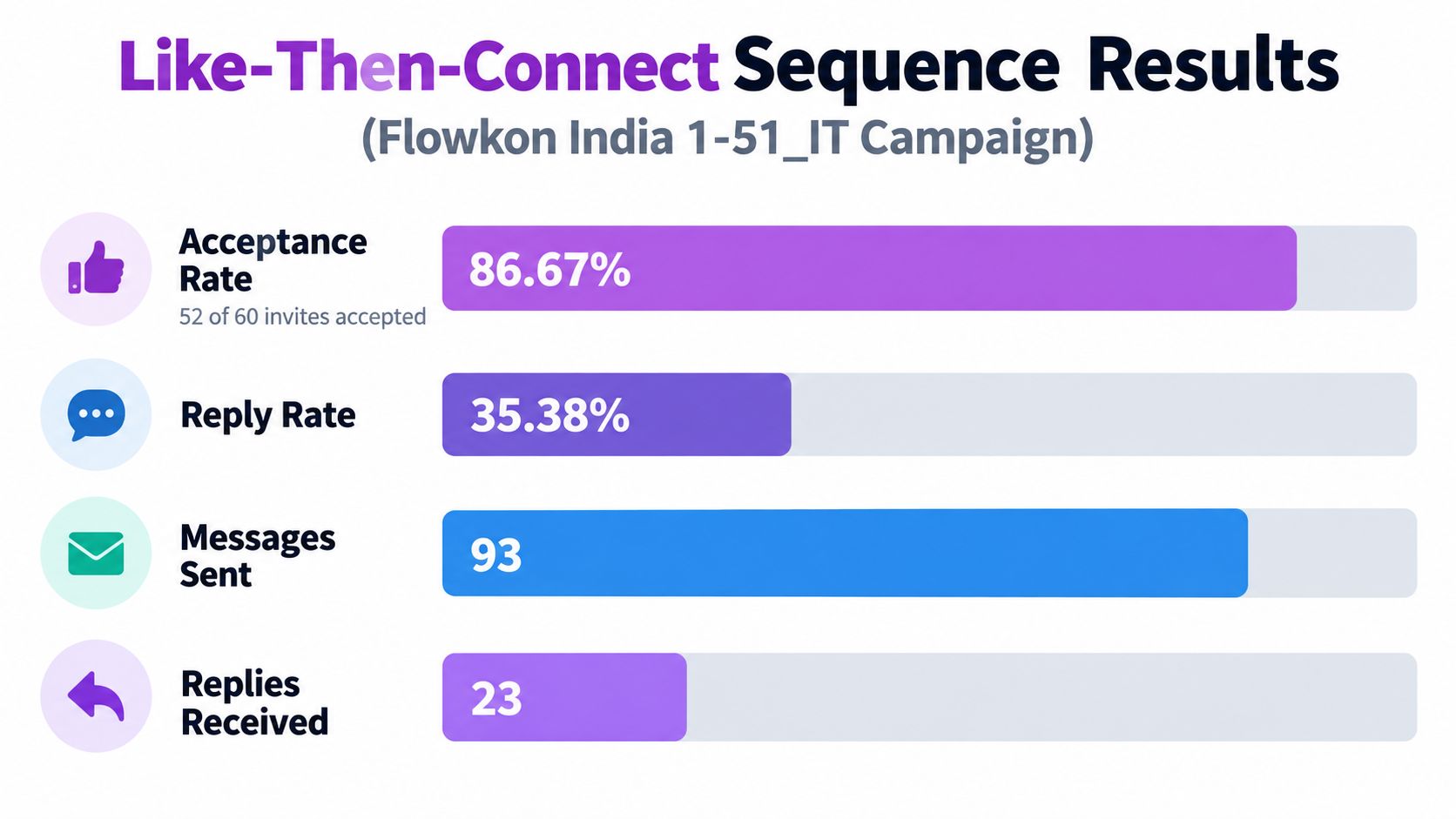
A light interaction before a request can make the sender more familiar without adding a pitch to the note. In Flowkon's India 1-51_IT campaign, the sequence was to like a prospect's post, send a connection request, then use an InMail after acceptance. The campaign recorded 86.67% acceptance, 35.38% reply rate, 93 messages sent, and 23 replies. The results show what happened in that campaign, not proof that liking a post caused the outcome.
For an IT decision-maker who recently shared a post about a work-related topic, a like can serve as a small, relevant first touch. Send the request soon afterward, then make the post-acceptance message about the prospect's work rather than your product. If there's no recent post, don't manufacture a warming step. Move that person into a different sequence.
Example: After liking a post about managing an IT migration, send: “Hi {{first_name}}, your perspective on the migration caught my eye. Would be glad to connect.” Only reference the post if you actually read it.
Practical rule: A warm touch only helps when it's genuine. A like on an old or irrelevant post can make the sequence feel automated rather than considered.
Keep the message restrained after the like. If the request note repeats the post reference and adds a pitch, the recipient gets two touches that both ask for attention. Track the sequence as a whole, and compare it with a request-only control before deciding the engagement step belongs in every campaign.
For a closer look at request setup and outreach sequencing, see this B2B guide to connecting on LinkedIn.
2. Connect-Then-View-Profile Sequence
Not every sequence needs a note to make the next touch useful. In Flowkon's Gurugram/Digi/Founder campaign, the account sent the connection request first, viewed the prospect's profile afterward, and sent an InMail only to people who accepted. The campaign recorded 70% acceptance and 21.67% reply rate. Those figures describe this campaign, not a guaranteed outcome for founder or agency audiences.
This order suits founder-heavy lists when a profile visit can act as a quiet reminder. For example, a team approaching digital agency founders in Gurugram can send the request, then visit the profile later rather than immediately. The visit gives the prospect another chance to notice the sender, but it doesn't replace a relevant follow-up.
A request-only control is important here. Without one, you can't tell whether the profile visit contributed anything or whether the result came from the audience, sender profile, or request itself. Keep the targeting and timing comparable across the two groups.
Example: Send a digital agency founder a connection request without a note, then view their profile later. If they accept, follow up: “Hi {{first_name}}, thanks for connecting. I noticed your agency works with {{verified_client_type}}. What's been changing for teams in that space?” Use the client type only if their public profile confirms it.
Use this sequence when:
- The audience is founder-led: Profile visits can fit naturally in a professional networking context.
- You have a follow-up ready: A visit alone rarely gives the prospect a reason to reply.
- The team can record touches: Log the visit and request so another rep doesn't repeat the action manually.
Don't schedule the profile visit immediately after the request just to tick off a step. A second touch should feel like normal research, not a mechanical echo. If the prospect accepts, continue with a specific, low-pressure message rather than treating acceptance as permission to pitch.
3. Peer-Style Profile-Detail Note
A peer-style note works when the sender can point to a real reason this particular person belongs on the list. In the campaign data, each campaign above 58% acceptance used a peer-style note mentioning one or two details from the prospect's profile, such as their role, company, or a recent post. That observation comes from those campaigns. It doesn't establish that profile details alone produced the results.

A structure to adapt is: “Hi {{first_name}}, your work on {{company}}’s {{specific_detail}} caught my eye. Would be glad to connect.” Use it only when the detail is accurate and the sender can explain why it matters. If the profile is thin, fall back to a genuine shared role or professional topic rather than filling a blank with a guess.
Example: “Hi Priya, I saw your team recently launched a developer onboarding guide. I work on onboarding too and would be glad to connect.” Send it only if the guide and your own work are real.
Keep personalization disciplined. One strong detail usually does more than a string of profile facts, which can make the note feel like surveillance. Don't reference private browsing behavior, inferred intent, personal demographics, or sensitive employment information. A public professional action or shared context is easier to explain and less likely to make the recipient wonder how you got the information.
Before sending, check the rendered message, not just the template. A broken {{company}} variable instantly undermines the personal tone. Flowkon's broader LinkedIn cold-message examples can help you carry the same topic into a follow-up, but the connection note itself should still make sense on its own.
4. Recent-Post Reference Note
When a prospect has published something thoughtful, refer to the idea rather than praising the post in general. A simple structure is: “Hi {{first_name}}, your post on {{topic}} last week was a useful read. Would be glad to connect.” It gives the recipient context without asking them to explain their post or react to your message.
For example, if a software-company hiring manager wrote about a difficult quarter, the note can acknowledge the post without turning it into a sales opening. Don't assume that a business challenge they discussed publicly means they're looking for a vendor. The point is to show that you read the post, not to infer a buying signal.
Example: “Hi Sam, your post about keeping hiring plans flexible during a difficult quarter was thoughtful. Would be glad to connect.” Only use this wording if it accurately reflects what Sam wrote.
A good reference sounds like something you noticed. It shouldn't sound like you're reciting a prospecting research file.
Choose a post about the person's own work rather than a company announcement, and keep the reference brief. If the post is old, use a different reason to connect. Record the post and its date in your CRM so the follow-up doesn't misstate what the person said or refer to an outdated topic.
A common mistake is to paraphrase several points from the post, then add a pitch. That turns a connection note into an unsolicited content review. Keep the note to one clear observation and a low-pressure invitation. If the person accepts, continue with one focused question or a relevant response to the topic, not a request for a meeting by default. For example:
Hi {{first_name}}, thanks for connecting. Your point about {{specific_point_from_post}} stayed with me. How are you approaching {{related_question}} at {{company}}?
Only send this if the question relates to what they actually wrote. If the post doesn't invite a question, share a brief, relevant observation instead.
5. Founder-to-Founder Note
A founder-to-founder note should sound like one operator reaching out to another, not a seller borrowing founder language. The It Founders Maharashtra campaign recorded 67.09% acceptance. That's a campaign result, not a promise that founder framing will work across markets or lists.
A structure to adapt is: “Hi {{first_name}}, saw you're building {{product_area}} in {{city}}. I'm working on something adjacent. Would be good to connect.” The shared point might be a market, product area, or company stage, but it needs to be true. If the sender isn't a founder or senior operator, don't present themself as one.
Example: “Hi Neha, saw you're building a scheduling tool for clinics in Pune. I'm building in healthcare software too. Would be good to connect.” Adapt both details to the actual founders before sending.
This approach is strongest when the list is narrow enough for each reference to be credible. A founder-led agency contacting founders of early-stage software companies in the same region can explain the shared context without pretending to know the recipient personally. The note should make connecting feel worthwhile, not suggest an undisclosed sales conversation.
Small founder communities also create a saturation risk. Repeating the same note to the same local audience can make the outreach feel coordinated in the wrong way. Space out contact, vary the reason only when the reason changes, and track acceptance by segment so you can distinguish the value of the audience from the wording.
If the prospect accepts, follow through on the peer framing. Ask about a specific operating question or offer to exchange notes on a shared problem. Don't open with a product pitch after using a note that implied a peer conversation.
For example, if your connection note mentioned a shared product area, you could follow up with:
Hi {{first_name}}, thanks for connecting. I noticed we're both building in {{product_area}}. What's one challenge your team is working through there right now? Happy to compare notes if useful.
Only use the shared product area if it's accurate, and be ready to have a genuine conversation rather than steer the reply toward a demo.
6. Advisory Value-First Note
Advisors and agency founders can give a prospect a useful reason to connect without leading with their service. The Mumbai 1-10 marketing and advisory founders campaign recorded 61.01% acceptance. The campaign result is a useful example, but it doesn't establish that a value-first note will produce the same outcome elsewhere.
Try a structure like: “Hi {{first_name}}, we've been looking at {{shared_problem}} with a few {{role}} teams in {{market}}. Happy to swap notes if useful.” The key is the problem. “Lead quality from paid LinkedIn ads” gives the recipient something concrete to evaluate; “growth” doesn't.
Example: “Hi Arjun, we've been comparing notes on lead quality from paid LinkedIn ads with B2B marketing teams in Mumbai. Happy to share what we've learned if useful.” Only make that offer if you've actually done the work and can share the findings.

Don't offer a benchmark, audit, or resource unless you can provide it after acceptance. A note that promises useful insight and then sends a deck or a meeting request feels like a bait-and-switch. Keep the invitation itself free of attachments and links, and make the first follow-up deliver the value you offered before asking for anything.
A practical sequence looks like this:
- Name the shared issue: Use a challenge relevant to the recipient's role or market.
- Make a modest offer: Suggest exchanging notes or sharing a specific resource you have ready.
- Follow through first: After acceptance, deliver what you promised before introducing a commercial next step.
The note fails when it hides a pitch behind vague language. If the offer is really a sales conversation, be honest about your role and don't imply that the recipient is agreeing to a consultation by accepting the connection.
7. Peer Role-and-Community Note
A role-and-community note is the restrained option for people who share a real professional circle. The Marketing_Bengaluru campaign recorded 58.82% acceptance. Use that as a result from one campaign, not as a forecast for another city or community.
A template structure is: "Hi {{first_name}}, fellow {{role}} in {{city}}. Would be good to connect with others working on {{topic}}." It works only if the sender belongs to that professional community. If the sender didn't attend a meetup or isn't part of the group, don't claim the connection.
For example, a growth team reaching out to marketers who attended the same local event could use that shared context. After acceptance, ask a real question about the prospect's channel mix or current work. Don't turn the shared community into a pretext for a sales pitch.
The trade-off is clear: restraint can make the request easy to accept, but it may not give the prospect a reason to reply. Track replies separately from acceptance. If many people accept but few engage, improve the follow-up rather than adding a stronger pitch to the note.
The same community reference can also become stale if your team repeats it to the same audience. Rotate the context only when there's a real new connection to mention, and avoid implying familiarity just because two people have the same job title or location.
8. No-Note Connection Request
A no-note request is useful as a baseline, not as an automatic default. In campaigns that connected without a prior like step, acceptance ranged from 29% to 39%. That range is specific to those campaigns. It doesn't show that every no-note request will perform worse than every personalized one.
Use the blank request when the profile doesn't provide enough reliable context, or when a control group will help you judge whether personalization is worth the effort. For example, an SDR can split a comparable list between a short peer-style note and a no-note request, then check acceptance and post-acceptance replies separately.
Don't treat acceptance as the whole result. A large observational study of LinkedIn requests found 22.60% acceptance for requests with a note versus 27.66% without one, but 47.80% of accepted noted requests produced a reply compared with 25.54% of accepted requests without a note. Measured per invitation sent, replies were 10.80% for the noted group and 7.06% for the no-note group. The study included 180,155 requests sent from January 8, 2025, through August 6, 2026, and its observational design doesn't prove that notes caused either difference. Its practical lesson is to track acceptance, replies among accepted connections, and replies per invitation sent, not acceptance alone (LinkedIn connection-note study and methodology).
Use a matched comparison rather than blaming the message when results shift. Keep the audience, sender profile, and campaign intent as similar as you can, then review whether the list changed. For more troubleshooting ideas, see this guide to LinkedIn outreach that gets ignored.
8 LinkedIn Connection Message Strategies Compared
For easier reading on mobile, each strategy is listed separately with its effort, reported acceptance, and best use case.
1. Post like + connection request
- Effort: Medium
- Reported acceptance: 86.67% (52/60); 35.38% reply rate
- Best for: Recent, relevant posts
2. Connection request + profile view
- Effort: Low
- Reported acceptance: 70% (42/60); 21.67% reply rate
- Best for: Founder-led lists
3. Personalized profile note
- Effort: Medium
- Reported acceptance: No standalone rate; used in campaigns above 58%
- Best for: Verifiable profile details
4. Recent-post note
- Effort: Medium to high
- Reported acceptance: No standalone rate
- Best for: Prospects posting about work
5. Founder-to-founder note
- Effort: Medium
- Reported acceptance: 67.09%
- Best for: Founders with shared context
6. Advisory value-first note
- Effort: Medium
- Reported acceptance: 61.01%
- Best for: Advisors with a specific issue
Peer role and community
- Effort: Low to medium
- Reported acceptance: 58.82%
- Best for: Shared professional circles
No-note request
- Effort: Low
- Reported acceptance: 29% to 39% in campaigns without a prior like
- Best for: Thin profiles or control groups
These figures describe separate campaigns, not a controlled comparison or a forecast. Track replies as well as acceptance when testing a strategy.
Build a Sequence You Can Measure
Choose one audience segment, select one message pattern, and compare it with a no-note request or a different sequence. Don't change the audience and the message at the same time, or you won't know which change mattered. Keep the test focused enough that a rep can explain why each prospect received that specific approach.
Track the request, acceptance, and reply as separate stages. Record the profile detail used, whether the sequence included a like or profile visit, and what the follow-up said. A note can leave acceptance unchanged yet help start a conversation after acceptance, so a single headline metric can hide the trade-off.
Review a sample of sent notes and follow-ups with the people doing the outreach. Check that every variable resolved, every reference is accurate, and every promised resource was delivered. Give prospects a clear, non-pressuring reason to connect, and respect requests to stop. If your team uses multiple channels, keep LinkedIn messaging distinct from email follow-up and record opt-outs so a later touch doesn't restart a conversation the prospect ended.
Campaign performance also needs context. Flowkon's India IT campaign saw its heaviest invite days on Tuesday, September 15 and Friday, September 18, while replies peaked on Saturday, September 19 and Friday, September 25, mostly after follow-up messages. Those dates describe one campaign of 60 invitations, and the available data doesn't break results down by time of day. Don't turn a small campaign observation into a universal send-time rule. For a separate view of follow-up planning, see this guide to timing your lead follow-ups.
Flowkon can organize connection requests, engagement steps, follow-ups, and campaign analytics in a sequence. It can help a team review what happened at each stage, but it can't make an inaccurate profile reference relevant or guarantee acceptance. The message still depends on sound research, a credible reason to connect, and a follow-up that matches the invitation.
In practice, Flowkon can help teams turn these templates into repeatable outreach workflows. You can segment prospects by audience type, assign different connection message patterns to each segment, track touches like post likes or profile views, and compare acceptance and reply rates by sequence. That makes it easier to see which approach is actually working, where follow-ups are underperforming, and whether personalization is improving outcomes enough to justify the extra effort.
Flowkon helps B2B teams organize LinkedIn connection requests, follow-ups, engagement steps, and campaign analytics in one outreach workflow. If you're ready to test a message against a control and review the results by stage, visit Flowkon.





.svg)

