.webp)

If you're trying to figure out how to connect on LinkedIn without burning through invites or looking like spam, the answer is simple: send fewer requests, target better people, and treat acceptance as only the first step. The common mistake is confusing activity with progress. A full queue of sent requests means nothing if the right people ignore them, decline them, or accept and never reply.
Why Most LinkedIn Connection Strategies Fail
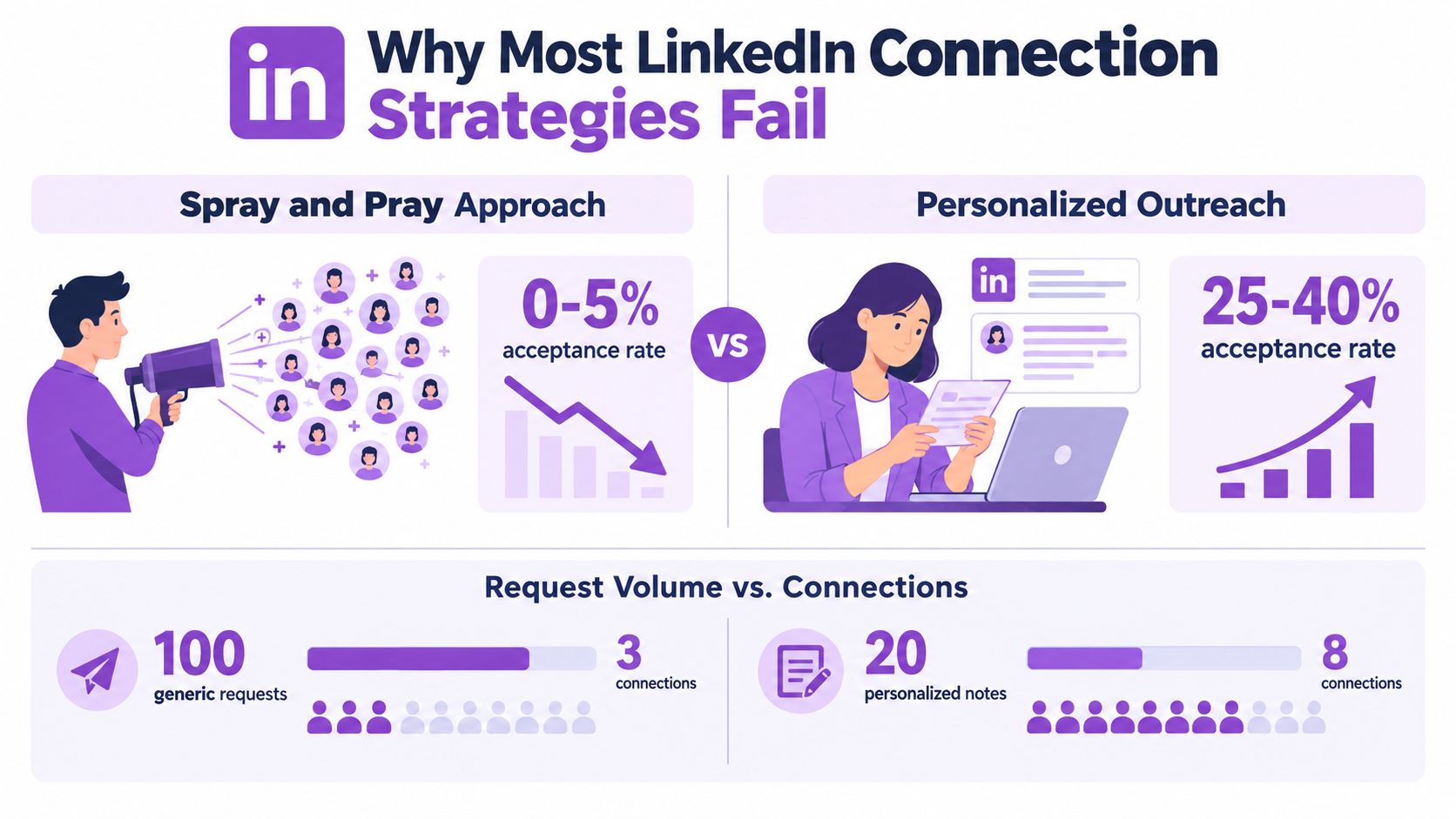
The fastest way to waste LinkedIn is to treat it like a volume channel. I've seen teams blast requests to anyone who matches a job title, then celebrate the send count while the pipeline stays flat. That approach ignores the core issue, fit.
A major benchmark across 13,218,869 LinkedIn connection requests found an average acceptance rate of 28.5%, with the reviewed cohort averaging 26% and the top quartile exceeding 40%. The gap matters because it shows that better targeting and stronger profiles change outcomes materially, while generic outreach stays stuck in the middle band. The same analysis framed 19% to 29% as a typical cold outreach range, which is a much more useful expectation than the inflated advice you see in most LinkedIn tips content. SmartReach's 2026 outreach benchmark
Acceptance is a quality signal, not a vanity metric
When you look at connection requests this way, acceptance becomes a filter on list quality, profile credibility, and message relevance. More requests won't fix weak targeting. A better list with fewer sends usually beats a broad list with more noise.
Practical rule: if your acceptance keeps sagging, fix the list before you blame the note.
That matters even more because LinkedIn is busy at scale, with more than 18,000 connections made every minute, which equals over 1 million new professional connections every hour. That volume creates opportunity, but it also means buyers and partners are flooded with bad outreach. Hootsuite's LinkedIn statistics overview
A second benchmark of 180,155 matured connection requests found 27.1% accepted, 27.6% of accepted connections replied, and 2.0% booked a meeting. That funnel shape is the key lesson. Your goal isn't just to get accepted, it's to build a usable network that can move into conversation and meetings. Reachium's research
Finding the Right Prospects on LinkedIn
Good targeting starts before you write a note. Open LinkedIn search and define the smallest group of people who could plausibly care about your offer. Think in terms of role, function, industry, and company context, not just “decision-maker.”
Build a list from the ICP outward
Start with your ideal customer profile, then reduce it into a working prospect list. If you sell to revenue teams, a broad title like “Head of Sales” is too loose by itself. Pair it with company size, geography, or a specific trigger so your outreach lands in a real business context, not a generic bucket.
Use these filters deliberately:
- Job title: target the people who own the problem, not the biggest title you can find.
- Industry: stay close to sectors where your use case already makes sense.
- Company size: match the workflow, buying cycle, and team structure you can support.
- Recent activity: prioritize people posting, hiring, changing roles, or engaging with relevant content.
- Mutual context: shared groups, events, customers, or network overlap can help your message feel grounded.
If you're using a broader prospecting system, keep the research layer disciplined. A workflow like this contact-research automation guide can help you gather candidates faster, but the list still needs human judgment before any request goes out.
Treat the list like a queue, not a database
A good LinkedIn list isn't huge, it's usable. I'd rather have 150 prospects I'm confident about than 1,500 people who only partially fit. Every connection request should answer one question, why this person, now?
Useful test: if you can't explain the relevance in one sentence, the prospect probably doesn't belong in the sequence.
That level of discipline also makes the later stages easier. When a prospect accepts, the follow-up feels natural because the original targeting was real. When targeting is fuzzy, every message after acceptance becomes harder.
Crafting a Personalized Connection Note
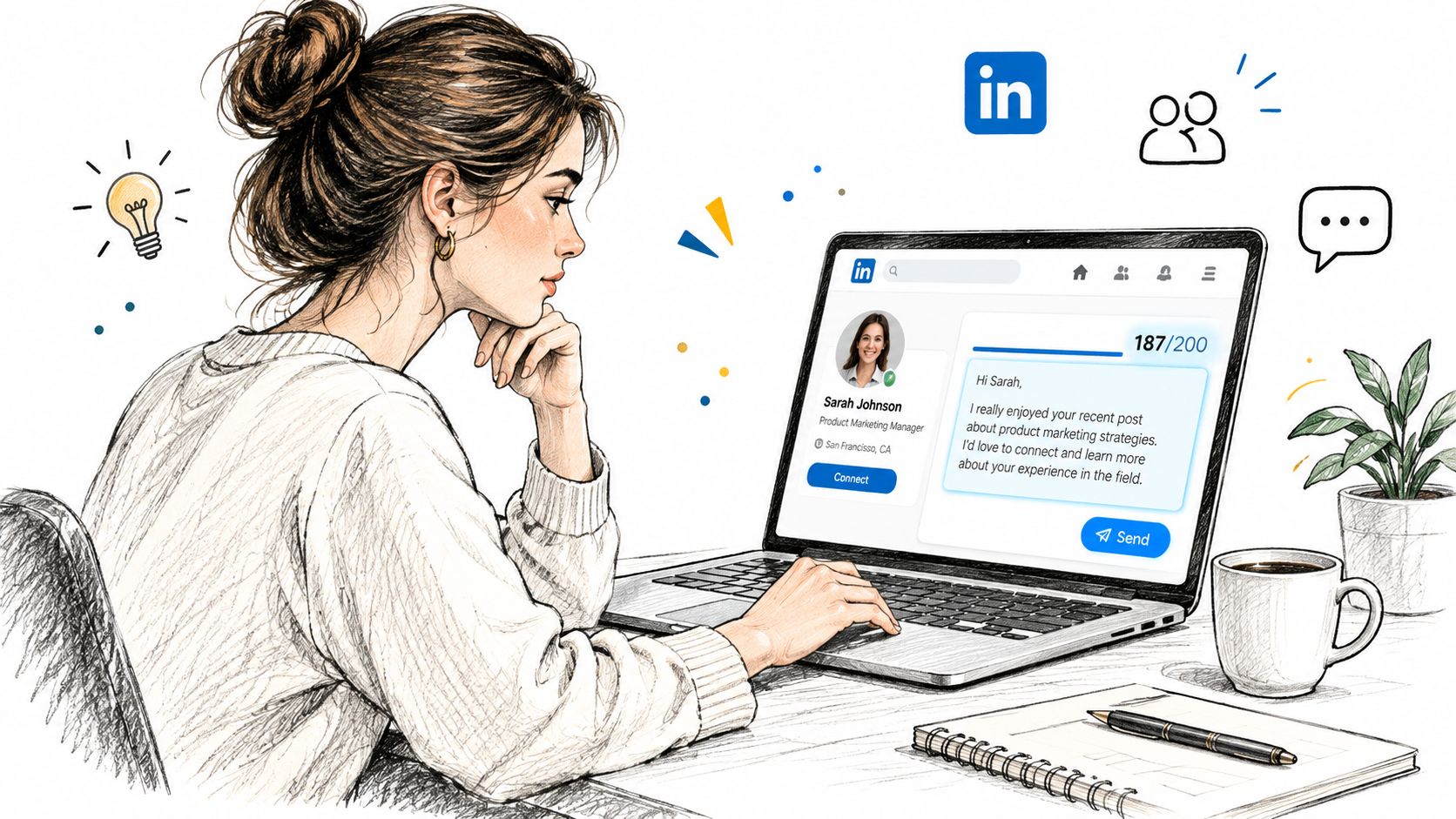
LinkedIn gives you very little room to work with. A personalized message on a connection request is limited to 200 characters, and LinkedIn allows that message on up to three connection requests per month. That scarcity changes the game. You should save those notes for prospects who are worth the extra effort. LinkedIn help on invitation messages
Write for relevance, not cleverness
The best note usually does three things fast. It identifies the reason for the connection, gives a small human signal, and ends without pressure. That could be a shared event, a mutual customer, a recent post, or a role change.
A simple structure works better than a polished paragraph:
- Open with context. Mention something specific that proves the request isn't random.
- Add one reason. Tie the connection to a real business or professional overlap.
- Close lightly. Keep the ask low-friction and avoid pushing the sale early.
Examples:
- Good: “Saw your post on pipeline reviews, we work with teams dealing with the same process challenges. Thought it made sense to connect.”
- Better for warm context: “We both know [mutual contact], and I've been following your work on outbound ops. Would be good to connect.”
- Too generic: “Looking to connect with like-minded professionals in sales and growth.”
The reason this works is simple. The note doesn't need to sell. It needs to make the request feel earned.
Acceptance and reply aren't the same thing
One benchmark found roughly 45% acceptance for personalized requests versus about 15% for generic requests, a roughly 3x lift, while another large analysis found that personalization after acceptance mattered more for replies than for acceptance itself. That's the trade-off teams miss. A personalized note can improve downstream conversation even when it doesn't always maximize acceptance. Reachium's LinkedIn outreach benchmarks 2026
A 2025 analysis of 11.5 million LinkedIn connection requests found that requests with a personalized note had a lower connection rate than requests without a note, 25.3% versus 27.6%, but they produced a much higher reply rate, 8.2% versus 5.3%. So the right choice depends on the outcome you want. If you only care about quick acceptance, a note might not always win. If you care about replies, the note often pays off. Belkins' LinkedIn outreach study
Rule from the field: don't measure the note by acceptance alone. Measure what happens after the connection lands.
Following Up After Acceptance
Acceptance is not the win. It's the start of a very short window where your next message can feel timely and useful, or pushy and forgettable. The biggest mistake is firing off a long pitch the moment someone clicks accept.
A cleaner first message is short, human, and easy to answer. I usually want three things in that first follow-up, a thank-you, a reason for reaching out, and a question that doesn't force a big commitment. If the prospect accepted because of a shared context, mention it once and move on.
A practical follow-up sequence
A strong first message can look like this:
- Message 1: “Thanks for connecting. I appreciated your post on the outbound process. We work with teams on the same problem, so I'd love to compare notes.”
- Message 2: If they reply, keep it narrow and specific. Ask one question, not five.
- Message 3: If they don't reply, wait and re-engage with something useful, a relevant article, observation, or a direct but polite check-in.
A weak follow-up usually does the opposite. It says “thanks for connecting” and immediately launches into a demo ask, a deck, or a calendar link. That turns a warm acceptance into a cold sales interruption.
Use the connection as a bridge, not a shortcut
The best post-acceptance messages sound like the start of a conversation between peers. If the person is senior, respect their time. If they're junior but relevant, keep the discussion practical. Either way, the objective is the same, move from a polite connection to a real exchange.
This is also where a multichannel sequence can help. If LinkedIn is the first touch, email can become the second touch once the person shows interest or opens a line of conversation. A sequence like this LinkedIn and email workflow guide is useful if your team wants to keep the conversation organized without forcing everything into one channel.
One thing I've learned the hard way, don't over-message right after acceptance. Let the prospect decide whether the thread is worth continuing. A well-timed second message often beats a crowded first one.
Manual Outreach vs Automation Tools
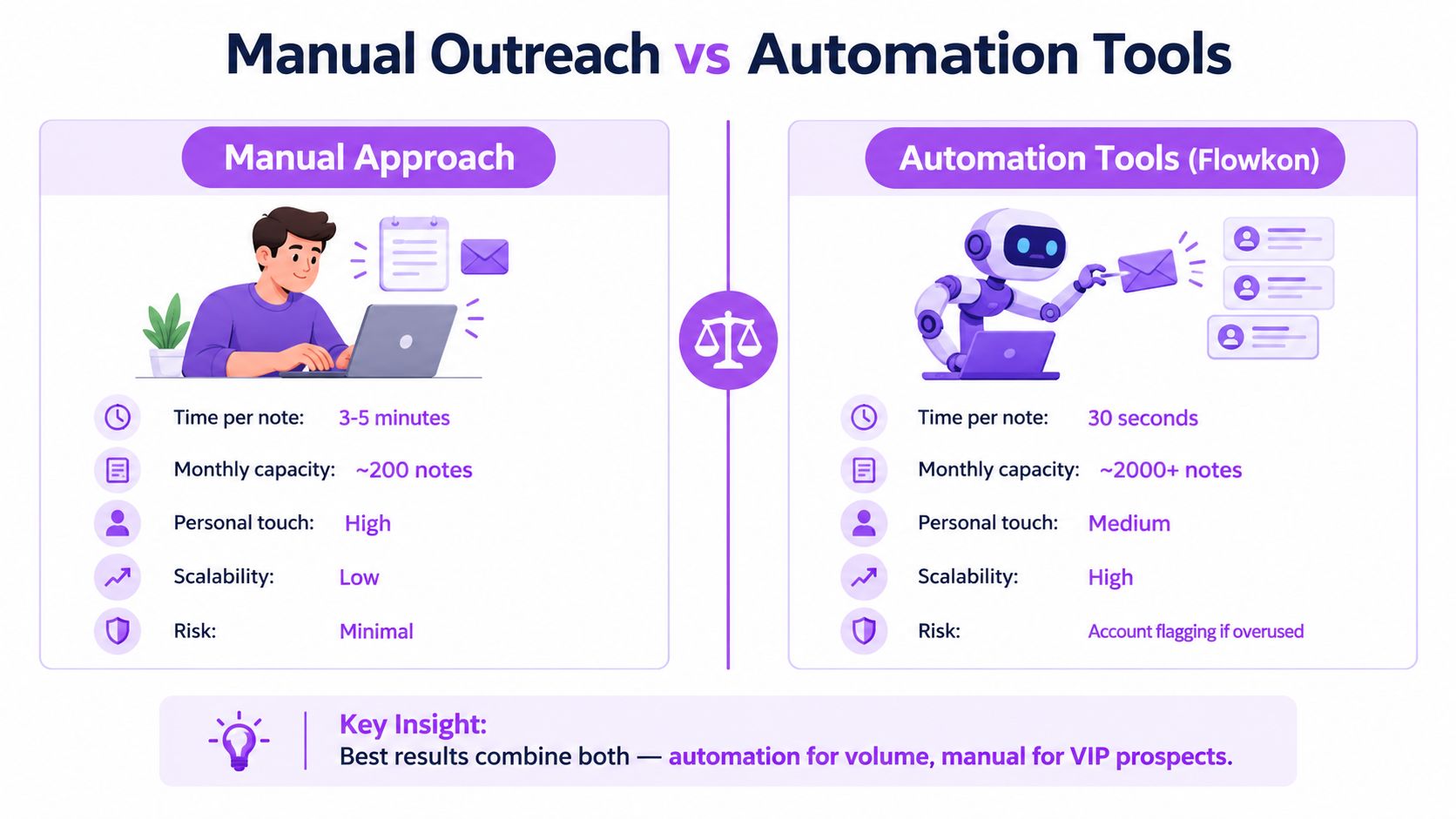
Manual outreach is still the safest way to start if your team is new or your targeting is messy. It forces discipline, and discipline usually improves list quality. The downside is obvious: it takes time, and that time cost grows fast once you move beyond a few dozen prospects.
Automation tools can reduce repetitive work, but they don't remove the need for judgment. LinkedIn's help center says invitations should only go to people you know and trust, and that invitation limits exist to protect member experience and keep requests relevant. It also warns that exceeding limits or using prohibited tools can lead to account restriction. LinkedIn invitation policies
Compare the two approaches honestly
Manual outreach works well when:
- The list is small.
- The prospects are high value.
- You need fully custom context.
- You want tight control over pacing.
Automation makes sense when:
- The workflow is repetitive.
- You need consistent follow-up.
- You're managing multiple campaigns.
- You want better visibility into acceptance and replies.
The main concern is account hygiene. LinkedIn says it may temporarily restrict sending if you hit the invitation limit, and that restriction typically lasts one week. That means burst sending is a bad habit, no matter what tool you use. LinkedIn invitation limit guidance
Use tools to support judgment, not replace it
If you automate, keep the system conservative. Pace actions, segment by audience quality, and reserve full manual attention for VIP prospects. That's the model I trust in real campaigns. It protects the account while still giving the team enough volume to learn and improve.
A tool like Flowkon's LinkedIn automation feature fits this kind of workflow when the goal is to manage connection requests, follow-ups, and messaging sequences in a more structured way. The value is not that it replaces outreach thinking; it's that it helps teams execute the thinking more consistently.
One more operational constraint matters over time. LinkedIn says first-degree connections are capped at 30,000, after which additional people can only follow you. For founders and sales teams building large networks, that changes how you think about long-term list quality and relationship value. Taplio's summary of connection request limits
Building a Sustainable LinkedIn Outreach Workflow
Sustainable LinkedIn outreach comes from rhythm, not bursts. The teams that do this well separate prospecting, sending, and follow-up into a repeatable weekly process. That keeps quality up and prevents the common pattern of a heavy push followed by silence.
A simple weekly operating rhythm
Use this cadence:
- Monday: build and clean the prospect list, remove weak fits, and flag high-priority accounts.
- Tuesday: write or review connection notes for the best prospects, especially the ones that deserve a personal message.
- Wednesday: send requests in controlled batches and track acceptance separately from replies.
- Thursday: follow up on recent accepts with short, relevant messages.
- Friday: review what worked, which segments accepted, which messages started conversations, and which prospects should be dropped.
That rhythm keeps the team focused on the right numbers. Acceptance tells you whether the targeting and message are credible. Replies tell you whether the conversation is worth continuing. Meetings tell you whether the sequence is actually helping revenue.
A weekly checklist for the team
Before you send anything, check the list quality, the profile, and the message. After you send, watch pacing and avoid rushing the follow-up. After acceptance, focus on the next conversation, not on adding more requests.
Good outreach systems don't just send more. They keep the right people moving through the funnel with less friction.
That's the answer to how to connect on LinkedIn. Connect with fewer people, but the right ones; write like a human; and treat an accepted request as the start of a sales process, not the end. If you want to turn that workflow into something your team can repeat without losing control of pacing or follow-up, take a look at Flowkon to see how you can organize LinkedIn outreach into a structured campaign instead of a pile of disconnected tasks.






.svg)

