.webp)

Most outreach emails get ignored for a simple reason: they read like templates sent to a list, so the prospect has no reason to answer. The message doesn't match the channel that came before it, the ask is too big, or the timing is wrong. These outreach email examples cover eight practical situations, from a post-connection note to a dormant-lead re-engagement email. We'll show when to use each one, how to personalize it, and where it belongs in a coordinated sequence. For early-stage signals, teams can also track early-stage funding events and use them as a timely reason to write.
1. Post-Connection Follow-Up Email for Sales Teams
Target persona: A sales development representative or account executive following up with a prospect who accepted a LinkedIn connection.
Send this within a day of acceptance. The prospect still remembers the connection, so the email feels like a continuation rather than a fresh interruption.
Subject: A checklist for your sales team
Hi [First Name],
Thanks for connecting. I noticed [specific observation about their role, team, or recent post].
We put together a short checklist for [relevant problem], and I thought it might be useful for your work at [Company]: [Link]
Would it be useful if I sent over the editable version?
Best,
[Name]
The restraint matters. We aren't pitching a product or asking for a meeting immediately. We're giving the prospect one relevant resource and one easy question.
In our sample set, this was the shortest email, and it drew the most clicks. That result doesn't prove short emails always win, but it does show why timing and brevity can beat detail when the first touchpoint is still fresh.
Practical rule: Keep one clear link and one simple ask. Don't add a demo request to a resource email unless the prospect signals interest.
Use the same sending window across comparable batches, then track the click rate for this email against [your click rate %] from your previous campaign. Change either the link or the ask, not both at once. If the prospect accepted after a conference, replace the opening observation with a specific reference to the event.
2. Multi-Client Agency Outreach Email
Target persona: Prospects across sales and marketing for an agency's different clients.
Agencies have a second problem beyond copy. They need to keep each client's targeting, sender identity, offer, and replies separate. Callbox Inc runs outreach for multiple clients in one platform, and its published case study headlines a 200% reply-rate increase. That is a case-study figure, not a guaranteed result for this template.
Subject: A practical idea for [Company]
Hi [First Name],
I'm reaching out on behalf of [Client Company], which helps [specific type of company] with [specific business problem].
I noticed [Company] is [relevant trigger or situation]. Teams in [industry] often run into [specific challenge] at that point.
Would it be useful to compare how you're handling it today with what [Client Company] supports?
Best,
[Sender Name]
[Client Company]
The email belongs to the client's campaign, not the agency's generic prospecting campaign. Keep the positioning narrow. A cybersecurity offer and a payroll software offer should never share the same opening, proof points, or sender profile.
Operating rules for agencies
- Separate workspaces: Give each client its own campaign area, sender profile, audience, and reporting view.
- Control permissions: Let team members access only the client accounts they manage.
- Set campaign limits: A daily volume limit per campaign prevents one client's push from affecting another.
- Approve proof points: Agree with the client which claims and examples are permitted before anyone writes copy.
- Share reporting safely: Use view-only access when clients need visibility without editing live campaigns.
The guide to managing multiple client LinkedIn accounts without chaos is useful when the same operational separation needs to extend beyond email.
A practical factor appears here. More client-specific personalization improves relevance, but it also increases review work. The answer isn't one universal template. It's a controlled framework with client-level variables and clear ownership.
3. Personalized Cold Email from Lead Data
Target persona: A founder testing a focused offer with a defined buyer group.
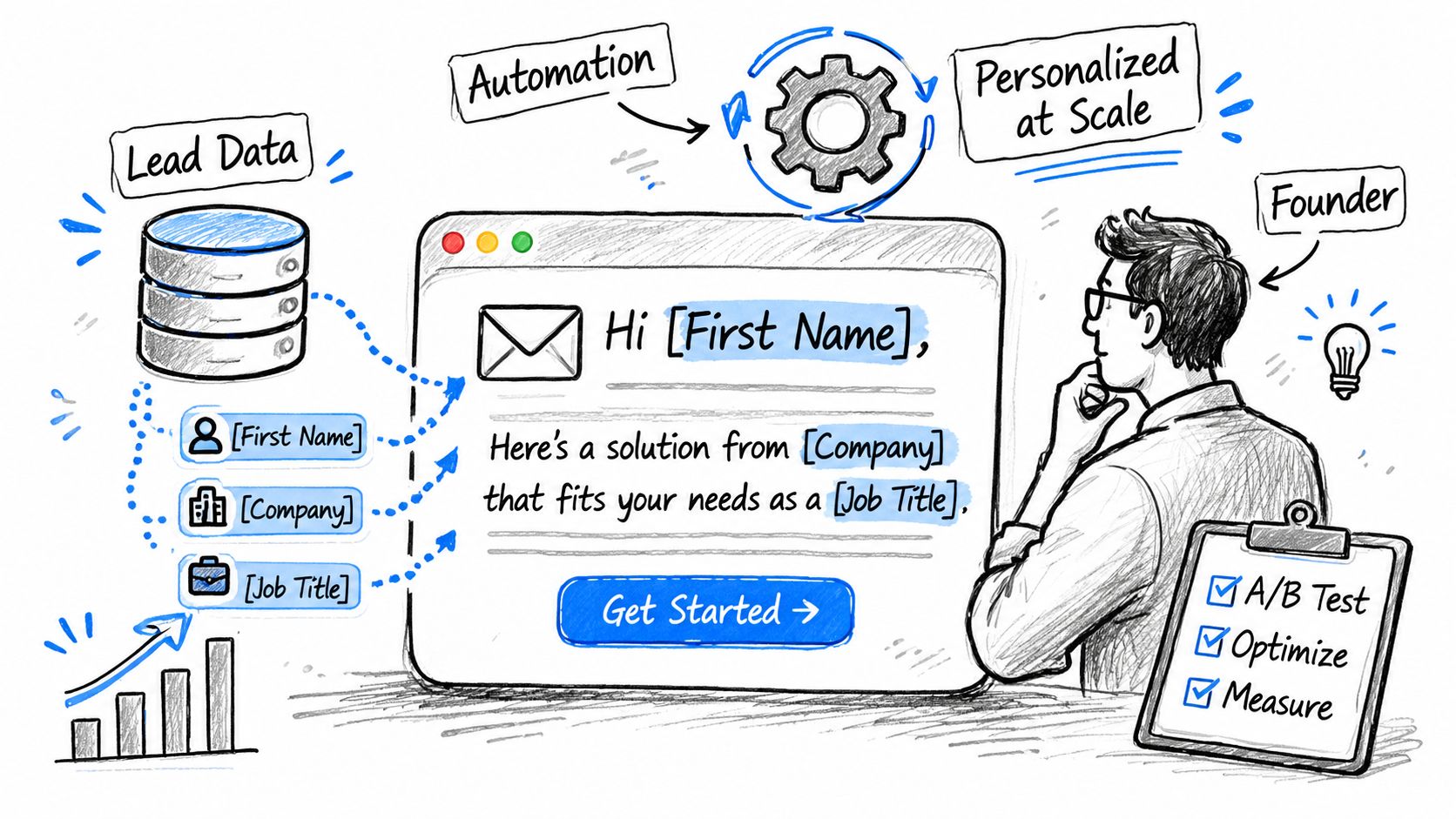
A founder selling to heads of operations in logistics can use first name, company, job title, and industry fields to frame a specific workflow problem. The data should shape the message, rather than decorate a generic template.
Subject: [Company] and [specific operations problem]
Hi [First Name],
I'm reaching out because [Company] operates in [Industry], and [Job Title] teams often lose time mapping carrier data across separate sheets.
We help operations leaders bring that process into one shared workflow, so updates are easier to review and act on.
Is improving that process on your list this quarter?
Best,
[Name]
The personalization changes the business context. A first name token alone leaves a generic message unchanged. The role and industry should guide the problem, language, and ask.
In the sample sequence, lead data was fetched from Apollo.io and inserted automatically. The labeled reply rate for that campaign is reported in the sequence dashboard, rather than presented as a result for every founder or segment.
Protect the experience
Check job titles against the company's current site or LinkedIn before launching. Add a fallback line for missing fields, and stop the sequence when a reply arrives.
Flowkon verifies email addresses before sending, controls daily volumes, and adds natural delays between sends. These controls remove avoidable operational problems, but they do not make a campaign effective by themselves.
Test the industry-specific problem statement against a role-specific version. That trade-off shows whether context or wording is doing more work in the first email. The personalization gap guide explains why scalable personalization still needs human review.
4. LinkedIn Plus Email Follow-Up
Target persona: B2B decision-makers who received LinkedIn outreach but haven't replied.
Email should add a second channel, not repeat the LinkedIn message word for word. Belkins Inc runs LinkedIn and email from one platform with a unified inbox, and its reported gains are operational: one workspace, one inbox, less app switching, and more consistent follow-up.
Subject: Following up on [LinkedIn topic]
Hi [First Name],
I sent you a note on LinkedIn about [specific topic]. I'm adding the details here in case email is easier.
We've been helping [relevant persona] with [specific problem]. Is that something you're currently looking at, or should I close the loop?
Best,
[Name]
A B2B team might add this step after two LinkedIn messages with no reply. Wait at least three business days after the last LinkedIn message, then send only to prospects who haven't answered on either channel.
“The email is a reminder, not a second pitch.”
Keep it shorter than the LinkedIn message. Stop the sequence as soon as a reply arrives on either channel. In Flowkon, a unified inbox brings LinkedIn messages and email replies into one view, while the team can adjust the sequence as the campaign runs. The LinkedIn and email sequence guide explains the handoff in more detail.
Test one variable, such as the subject line, against the previous batch. Don't change the timing, opening, and CTA together, or you won't know what affected the result.
5. Recruiter Candidate Outreach Email
Target persona: A candidate with experience that matches a specific role.
Generic phrases such as “I have an exciting opportunity” give candidates no reason to care. A stronger note names one relevant piece of work, gives basic role context, and asks for one short conversation.
Subject: Data engineering role at [Company]
Hi [First Name],
Your open-source pipeline project stood out, especially the work on [specific technology or problem].
I'm hiring for a data engineering role at [Company]. The team works with [relevant stack or type of data], and the position focuses on [clear responsibility]. The location is [location], and the pay range is [range, if permitted to share].
Would you be open to a short call this week?
Best,
[Recruiter Name]
Pay information can improve clarity when you can share it, but check the applicable pay-transparency rules before including salary details.
Use one profile reference, and keep it to one sentence. Similar roles can share a sequence, but someone should review that reference line for every candidate. Send at a reasonable local time, and compare the reply rate for this role with [your reply rate %] from earlier hiring rounds.
6. Breakup Email for a Final Follow-Up
Target persona: A prospect who has received several relevant touches but hasn't replied.
A breakup email closes the loop without guilt. It gives the prospect an easy way to say “not now,” which is useful because silence can mean poor timing, not permanent disinterest.
Subject: Close the loop?
Hi [First Name],
I haven't heard back, so I'm assuming this isn't a priority right now.
Should I close the loop, or would it make sense to revisit [specific topic] later?
Either answer is helpful.
Best,
[Name]
Use this once, after the sequence has run its course. An SDR might send it after four emails and two LinkedIn messages, then add “later” replies to a quarterly follow-up list. A founder could use the same structure with a trial user who stopped responding, changing the context rather than applying pressure.
Keep the exit clean
- Use the existing thread: Match the earlier subject line so the prospect recognizes the conversation.
- Log the outcome: Record “later,” “no,” unsubscribe, and other responses separately.
- Watch the inbox: Check replies for the next 48 hours after sending.
- Suppress when asked: A direct opt-out should end the sequence immediately.
For commercial email to U.S. recipients, CAN-SPAM requires a clear opt-out explanation. The opt-out method must process requests for at least 30 days after the message is sent, and senders must honor requests within 10 business days, according to the FTC's CAN-SPAM compliance guide.
7. Post-Engagement Follow-Up Email
Target persona: A prospect who commented on a relevant LinkedIn post and fits your target account profile.
A comment gives you more useful context than a passive like. Refer to the actual point the prospect made, then start a small conversation rather than turning the interaction into an immediate sales pitch.
Subject: Your point about ramp time
Hi [First Name],
I liked your comment on [Post Topic], especially your point about [specific idea].
We've been looking at the same issue with [relevant persona], and I put together a short checklist on [topic]: [Link]
Would you like me to send the version we use with sales teams?
Best,
[Name]
Reply publicly to the comment first when that feels natural, then send the email. This creates continuity without implying that you're monitoring every action the prospect takes.
A sales leader might use this after a prospect comments on a post about outbound testing. A founder could reference a prospect's point about ramp time after they shared a hiring post.
Keep the note mobile-friendly and use it only for people who match your target persona. If the reference sounds forced, skip the email. Relevance matters more than extracting a message from every engagement.
8. Dormant Lead Re-Engagement Email
Target persona: A past trial user, old opportunity, or earlier prospect who went quiet after a real conversation.
A strong re-engagement email recalls the earlier context and explains what has changed since the last conversation.
Subject: Re: [Earlier topic]
Hi [First Name],
We spoke about [specific problem] when you evaluated [product or approach].
You mentioned [relevant obstacle]. Since then, we've added [specific change that addresses it].
Is this still relevant at [Company], or has the priority moved on?
Best,
[Name]
A RevOps team might pull old opportunities from its CRM and contact only leads with clear conversation notes. A SaaS founder could write to past trial users after releasing a feature they had asked about.
Check the previous thread before writing. Mention only changes that matter to the lead's role or industry, and verify old addresses before sending. Track this segment separately from new prospects and compare it with the reply rate of your last re-engagement batch, not with cold-outreach benchmarks. A dormant lead deserves a different baseline because the person already has some context.
The operational risk is duplicate outreach. Search for recent replies, active opportunities, opt-outs, and ownership before enrolling anyone in a new sequence.
8 Outreach Email Types Compared
ItemImplementation (complexity)Resources and Speed (requirements / efficiency)Expected Outcomes (results / impact)Ideal Use CasesKey AdvantagesPost-Connection Follow-Up Email (Sales Teams)Low, simple template + timingLow resources; very fastHigh short-term clicks and replies in samplesLinkedIn-first sales teams adding email follow-upCatches fresh connections; concise ask; high engagementMulti-Client Agency Outreach EmailHigh, per-client setup, approvals, workspacesHigher resources; moderate speedGood client-specific results; operational consistency when managedAgencies / outsourced SDRs running many client campaignsPreserves client voice; prevents cross-client errors; scalable with processPersonalized Cold Email from Lead Data (Founders)Medium, data mapping & automation rulesModerate resources; scalable and efficientStrong personalization at scale; outcome depends on data qualityFounders/small teams testing a buyer persona with controlled listsPersonalization at scale; behavior-based sequencing; testableLinkedIn Plus Email Follow-UpMedium, cross-channel coordination and unified inboxModerate resources; timely follow-up improves efficiencyHigher reach by adding email channel; better reply captureSales teams using LinkedIn as main channel with email as fallbackUnified inbox/context retention; easy mid-campaign adjustmentsRecruiter Candidate Outreach EmailLow, short, profile-specific messageLow resources; fast sendsHigh relevance; reduces back-and-forth; better replies from passivesRecruiters and talent teams sourcing passive candidatesSignals profile read; provides role facts up front; reusable templateBreakup Email (Final Follow-Up)Low, simple but requires correct timingMinimal resources; immediate closureOften prompts final responses ("later"/"no"); cleans pipelineSales teams and founders closing out unanswered sequencesRemoves pressure; elicits clarity; aids CRM hygienePost-Engagement Follow-Up EmailLow to Medium, manual review to ensure accuracyLow resources but manual; quick to sendWarm start with high relevance; good conversation conversionFounders/sales leaders turning post engagement into chatsNatural bridge from content to convo; high signal-to-noiseDormant Lead Re-Engagement EmailMedium, needs CRM notes and verificationModerate resources; slower due to validationModerate reactivation rates; recovers mistimed opportunitiesRevOps, AEs, founders re-engaging old pipeline or trial usersLeverages prior relationship; low-pressure re-entry; timing recovery
Build the System Behind the Email
Good copy still needs disciplined execution. A sequence should know what happens after a click, a reply, a bounce, or silence. Flowkon supports multi-step email sequences with scheduled delays and behavior-based conditions, so a follow-up can stop after a reply rather than sending the next message anyway.
Personalization at scale works best when the fields are useful and controlled. Dynamic variables can insert first name, company, job title, and industry, but each field needs a fallback and a quality check. A blank token or incorrect role does more damage than a plain sentence.
Use channels as one conversation
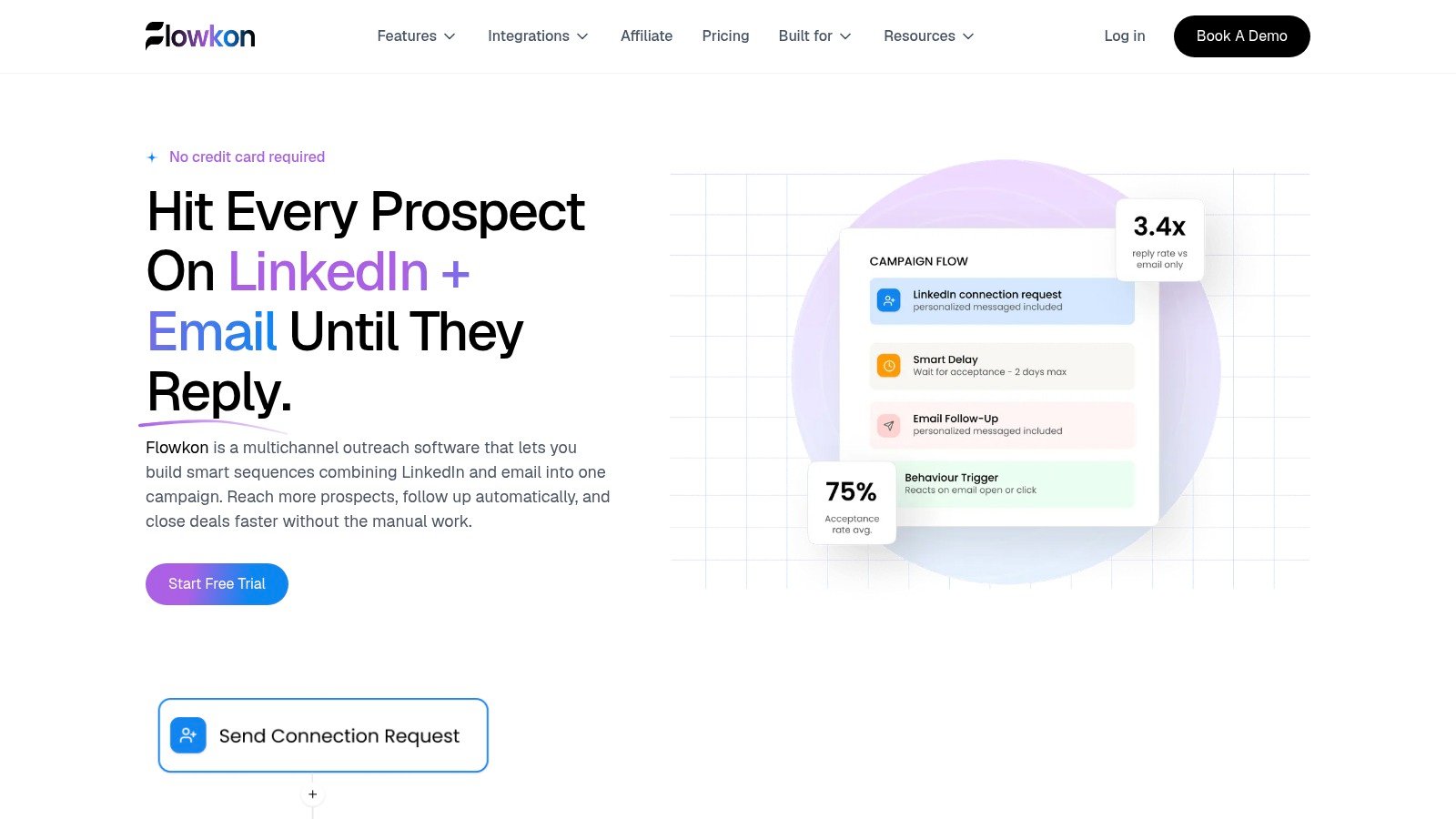
A LinkedIn connection request, LinkedIn follow-up, and email should share context. Flowkon combines LinkedIn and email in one multichannel campaign, while the unified inbox collects replies from both channels. That gives the team one place to assign ownership, respond, and prevent duplicate messages.
If you want a concrete product example, Flowkon's multichannel campaign page shows the exact setup this article is describing: one sequence can include LinkedIn connection requests, LinkedIn messages, email follow-ups, delays, and behavior-based steps in a single campaign. The same page also shows a visual flow builder for planning the sequence and centralized analytics for tracking connection acceptance, opens, clicks, replies, and bounce data. Flowkon also mentions vendor-reported gains such as 70% more prospect engagement and 100% automated follow-up on that page, which should be treated as product marketing claims rather than guaranteed results.
Delivery tracking should include opens, click-throughs, replies, and bounces. Gmail says all senders need at least SPF or DKIM authentication, while bulk senders must use SPF, DKIM, and DMARC. Google recommends keeping the user-reported spam rate below 0.1% and preventing it from reaching 0.3% or higher, as explained in its sender requirements.
Flowkon also verifies emails before sending, controls daily volumes, and adds natural delays. These measures support responsible pacing, but they aren't a guarantee that every message reaches the inbox.
Measure and Improve Each Sequence
Start with one template and measure every step separately. Track the open, click, and reply rate for each email, then record positive replies, meetings, bounces, and opt-outs where your workflow supports them.
Mailchimp reports an average open rate of 35.63%, click rate of 2.62%, and unsubscribe rate of 0.22% across its benchmark dataset. Its business-and-finance category reports a 31.35% average open rate, 2.78% click rate, and 0.15% unsubscribe rate. These figures cover email marketing broadly, not strictly one-to-one cold outreach, so use Mailchimp's benchmark data as directional context rather than a promise.
Change one variable per batch:
- Subject line: Keep the body and audience stable.
- Opening line: Test a business trigger against a role-based observation.
- Call to action: Compare a yes-or-no question with a short call invitation.
Flowkon's built-in A/B testing is coming soon, so test manually for now. Send comparable batches in similar windows, compare open, click, and reply rates in the dashboard, and make the stronger version the baseline for the next batch. Because sequences can be adjusted while they run, you can change a weak subject line or follow-up without rebuilding the entire campaign.
Don't optimize opens in isolation. A message can earn attention and still produce no useful conversation. If opens are healthy but replies are weak, inspect the opening, offer, and CTA. If bounces or complaints rise, pause the sequence and fix the list or sending setup before changing the copy.
Pick One Template and Build Your First Sequence
The fastest way to improve outreach is to pick one scenario, launch one clean sequence, and measure what happens. If prospects accept LinkedIn connections but stall, start with the post-connection follow-up. If your team runs outreach for multiple clients, build the process around workspace separation and client-specific messaging. If you already have old opportunities or trial users with real context, test re-engagement before paying for more leads.
Keep the rollout simple. Change one variable per batch, such as the subject line, opening line, or call to action. Compare each result with [your reply rate %] from the previous batch, and judge success by useful replies, conversations, and meetings booked. Flowkon reports platform-wide benchmarks of up to 3x higher reply rates, 80%+ connection acceptance, and 40% more meetings booked, but those figures aren't guaranteed results for any individual template.
If you want to turn these templates into a live system, start your 7-day free trial with Flowkon and build one multichannel sequence with LinkedIn plus email, behavior-based delays, and a unified inbox. Launch a small batch, watch the replies, and improve the next round with real data.
You can also use this email finder tool comparison when reviewing your data workflow.
Flowkon gives sales teams, agencies, recruiters, and founders one place to run LinkedIn and email outreach without losing context across channels. Use one of these outreach email examples, turn it into a controlled sequence, and start testing what actually gets replies.






.svg)

