.webp)

The usual advice on HeyReach vs Dripify is to choose Dripify for a single seller and HeyReach for an agency, then add senders as volume grows. That is a useful starting point, but it overlooks an important distinction: adding senders does not, by itself, make LinkedIn outreach safer.
Multiple accounts can distribute activity, but they also increase the number of accounts and workflows a team must monitor. The more consequential decision is how each tool structures campaigns, charges for access, and handles replies, account restrictions, and operational recovery.
HeyReach vs Dripify at a Glance
HeyReach coordinates multiple LinkedIn senders within shared campaigns; Dripify emphasizes structured drip sequences associated with individual accounts. Both are LinkedIn-first tools. Dripify includes email steps in its funnels. The published material reviewed for this comparison does not establish whether HeyReach offers equivalent email steps, so confirm that requirement directly before purchasing.
Core Differences Between HeyReach and Dripify
FactorHeyReachDripifyCore modelCoordinates multiple LinkedIn senders within shared campaignsVisual drip funnels built around individual accountsPricing unitPer senderPer userList priceApproximately $79 per sender per monthBasic $39, Pro $59, Advanced $79 per user per monthEmail stepsNot confirmed in the published sources reviewedEmail steps with delays and conditionsSender rotationCampaign-level rotationAccount-level operationUnified inboxReplies from connected senders in one placeReplies remain in each account's LinkedIn inboxAPI and webhooksAvailableNot confirmed in the published sources reviewedBest-fit buyerAgencies and teams managing multiple sendersIndividual sellers and small teams running straightforward sequences
Published comparisons of the two pricing models put HeyReach at approximately $79 per sender per month and Dripify at $39 per user per month for Basic, $59 for Pro, and $79 for Advanced. A separate comparison of campaign architecture describes Dripify as a visual, drag-and-drop funnel tool and HeyReach as a platform centered on sender rotation, shared campaigns, client workspaces, and a unified inbox.
These findings come from published product information and third-party comparisons, not a controlled side-by-side test. They should not be interpreted as evidence that either tool produces higher acceptance or reply rates. Targeting, messaging, account history, and sending practices all affect those outcomes.
The initial selection criterion is straightforward: if shared campaign management and centralized replies are essential, evaluate HeyReach first. If the priority is a readable sequence for an individual account, start with Dripify.
How Each Tool Builds a Campaign
The distinction is where campaign ownership sits, not simply how many actions each tool can automate.
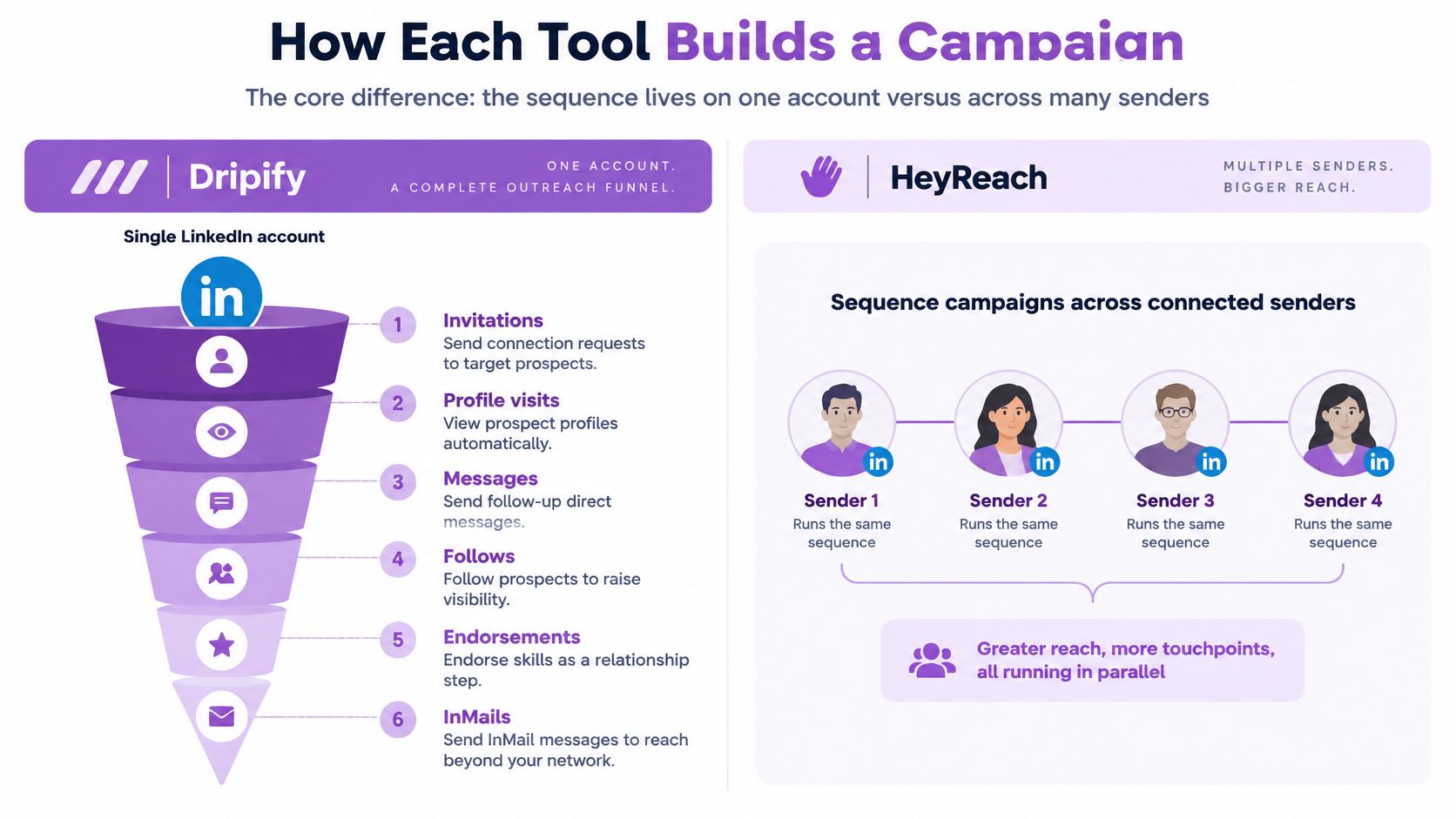
In Dripify, a visual funnel is associated with an account. A user arranges steps, delays, and conditions and can stop a sequence when a prospect replies. In HeyReach, a campaign can sit above multiple senders, distributing activity across LinkedIn accounts while the team manages it in shared workspaces.
The illustration below shows that difference in structure.
What Dripify Puts in a Funnel
A Dripify funnel can combine LinkedIn actions, email steps, and waiting periods. Its visual format makes it relatively easy to trace a prospect's path from the first action through the stopping rule.
- Invitations: Send connection requests to selected prospects.
- Profile visits: Use profile views as an initial touch.
- Messages and InMails: Follow up with connections or contact people outside the network.
- Follows and endorsements: Add relationship-building steps between messages.
- Delays, conditions, and reply rules: Schedule actions, branch based on behavior, and stop when a prospect replies.
For an individual seller, this visibility is valuable when diagnosing a sequence. There is one account, one funnel, and a clear record of where an unexpected action occurred.
One List and Three SDRs
Consider 300 prospects in a SaaS ideal customer profile and three SDRs, each using a separate LinkedIn account.
With Dripify, each SDR builds or copies a funnel and works an assigned portion of the list. Setup can be straightforward, and reporting remains associated with each person. That supports coaching on individual messaging and pacing. The trade-off is maintenance: when copy changes during a campaign, the team must update and verify each funnel.
With HeyReach, the team can assign one campaign across the three senders. Messaging and campaign management are centralized, and replies can be handled from one inbox. That reduces the work involved in maintaining three similar funnels.
Operational rule: Deduplicate the prospect list before enabling sender rotation. Duplicate records can result in two accounts contacting the same buyer within days of each other.
Centralization introduces a different audit requirement. Name senders clearly and retain assignment and action records so the team can determine which account contacted a prospect and when. This is especially important for agencies answering client questions about outreach to specific executives.
Before selecting a model, establish who owns each prospect and who needs visibility into each conversation. Individual ownership favors Dripify's account-centered workflow. Shared ownership favors HeyReach's centralized campaign model.
Running LinkedIn and Email in One Sequence
Neither product should be assumed to provide a complete, unified LinkedIn and email stack. Both are LinkedIn-first, and Dripify is the product whose published funnel descriptions include email steps. Accordingly, a direct comparison of email deliverability between the two would not be meaningful here.
Inbox placement depends on sending domains, account configuration, list quality, and message content. A valid tool-level comparison would require the same domains, prospect list, copy, and operating conditions. Without those controls, differences in bounce rates or placement cannot reasonably be attributed to the software alone.
The illustration below highlights the central workflow question: whether LinkedIn and email activity share a reliable prospect record.

A Sample Three-Touch Flow
- Day 0, LinkedIn connection request: Send a concise, relevant note. "Hi [first name], I noticed you're hiring SDRs in [region]. We work with [role] teams on [specific problem]. Would a short note on this be useful?"
- Day 2, email: Use a subject that matches the message, such as "[specific role] outreach: the resource I mentioned." The message might say: "Following up on my LinkedIn note. Here is the [resource]. You are receiving this because you are a [role] at [company]. Reply unsubscribe to stop future emails." Include your name, company, and physical postal address.
- Day 5, LinkedIn message: Send only if the prospect has not replied on either channel. Refer to the resource rather than repeating the original pitch.
The sequence should stop after a reply on either channel. Otherwise, a prospect who answered on LinkedIn may still receive a scheduled email. Tools that combine LinkedIn and email in one visual sequence builder, with a shared inbox, reply detection, and behavior-based branching, can make that cross-channel stopping rule easier to administer.
Email Rules That Apply Either Way
The FTC CAN-SPAM compliance guide calls for accurate header information, subject lines that reflect the message, appropriate identification of commercial email, and a clear opt-out method. Suppress contacts who opt out.
Adding LinkedIn steps does not remove obligations associated with commercial email. In a product demonstration, ask: Does each prospect have one record that reflects activity on both channels? If not, the team will need another process to synchronize replies and suppress follow-ups.
What Each Tool Costs at One, Five, Ten and Twenty Senders
Published prices provide a baseline, not necessarily the final purchase price. Dripify charges per user and HeyReach per sender. At the list prices cited here, the number of active senders materially affects the comparison.
Monthly List Cost by Sender Count
SendersHeyReach at $79 per senderDripify Pro at $59 per userMonthly difference at list1$79$59$20 more for HeyReach5$395$295$100 more for HeyReach10$790$590$200 more for HeyReach20$1,580$1,180$400 more for HeyReach
These figures are simple calculations using published list prices. They exclude negotiated rates, billing-term discounts, and add-ons. A comparison of per-sender and per-user pricing likewise lists HeyReach at approximately $79 per LinkedIn sender per month, while describing Dripify pricing on a per-user basis.
Why Published Prices Disagree
Published figures for Dripify Pro are not consistent. Emelia reported that one LinkedIn account cost $79 per month on both HeyReach Growth and Dripify Pro when billed monthly, rather than the $59 Dripify Pro figure used in the list-price calculation above. Billing period may explain some discrepancies, but verify the applicable rate in a written quote.
Agency quotes may also reverse the apparent cost ranking. ZoomInfo reported an estimated $1,000 per month for 20 LinkedIn accounts on HeyReach, compared with $1,580 per month on Dripify Pro. That differs substantially from the list-price table. For procurement purposes, compare written totals for the same sender count, billing period, and included features.
Request a quote for the number of senders you expect to run this quarter, not a hypothetical future team size.
Costs the Subscription Leaves Out
Include CRM access, email infrastructure, data enrichment, and the staff time required to monitor accounts and route replies. A single seller may have little need for centralized sender coordination. A five-person team may find it worthwhile if a shared inbox reduces account switching and unhandled replies.
Choose against current operating needs, then revisit the calculation as headcount changes. Where plan changes are available, avoid paying for sender capacity that is not yet in use.
Pacing, Limits and Account Safety Compared
LinkedIn policy sets an important constraint on any discussion of automation. LinkedIn's prohibited software guidance prohibits third-party software, browser extensions, bots, crawlers, and other automated methods that access or modify its platform, including methods used to scrape profiles, add contacts, or send messages.
Neither tool is officially approved by LinkedIn, and neither can guarantee that an account will avoid restrictions. Pacing controls can help manage activity; they do not constitute platform authorization.
How Each Tool Controls Pace
Both tools provide daily limits and randomized delays. Dripify also offers a working-hours schedule for individual accounts. HeyReach can distribute a shared campaign's activity among senders, reducing the amount assigned to any one account.
Distribution changes how activity is allocated, but it does not eliminate operational risk. If one account in a multi-sender program is restricted, the team still needs to address its queued actions, open conversations, reporting, and assigned prospects. Additional accounts create additional points that require monitoring.
LinkedIn's invitation restriction guidance notes that excessive invitation activity can lead to restrictions, particularly when automation is suspected. It also says most restrictions are removed automatically in approximately one week, repeated suspensions can result in permanent restriction, and LinkedIn cannot remove invitation restrictions on request.
Questions to Ask Before You Buy
- Single-sender pause: Can an administrator pause one sender without stopping the entire campaign?
- Action log: Can the team review what each sender did and when?
- Queued actions: What happens to scheduled steps after an account is paused?
- Workspace isolation: Can client accounts be managed separately?
Whatever tool you choose, use conservative account practices. Increase activity gradually, set limits below product maximums, review restriction signals, and pause activity when concerns appear. Our guide to safe LinkedIn invite pacing discusses how to assess weekly volume. A vendor's maximum setting is not a safety benchmark; account history, targeting, recipient behavior, and LinkedIn's enforcement all matter.
Inbox, CRM Sync and Team Governance
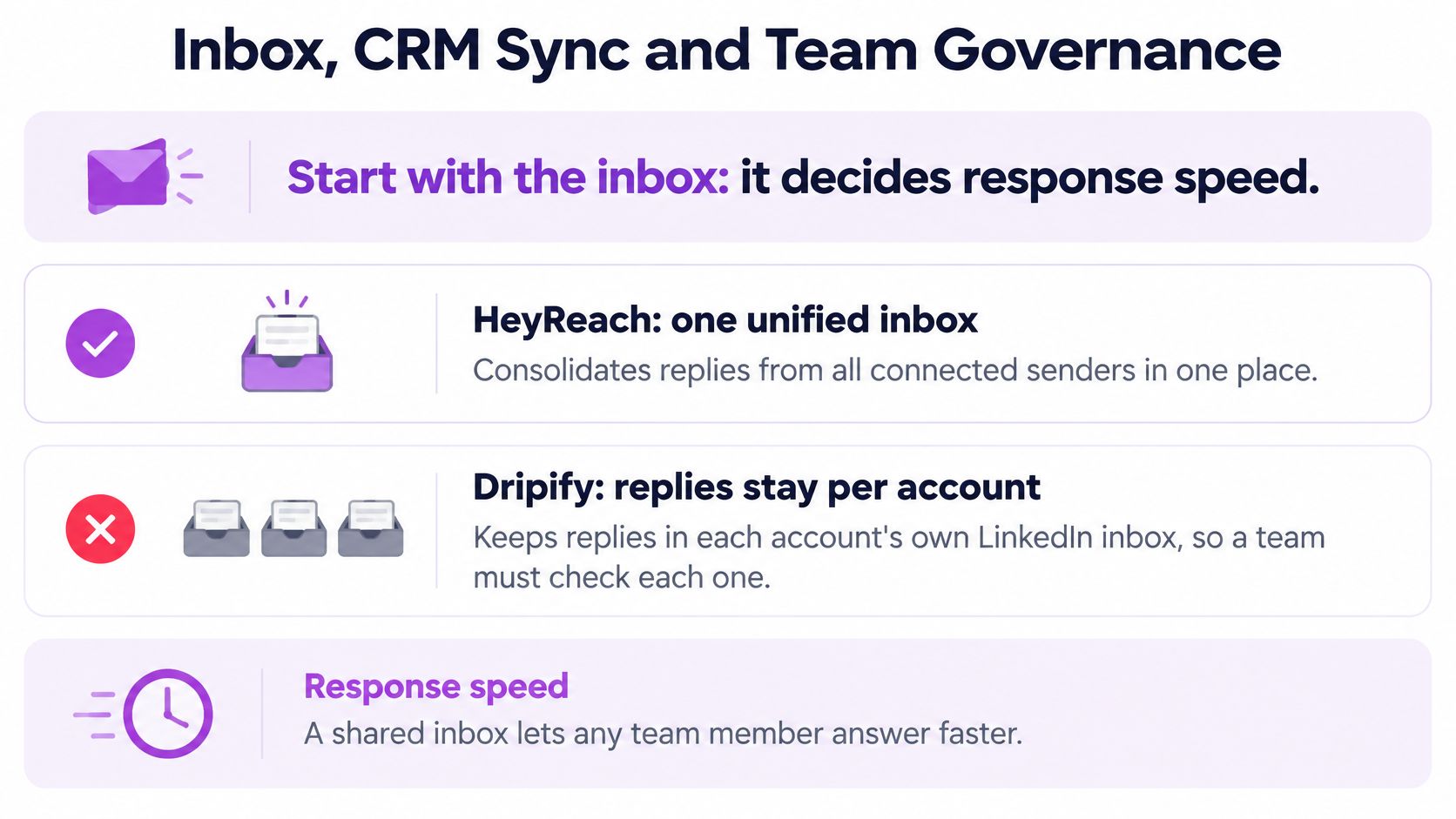
Inbox design affects who can respond and how quickly. HeyReach provides a centralized view of replies from connected senders. In Dripify, replies remain associated with each sender's LinkedIn inbox, so a team overseeing multiple accounts needs a process for checking each one.
This is a workflow distinction, not a measured response-time advantage. The published information reviewed here does not establish response-time results for either tool. During a trial, measure how long a positive reply remains unanswered when the assigned sender is unavailable.
The chart below summarizes the shared-inbox consideration.
CRM Sync and Governance Checks
The published material reviewed for this article does not confirm native CRM connectors for either HeyReach or Dripify. HeyReach documents API and webhook support; confirm whether those options meet your CRM requirements and who would maintain the integration. Verify any specific native connector in the vendor's own documentation.
For comparison, Flowkon integrates with Salesforce, HubSpot, Monday.com, Zoho, and Pipedrive. Its Zoho integration syncs LinkedIn leads with Zoho CRM, while its Pipedrive integration creates deals and contacts. Flowkon also describes real-time inbox synchronization for team-wide conversation visibility.
In a live demonstration, examine the following:
- Permissions: Appropriate access for administrators, representatives, and viewers.
- Client separation: Distinct workspaces for different clients.
- Reporting access: View-only access for stakeholders who should not send outreach.
- Attribution: A clear method for crediting meetings to the responsible sender.
- Offboarding: A process for removing a representative without losing prospect history.
Offboarding deserves particular attention in agency operations. Our guide to managing multiple client LinkedIn accounts covers the broader workflow. The practical requirement is to preserve prospect records in a shared system rather than relying on a departing employee's personal login.
Moving Your Outreach Without Losing History
A migration or sender expansion needs a defined cutover date, an owner, and a plan for preserving status and conversation history. Treat it as an operational change rather than a simple data import.
Migration Steps in Order
- Freeze enrollment: Stop adding prospects to the old tool. Let active sequences finish or end them on a documented date.
- Export statuses: Retain records for connected prospects, replies, booked meetings, and opt-outs.
- Clean the list: Remove duplicates and opted-out contacts. Cross-check ownership against the CRM before import.
- Map ownership: Assign every sender a named owner and, where relevant, a client workspace.
- Ramp cautiously: Begin each new sender at a low daily volume and monitor restriction signals during the first week.
- Compare setups where practical: Use comparable prospect segments across the old and new setups for two weeks, without enrolling the same person in both.
- Archive before removal: Store campaign data in the CRM or a shared location before disconnecting accounts.
Two avoidable errors are importing the same prospects into both tools and treating a tool's default daily limit as a recommended target. The former risks duplicate contact; the latter can encourage activity beyond what the team is prepared to monitor.
Review ten migrated CRM records manually in the first week. A small audit can expose field-mapping problems before they affect an entire campaign.
Choose the Tool That Matches Your Sender Count
Select a starting point based on the team workflow, then validate it through a controlled trial. A feature checklist alone will not resolve questions about ownership, response handling, or acceptable account activity.
The comparison below maps common operating models to an initial choice.
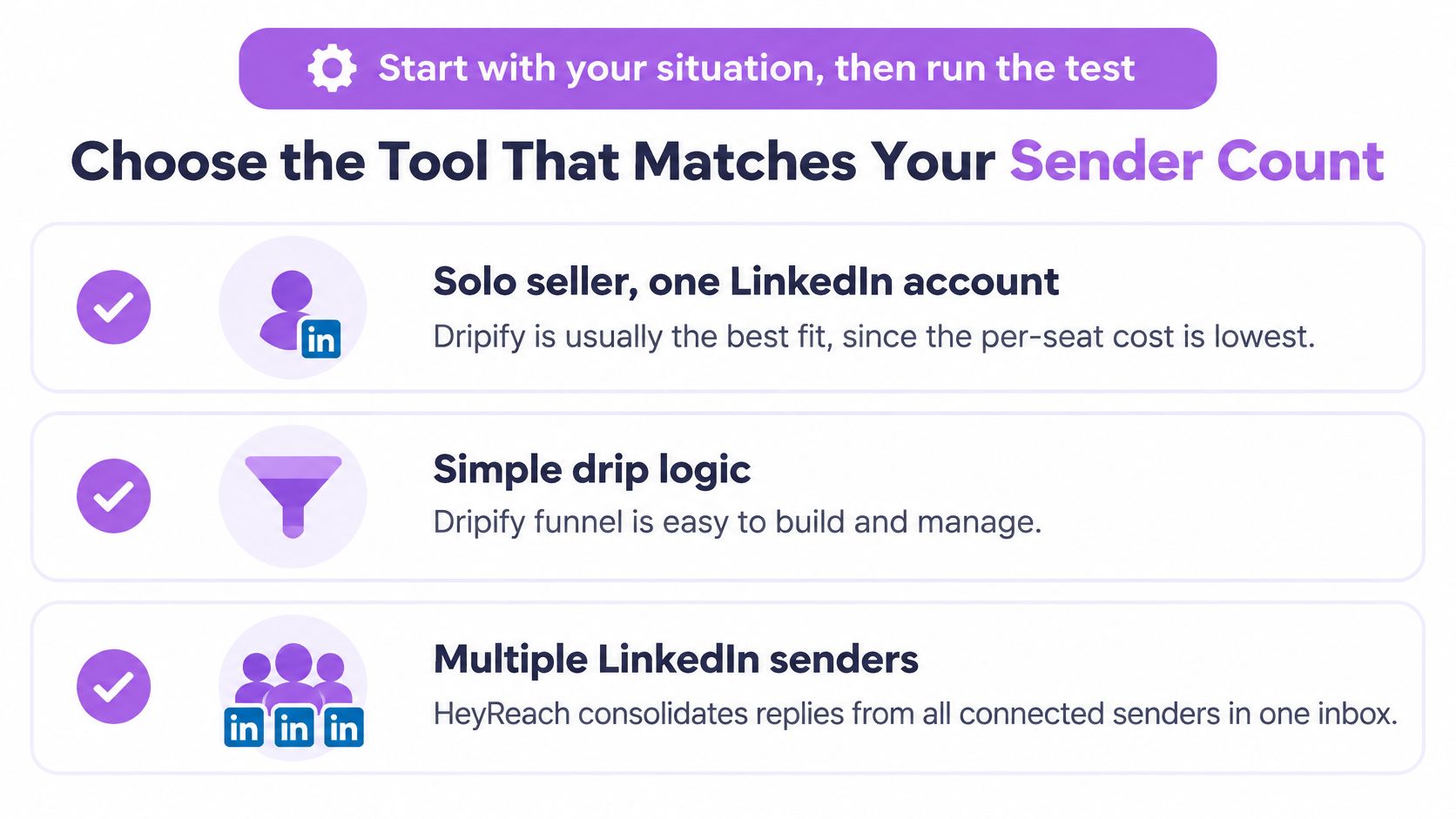
SituationBetter starting pointRationaleVerify before purchasingOne seller, one LinkedIn account, simple drip sequenceDripifyLower cited list price for one user and a straightforward visual funnelInvitation caps and pacing controlsThree to five SDRs sharing reply coverageHeyReach, subject to the quoteCentralized replies and campaign-level sender rotationTotal price at the planned sender count and per-sender action logsAgency managing ten or more client accountsHeyReachShared management, sender rotation, and client workspacesHow an individual restricted account is paused and isolatedLinkedIn and email in one coordinated flow with CRM syncA combined tool, such as FlowkonBoth products compared here are LinkedIn-firstDeliverability using your own sending domains and workflowTeam requiring a specific CRM connectorConfirm with each vendorA named connector was not established for either product in this reviewConnector documentation and implementation requirements
Begin with three questions: How many active senders do you need? Who must be able to handle replies? Must email and CRM activity share the same prospect record? If cross-channel coordination is central, include a combined platform in the trial. Flowkon offers a 7-day free trial without a credit card, allowing teams to evaluate that workflow alongside the LinkedIn-first options.
This walkthrough shows how a combined sequence is built.
Where feasible, evaluate finalists over two weeks using comparable prospect segments, similar sender counts, and the same operating limits. Track accepted connections, positive replies, and meetings per active sender, rather than invitations alone. Record the limits used alongside the results. A higher meeting count achieved at an unacceptable level of account risk is not an operational improvement.
If your evaluation points to a need for LinkedIn and email in one sequence, a shared inbox, and CRM synchronization, run the same workflow in Flowkon. Start with one campaign and a defined sender group, apply conservative limits, and compare meetings per active sender using your own prospect data.







.svg)

