

In a 2025 survey of 602 CRM users and administrators in the United States, United Kingdom, and Australia, 76% said less than half of their CRM data was accurate and complete, according to the survey cited by Bliro. That's the first problem to solve when choosing sales forecast software, not whether a vendor has the most advanced prediction model.
The right tool makes revenue expectations traceable: which deals contribute, what assumptions support them, and where a manager changed the call. Start with data governance, then compare forecasting methods and features. Otherwise, you're buying a cleaner presentation of an unreliable pipeline.
What Sales Forecast Software Does for Your Pipeline
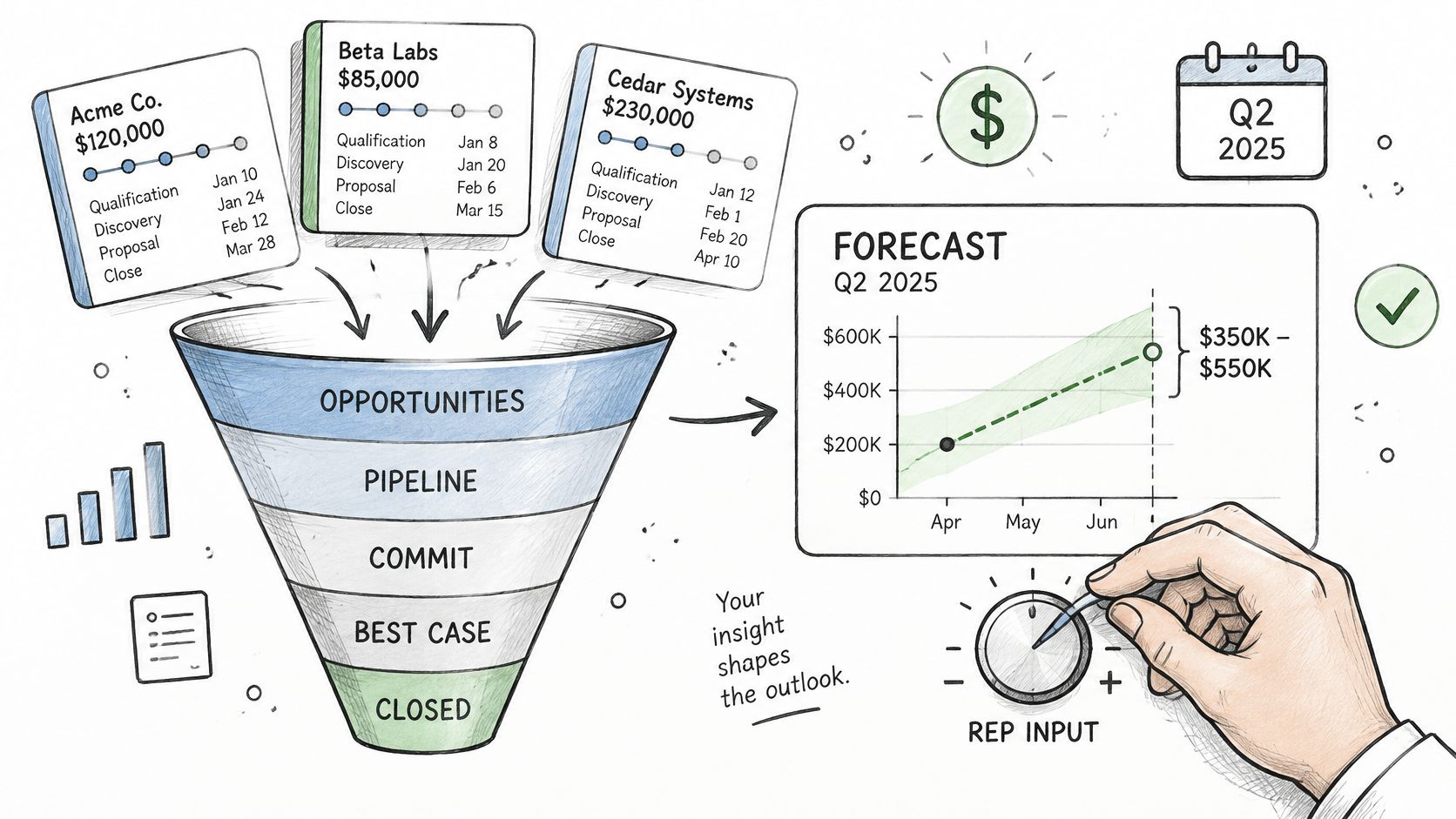
Sales forecast software projects revenue for a defined period using opportunity records, stage history, close dates, and seller inputs. A useful setup also shows a range of possible outcomes and the assumptions behind each one. It should help a founder plan hiring, a sales leader challenge a commit call, and a revenue team explain changes without rebuilding spreadsheets.
Think of a spreadsheet forecast as a photo of the pipeline taken on Friday. Connected forecasting software behaves more like a live model, recalculating when records change. That distinction matters only if the changes reflect what's happening with buyers.
The layers behind the forecast
Evaluate the system through its inputs, calculations, and review workflow:
Data capture: The tool reads opportunity amounts, ownership, stage changes, activity, and expected close dates from the CRM.
Calculation: It applies stage probabilities, historical patterns, or another forecasting method to estimate likely bookings.
Management review: Leaders inspect commit, best case, and total pipeline, then document adjustments.
Keep bookings, recognized revenue, and cash collection separate. If your team forecasts signed contracts, label the output accordingly rather than presenting it as cash available to spend.
What happens when a record is wrong
Say a large opportunity still carries a quarter-end close date, but the buyer has moved procurement into the following period. If nobody updates the record, the software can continue including it in the current forecast. An unrecorded meeting can cause the opposite problem: the buyer has progressed, but the system still shows an inactive deal.
In February 2020, Gartner reported that only 45% of sales leaders and sellers had high confidence in forecasting accuracy, while just 47% believed their organizations had high-quality data. Gartner's 2025 sales AI findings set a sharper benchmark: only 7% of sales teams achieved forecast accuracy of 90% or more, while median accuracy fell between 70% and 79%.
Software alone hasn't closed that gap. For management reviews, The Social Search's resource on forecast risk reporting for B2B teams provides a useful reporting reference. Keep upstream campaign reporting, such as our dashboard and analytics, distinct from the revenue forecast so leaders can inspect activity without confusing it with expected bookings.
Forecasting Methods and Which One Fits Your Data
| Method | What It Uses | Best When | Main Weakness |
|---|---|---|---|
| Stage-weighted pipeline | Open amount multiplied by stage probability | Stages are defined consistently and you have enough open deals | Probabilities are guesses unless calibrated against past wins |
| Historical trend | Closed revenue from past periods | Stable business with several quarters of clean history | Breaks when pricing, team, or territory changes |
| Rep commit | Manager and rep judgment on named deals | Few large deals where context matters most | Optimism bias and inconsistent standards |
| Regression | Factors such as deal size, cycle length, and source | Many closed deals exist to reveal patterns | Needs large, clean historical datasets |
| Monte Carlo simulation | Ranges for deal timing and conversion | Complex, multi-deal cycles where a range matters more than a single number | Needs clean inputs and someone who can explain the model |
| Straight-line | Recent run rate | Early-stage team needing a quick baseline | Ignores pipeline changes and new deal flow |
Salesforce's sales forecasting guide describes historical, pipeline, opportunity-stage, and quantitative methods, including regression and Monte Carlo simulation. It also recognizes the value of qualitative judgment. Treat these as alternatives to test, not features every team needs immediately.
Start with a calculation you can explain
For a hypothetical stage-weighted forecast, suppose you have three deals worth $20,000 each at 80% probability, plus five deals worth $10,000 each at 50% probability.
The calculation is:
First group: 3 × $20,000 × 80% = $48,000.
Second group: 5 × $10,000 × 50% = $25,000.
Weighted pipeline: $48,000 + $25,000 = $73,000.
That's expected value across the group, not a promise that exactly that amount will close. Check timing separately: a deal can be likely to win without being likely to close this period.
Historical trend gives you an independent reference point when the business is stable. Straight-line forecasting is simpler still, but neither captures a sudden change in active opportunities. Rep commit adds deal context, although you should keep that judgment separate from the calculated result.
Add complexity only when it earns its place
Regression makes sense when you have enough relevant closed deals to distinguish patterns from noise. Don't combine unrelated sales motions just to make the dataset larger. An agency selling retainers and fixed projects may need separate views.
Monte Carlo simulation is useful when leaders need to understand combinations of timing and conversion outcomes. Its range is only useful if someone can explain the assumptions behind it.
A forecast range is more honest than a precise total when a small group of deals can change the outcome.
I would run a simple baseline and a challenger method side by side for two quarters as an evaluation workflow. Preserve each call, compare both with actual bookings at the same cutoff dates, and keep the approach that performs reliably without creating unnecessary administration.
Vetting Data Governance Before Features
A polished demonstration usually starts with clean records. Your purchase test shouldn't.
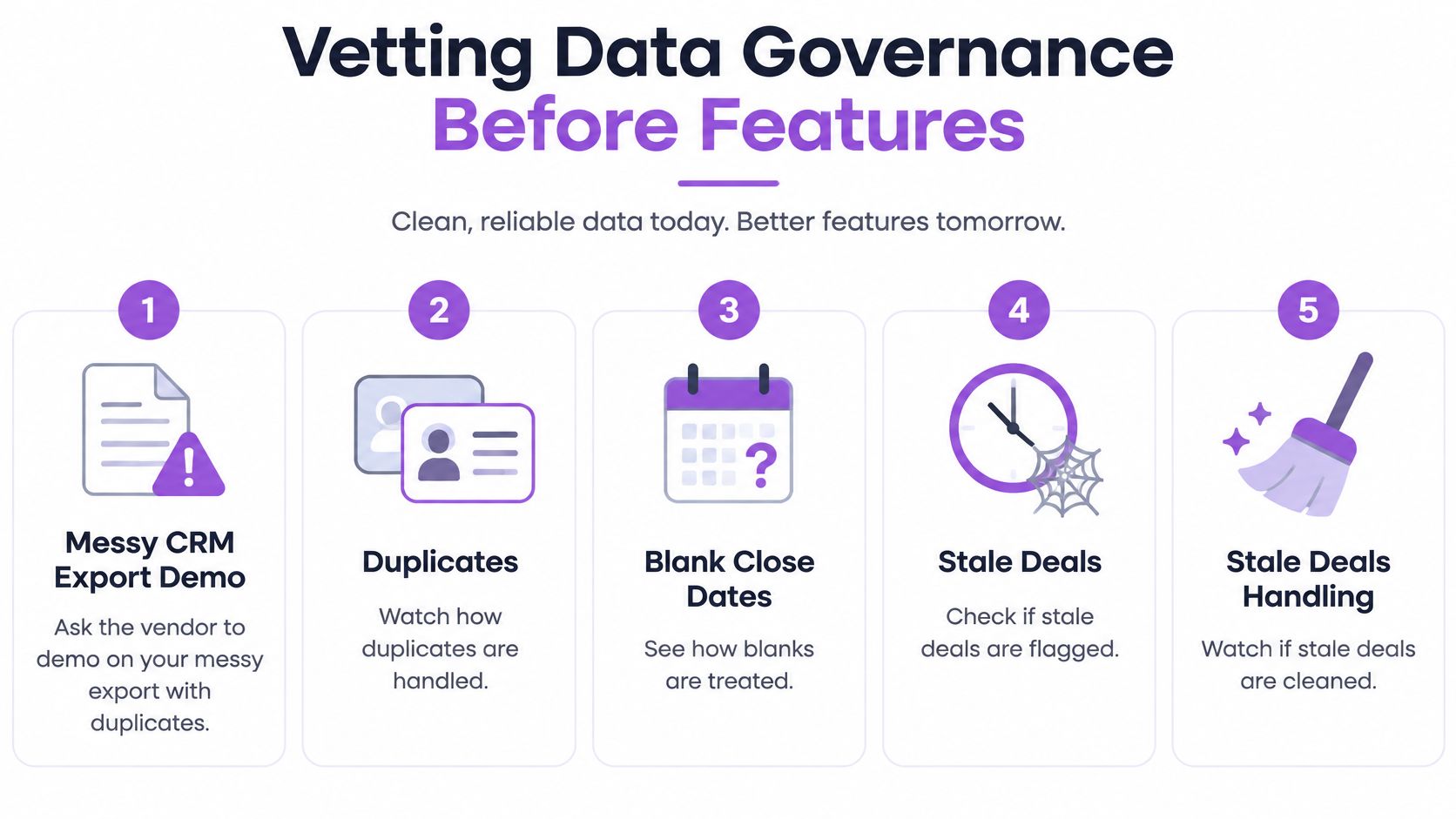
Give the vendor a controlled, permissioned export from your own CRM containing duplicates, blank close dates, stale opportunities, and inconsistent stage values. Ask them to process it live. You want to see whether the software rejects, flags, repairs, or accepts each problem.
The important question isn't whether the tool produces a total. It's whether you can trust how it got there.
Run the governance checks first
Gartner's sales analytics guidance recommends standardized opportunity-management processes and combining quantitative analysis with qualitative input from sellers and managers. Translate that into acceptance tests rather than accepting a general promise of better accuracy.
| Criterion | What to Verify | Red Flag |
|---|---|---|
| Stage definitions | Written criteria for each stage that admins can edit | Stages renamed per rep with no documentation |
| Stage history | Every stage change logged with a date | Only the current stage is stored |
| Forecast snapshots | Calls frozen at the start of each period | Last week's forecast is overwritten |
| Missing-data alerts | Flags blank amount, close date, owner, or next step | No hygiene report or alerts |
| Calibration reporting | Actual win rate for deals at each probability band | Only a total forecast figure is shown |
| Override tracking | Records who changed a call and the stated reason | Changes happen silently |
| CRM field mapping | Two-way sync of stage, amount, and close date | One-way export only |
| Explainability | Shows which deals and inputs drive each total | A single AI score with no breakdown |
Stage definitions need buyer evidence. A proposal stage shouldn't mean that one rep emailed a document while another has confirmed a buying process. Write exit criteria, appoint an administrator, and require an explicit approval process for changes.
Stage history and snapshots serve different purposes. History shows how a deal moved; snapshots preserve what the team knew when it made the call. Without both, managers can mistake later information for something they should have known earlier.
Calibration deserves a demonstration, not a checkbox. Ask the vendor to group opportunities by their assigned probability and show the eventual outcomes. Include losses and slipped deals, not just wins, and specify whether the measure concerns eventual conversion or closing within the forecast period.
For CRM mapping, test conflicting edits. If a manager changes an amount in the forecasting tool while a rep changes it in the CRM, which value survives? Require a documented source-of-truth rule, visible sync errors, and controlled write permissions before enabling bidirectional updates.
Purchase test: A tool that can explain a missing record is more useful than one that quietly fills the gap with an assumption.
Evaluate features in the order your team uses them
Once the governance checks pass, walk through a real forecast review:
Inspect the rollup. Open weighted pipeline by rep, team, and region, then trace a total back to named opportunities.
Review forecast categories. Check commit, best case, and pipeline definitions, with a change log showing category movement.
Challenge the scenarios. Build base, downside, and upside views using explicit deal and timing assumptions.
Lock the period. Confirm that later edits won't rewrite the submitted call.
Investigate deal risks. Test missing next steps, repeated close-date slips, and inactivity thresholds appropriate to your sales cycle.
Compare accuracy. Inspect performance by segment and forecast horizon rather than accepting an aggregate score.
Test permissions. Confirm who can edit probabilities, submit calls, approve overrides, and view another team's records.
Require the vendor to demonstrate exports as well. Your team should be able to retrieve the submitted forecast, its underlying opportunities, and the adjustment history without manually copying dashboard screens.
Assign responsibility for process changes before deployment. Our sales best-practice guidance can support that operating discussion, but your own stage criteria and approval rules must be specific to your sales motion.
Finish the demo with a reconstruction request: Which feature rebuilds last quarter's call using only the information available at the time? If the vendor can't answer that clearly, you don't yet have an auditable forecasting process.
Connecting CRM Data and Outreach Signals
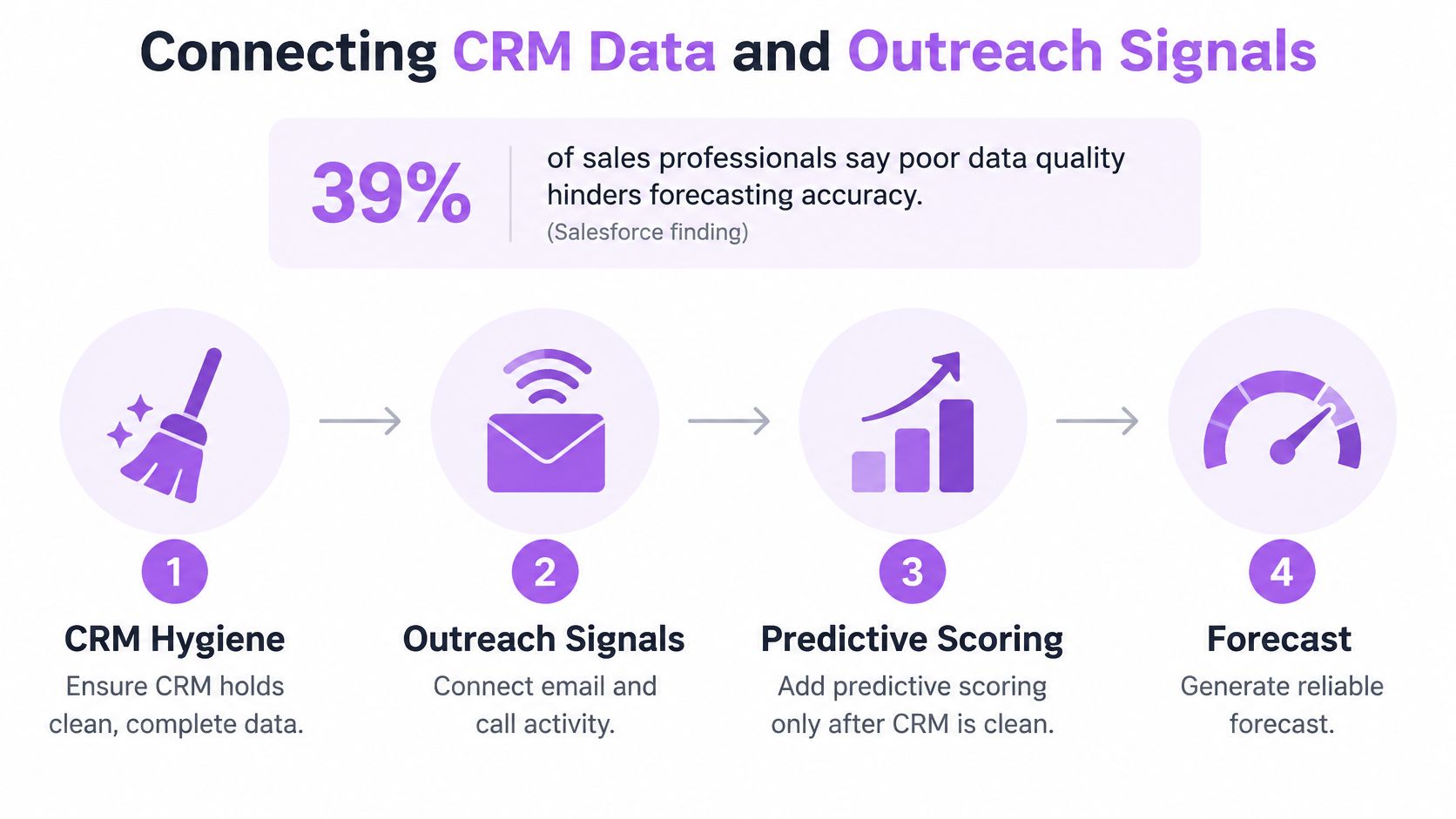
39% of sales professionals say poor data quality hinders forecasting accuracy, according to Salesforce. Don't add predictive scoring until the CRM holds dependable inputs: an opportunity amount, expected close date, stage, owner, account, and next activity.
For SDRs and agencies, the difficult part is preserving the path from prospecting to a qualified opportunity. Record the original campaign and contact, but don't let an automated event make a commercial judgment.
Map events before using them
Set explicit rules for what each outreach event may change:
Log the touch. Attach the email, call, or LinkedIn activity to the correct contact and account. Preserve the rep, sequence, campaign, timestamp, and event type.
Classify the buyer response. Separate positive interest, referral, objection, unsubscribe, and automated replies. A reply needs interpretation before it becomes a qualification signal.
Confirm opportunity progress. A booked meeting can update the next activity, but move the opportunity stage only when the buyer meets the stage criteria.
Capture the forecast cutoff. When the period locks, retain the opportunity state and supporting activity available at submission.
Suppose an SDR sends an automated follow-up and the buyer replies asking to revisit later. The send is completed activity; the reply is evidence about timing. Neither justifies advancing the deal into a near-term commit category.
A sent email is an activity, not evidence that a buyer intends to purchase.
Keep synchronization separate from qualification
Flowkon integrates with Salesforce, HubSpot, Monday.com, Zoho, and Pipedrive. We track team performance from one dashboard, and every reply syncs into the CRM. For Salesforce workflows, review our Salesforce integration alongside your own contact, account, and activity-mapping rules.
AI capabilities matter when they help your team examine reliable evidence. Flowkon's AI-enabled MCP layer lets AI assistants query live campaign data. That can help teams inspect outreach signals, but it is not the same as predicting bookings or deciding whether a buyer is qualified. When comparing AI-enabled sales tools, ask which data the AI can access, how current it is, and whether a person can verify the result against the underlying records.
That connection addresses capture, not interpretation. Test whether replies attach to the right records, whether duplicate contacts cause attribution errors, and whether a response from an existing customer is incorrectly treated as new pipeline.
Also distinguish missing information from adverse evidence. No recorded next meeting calls for investigation; a documented procurement review may explain the gap. A stale expected close date needs correction rather than silent acceptance.
Run a weekly hygiene report showing missing fields, overdue activities, unchanged stages, and close-date movement by rep. Use it to coach specific behavior, such as recording buyer-confirmed next steps, rather than asking everyone to make the CRM look complete before the forecast meeting.
When to Override the Model With Rep Judgment
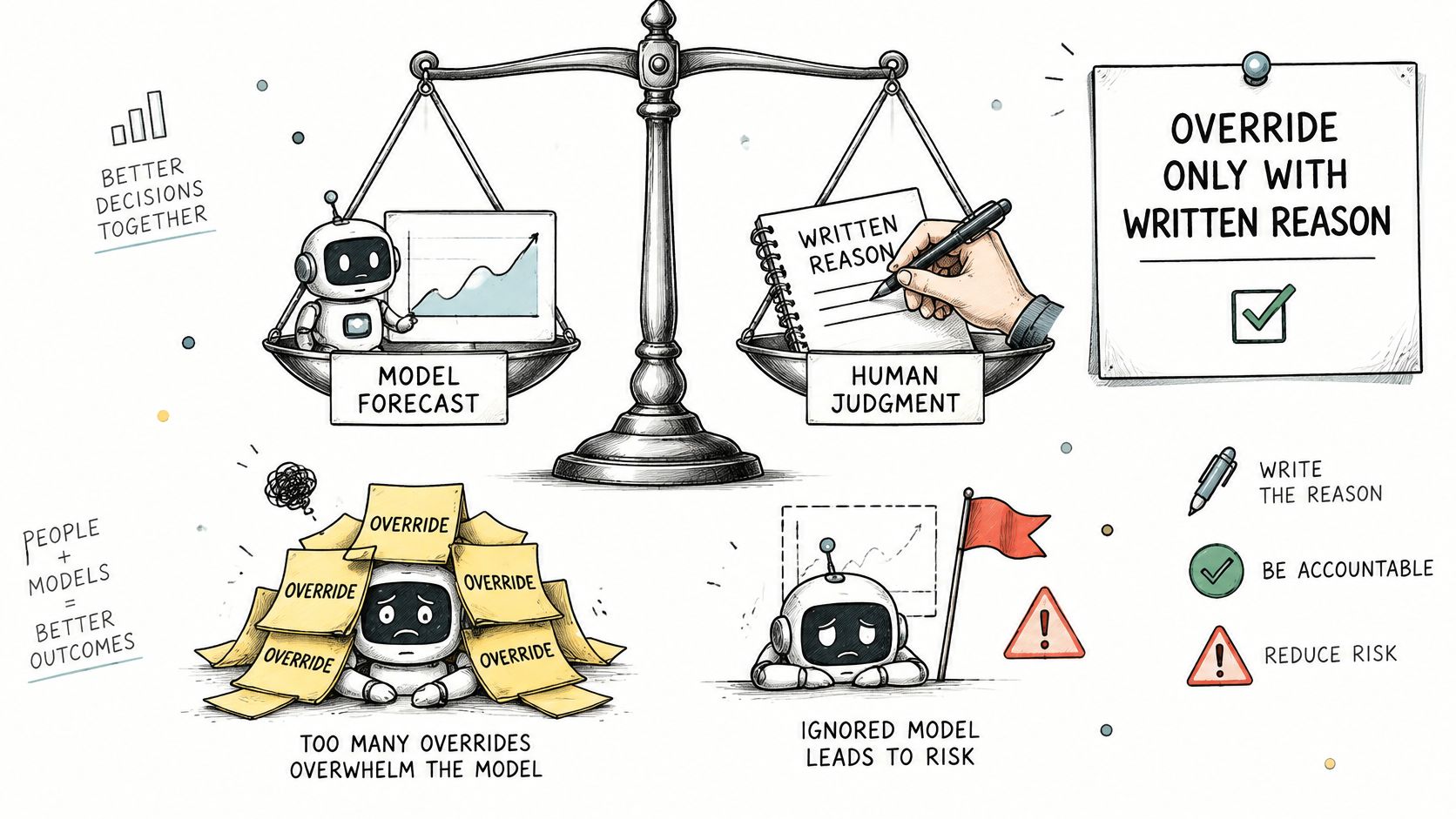
Too many overrides turn the model into decoration. Zero overrides can mean nobody is checking whether its assumptions still hold.
Set a clear rule: override only for named deals, with a written reason and supporting evidence. Keep the original model output visible beside the adjustment. A manager should be able to distinguish a genuine change in circumstances from a rep's desire to hit the target.
A justified override changes the assumption
Consider a hypothetical $150,000 deal in an 80% probability stage. The champion has left the company, and nobody has identified a replacement sponsor. The model still applies the stage probability, but the rep proposes 20% until sponsorship is re-established.
In this example, the weighted contribution changes from $120,000 to $30,000. The useful part isn't the lower number by itself. It's the documented reason, the evidence date, and the condition that would justify restoring confidence.
Record enough information to review the decision later:
Changed circumstance: Champion departed; replacement sponsor unconfirmed.
Evidence: Buyer communication or a documented account update.
Owner and approval: Rep proposing the adjustment and manager accepting it.
Revisit condition: Confirm a new sponsor and validate the approval path.
The same logic applies to internal approval risk, a competitor entering late, or a budget freeze communicated outside the CRM. Human judgment is useful when someone knows something material the model hasn't captured.
Review judgment as critically as the model
Watch for sellers who repeatedly promote weak deals into commit. Also watch managers who lower every call to protect themselves. Both behaviors make the forecast less useful for planning.
Don't change a probability merely because a deal is important. If the evidence concerns timing, adjust the forecast period rather than pretending the buyer is less likely to purchase eventually.
Accountability means preserving what the model said, what the person changed, and why.
Review the largest open opportunities by hand each week. Once a quarter, compare each rep's commit calls with actual outcomes and distinguish timing misses from losses.
Use those reviews for coaching, not a public ranking of optimists and pessimists. Ask whether the adjustment added useful information, whether the evidence was available at submission, and what would make the next judgment better.
Pick a Forecast Setup That Fits Your Team Size
| Team Size | Typical Setup | What to Skip | Forecast Owner |
|---|---|---|---|
| 1-5 reps | Weighted pipeline report in the CRM or a simple spreadsheet, reviewed weekly | Advanced machine learning and scenario tools | Founder or sales lead |
| 6-20 reps | CRM forecast module with snapshots, rep commit, and a weekly hygiene report | Custom models before the data is clean | Sales lead with part-time sales operations support |
| 20-50 reps | Dedicated forecasting software with calibration, scenario views, CRM sync, and role permissions | Tools that cannot export snapshots or override logs | Sales operations or RevOps |
| 50+ reps or multiple regions | Forecasting platform with category rollups, governance workflows, and accuracy reporting by segment | Single-number forecasts with no breakdown | RevOps team with a named forecast owner |
These are recommended starting points, not purchasing thresholds. The ranges overlap because operational complexity matters more than an exact headcount. A small team selling across different products and buying processes may need stronger controls than a larger team with a uniform sales motion.
Make the purchase decision in sequence
Count the usable history. Review open opportunities and closed deals from the last four quarters. With fewer than a few dozen relevant closed deals, I wouldn't treat regression as a dependable primary method; start with weighted pipeline and a separately recorded rep call.
Audit the workflow. Sample two weeks of CRM updates and inspect completeness, attribution, and correction habits. If basic opportunity fields remain unreliable, assign remediation owners before signing a software contract.
Name the forecast owner. A founder can own the call for a small team, but growing organizations need sales operations support. Once regions or products report separately, appoint a RevOps owner who can resolve definitions and submission disputes.
Buy for the operating burden you actually have
Choose a baseline and challenger method, define the comparison period, and agree on the outcome measure before the pilot starts. Don't let a vendor select whichever accuracy calculation makes its result look best.
Build your shortlist around the work your current setup can't handle:
Too much manual consolidation: Prioritize category rollups, ownership rules, and submission workflows.
Arguments about past calls: Prioritize retrievable snapshots and adjustment logs.
Different results across segments: Prioritize separate views and consistent evaluation cutoffs.
Missing prospecting activity: Fix capture and attribution before adding another prediction layer.
Run the messy-export demonstration with the people who will administer the tool, not only the executive buyer. Have them reconcile a submitted total and resolve a sync failure.
If sequence activity isn't reaching your CRM, Flowkon can help with that upstream workflow. Verify the records against your own campaigns before using them as forecast inputs. The right purchase is the smallest setup that gives your team a defensible call and a practical review routine.
Flowkon brings LinkedIn and email outreach, conversation management, and CRM synchronization into one workflow, helping your team preserve the activity behind its pipeline. Visit Flowkon to test those records against your forecasting requirements with a 7-day free trial, no credit card required.