LinkedIn does not publish one single official price for every Sales Navigator setup. Core is US$119.99/month or US$89.99/month on annual billing, Advanced is US$159.99/month or US$149.99/month annually, and Advanced Plus is custom-priced, with regional pricing varying by market and billing currency.
If you're comparing sales navigator pricing because renewal is coming up, the real question is not just what the invoice says. It is whether the mix of seat count, billing cycle, and plan level helps your team create enough qualified pipeline to justify the spend. A cheaper plan that nobody uses consistently is not really cheaper. A more expensive plan that helps reps find better-fit accounts, move faster, and keep the CRM cleaner can easily be the better decision.
This guide goes beyond the basic pricing table. It breaks down what each plan actually costs, where buyers get tripped up, how to think about annual versus monthly billing, and how to decide whether a higher tier will improve outcomes or just add features your team will ignore.
What Sales Navigator Costs in 2026
The easiest way to budget for Sales Navigator is to think of it as a per-seat subscription with three different buying motions, not one simple list price. On LinkedIn's comparison page, Core starts at US$119.99 per month per license or US$1,079.88 annually, which works out to US$89.99 per month when prepaid. Advanced starts at US$159.99 per month per license or US$1,799.88 annually, with an effective annual rate of US$149.99 per month. Advanced Plus does not have a public list price. It is quoted based on team size, CRM setup, onboarding, training, and contract structure, so it behaves more like an enterprise software purchase than a simple card-on-file subscription. LinkedIn's plan comparison
Where many buyers go wrong is assuming the number on the pricing page is the number finance will actually pay. It usually is not. Taxes, local currency, seat volume, timing, promotions, and contract terms can all change the total. LinkedIn also shows localized pricing, for example €120.99 monthly or €1,088.88 annually for Core, and €148.21 monthly or €1,693.88 annually for Advanced. That is a good reminder to budget in the billing country’s actual currency instead of making a quick USD conversion in a spreadsheet.
There is also a second layer of cost that is easy to miss. The software price is only part of the story. If reps are spending hours each week cleaning lead lists, moving data between tabs, or manually updating the CRM, that labor is part of the real cost too. In many teams, the biggest difference between plans is not just what you pay LinkedIn. It is how much friction the tool removes from daily prospecting.
A simple example makes this clearer. Imagine a solo founder using one Core seat to build a shortlist of ideal prospects each week. That buyer mostly cares about direct subscription cost and whether the tool creates meetings. Now compare that with a six-person SDR team. That team has to think about duplicate outreach, account ownership, manager visibility, CRM handoff quality, and whether reps are actually using the product the same way. The sticker price matters in both cases, but the operational impact matters a lot more for the team.
That is why a realistic cost review should include five things:
Subscription cost, seat price multiplied by active users
Billing commitment, monthly flexibility versus annual savings
Operational overhead, admin time, CRM cleanup, and duplicate work
Adoption risk, inactive seats, weak onboarding, or inconsistent rep usage
Procurement drag, approvals, legal review, and finance controls on larger plans
For teams building a broader outbound engine, it also helps to think about what happens after a lead is found. Sales Navigator is strong at helping reps identify the right people and accounts. It is not the full workflow on its own. That is where some teams pair it with an execution layer like Flowkon for sales teams, so sourced leads can move into outreach, inbox handling, and CRM sync without a lot of manual steps.
Practical rule: when you compare tools across a sales stack, compare the real seat cost in your billing country, not the headline number on a pricing page. That is the same discipline you would use when you find pricing for revenue teams, because budget decisions get messy fast when currency, taxes, and seat counts are ignored.
For a live look at how Sales Navigator fits into broader outbound tooling, the comparison in this 2026 email outreach platform roundup is useful because it separates prospecting data from execution software.
Last updated: October 2026.
Core vs Advanced vs Advanced Plus Compared
The fastest way to compare sales navigator core vs advanced is to ignore the marketing language for a minute and focus on the four things that usually affect ROI most: search depth, team collaboration, CRM workflow, and admin visibility. In plain English, the real decision is this: are you buying a better individual prospecting tool, or are you paying for a system that helps a team work together with less mess?
| Capability | Core | Advanced | Advanced Plus |
|---|---|---|---|
| Search and lead discovery | Strong individual prospecting, advanced filters, lead lists, alerts | Same core discovery, plus team-oriented buying signals | Enterprise-level discovery with custom packaging |
| InMail and outreach access | 50 InMail credits per month | 50 InMail credits per month | Custom contract terms |
| CRM sync | Basic CRM connection and lead handling | Deeper embedded CRM experiences and team usage visibility | Advanced CRM integration, governance, and workflow controls |
| Team collaboration and reporting | Limited team workflow | Shared lists, team reporting, and warm paths | Custom reporting, onboarding, and admin controls |
| Buyer fit | Solo reps and founders | Sales teams that work together | Larger organizations with procurement and governance needs |
What the five-person setup looks like: One person uses a Core seat to find prospects in Sales Navigator and build a target list. The other four work from that list in Flowkon rather than each paying for Sales Navigator access. Flowkon's workspaces can manage team campaigns with role-based permissions, and its outreach features support connection requests, personalized messages, and follow-ups. The value is not just fewer sourcing seats: the team has a way to act on the prospect list together instead of leaving it in one person's saved leads.
| Core billing | Five Sales Navigator seats | One sourcing seat | Difference in Sales Navigator fees |
|---|---|---|---|
| Monthly | US$599.95/month | US$119.99/month | US$479.96/month |
| Annual | US$5,399.40/year | US$1,079.88/year | US$4,319.52/year |
This is a comparison of Sales Navigator subscription fees, not net savings for the full stack. It excludes Flowkon fees, taxes, and other costs. The arrangement only works if the four teammates can prospect from the shared list without using Sales Navigator directly; anyone who needs direct Sales Navigator access still needs their own seat. CRM sync is available on Flowkon's Professional and Custom plans, so include the relevant Flowkon plan cost when evaluating the complete workflow.
One detail that surprises buyers is that Advanced does not give you more InMail capacity than Core. Both plans show the same monthly credit allowance. So if someone on your team is pitching Advanced as the better plan because it means more outreach volume, that is not really the case. The upgrade only pays off when the team features improve how reps coordinate, share context, or keep records clean.
A good way to pressure-test this is to follow one lead through the workflow. In a Core setup, a rep might find a promising account, save the lead, switch tabs, build a manual list, and then update the CRM by hand later. In an Advanced setup, the search experience is similar, but the value can show up after discovery. Shared visibility is better, duplicate touches are easier to avoid, and managers have a clearer view of how the team is working. In Advanced Plus, the real value is usually less about prospecting power and more about governance, onboarding, permissions, and process control.
Here is another way to frame the difference:
Core is usually about helping one person prospect more effectively.
Advanced is usually about helping several people avoid working in silos.
Advanced Plus is usually about helping a larger sales organization standardize how prospecting happens.
For example, imagine two SDRs working the same named-account list. If both are reaching into the same buying committee and accidentally contacting the same people, the issue is not that the search filters are weak. The issue is coordination. That is where Advanced can create value. On the other hand, if a founder is prospecting alone and following up manually, Core may do almost everything they need.
Another practical filter is to ask whether the plan changes manager behavior. If managers need reporting, rep visibility, and cleaner team-level oversight, Advanced becomes easier to justify. If nobody is checking adoption and every rep still works independently, the upgrade may look good on paper but do very little in reality.
Who each tier actually fits
Core is a strong fit for founders, solo AEs, consultants, and independent operators who want better access to prospects without building a complicated team process around it. If one person handles targeting, outreach, meetings, and closing, Core is often enough. The value comes from better filters, alerts, and list-building, not from shared workflows.
A good example is a solo consultant selling high-ticket services into a narrow market. They may only need a small number of well-chosen accounts each month. In that case, targeting precision matters far more than collaboration features, and Core can be the cleanest choice.
Advanced starts making sense when more than one person is touching the same segments and when management actually cares about visibility. This often happens with SDR pods, account-based motions, or small outbound teams that need shared lead lists and fewer disconnected workflows. If reps are constantly asking, “Who owns this account?” or “Did anyone already reach out here?” the team is probably feeling the pain Advanced is meant to reduce.
A practical example would be a four-person SDR team working named accounts in SaaS. If the reps share targets, split territories, and review account coverage with a manager each week, the collaboration layer can save real time and prevent sloppy overlap.
Advanced Plus is usually the right conversation when the buying process includes RevOps, IT, security, procurement, and formal CRM requirements. This is less about individual rep productivity and more about system-level control. If a sales org needs structured onboarding, deeper integration, custom reporting, and stronger admin controls, that is where Advanced Plus enters the picture.
A useful benchmark is this: if the tier does not change how leads move from search to pipeline, it is probably too early to upgrade. If it does change that workflow in a meaningful way, then the higher plan might be worth it, but only after you model the expected impact.
Some common examples:
A solo consultant may get full value from Core because prospect volume is low and process complexity is limited.
A 4-person SDR pod may benefit from Advanced because shared lists and team visibility reduce duplicate work.
A 12-person outbound team may begin to justify Advanced or Advanced Plus because manager oversight and CRM consistency become part of performance.
A large enterprise sales org should usually evaluate Advanced Plus only when those controls are genuinely required, not just because it feels like the complete version.
Calculating Cost Per Qualified Lead at Each Tier
A feature checklist is useful, but it is rarely enough to support a smart buying decision. What usually gives you a clearer answer is a cost per qualified lead model. That lens forces the decision back to business output instead of gut feel.
This matters because teams often buy software based on a vague sense that one plan feels more serious or more complete. That can be expensive. A better approach is to ask a simple question: what are we actually getting back for every dollar spent?
For some teams, the answer is direct. If one rep pays for a seat and books more qualified meetings, the tool is doing its job. For other teams, especially multi-seat teams, the answer is more indirect. The value may show up in fewer admin hours, fewer duplicate touches, and better handoffs between prospecting and CRM. Those gains still matter, but you need a model that captures them.
The spreadsheet model
The simplest way to do this is to create one spreadsheet column for each tier, then keep the same input rows across all plans. That helps you compare on consistent terms instead of changing the assumptions every time a plan gets more expensive.
The core inputs are simple:
Monthly seat cost
Number of seats
Add-on cost
Total monthly cost
Leads sourced per month
Connection acceptance rate
Reply rate
Qualification rate
The core math looks like this:
Qualified leads per month = leads sourced × acceptance rate × reply rate × qualification rate
Cost per qualified lead = total monthly cost ÷ qualified leads per month
A useful external primer on using per-lead thinking in channel budgeting is this Instagram lead generation cost guide, because the math discipline is the same even when the channel changes.
| Input | Core | Advanced | Advanced Plus |
|---|---|---|---|
| Monthly cost per seat | US$119.99 | US$159.99 | Custom |
| Seats | 1 | 1 | 1 |
| Add-on cost | Varies | Varies | Varies |
| Total monthly cost | Seat cost plus add-ons | Seat cost plus add-ons | Seat cost plus add-ons |
| Leads sourced per month | Same input | Same input | Same input |
| Acceptance rate | Same or adjusted if the workflow changes | Same or adjusted if the workflow changes | Same or adjusted if the workflow changes |
| Reply rate | Same or adjusted if the workflow changes | Same or adjusted if the workflow changes | Same or adjusted if the workflow changes |
| Qualification rate | Same or adjusted if the workflow changes | Same or adjusted if the workflow changes | Same or adjusted if the workflow changes |
To make the model more realistic, add two more rows that teams often forget:
Admin hours saved per rep per month
Estimated value of rep time per hour
These are especially important when a higher plan does not obviously increase lead volume but does make the workflow smoother. For example, if Advanced saves each rep three hours per month by reducing manual list management and CRM cleanup, the price gap can shrink quickly once you put a dollar value on rep time.
This is also where it helps to think about the rest of the stack. If Sales Navigator is used purely for sourcing, your model should stop there. But if those leads immediately feed an execution system, the efficiency math can improve. A team that uses Sales Navigator for discovery and then pushes prospects into a workflow tool like Flowkon may not only measure sourced leads, but also how quickly those leads become touches, replies, and opportunities.
Here is a simple single-seat example:
Leads sourced per month: 200
Acceptance rate: 25%
Reply rate: 20%
Qualification rate: 30%
That gives:
- 200 × 0.25 × 0.20 × 0.30 = 3 qualified leads per month
At list price, the rough cost per qualified lead would be:
Core: US$119.99 ÷ 3 = about US$40 per qualified lead
Advanced: US$159.99 ÷ 3 = about US$53.33 per qualified lead
In that scenario, Core clearly wins unless Advanced improves one of the funnel rates or saves enough time to justify the difference.
Now consider a second scenario where Advanced improves execution quality:
Leads sourced per month: 220
Acceptance rate: 27%
Reply rate: 22%
Qualification rate: 32%
That gives:
- 220 × 0.27 × 0.22 × 0.32 = about 4.18 qualified leads per month
Then the rough cost per qualified lead becomes:
- Advanced: US$159.99 ÷ 4.18 = about US$38.27 per qualified lead
In that version, Advanced is actually more efficient even though the seat is more expensive. That is exactly why tier decisions should be tested against output, not just price.
How I'd read the output
Once the spreadsheet is filled in, the interpretation is usually straightforward. If a higher tier does not improve acceptance rates, reply rates, qualification rates, or save meaningful admin time, then the cheaper plan usually wins. If the higher tier changes rep behavior in a way that creates better outcomes, then the premium may be justified.
I would usually read the output in this order:
Does the higher tier improve qualified lead economics?
If not, does it save enough time to offset the extra cost?
If not, are we paying mainly for convenience?
If yes, is that convenience actually valuable enough to renew?
Practical rule: do not confuse feature depth with commercial value. A more expensive plan only makes sense if it improves funnel performance or reduces enough friction to matter.
One useful reality check is to compare average reps with top performers. Sometimes the best rep on the team makes a premium plan look fantastic, but the median rep gets almost no extra value. That should make you cautious. Software decisions should work across the team, not just for the one person who already had a strong process.
I would also ask four follow-up questions after looking at the model:
Did the higher tier improve results, or just make work feel smoother?
Is the improvement true across the whole team, or only for top performers?
Will the gain still matter six months from now?
Could a process fix outside Sales Navigator create the same benefit for less money?
That fourth question is underrated. Sometimes the real issue is poor targeting, weak copy, unclear account ownership, or bad follow-up habits. In those cases, changing the plan may not solve the underlying problem at all.
Which Tier Fits Your Team and Use Case
Billing choice matters almost as much as plan choice. Core's annual saving is 25%, while Advanced's annual saving is 6%, so the economics are not symmetrical. For Core, annual billing can be easy to justify if the seat is going to stay active. For Advanced, the case needs to be stronger because the discount is smaller relative to the monthly option.
The best plan is rarely the one with the longest feature list. It is the one that fits your team structure, sales motion, and usage stability. A company with a steady outbound process and stable headcount can commit more confidently. A team still figuring out its ICP, messaging, or SDR structure should usually be more cautious.
Another way to think about this is maturity. Early-stage teams often benefit more from flexibility. More mature teams benefit more from consistency. If you are still testing whether reps will actually use the tool every week, locking into multiple annual seats can backfire. If the process is already stable and repeatable, annual billing is much easier to defend.
Matching tier to team size
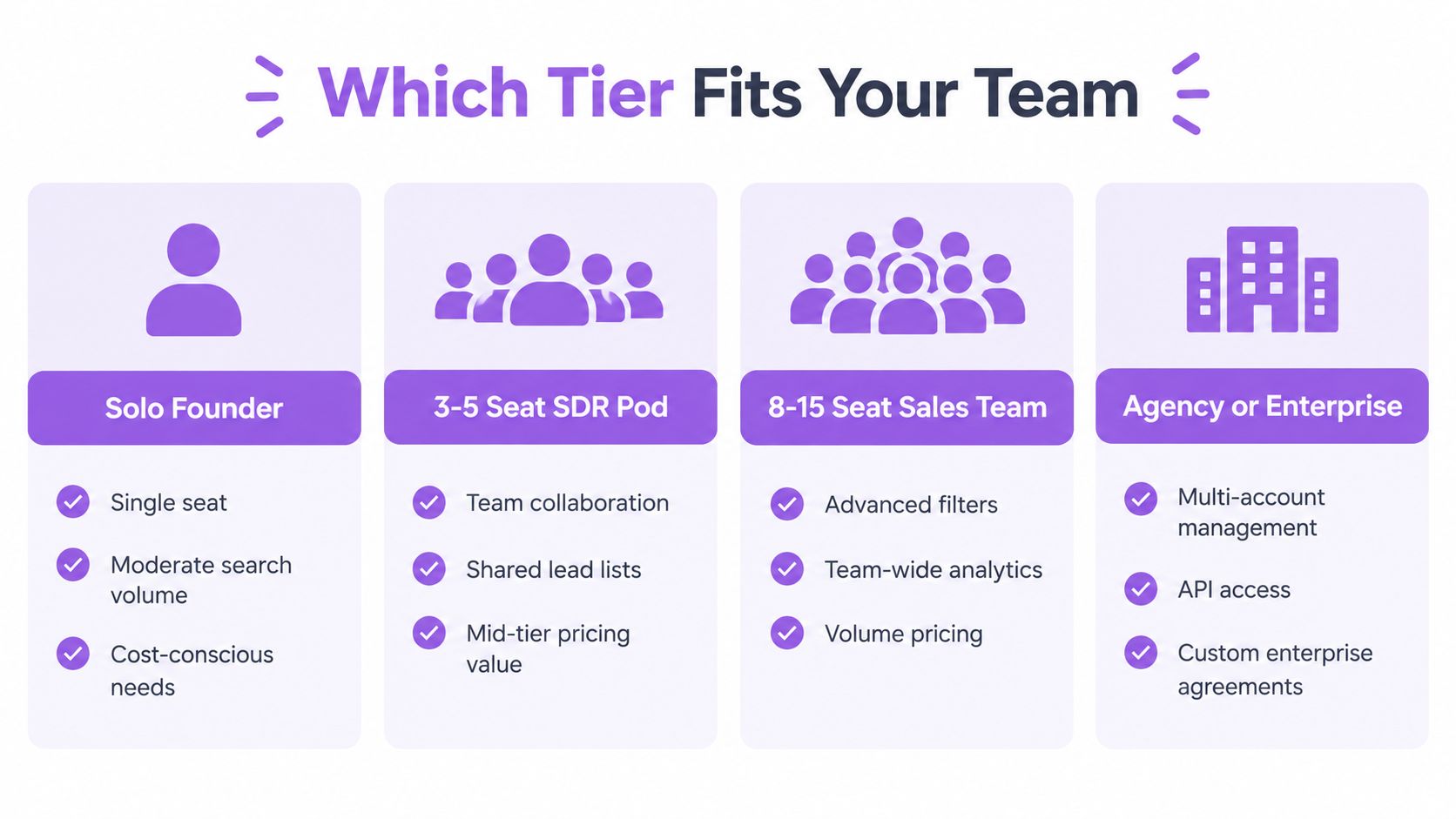
A solo founder usually starts with Core, often on annual billing if prospecting is already part of the weekly routine. In that situation, the workflow is simple and the annual savings are meaningful. The founder usually does not need team-level collaboration features because there is no team to coordinate.
A 3 to 5 seat SDR pod often has a more nuanced decision. If everyone is working from shared target accounts and managers need visibility into what reps are doing, Advanced can become worth it. In small teams, duplicate outreach and unclear account ownership waste more time than people expect. If Advanced helps reduce that confusion, the higher price can pay back quickly.
An 8 to 15 seat team usually starts to feel the cost of weak process more sharply. At that size, reporting gaps, messy CRM updates, and poor handoffs are no longer minor annoyances. They affect performance. That is where Advanced can make sense, and where some organizations begin exploring Advanced Plus if governance and integration become core requirements.
An agency or enterprise buyer should think about Advanced Plus only when onboarding, permissions, procurement controls, and CRM depth are genuinely needed. If the team is small and simply wants the enterprise plan because it sounds safer or more complete, that is usually a poor buying signal.
A practical mental model looks like this:
1 seat: buy for individual productivity
2 to 5 seats: buy for coordination and visibility
6 to 15 seats: buy for workflow consistency and manager oversight
Larger orgs: buy for integration, governance, and procurement fit
Of course, team size alone is not enough. A three-person account-based team selling into complex enterprise accounts may need tighter coordination than a ten-person team doing broad, simple outreach. The sales motion matters more than the org chart.
Monthly versus annual billing
Monthly billing buys flexibility. Annual billing buys a lower effective rate. The right choice depends on how stable your headcount, process, and usage really are.
Monthly billing is often smarter when seats may change, when a team is still hiring, or when leadership is not yet sure the workflow will stick. It is also the safer choice for agencies, seasonal campaigns, or teams testing a new outbound motion. Paying more per month can be rational if it protects you from committing to seats that go unused.
Annual billing works better when the user is established, adoption is strong, and the process is already part of the team’s routine. A consultancy with one full-time outbound operator using Sales Navigator every week is a classic example. That buyer usually knows the seat will stay active, so the lower annual rate is easier to justify.
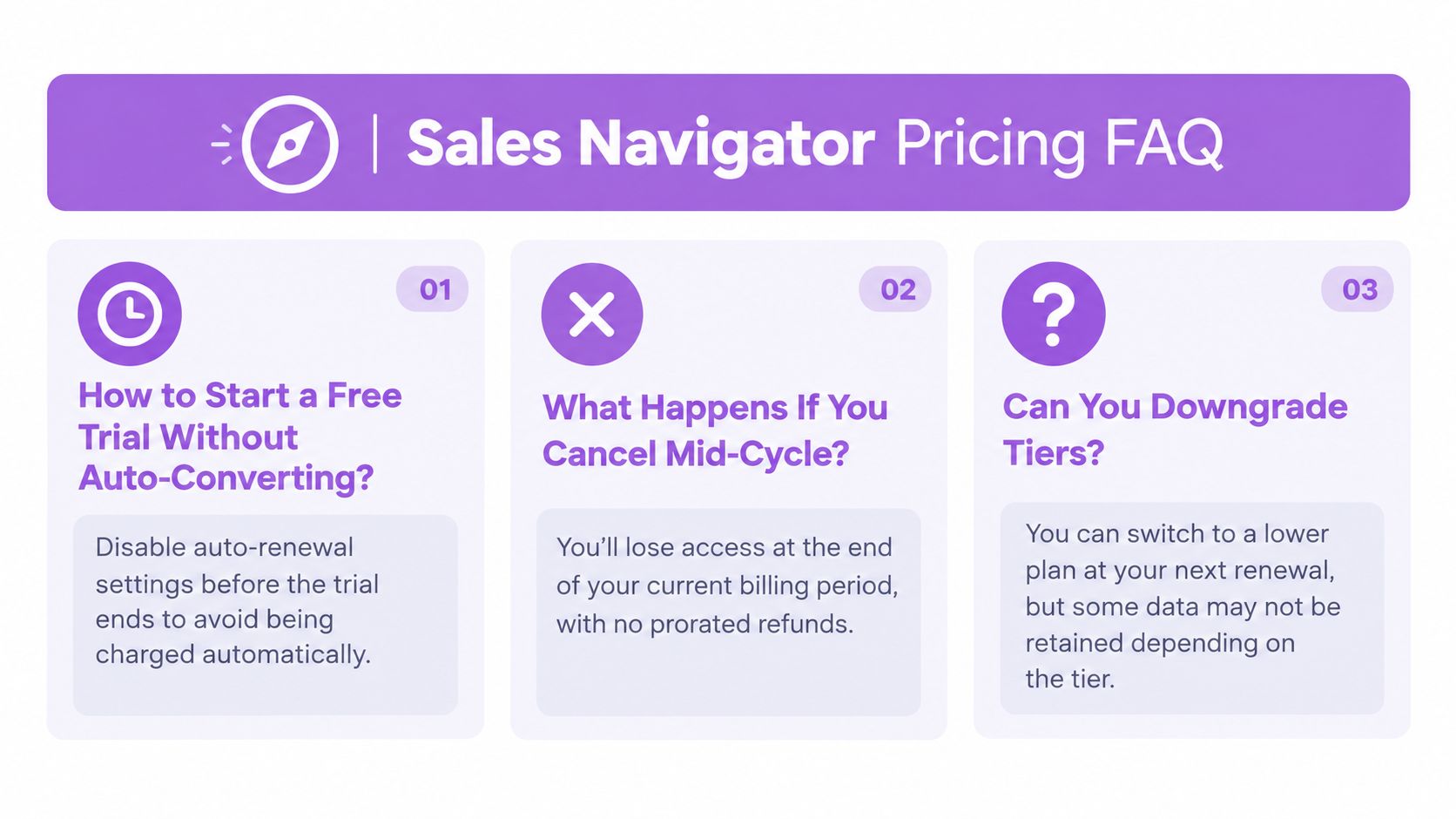
Cancellation timing matters too. LinkedIn says cancellation ends the subscription at the close of the current billing period, not immediately, so you need to cancel before the renewal date if you want to avoid another charge. In practice, that means keeping your cancellation confirmation and tracking the renewal date instead of assuming a partial refund will appear automatically.
For teams building a multi-channel outbound motion, this is also the point where workflow matters. A seat only creates value when it consistently feeds a repeatable process. The workflow overview in Flowkon for sales teams is relevant here because a prospecting subscription works best when leads move smoothly into follow-up, inbox handling, and CRM updates instead of stalling in a saved list.
A simple decision framework can help:
Choose monthly if headcount may change soon.
Choose monthly if you are still validating whether reps will actually use the tool.
Choose annual if the user is established, the workflow is stable, and the discount is meaningful.
Choose annual if procurement takes time and you would rather lock budget once.
For example, a startup hiring its first two SDRs may want monthly billing for 60 to 90 days while it validates process fit. A consultant who prospects every week may be better off locking in annual Core right away.
How to Negotiate a Real Discount on Sales Navigator
The best renewal conversations usually start with usage, not with pricing pressure. If you can show that the seats are active, the team is sourcing meetings, and the tool influences pipeline, you have a much stronger position. If you open with, “Can you lower the price?” you usually get a softer response.
This is especially true with software vendors that care about retention and expansion. If your account looks healthy and likely to grow, you are a more valuable customer to keep. That gives you leverage. If your account looks underused, you may still get some flexibility, but the conversation becomes harder because your own adoption data weakens the case.
A lot of buyers miss this. Negotiation is not only about pushing on price. It is about making the vendor believe that keeping your account happy is worth solving for.
What to bring to the call
I would go into a renewal conversation with four numbers ready:
Weekly active seat count
Average searches and saved leads per rep
Meetings sourced from Sales Navigator
Pipeline influenced over the last two quarters
Those four metrics do two things. First, they turn the conversation into a business discussion instead of a pricing complaint. Second, they make it easier to justify asking for better terms in exchange for commitment.
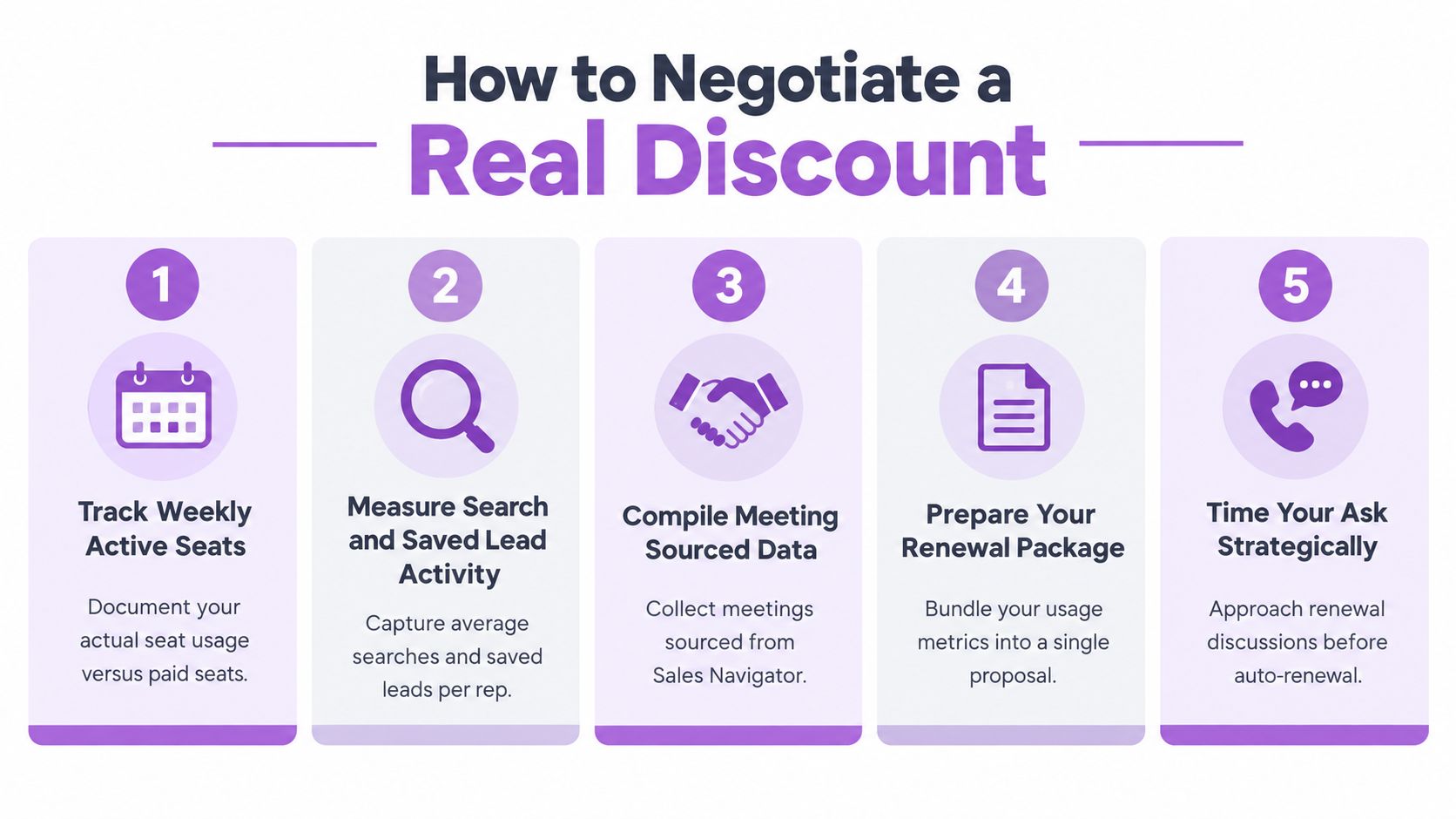
If you want to be more prepared, bring a short renewal brief that includes:
Current seats and actual active users
Usage trend over the last 3 to 6 months
A few sourced opportunities or wins
What features your team relies on most
What pricing or term change would make renewal easier internally
That kind of prep sends the right signal. It shows you are not casually shopping around. You are evaluating a tool that matters to your process.
It also helps to be honest about what is and is not working. If your team gets strong value from lead discovery but still struggles with follow-up discipline, that is useful context. It frames the conversation around workflow reality. In some cases, buyers discover the bigger issue is not the Sales Navigator seat price at all, but the lack of a reliable system after the prospect is found.
How the ask should work
Start the process around 60 days before renewal. That gives your rep time to work the request internally and gives you enough room to compare options if needed. Lead with usage and business impact, then offer something in return, like annual prepay, a longer term, or predictable seat growth.
| Bring to the call | Offer in return | Realistic outcome |
|---|---|---|
| Active seat usage and weekly login data | Annual prepay | Better per-seat rate |
| Search, saved lead, and meeting data | Two-year term | Locked pricing for longer |
| Pipeline attributed to the seats | Added seats over time | Volume-based flexibility |
| Renewal timing and notice | Clean contract terms | Fewer surprises at renewal |
Negotiation rule: do not ask for a vague “deal.” Show that the account is healthy, then trade commitment for price.
A simple script can work well:
"We have strong adoption and can show sourced pipeline."
"We are reviewing renewal now, and budget is under pressure."
"If we commit to annual prepay or a longer term, what flexibility is available on rate or future seat additions?"
That framing is usually stronger than a blunt discount request because it gives the rep something specific to solve.
Here is a practical example. I have seen 8 Advanced seats negotiated from roughly US$1,800 per seat per year down to around 15% off list, which brought the rate closer to US$1,530 per seat per year, with a locked two-year price and room to add seats later at the same discount. The key factor was not aggressive language. It was steady usage and a credible renewal case.
Another example: if your team only used 5 of 8 seats consistently, the smartest ask may not be “give us 20% off.” It may be “reduce the seat count, improve the annual rate on the seats we actually use, and give us pre-negotiated pricing if we expand again later.” That is often easier to win because it lines the contract up with reality.
How Flowkon Complements Sales Navigator
Sales Navigator and Flowkon solve different parts of the same outbound workflow. Sales Navigator is strongest at helping teams identify the right accounts and people on LinkedIn. Flowkon fits after that step, when the question shifts from "Who should we contact?" to "How do we run outreach consistently and keep the process organized?"
That distinction matters because a lot of teams do not struggle with discovery alone. They struggle with everything that happens after discovery. A rep finds a promising lead, saves it, maybe exports it or copies it into another tool, then follow-up becomes fragmented across inboxes, spreadsheets, and CRM notes. The result is usually not a targeting problem. It is a workflow problem.
Used together, the tools can create a cleaner division of labor:
Sales Navigator helps with account research, lead discovery, buying committee visibility, and lead saving.
Flowkon helps with outreach execution, follow-up management, inbox handling, campaign flow, and CRM sync.
For many teams, that combination is easier to justify than expecting one tool to do everything. Sales Navigator stays the sourcing layer. Flowkon becomes the execution layer that helps the team act on those leads in a more structured way.
There is a potential seat-cost saving, too. As described by Flowkon, one person can use a Sales Navigator account to build a prospect list, then make that list available to teammates for prospecting in a Flowkon workspace. If those teammates only need to work from the shared list, they may not each need a Sales Navigator subscription. Anyone who needs to search or use Sales Navigator directly would still need their own access.
Five-person example: At LinkedIn's published starting Core price, five monthly seats cost US$599.95 per month. If one person handles Sales Navigator research and the other four prospect from the list in Flowkon, the team pays for one Core seat at US$119.99 per month, a difference of US$479.96 per month or US$5,759.52 over 12 months in Sales Navigator subscription costs. On annual Core billing, five seats cost US$5,399.40 per year versus US$1,079.88 for one, a difference of US$4,319.52 per year. These figures exclude Flowkon fees, taxes, and any other costs; they are not net savings for the full stack. The setup only fits if the other four people do not need direct Sales Navigator access.
A simple way to think about it is this: Sales Navigator helps you find the right people. Flowkon helps you make sure those people actually move through a repeatable outbound process.
Where Flowkon fits in the workflow
The handoff point usually comes right after lead selection. Once a rep has identified target accounts and contacts inside Sales Navigator, the next challenge is turning that list into real activity without losing context or creating admin work.
This is where Flowkon can complement the setup in a practical way:
Lead discovery starts in Sales Navigator. Reps filter by title, seniority, geography, company size, and account signals.
Qualified prospects move into outreach. Instead of living in saved lists for too long, those prospects can move into an execution workflow.
Follow-up becomes consistent. Outreach, response handling, and next steps are easier to manage when they live inside one process instead of scattered tools.
CRM updates become less manual. When workflow and sync are tighter, reps spend less time copying activity across systems.
That can be especially useful for teams that already like Sales Navigator but feel the value drops off after sourcing. In those cases, the issue is often not whether Sales Navigator is working. It is whether the rest of the stack turns sourced leads into enough conversations.
A good example is a small SDR team that builds strong lists every week but still misses follow-up windows or leaves CRM fields incomplete. The team may not need a different prospecting tool. It may need a better operating layer after the lead is found. That is the type of gap Flowkon for sales teams is meant to address.
A practical stack example
Imagine a five-seat outbound team selling to operations leaders in mid-market SaaS.
The reps use Sales Navigator to identify target accounts, track job changes, and build buying-committee lists.
They save promising leads, but the team also needs a reliable system for multichannel follow-up.
Managers want to see whether those leads actually turned into touches, replies, and meetings.
RevOps wants cleaner CRM activity without endless manual updates.
In that environment, Sales Navigator does the front-end discovery work well. Flowkon can sit behind it to help run outreach, organize inbox activity, and keep the motion moving after the lead has been sourced.
The ROI logic is straightforward. If Sales Navigator helps reps find better-fit prospects, and Flowkon helps those prospects get contacted and tracked more consistently, then the combined value may be much higher than using either tool in isolation. Discovery without execution stalls. Execution without strong targeting wastes effort. The stack works best when both parts are covered.
This also helps explain when Flowkon is probably unnecessary. If one founder is prospecting manually, sending low-volume outreach, and tracking everything personally, Sales Navigator alone may be enough. But once follow-up becomes multi-step, multi-rep, or difficult to track, adding an execution layer can make the process feel much less fragile.
Is Sales Navigator Worth It, Free Trial, and Alternatives
Sales Navigator is worth it when your team needs better access to the LinkedIn graph, stronger account visibility, and faster prospect discovery. It is less compelling when buyers expect it to solve the entire outbound workflow by itself. It is very good at helping teams find people. It is not a sequencing platform, not a shared inbox, and not a full CRM hygiene solution on its own.
For teams comparing sales navigator alternatives, the real split is usually between sourcing tools and execution tools. Sales Navigator is strongest on the sourcing side. Email platforms, contact databases, and multichannel systems sit more on the execution side. A practical guide to that split is the LinkedIn outreach comparison in this multichannel outreach article, because the real question is usually not “which tool is best?” but “which part of our workflow is actually broken?”
The easiest way to judge whether Sales Navigator is worth it is to start with the underlying problem:
If the problem is finding the right people, Sales Navigator can help a lot.
If the problem is turning leads into consistent follow-up, you may need an execution layer as much as a sourcing layer.
If the problem is weak messaging or poor offer-market fit, buying another tool may not help much at all.
A few realistic examples make that clearer:
A founder selling to mid-market HR leaders may get strong value from Sales Navigator because title filters, account research, and lead alerts improve targeting.
A high-volume SDR team may still need separate sequencing and inbox tooling because lead discovery alone does not create follow-up discipline.
A team with poor CRM hygiene may overestimate Sales Navigator’s value if the real issue is internal process.
This is also where Flowkon can be inserted naturally in the stack. If Sales Navigator is the discovery layer, Flowkon can sit after it as the execution layer, helping teams run LinkedIn and email outreach, manage follow-up, and keep CRM sync tighter. That positioning tends to make the most sense when teams already like Sales Navigator for targeting but feel the process breaks down after leads are identified.
Good practice is not a guarantee
Warming accounts, personalizing outreach, staying within sensible usage patterns, and verifying emails can all improve reply quality and lower risk. But they do not guarantee that an account will never get restricted. That distinction matters, because some buyers assume the tool itself removes all channel risk. It does not.
Sales Navigator also offers a free trial path for Core and Advanced, but the details can change, including eligibility, card requirements, and trial length. The best way to use a trial is not to browse the interface and decide whether it looks polished. The best way is to test whether your team can turn access into actual meetings and cleaner workflow.
A simple trial process looks like this:
Pick one ICP and one use case.
Build a lead list inside the trial.
Move those leads into your actual outreach workflow.
Track acceptance, replies, meetings, and admin time.
Compare the result against your current process.
That gives you a real buying signal. Without that structure, teams often judge the product based on interface quality rather than commercial impact.
For teams that want sourcing plus execution in one motion, Flowkon is one option because it pairs LinkedIn and email outreach with CRM sync and campaign tracking. For analytics-minded teams looking to understand LinkedIn behavior more broadly, the guide to LinkedIn analytics for marketers is a useful reference point for how profile and content signals can be interpreted alongside outbound activity.
Sales Navigator Pricing FAQ and Next Steps
Next steps
Pick the tier that your funnel math actually supports. Choose monthly or annual billing based on how stable your seats and process really are. If you plan to negotiate, start early, bring usage data, and trade commitment for price instead of making a generic discount request. And if your team is strong at finding leads but weak at moving them through outreach and CRM, make sure the execution layer is part of the buying conversation too.
A practical next step is to build a one-page internal buying memo with:
The plan you are considering
The number of seats
Monthly versus annual cost
Expected qualified leads per month
Workflow gains you expect to see
A renewal or cancellation date to track
That small exercise forces clarity before money gets committed.
If you are trying to turn Sales Navigator into a working outbound system instead of just another line item, take a look at Flowkon. It connects LinkedIn sourcing with multichannel outreach, inbox management, and CRM sync, so the seats you pay for can support a more complete pipeline workflow. Visit Flowkon and see how that process can run end to end.
Sales Navigator Pricing 2026
Sales Navigator pricing 2026, plan costs, and ROI guide