.webp)

Your prospect replies. The follow-up email goes out anyway. Another SDR reaches out from a spreadsheet, and nobody can tell who owns the conversation. The team is busy, but the buyer sees a team that isn't listening.
More outreach won't fix that. A sales engagement platform connects messages, replies, owners, and CRM records so the next action reflects what the buyer actually did. The question isn't how much you can automate. It's whether your team can stay in control.
Why Outbound Teams Lose Control
The prospect's reply sits in an individual inbox. The sequence doesn't know anyone has answered, so it queues another message. A different SDR sees the account in a spreadsheet and sends a note of their own. Later, a manager tries to understand what moved the opportunity forward and finds activity scattered across email, LinkedIn, spreadsheets, and the CRM.
This is familiar in teams that have grown beyond one person doing outreach by hand. Each tool may do its own job well, but without shared rules, people have to carry context between them. That creates context switching, inconsistent follow-up, duplicate outreach, and records that don't reflect the actual conversation.
The cost isn't just administrative. A prospect who has already replied may receive a generic follow-up that makes the company look inattentive. An interested buyer may wait while the team works out who should respond. And a sales leader may mistake a high volume of logged activity for meaningful progress.
A coordinated system gives the team a place to define what happens next. It can connect a prospect record to a campaign, pause scheduled steps when someone replies, route the conversation to an owner, and record the activity against the right CRM record. Those controls make it easier to follow through without treating every prospect as a reason to send another touch.
Working rule: If a reply doesn't change what the system does next, the team is still coordinating the campaign manually.
The right fit depends on how your sales motion works, not on how many features a vendor can show in a demo. You should be able to identify where your current process loses ownership or context, then decide whether a platform can fix that specific failure. More activity isn't the goal. A coherent path from first signal to useful conversation is.
Understanding the Sales Engagement Platform
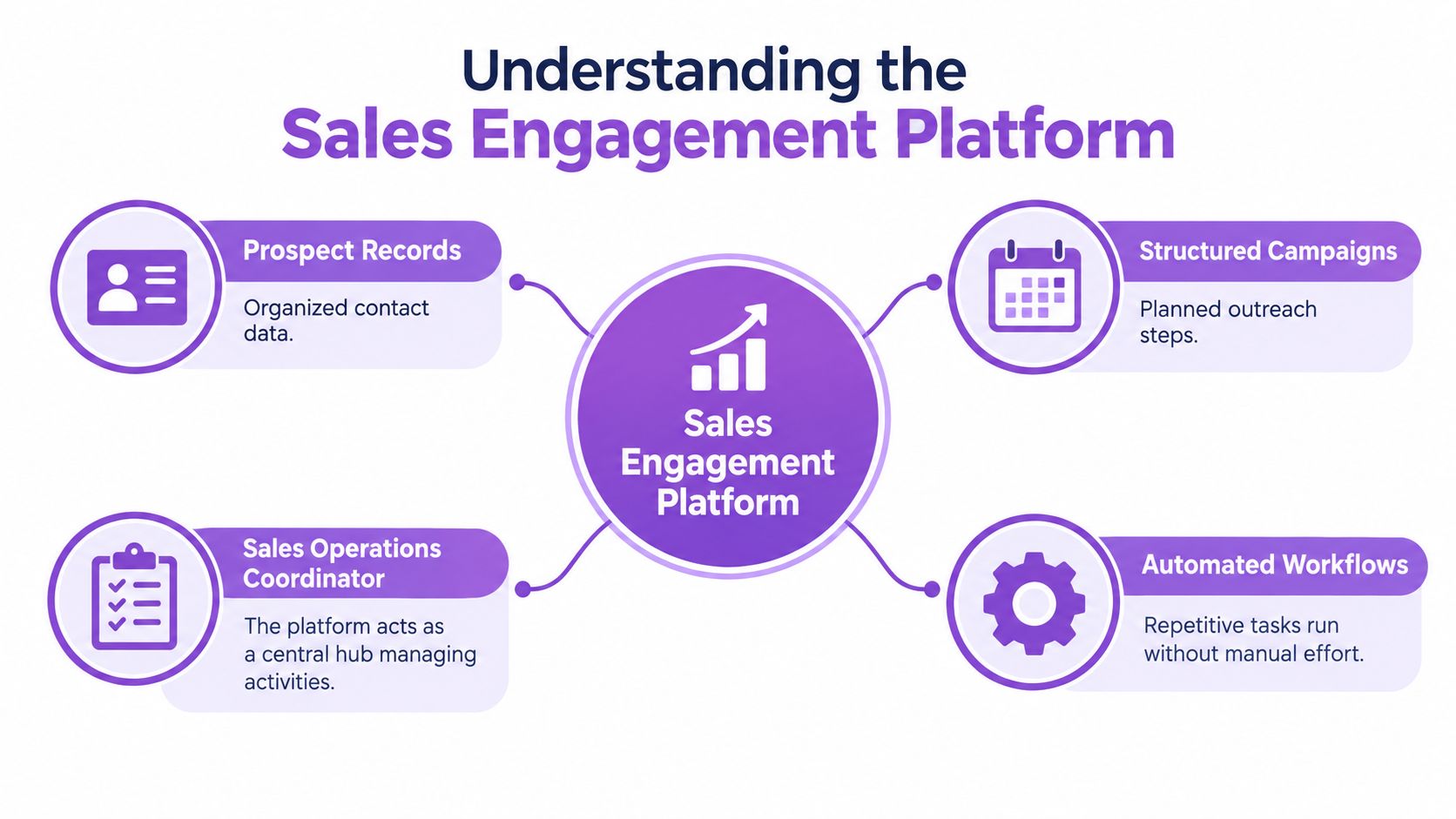
Think of a sales engagement platform as a sales operation's coordinator for prospect communication. It organizes contact records, schedules campaign steps, tracks interactions, routes replies, and passes useful activity back to the CRM. The platform isn't the salesperson. It manages the routine handoffs that make a salesperson's work easier to carry out and inspect.
How the pieces fit together
The platform's work spans several connected jobs:
- Prospecting: Organize records and, where supported, import or enrich contact details.
- Execution: Schedule email, LinkedIn, calls, or other steps in an intentional sequence.
- Conversation management: Surface replies and make ownership clear.
- Analytics: Show which activities led to responses and progression.
- CRM synchronization: Record relevant events and use CRM status to guide follow-up.
A CRM and a sales engagement platform aren't interchangeable. A CRM is the system of record for accounts, contacts, and pipeline. An engagement platform helps the team execute and coordinate prospect communication. A contact database can help find prospects, while a narrow email sequencer can schedule messages, but neither necessarily manages the full loop from activity to reply to ownership to CRM outcome.
The category has shifted from isolated email or calling tools toward systems designed to coordinate prospecting, buyer interactions, analytics, and multichannel workflows. Fact.MR estimates the global sales engagement software market at approximately USD 9 billion in 2024, with a projection of about USD 25 billion by 2031, representing roughly 16%–17% compound annual growth; the estimates vary with how adjacent sales automation, digital selling, and CRM functions are counted (Fact.MR's sales engagement software market outlook). Treat that forecast as directional context, not a precise measure of every product category.
For buyers comparing broader sales software, a sales enablement platform buying guide can help clarify how enablement fits beside engagement. The practical test is simpler: if your team can't connect an activity, response, owner, and deal outcome, it doesn't yet have a coordinated engagement system.
Core Capabilities That Shape Daily Sales Work
A sales engagement platform earns its place when information moves cleanly from targeting to outreach, then through replies and back into the CRM. A feature list matters less than whether each capability works as part of that chain.
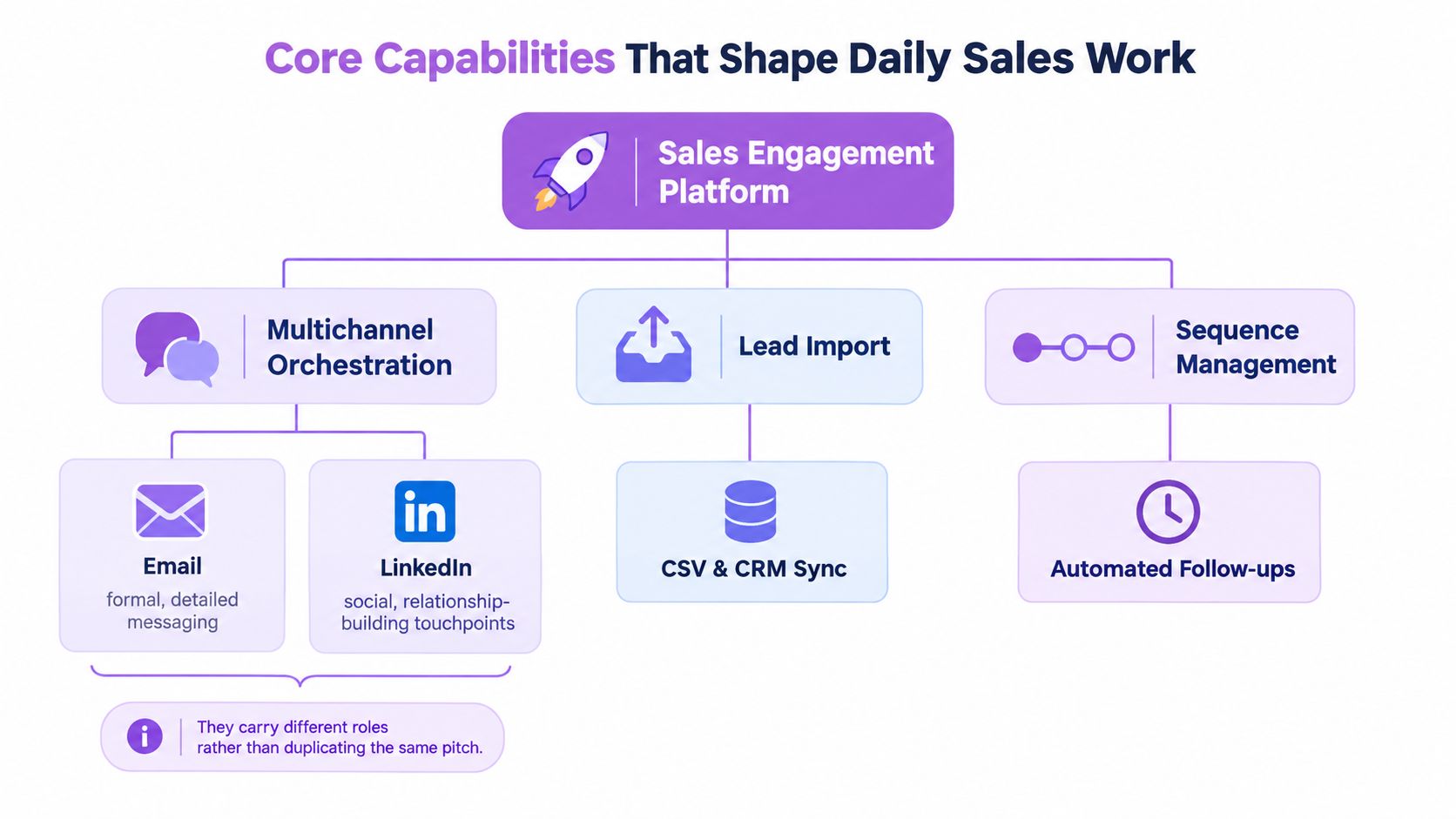
Orchestration needs distinct channel roles
Email and LinkedIn shouldn't carry the same pitch in different wrappers. Email can provide a clear, detailed explanation; LinkedIn can support a more social introduction or a relevant relationship-building touchpoint. If both channels repeat the same ask, the campaign adds activity without adding context.
A sequence builder should let a team set delays, manual tasks, conditions, and exit rules. For example, a reply should pause competing steps; a change in CRM status should prevent an outdated campaign from continuing. Good sequence logic includes deduplication, so one response doesn't create multiple tasks or restart the sequence, and a clear owner for each conversation.
Data and conversation handling have to meet
Lead import and enrichment help prepare records, but bad data can make even thoughtful messaging irrelevant. Teams should check that imported contacts match the intended account and role, and verify email addresses before sending. A useful overview of how phone-call note-taking can fit into a rep's workflow is this guide to finding a phone call notetaker for reps.
A centralized inbox can reduce the need to jump between channels, but it needs practical routing: who sees a reply, who acts on it, and what happens when the owner is unavailable? Permissions, workspace separation, and an activity history matter when multiple teams or client accounts share a platform. Without them, speed can come at the cost of oversight.
Measure outcomes, not just sends
Campaign analytics should distinguish messages sent from replies, positive replies, meetings, opportunities, and later pipeline progression. Opens and clicks may help diagnose a message, but they don't establish that a prospect is interested or that a campaign created business value.
CRM synchronization should work in both directions. Activities should update the contact or account record, while meaningful CRM changes should affect who stays in a sequence. When the platform can't preserve that relationship, reps end up doing the reconciliation by hand, and reporting becomes less reliable.
When a Platform Adds Value
The same platform can solve a daily headache for one team and create unnecessary administration for another. Start with the operating problem, then decide whether a shared system is worth the cost and attention.
Operating modelPrimary problemCapabilities to prioritizeTrade-off to watchFounder doing salesFollow-ups slip while the founder handles other workSimple sequences, clear task reminders, CRM loggingA complex setup can take more time than it savesSDR teamReplies and account ownership are scatteredShared inbox, routing, pause rules, team reportingAutomation can make generic outreach easier to scaleAgencyClient campaigns and records need separationWorkspaces, permissions, client-level visibilityMore governance means more setup and administrationRecruiting teamCandidate conversations need distinct context and controlTailored campaign stages, reply ownership, suppression rulesSales templates may not suit candidate communicationRevOpsActivity and CRM data don't line upField mapping, event history, permissions, reportingA new layer can complicate an already crowded stack
A founder working alone may need only a lightweight sequence and reliable reminders. An SDR team usually benefits more from shared reply handling and explicit ownership, because one person's inbox shouldn't determine whether a prospect gets a timely response.
Agencies need to keep client records, access, and reporting distinct. Recruiters should assess whether workflows support candidate communication and opt-outs, rather than assuming a standard sales cadence will fit. RevOps teams should focus on data mapping, event visibility, and whether CRM changes reliably affect campaign behavior.
A point solution can still be the right choice. For example, a team may use a dedicated deliverability service for diagnostics that go beyond the engagement platform's visible controls. An engagement platform should coordinate work, not pretend to replace every specialist system. Adoption, process maintenance, and governance are real operating costs. If a spreadsheet and a well-defined manual process work reliably for a small team, adding software may not solve a meaningful problem.
Adoption has become broad, but market estimates deserve careful interpretation. One industry estimate reports that more than 72% of B2B organizations implemented sales engagement platforms in 2025, with the United States accounting for approximately 38% of global enterprise deployments; the source notes that definitions of implementation can differ (Industry Research's sales engagement software market report). Those figures signal category reach, not a reason for every team to buy.
A Practical Multichannel Campaign
Start with a defined account and a specific contact role, not a list built around whatever data is easiest to export. Suppose a B2B team is approaching an operations leader at a company that appears to have a relevant process problem. The campaign should explain why this person might care and what the next useful conversation could be.
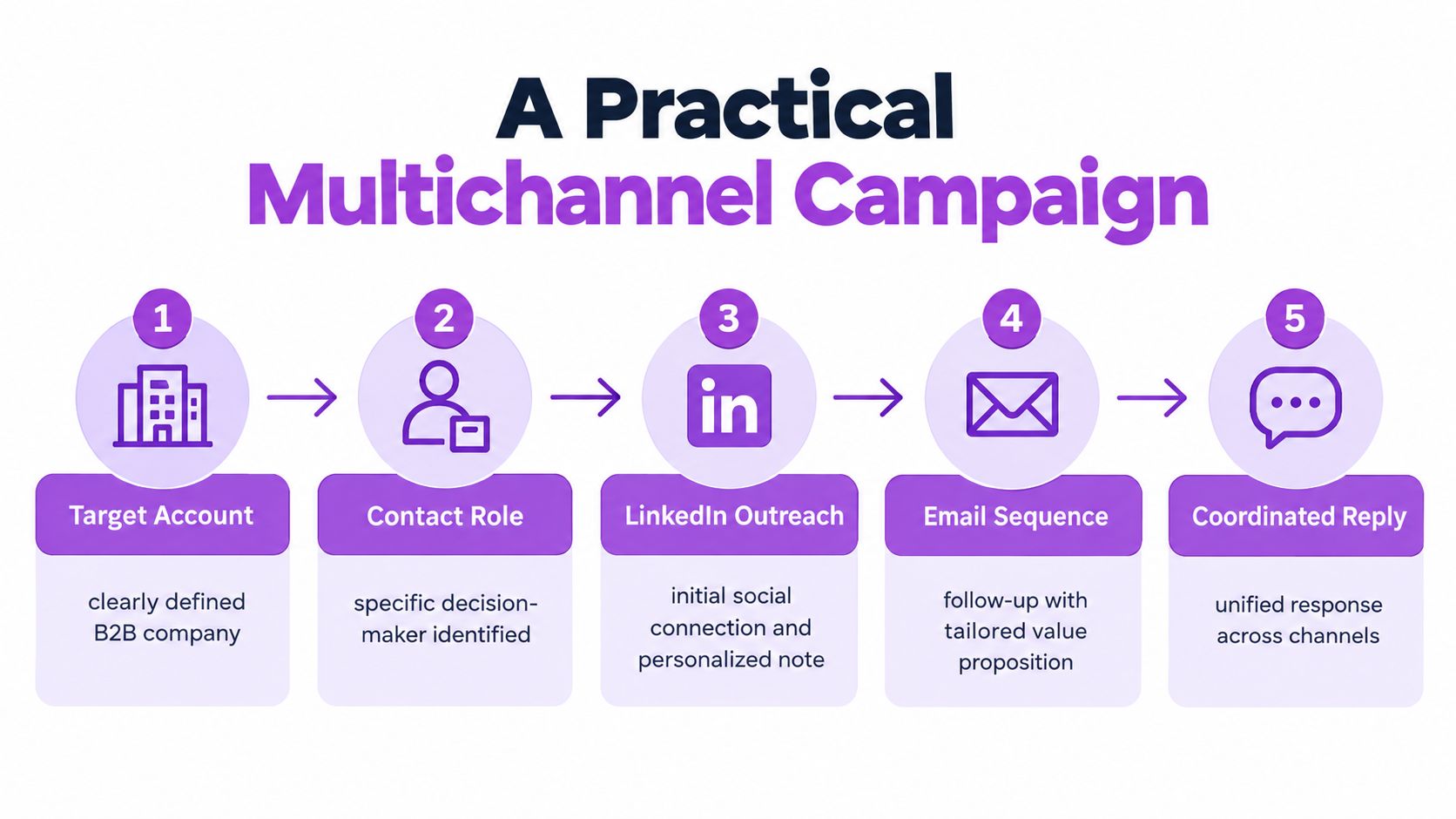
The contact record needs enough context to personalize responsibly: their role, company, source, and a verified business email if email is part of the plan. Before outreach, check that the person isn't already in another active sequence and that the account isn't marked as a customer, active opportunity, or opted out.
A simple campaign might begin with a LinkedIn connection request, followed by a relevant note if the person accepts. Email can then add substance rather than echoing the same pitch.
LinkedIn note
Hi Morgan, I noticed your team is focused on improving how operations requests move between departments. I'd be glad to connect and compare notes on the handoffs that tend to slow that work down.
Subject: A question about operations handoffs
Hi Morgan, I'm reaching out because teams often have to reconcile requests across several systems before anyone can see who owns the next step. If that's a current concern, I can share a short outline of how teams structure the handoff. If it's not relevant, no need to reply.
The wording is illustrative, not a claim about results. The point is that each channel has a job and the message gives the prospect room to decline.
Make the sequence respond to events
Use simple rules that the SDR can explain to a colleague:
- Wait: Give a person time to accept or respond before moving to another touch.
- Branch: If they engage but don't reply, choose a relevant next step rather than repeating the same ask.
- Stop: End outreach after a reply, opt-out, or CRM status change that makes the campaign inappropriate.
When a reply arrives, assign it to the responsible person, pause the remaining sequence, log the event to the CRM, and let the owner take over. Keep timestamps so the team can see when a response arrived and when someone acted on it.
For list preparation, a guide to Mailbeam use cases for verification can help teams think through the role of address quality before a campaign starts. For more detail on combining channels into a single workflow, use this guide to combine LinkedIn and email outreach in one sequence.
Report replies, positive replies, and qualified meetings alongside channel activity. A unified campaign, inbox, analytics, and CRM environment, such as Flowkon, is one way to organize that workflow. The operational question is whether each response changes the next action and leaves a useful record behind.
Measure the System Not the Activity
A dashboard full of activity can still hide a broken process. LinkedIn acceptance, email opens, clicks, replies, meetings, and opportunities describe different stages, and none should stand in for the others. Preserve the event trail, but don't treat an open as proof that a person read or valued the message. This guide to what an impression means on LinkedIn for B2B sales can help teams interpret a platform metric without confusing visibility with intent.
Operating questionUseful signalWhat to inspect when it's weakDid the right person receive a relevant message?Replies and positive repliesTargeting, message context, data qualityDid the team respond to interest promptly?Arrival-to-first-human-action timeRouting, owner availability, notificationsDid the conversation progress?Qualified meetings and opportunity creationQualification, handoff quality, next stepsIs email execution dependable?Authentication, bounces, complaints, delivery indicatorsDomain alignment, address verification, sending practicesIs automation respecting the buyer's context?Unwanted-contact signals and campaign exitsPause rules, CRM status, suppression handling
Response time is an operational control, not just a reporting field. A study of more than 15,000 web-form leads and over 100,000 call attempts across six companies reported that leads contacted within five minutes were 100 times more likely to be reached and 21 times more likely to be qualified than leads contacted after 30 minutes (summary of the MIT/InsideSales lead-response study). Those findings concern reach and qualification, not guaranteed revenue. Use them to think about routing and service expectations, not to forecast a universal conversion result.
Email performance also depends on infrastructure and data quality. A 2026 analysis of more than 10 million emails reported open rates of 20.11% for DMARC-valid campaigns versus 17.31% without DMARC, and click rates of 1.58% for DKIM-valid campaigns versus 1.23% without DKIM (Snov.io's email deliverability analysis). These are observed benchmarks, not controlled proof of causation. Teams should check SPF, DKIM, DMARC alignment, sender reputation, and address verification before outreach, then investigate bounces, complaints, or authentication failures rather than just adding more messages.
LinkedIn's policy creates a separate risk. The company explicitly prohibits third-party software that automates activity on its site, including methods used to send messages, interact with content, or scrape data, and it prohibits bypassing access controls or use limits (LinkedIn's User Agreement). No vendor can guarantee that automation will never lead to restrictions. Keep human oversight, respect platform controls, and pause activity if account warnings or behavior changes appear.
Choose and Roll Out a Platform Carefully
A polished product tour doesn't show whether the platform handles an awkward reply, a duplicate contact, or a CRM status change correctly. Define the jobs the system must perform before comparing vendors, then make each one demonstrate the relevant workflow.
Test the work, not the feature list
Bring a realistic campaign scenario to the evaluation. Ask the vendor to show how the system handles a prospect reply, sequence exit, owner assignment, and CRM activity logging. Then test what happens when the same contact enters through another list, or when a record changes status while the campaign is active.
Check the operating controls, too:
- Reply handling: Can the right person see and own a conversation without conflicting follow-ups?
- Sequence logic: Can a reply, opt-out, or CRM change pause or stop outreach?
- Data management: Can your team map fields, avoid duplicates, and review event history?
- Governance: Can administrators set role-based access and separate workspaces where needed?
- Reporting: Can managers inspect channel activity and downstream outcomes without confusing volume with progress?
Ask for exportable event history and a demonstration of permissions, not just screenshots. If Salesforce is part of your stack, confirm how records and campaign events move through the Salesforce integration workflow. A connection marked “available” doesn't tell you whether the fields and events your team relies on will behave as expected.
Pilot narrowly and review honestly
Start with a single, repeatable use case and assign an owner who can review the setup, monitor exceptions, and gather feedback from the people using it. Compare the pilot with the team's previous process: Are replies easier to handle? Are records clearer? Do scheduled steps stop when they should? Has the tool reduced manual reconciliation, or shifted it somewhere else?
Compliance requires workflow decisions, not just a checkbox during setup. In the United States, the FTC says commercial email must use accurate sender and routing information, subject lines that reflect the message, business identification, and an operational opt-out process (FTC guidance on CAN-SPAM compliance). In the United Kingdom, email rules differ according to recipient type. The ICO says PECR's electronic-mail restriction doesn't apply to corporate subscribers in the same way it applies to sole traders and some partnerships, which generally require consent or a qualifying soft opt-in; marketers must also identify themselves and provide an opt-out method (ICO guidance on business-to-business marketing).
Expand only when the pilot demonstrates that people can use the workflow and administrators can govern it. If reps bypass the platform, reporting can't be reconciled, or sequence exits fail, fix those problems before adding teams or accounts.
Make the Platform Support Buyer Control
A good sales engagement platform helps a team stay relevant and coordinated while giving both buyers and sellers a clear sense of what should happen next. That means controlling timing, context, frequency, and escalation, not maximizing automated activity.
Begin with one current outbound workflow. Write down where the prospect record comes from, which channels the team uses, who owns replies, what should stop a sequence, and which CRM changes matter. Then identify the points where messages, conversations, or records break apart.
Add a channel only when it has a distinct role and a clear stop condition. A LinkedIn touch that only repeats an email doesn't improve coordination. A reply that doesn't pause the rest of the sequence isn't a working handoff. And a campaign that can't distinguish a useful conversation from a routine click is measuring the wrong thing.
Run a small, governed pilot against the workflow you mapped. Check whether the system prevents duplicate contact, routes replies to a real owner, and records outcomes in the CRM. If you're evaluating Flowkon, assess whether its combined LinkedIn and email campaigns, inbox, analytics, and CRM workflow fit that specific use case, along with the controls your team needs to manage it.
Flowkon brings LinkedIn and email outreach, conversation handling, analytics, and CRM synchronization into one workflow for B2B teams. Map a campaign you already run, then visit Flowkon to see whether its approach fits your process and governance needs.






.svg)

