.webp)


For sales teams, choosing between Dripify, Expandi, and Flowkon is a coordination decision, not simply a choice of outreach automation. The platform must help prevent duplicate prospecting, give colleagues visibility into replies, and keep CRM records accurate. This comparison focuses on the workflows executives should verify before committing to a tool.
Why Teams Struggle to Pick a LinkedIn Outreach Platform
A single sender can manage outreach from one LinkedIn account and track recent conversations. That approach becomes unreliable when five people build lists, launch sequences, and handle replies independently. Even clearly defined territories can overlap when representatives target the same company for different reasons.
The prospect sees the result before the manager does. A connection request arrives from Maya on Monday, followed by a similar request from Tom on Wednesday. Neither representative intended to duplicate the outreach; neither could see the other's activity. The issue is not message quality alone. It is the absence of shared visibility before a message is sent.
Reply handling presents a related risk. A prospect responds after hours, the account owner is away the next day, and the conversation waits in an individual inbox. Activity reports may show that messages were sent without showing that an interested prospect is waiting for a response.
What breaks at team scale
- Duplicate extraction: Multiple seats run the same Sales Navigator searches and enroll overlapping prospects in separate campaigns.
- Fragmented replies: LinkedIn messages, InMails, and email responses sit in different inboxes, making handoffs dependent on screenshots or forwarded threads.
- Unclear ownership: Without account-level attribution, RevOps cannot reliably establish who contacted a prospect, when, or with what message.
- Inconsistent risk controls: One representative increases activity while another takes a conservative approach, with no clear owner of pacing across accounts.
A tool that works well for one sender may still be a poor fit for five if it cannot coordinate their work.
That is why a feature checklist is insufficient. Connection requests, profile visits, and follow-ups are foundational capabilities. For teams, the more consequential questions are operational: Can one extraction serve multiple seats? Can colleagues see and cover replies? Does activity reach the CRM accurately? Can a manager pause a campaign when needed? A demonstration should answer those questions with working workflows, not just a list of supported features.
Core Capabilities at a Glance
Dripify, Expandi, and Flowkon all support automated LinkedIn outreach. Their differences matter most in how they organize the work around it. LinkedIn membership surpassed 1.1 billion registered members worldwide in January 2025, and users aged 25 to 34 represented about 60% of that base in the same reported estimates. A large, geographically distributed prospect pool makes governance particularly important when several representatives search across regions, time zones, and segments.
LinkedIn sequencing is the common starting point. Flowkon offers the core outreach steps discussed here, including connection requests, follow-ups, profile visits, and conditional steps based on acceptance or replies. The more useful comparison is how each platform lets managers reuse sequences across seats, identify where prospects leave a sequence, and stop steps when a conversation changes direction.
Email creates a more meaningful distinction in campaign design. Dripify and Expandi are primarily LinkedIn-led, while Flowkon presents LinkedIn and email steps within one campaign flow, with stated Gmail and Outlook connectivity, email verification, and conditional sequencing. The practical test is whether an email reply stops subsequent LinkedIn steps. If it does not, a prospect can continue receiving automated touches after starting a conversation.
Reply handling and lead preparation also deserve separate scrutiny. A centralized inbox should make LinkedIn DMs, InMails, and email replies accessible to the people responsible for coverage without requiring them to share account credentials. Lead handling should support the imports your team uses, whether from Sales Navigator, LinkedIn, or CSV, and make email discovery and verification available where needed.
RevOps should evaluate the downstream workflow. CRM synchronization should create or update the right contacts, activities, and deals in supported systems such as HubSpot, Salesforce, Pipedrive, Zoho, or Monday.com. Workspaces, role-based permissions, and view-only reporting should let managers and clients review performance without changing live campaigns.
These capabilities cannot compensate for poor targeting or an unconvincing offer. Develop the motion around proven LinkedIn lead gen strategies, then validate each vendor claim in a pilot using your own lists, inboxes, and CRM.
Detailed Comparison Across Team-Relevant Criteria
Response time gives this comparison commercial significance. A Harvard Business Review audit of 2,241 U.S. companies found an average response time of 42 hours to an online sales lead, while 23% never responded. Clear ownership and shared reply access can help address that delay. More sending capacity, on its own, cannot.
Team-Relevant Feature Comparison
Treat the table as a set of claims to verify, not a controlled performance ranking. This article discusses Flowkon's stated team workflows, but it does not present the results of a controlled head-to-head test of all three products. In Flowkon's described lead-sharing workflow, one person extracts prospects from Sales Navigator and other team members use those leads in their campaigns. Ask each vendor to demonstrate how a lead extracted by one seat becomes available to another, and what prevents duplicate enrollment, without relying on a CSV export and reimport.
The second distinction is channel coordination. When LinkedIn and email run in separate tools, someone must reconcile replies, opt-outs, ownership, and CRM records. A unified campaign only reduces that work if its suppression and attribution rules function across channels. Enroll a test contact, reply by email, and verify that the LinkedIn follow-up stops and the CRM shows the correct owner.
Pricing requires the same level of verification. An attractive per-seat price can change materially when CRM synchronization, shared inbox access, or team management requires a higher tier. Compare the cost of the configuration you would actually deploy. Review current Flowkon pricing and plan details and the corresponding pages for Dripify and Expandi, then confirm account allowances and usage limits directly with each vendor.
Evaluation principle: Assess duplicate prevention, reply coverage, and CRM data quality before comparing campaign-builder features.
Deliverability and Safety Controls That Matter
If a connected account is restricted, the impact extends beyond that sender. Replies may go unanswered, CRM records may remain inaccurate, and other representatives may continue contacting prospects who have already opted out. Teams therefore need controls for both account activity and coordinated response.
LinkedIn states it does not permit third-party software, crawlers, bots, browser plug-ins, or extensions that scrape data, modify the site, or automate activity, and that members using such tools violate its User Agreement. That policy is the appropriate starting point for evaluating vendor safety claims. No platform can guarantee freedom from restrictions or claim official LinkedIn approval on the basis of pacing features.

LinkedIn also notes that API requests are subject to separate application and member quotas that reset daily, while standard endpoint limits are not publicly published. A universal "safe daily limit" is therefore not a sound purchasing criterion. Examine the controls a manager can actually use: per-account pacing, delays between actions, conditions for pausing activity, centralized logs, and permissions that limit who can change campaign settings. Flowkon states that it provides cloud execution, automated pacing, daily usage monitoring, and safety guardrails. Verify how those features work in a pilot rather than treating them as a guarantee. Our guide to safe LinkedIn automation practices and avoiding account restrictions addresses the operating practices that remain relevant whichever platform you choose.
Email compliance remains the sender's responsibility. In the United States, CAN-SPAM also applies to B2B email and requires accurate headers, nondeceptive subject lines, appropriate sender identification, a physical postal address, and timely handling of opt-outs. Google imposes authentication and unsubscribe requirements on bulk senders, with noncompliant messages at risk of rejection. Under UK PECR, the rules distinguish corporate subscribers from individual subscribers; sole traders and some partnerships generally require consent or a valid soft opt-in.
For teams, the critical question is whether suppression is shared and reliable. Opt a pilot contact out of email, then check whether later email and LinkedIn steps stop across seats and whether the CRM reflects the change and the correct owner. Monitor hard bounces, spam complaints, unsubscribe processing time, and account pauses by workspace. These operational measures are more informative than a platform's published reply average.
Define responsibility before launch. Specify who approves campaigns, reviews activity logs, and pauses activity when an account is flagged. Agencies should apply those controls at the client-workspace level so an issue in one campaign can be contained promptly.
What a Five-Person Team Should Check Before Buying
At five seats, coordination failures are easy to observe: two representatives contact the same prospect, while another cannot cover a colleague's replies because the conversation history is inaccessible. Evaluate the platform against those situations before focusing on template libraries or sequence design.
Price the configuration required for one coordinated team workflow, not the entry-level seat. A HeyReach comparison of Expandi and Dripify places Dripify's team management on its Advanced tier and describes Expandi's Agency plan as an option for team management, client reporting, and workspaces. It also characterizes Dripify as simpler to set up and Expandi as better suited to more complex, multi-account workflows. Use that comparison as context, then verify current plan terms and the relevant workflows with each vendor.
Price the real configuration
Start with users, connected accounts, and feature access. Flowkon states that it does not limit users or gate features by plan. That does not establish how many LinkedIn accounts or how much sending capacity a given price includes, so ask for those terms in writing. For Dripify and Expandi, confirm the number of paid seats and the plan required for the team functions you intend to use.
Model the total at both five and seven team members. Check account-level invite and message limits, whether email is included, and whether using a separate email platform would add both cost and a second suppression process.
Interrogate the team mechanics
Pricing pages rarely show how team members actually work together. Ask vendors to demonstrate the following:
Request a live walkthrough for any answer that depends on a particular plan, integration, or workaround.
Run the trial with deliberate overlap. Give two representatives the same target accounts and check whether the platform identifies potential duplicates before outreach. Have one representative extract a list and another build a campaign from it. Send a test reply and measure how quickly it appears to someone responsible for coverage. Review how Flowkon structures team and workspace access, then ask Dripify and Expandi to demonstrate equivalent controls.
Set pass and fail criteria in advance. If duplicate messages reach prospects, colleagues cannot cover replies, or CRM records require routine manual correction, the platform has not met the team's operational requirements, regardless of how polished its campaign builder looks.
Matching Each Tool to Your Team Profile
Channel mix should influence the decision. Independent 2025 benchmark reporting covering 321,000 sales meetings found that phone calls generated 85% of meetings, email 8%, and LinkedIn 7%, while multichannel outreach performed best overall. These figures do not make LinkedIn irrelevant. They reinforce the need to assess how LinkedIn activity fits alongside email, calling, and CRM reporting rather than treating it as an isolated channel.
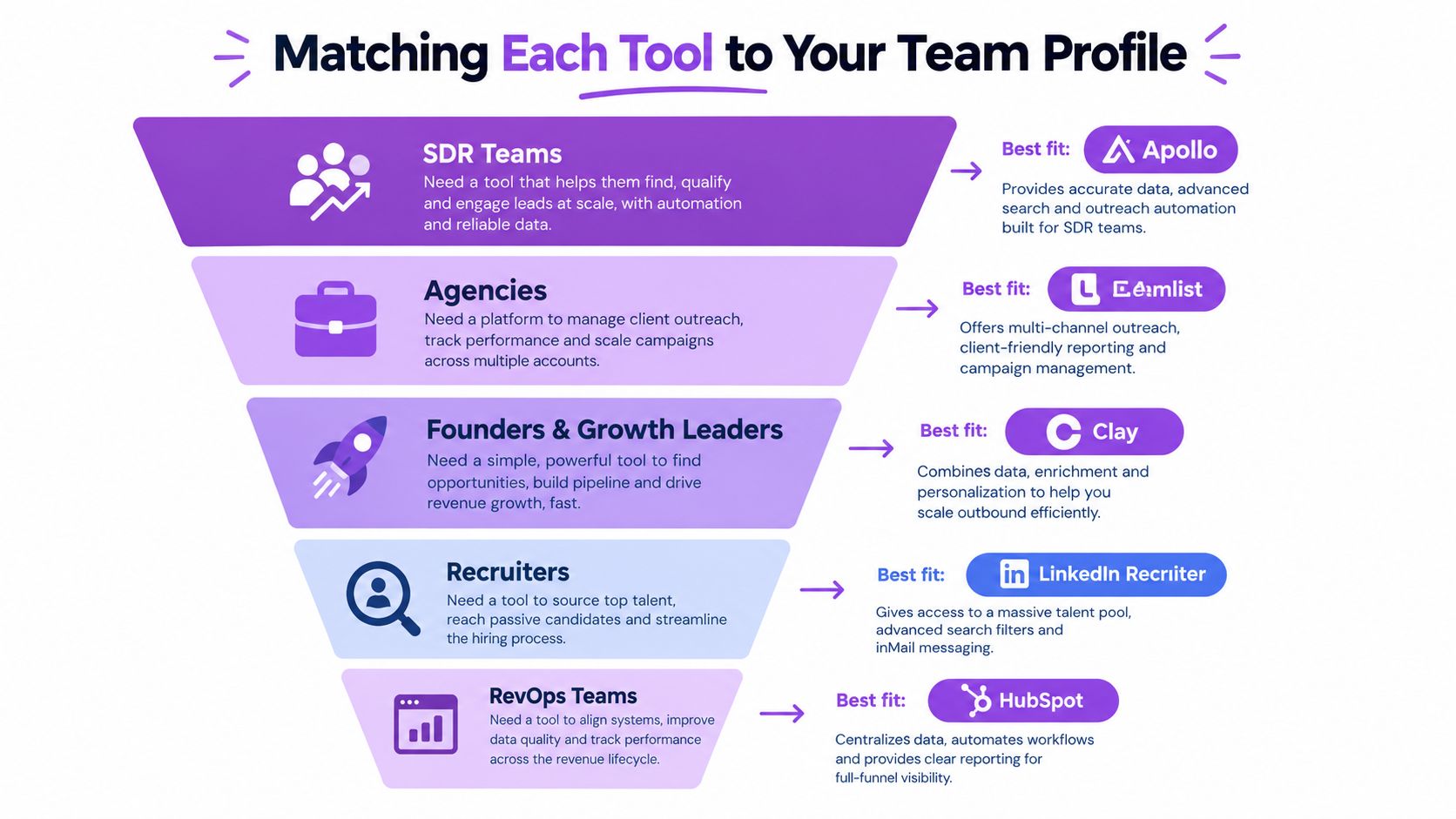
SDR teams focused on LinkedIn may have little reason to change platforms if their existing Dripify or Expandi workflow meets their requirements. If shared inbox access, email steps, and deeper CRM synchronization are not priorities, migration costs can outweigh the benefits of additional features.
Agencies managing client outreach should prioritize workspace separation, permissions, and reporting access. Test whether a manager can pause one client's activity without affecting another's. Confirm who owns exported lead data and how records can be transferred if a client leaves.
Founders and small growth teams should examine where channel handoffs create work. If one person manages LinkedIn while another runs email elsewhere, a unified sequence, shared lead pool, and CRM synchronization may reduce manual reconciliation and clarify which interactions precede a meeting.
Recruiters should test ownership and response coverage, particularly where multiple people may contact the same candidate. RevOps teams should focus on auditability, deduplication, and whether contact and activity records arrive in the CRM consistently enough for reporting.
The practical distinction is between a team that primarily needs a capable LinkedIn sending workflow and one that needs coordination across channels, seats, or clients. Buy for the latter only if those requirements are real and the platform passes the corresponding tests.
A Decision Framework for Choosing the Right Platform
Feature demonstrations can make competing platforms appear similar. To distinguish them, evaluate the same operational tasks in the same order for each candidate.
The sequence of gates reflects potential business impact. Duplicate outreach can go unnoticed until prospects receive conflicting messages. Poor reply coverage and inaccurate CRM data undermine follow-up and reporting. Manager controls matter as well, but they cannot compensate for failures in the first three areas.
Apply identical tests to Dripify, Expandi, and Flowkon rather than relying on different vendor demonstrations. Dripify or Expandi may satisfy the requirements of a smaller, single-channel team. Flowkon's stated shared extraction, multichannel flow, and centralized inbox are intended for teams coordinating leads and conversations across seats; validate those workflows with your own data before drawing a conclusion.
Once a platform passes the operational tests, assess whether the outreach motion produces incremental value. Keep a comparable group of leads out of LinkedIn steps during the trial and compare meetings booked with the group that receives them. Then examine response and handoff discipline. Effective follow-up strategies for sales teams require a process the whole team can execute consistently, not just a tool that schedules messages.
Choose the platform for the workflow your team expects to run in six months, not only the campaign it runs today.
How to Migrate Without Losing Momentum
Clean lead and suppression data before moving campaigns. Export active lists, compare them against CRM records, and identify prospects who opted out, replied negatively, or are already in an active conversation. Enrolling those contacts in a new platform would carry existing problems into the new workflow.
A practical migration sequence
- Document current campaigns: Export or capture live sequences, templates, and step timing. Identify which campaigns generated meetings and retire those that did not justify migration.
- Establish a shared lead pool: Start with one Sales Navigator extraction, define ownership by territory or account, and have the team work from a common source instead of separate private lists.
- Connect the CRM before sending: Map fields, configure activity logging and opt-out updates, and test the integration using internal contacts.
- Pilot in parallel: Keep existing campaigns running while a small group tests the new platform on a fresh, nonoverlapping list. Measure duplicate incidence, reply handling time, and CRM accuracy alongside campaign outcomes.
- Set pacing and permissions: Configure account-level activity settings, approval rights, and pause authority. Make sure the team understands LinkedIn's stated position on automation and the limits of vendor safety claims.
Explain the migration in terms of the work it changes. Representatives need to know who owns the shared lead pool, who covers replies during absences, and how duplicate outreach will be prevented. Assign owners for those functions during the first month rather than assuming the software will establish the process for you.
Move campaigns as they conclude instead of imposing a single cutover date. Rebuild successful sequences in the new platform using cleaned lists while allowing existing enrollments to finish in the old tool. This reduces the need for a bulk transfer and preserves access to historical conversations where they occurred.
If your team needs shared lead extraction, LinkedIn and email sequencing in one campaign, centralized reply handling, and CRM synchronization, Flowkon is designed around that coordinated workflow. Pilot it on a small list and evaluate duplicate prevention, reply coverage, suppression, and data quality against the same criteria you apply to Dripify and Expandi.






.svg)

