
The cheapest seat is the advice teams often hear first, and it is the advice that most often misleads them. A low monthly price only covers the software line. It does not cover a restricted LinkedIn account, a sequence that stalls for days, or the hours someone spends cleaning up duplicates and missed follow-ups. This Meet Alfred review treats that gap as the purchase question: what the seat costs after account risk and cleanup time, not what the pricing card shows.
Meet Alfred fits a founder, a solo SDR, or a small team that runs LinkedIn-first sequences and wants one cloud tool to schedule invitations, messages, and follow-ups. It is a weaker fit if you need fast human support, a promise that automation is safe on LinkedIn, or a bill you can forecast without reading the fine print. Nobody can give you that promise. The account owner still carries the policy risk.
Is Meet Alfred Worth Buying and What Does It Cost
Buy the tier that covers the channels you send. The Meet Alfred pricing page lists Individual at $29, Teams at $39, and Business at $49 per user per month on annual billing, with Enterprise priced through a custom quote. Those figures are the annual-commitment rates, so month-to-month billing costs more than the card suggests. Check the live numbers on that page before you budget, because pricing pages change.
The published lineup splits into LinkedIn-only and multichannel. Teams at $39 and the custom Enterprise quote sit between and above those two tiers, so use the trial period to confirm which channels they include before you commit seats.
Why the tier beats the headline
A LinkedIn-only plan cannot move a prospect into email. A founder sending connection requests, messages, follow-ups, and profile visits can stay on Individual. An SDR team that coordinates LinkedIn touches with email follow-up needs the multichannel tier, and buying the cheaper plan means rebuilding the sequence later on a contract you already paid for.
The page advertises unlimited campaigns and unlimited steps. That matters for an agency judging capacity across client accounts. It does nothing for a bad list: unlimited steps run a weak sequence more times, they never fix the targeting.
Annual contracts hide more than a discount. Read up on hidden costs in annual software contracts before you lock a year, because picking the wrong tier is expensive to unwind mid-term. Count only seats that send messages. A manager who reviews replies can work from a shared view unless the vendor forces a paid login.
What the evidence actually supports
Reviewers keep naming the same strength: simple setup and hours saved on repetitive steps. The recurring weaknesses are low support ratings, weak value-for-money scores, reliability complaints, and policy exposure that stays with the LinkedIn account owner. An agency running several client accounts should only move forward with written governance and a tested kill switch.
For a side-by-side on seat pricing, compare Flowkon's plan structure, or book a demo and chat with sales first. The sensible sequence is a two-week pilot on the tier you believe you need, then the annual signature.
What Reviewers Say About Ease, Support and Value
The review sites do not agree on Meet Alfred, and the disagreement itself is worth reading. A G2 listing for Meet Alfred is one snapshot. Other aggregators paint a noticeably harsher picture, with overall scores in the lower half of the scale and only a minority of reviewers willing to recommend the product.
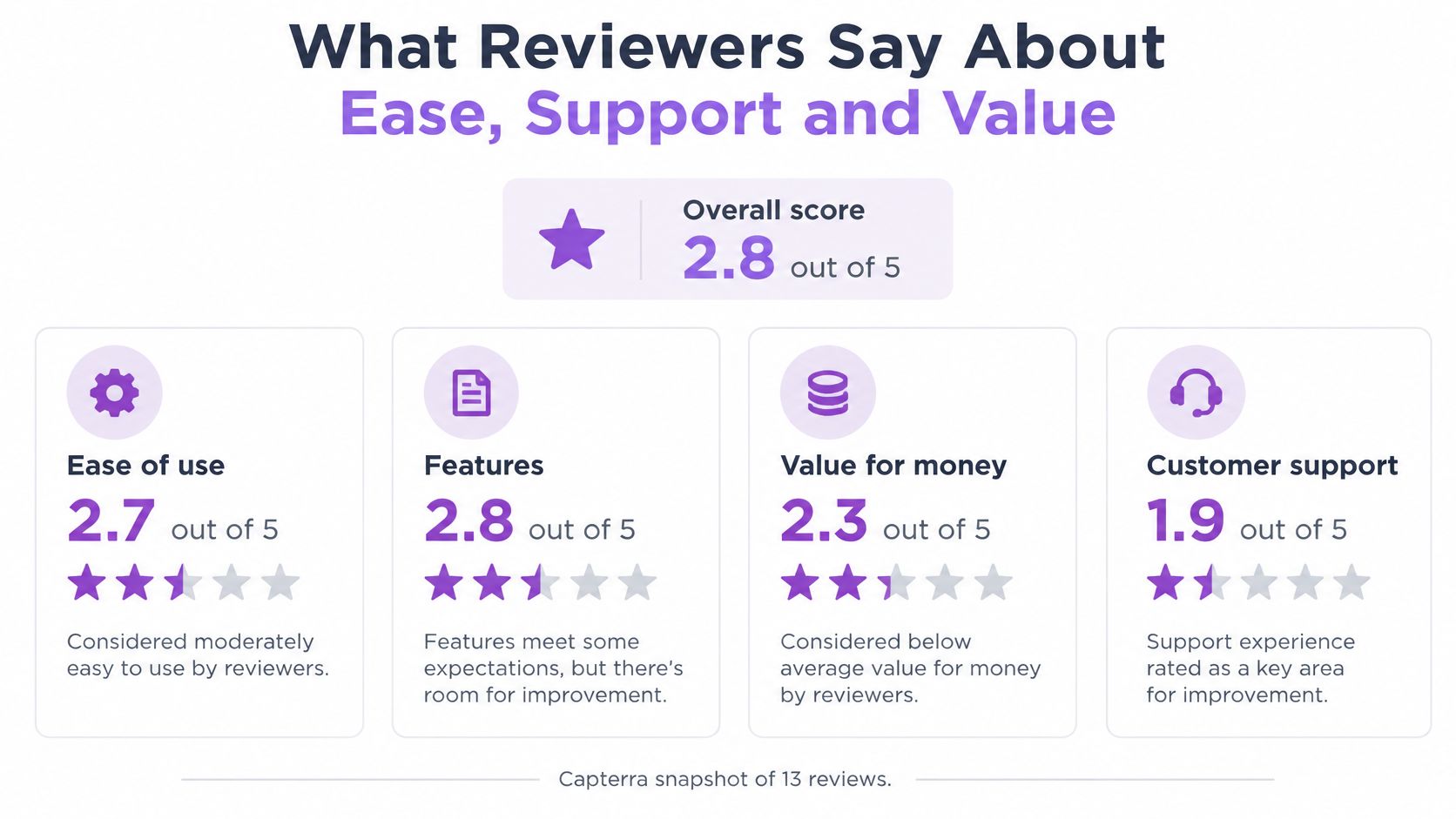
The pattern inside the harsher snapshots is consistent. Ease of use and features land in the middling range. Value for money scores lower. Customer support is the weakest criterion by a clear margin.
How to read the gap
Review counts vary across G2's own pages and between aggregators, and they shift with each update cycle, so any single count is a snapshot rather than a census. What stays consistent is the shape of the feedback. Reviewers praise ease of use and time saved on repetitive steps. The recurring complaint is slow customer support.
Middling ease scores against a bottom-ranked support score is a practical divide, not a rounding error. A team with an internal owner who builds and fixes sequences can live with slow replies. An agency that needs a same-day fix on a client account cannot, and the weak value-for-money score says the seat starts feeling expensive once support and reliability enter the picture.
That is the part of the fee nobody prices in. When a sequence stalls or an account runs into a LinkedIn restriction, the cleanup hours land on your side of the invoice, and a cheap seat with slow support stops being cheap. For contrast, Flowkon has a 5.0 rating on G2, based on 32 reviews. Treat that as its own snapshot, the same way you should treat every Meet Alfred number.
Practical rule: Check the review date, the review count, and whether the complaint is about the product or about billing. A score built on a handful of reviews is not the same evidence as one built on several times that.
A team that writes its own sequences and names one owner can tolerate slow support. A team that outsources fixes to the vendor will feel that bottom-ranked support score every week.
How Meet Alfred Runs LinkedIn and Email Sequences
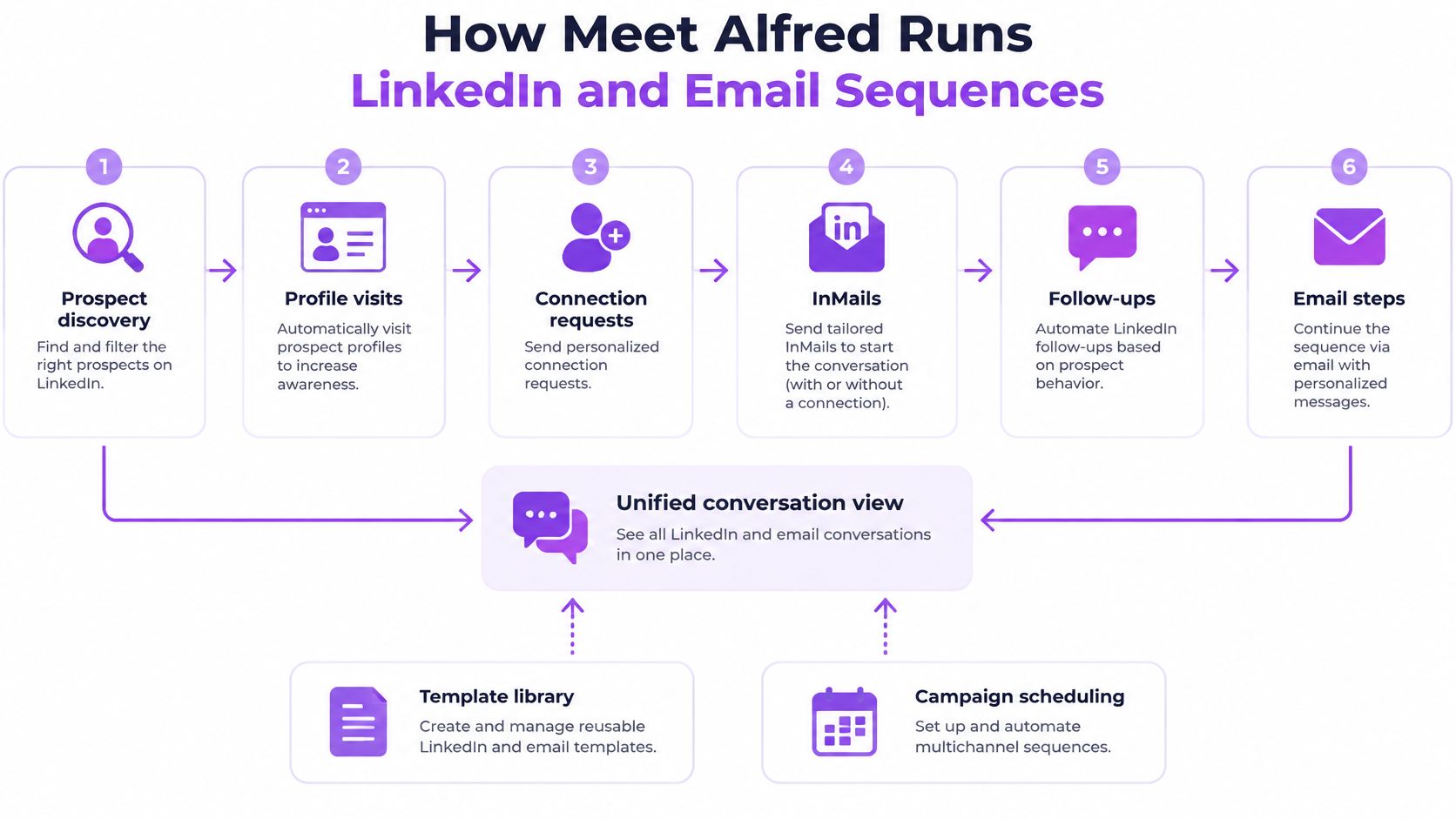
Orchestration is where this product earns its seat. A SalesHive vendor teardown describes a cloud app that can automate profile visits, connection requests, InMails, follow-ups, email sequences, prospect discovery, conversation management, and campaign scheduling. Reported extras include a LinkedIn-focused CRM, a unified inbox, a template library, lead finding and enrichment, team collaboration, and integrations through Zapier, webhooks, and APIs.
The walkthrough below shows how those steps sit in one flow.
Automation raises activity volume. Buyer relevance is a separate problem. A sequence with high sends and few positive replies is a failing sequence, even when every step fires on schedule.
A build order you can audit
- Load the target list from Sales Navigator or a CSV. Confirm in the trial that those imports exist for your plan, because public write-ups do not settle that for every tier. Check that the row count matches the file.
- Enrich the fields you will use, then remove duplicates. Check that one person is not in two live campaigns.
- Write a short connection note that names something specific. Check delivery status on that step, not just the queue.
- Wait two to three business days before the first follow-up. Treat that gap as a starting point and check that the delay held.
- Send a short follow-up that points at the profile rather than a generic pitch. Check reply attribution so you know which variant earned the answer.
- Add an email step only for people who have not replied, and only on a plan that includes email. A flow that creates, schedules, and tracks email campaigns inside one sequence is the pattern described in this guide to combining LinkedIn and email outreach. Check suppression so opted-out contacts never receive that step.
- Route positive replies to the CRM and read the unified inbox daily. Check that a reply paused the sequence for that person.
Sample connection note: "Hi Dana, saw your team is hiring two SDRs for the EMEA launch. Is outreach capacity part of that plan?"
Sample follow-up after two business days: "Dana, one idea on tracking reply rates by sequence variant, worth a look?"
What to measure instead of send volume
Benchmark connection acceptance, positive-reply rate, qualified-meeting rate, bounce rate, and time-to-response by sequence variant. Campaign-level delivery logs, per-step status, reply attribution, suppression, exportable activity, and CRM sync matter more than the headline channel count.
Price the sequence, not the seat. A cheap plan stops looking cheap once you add the hours spent rebuilding a stalled campaign or cleaning up after a flagged LinkedIn account. If you are still shortlisting tools, compare sales engagement software shortlists against those same checks, not against feature grids.
LinkedIn Policy Risk and Account Limits to Plan For
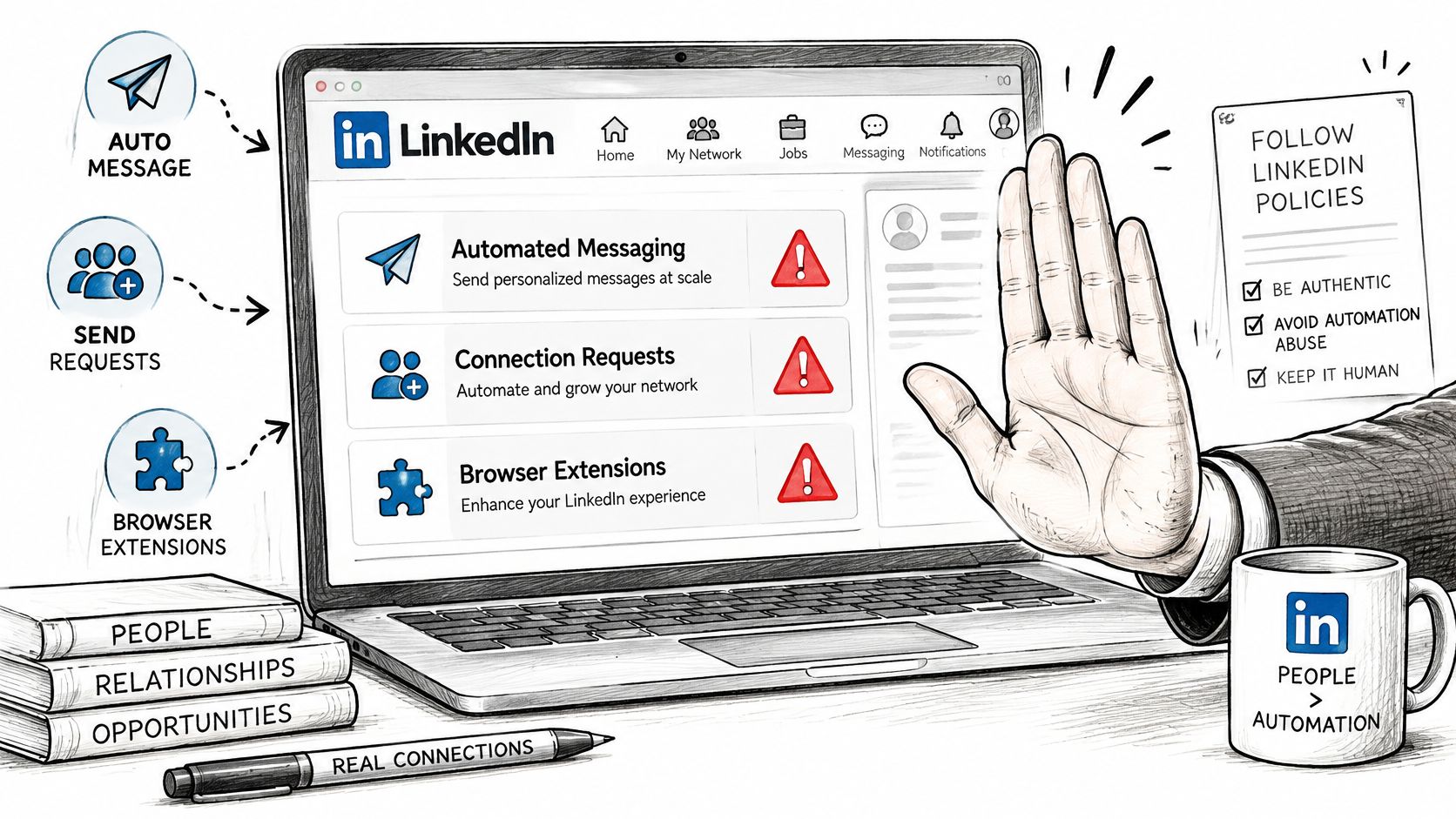
Pacing does not turn a prohibited action into an allowed one. LinkedIn's help on automated activity prohibits third-party software, including bots, crawlers, browser extensions, and other unauthorized automation that scrapes data or automates adding contacts, sending messages, liking, commenting, or sharing. Violations can result in account restriction or shutdown. Randomization and "human-like" delays may change the pattern. They do not create authorization.
Invitation limits still apply to the person
LinkedIn's invitation-limit guidance says every member, Basic and Premium, is subject to invitation limits. When an account hits its limit, LinkedIn may temporarily restrict further connection requests, and that restriction typically lasts one week. Sending many invitations in a short period, a high number of ignored or pending invitations, or requests marked as spam can trigger restrictions. An account with too many outstanding invitations may need to wait up to one month before sending more.
A campaign is not "working" because the software queued a large batch. List quality and follow-up discipline are operating requirements.
Controls a team can actually run
- Daily cap: Set sends well below the account's real ceiling, then stop when acceptance quality drops.
- Weekly pending review: Withdraw stale invitations instead of stacking more on top.
- Pause rule: Halt the sequence when acceptance falls, before LinkedIn does it for you.
- Named owner: One person per LinkedIn seat, so a warning has a human attached.
- Kill switch: One action that stops every sequence, tested before a client account is live.
Also review opt-out propagation, audit logs, credential handling, and what you do the hour an account is suspended. More detail sits in this note on practices that reduce restriction risk. Good practice is not a guarantee.
Native LinkedIn workflows and approved APIs are the lower-exposure option. They are often slower to set up. Session-based automation can reach more people and puts the account itself at risk.
Discount expected pipeline by a restricted account: lost message history, paused campaigns, remediation time, and possible privacy work. Outsourcing the clicks to software does not move that cost off the account owner.
Reliability Gaps and the Real Cost of Ownership
A cheap seat gets expensive when step three never leaves the building. On Trustpilot reviews of Meet Alfred, user reports describe delayed or missing campaign steps, reconnection problems, email bounces, slow escalation, and unresolved support cases. One review describes Step 3 messages failing for 12 days, and another reports paid-account technical issues with a denied refund request. One reviewer quoted a price near the mid-tier seat cost, but reviews rarely turn that fee into interrupted sequences, manual fixes, duplicate outreach, lost meetings, or staff time.
An illustration, not a quote
Say five SDR seats sit on annual billing at the Individual plan's $29 per user per month. Software is $145 per month. Suppose a stalled sequence stops follow-ups for one week and needs two hours of cleanup. At an assumed staff rate of $50 per hour, that is $100 per week of labor the subscription line never shows, before any lost meeting. Twelve days of failed Step 3 messages is longer than that illustration, and the meetings in that window do not come back because the invoice was small.
A lower software price is not a lower cost if support delays push the team back into spreadsheets and manual sending. Reliability cost scales with seats and campaign volume. Agencies and SDR teams live on timely, multistep follow-up, so a silent miss hits revenue, not just the admin. This is the trade-off in the sticker price: the fee is fixed, but the failure cost lands on whoever owns the account and the pipeline behind it.
Questions to ask before you sign
- Retries: Does a failed step retry without sending a duplicate?
- Stranded people: Can a manager see every prospect stuck mid-sequence?
- Outages: Are they announced, or do you discover them in the inbox?
- Commitment: Is there a service level or a credit policy?
- Refunds: What is the written policy after you upgrade?
- Cleanup time: How long do reconnection and bounce cleanup usually take?
The two-week pilot
Run one real sequence on the tier you intend to buy. Track missed steps, duplicate sends, hours spent on fixes, and support response time per ticket. Compare that log with the plan price. If the tool cannot show stranded prospects, or if a ticket sits for days, the annual discount is not a saving.
Meet Alfred Compared With Flowkon on Key Criteria
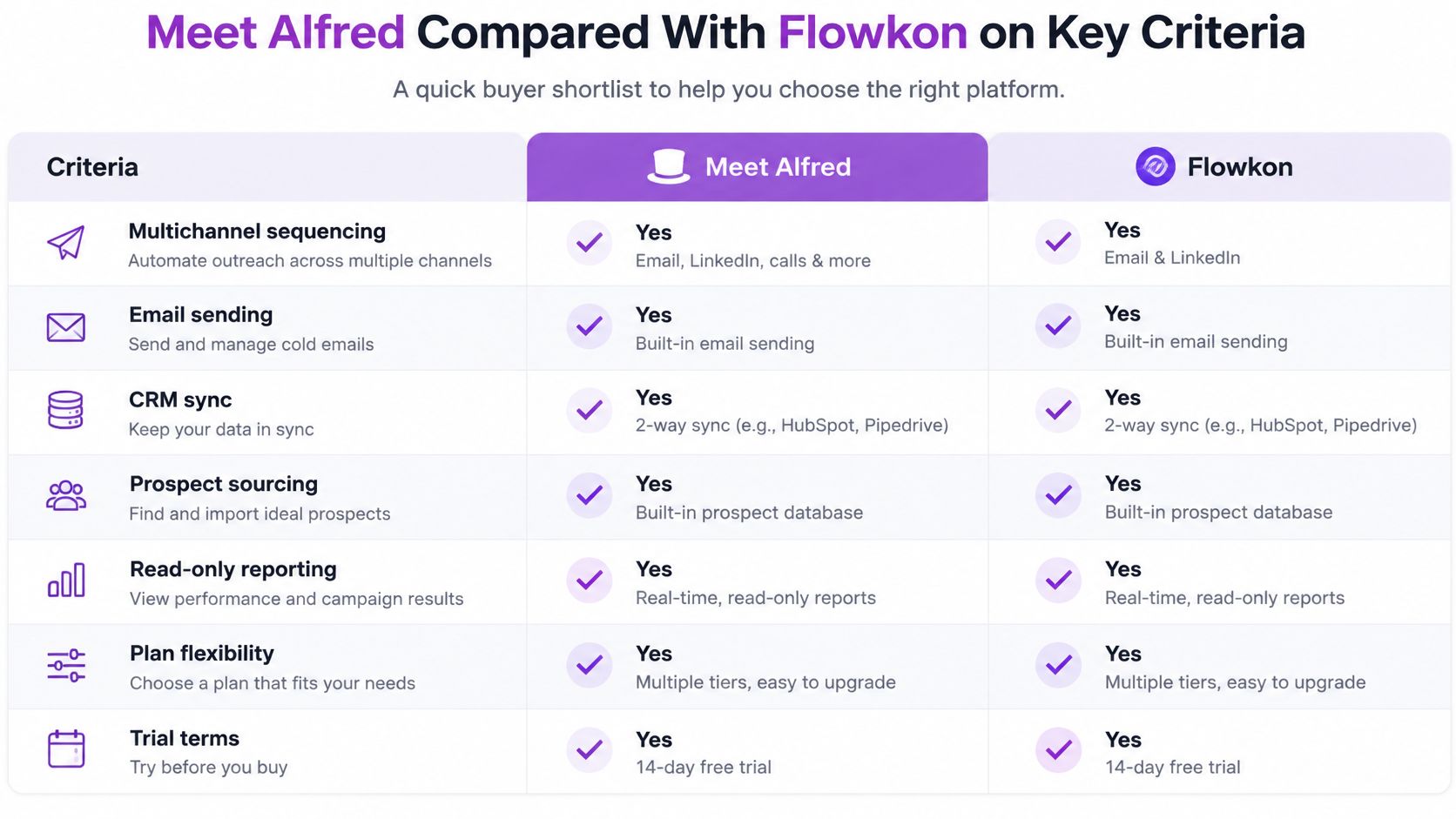
Flowkon has the stronger functional fit when your team needs more than scheduled outreach: a visual sequence builder, conditional branches that exit prospects when they reply, LinkedIn and email touchpoints in one flow, and workflows for agencies and recruiters. Meet Alfred still has a distinct advantage if X is an essential outreach channel. Shortlist on the functions you will actually use, then on price per active seat. The same checks work for any other tool you are still holding. If you want a wider set of options, browse leading sales engagement solutions and score them on these rows, not on slogans.
Where the purchase actually changes
Short verdict: Choose Flowkon if your team needs LinkedIn and email in one visual sequence, with reply detection and conditional branches that stop follow-ups when a prospect responds. Choose Meet Alfred if X is essential to your outreach. Test the workflow you will actually use before committing seats.
Channels and email behavior. Meet Alfred's multichannel tier can move people across LinkedIn, email, and X. Flowkon combines LinkedIn and email touchpoints in one campaign, and its reporting tracks email opens and clicks. If you want the next step to depend on an open or a click, test that exact condition in a trial rather than assuming the reporting metric also works as a trigger. X matters if your buyers answer there; otherwise, compare the LinkedIn and email workflows you will actually use.
CRM. Meet Alfred's CRM is LinkedIn-focused, with Zapier, webhooks, and APIs. Flowkon has native connections to HubSpot, Salesforce, Pipedrive, Zoho, and Monday.com, plus webhooks. On eligible plans, Flowkon sends contacts, activities and replies to the CRM; this is Flowkon-to-CRM sync, not a claim of two-way sync. Check supported fields and webhook behavior for your setup.
Agencies, freelancers and access. Flowkon's agency workflow lets agencies manage multiple client campaigns in workspaces with role-based permissions. Freelancers can run LinkedIn and email outreach in the same platform. One teammate can source prospects using Sales Navigator and share them with the team; assign each prospect to one campaign owner so two teammates do not contact the same person. A viewer role gives stakeholders access without a sending role. Meet Alfred offers lead finding and enrichment, but test its client-account controls and reporting exports before choosing it for agency work.
Commercial terms. Published Meet Alfred tiers run from $29 to $49 per user per month on annual billing, plus custom enterprise. Plans on our side can be upgraded or downgraded at any time. Flowkon offers a 7-day free trial for first-time subscriptions per user account; check the signup terms before starting additional subscriptions. Anything this research did not confirm about Meet Alfred's trial, reporting, or Teams channel scope should be checked on the vendor site before you decide. Match the channel mix and the CRM stack first. Price per active sending seat comes after that, and only after the two-week reliability log.
Flowkon runs LinkedIn and email in one sequenced campaign, with a unified inbox, CRM sync, and a trial you can start without a card. If this Meet Alfred review left you wanting clearer governance, delivery logs, and a kill switch you can test, see how that workflow is set up on Flowkon.