
You're staring at a prospect's LinkedIn profile, the message box is empty, and the actual question is simple. How to reach out to someone on LinkedIn without sounding salesy, getting ignored, or burning the account? The short answer is this, qualify first, choose the right outreach method, then send a short message with a genuine reason to connect. If you want the fastest path to the right play, jump to Which way should you reach out, Before you message anyone, or 12 LinkedIn message templates that get replies.
Which way should you reach out
If you're a founder, agency owner, or revenue lead, the first mistake is picking a tactic before you know the goal. A connection request, a direct message, InMail, a mutual intro, and content engagement first are not interchangeable. The right choice depends on whether you're trying to win a client, open a partnership, ask for a referral, or invite someone onto a podcast or event.
| Goal | Best method | Why this works |
|---|---|---|
| New client | Connection request with a note, then a direct message after acceptance | It gives you a credible reason to connect before any pitch. |
| Partner | Mutual introduction or connection request with context | A shared contact lowers friction and adds trust. |
| Referral | Direct message to a first-degree connection | Existing connections are easier to approach with a specific ask. |
| Podcast or event guest | Connection request or InMail, depending on access | You need a concise reason and a low-friction invitation. |
Many teams get lazy here. They treat a connection request like a mini-email campaign, or they use InMail because it feels more direct. In reality, LinkedIn InMail vs connection request is a choice between a paid, reply-tracked message path and a scarce connection note that should be reserved for high-value prospects.
For a practical example of why outreach gets ignored, I'd also read why your LinkedIn outreach is getting ignored and how to turn it around. The pattern is almost always the same, wrong target, wrong method, too much talking.
Practical rule: if you don't have a clear shared context, don't start with a pitch. Start with a reason to be relevant.
For LinkedIn outreach for agencies, this distinction matters even more. Agency founders usually have multiple offer types, SEO, paid media, design, dev, consulting, and the wrong opening message can make all of them feel noisy. The cleaner approach is to pick one reason to reach out, one recipient segment, and one method.
If you only remember one thing, remember this. How to reach out to a potential client on LinkedIn is not about volume first, it's about fit first. The message is the last step, not the first one.
Before you message anyone
The best outreach starts before the note is written. In our agency campaigns, the requests that got accepted fastest almost always came after one or two genuine comments on the prospect's posts. That small bit of familiarity does more for trust than a polished opener. A quick profile check also tells you whether the person is worth contacting now or later.
Look at role, company, geography, recent activity, and one obvious hook you can refer to without forcing it.
Do the quick research first
Use LinkedIn search, scan the person's last few posts, and check whether their company has posted anything that changes the context. If they just launched a product, hired a new team lead, or posted about a problem your service solves, that is a real opening. If nothing stands out, do not invent one.
A useful filter is simple. Can I explain why I'm contacting this person in one sentence without lying, guessing, or overexplaining? If the answer is no, keep moving.
Warm the name before you send the request
A lot of outreach fails because the sender is technically correct but completely unfamiliar. Commenting thoughtfully on one or two posts before the request lands makes your name feel less random. You do not need a speech, just a clean, relevant comment that shows you read the post.
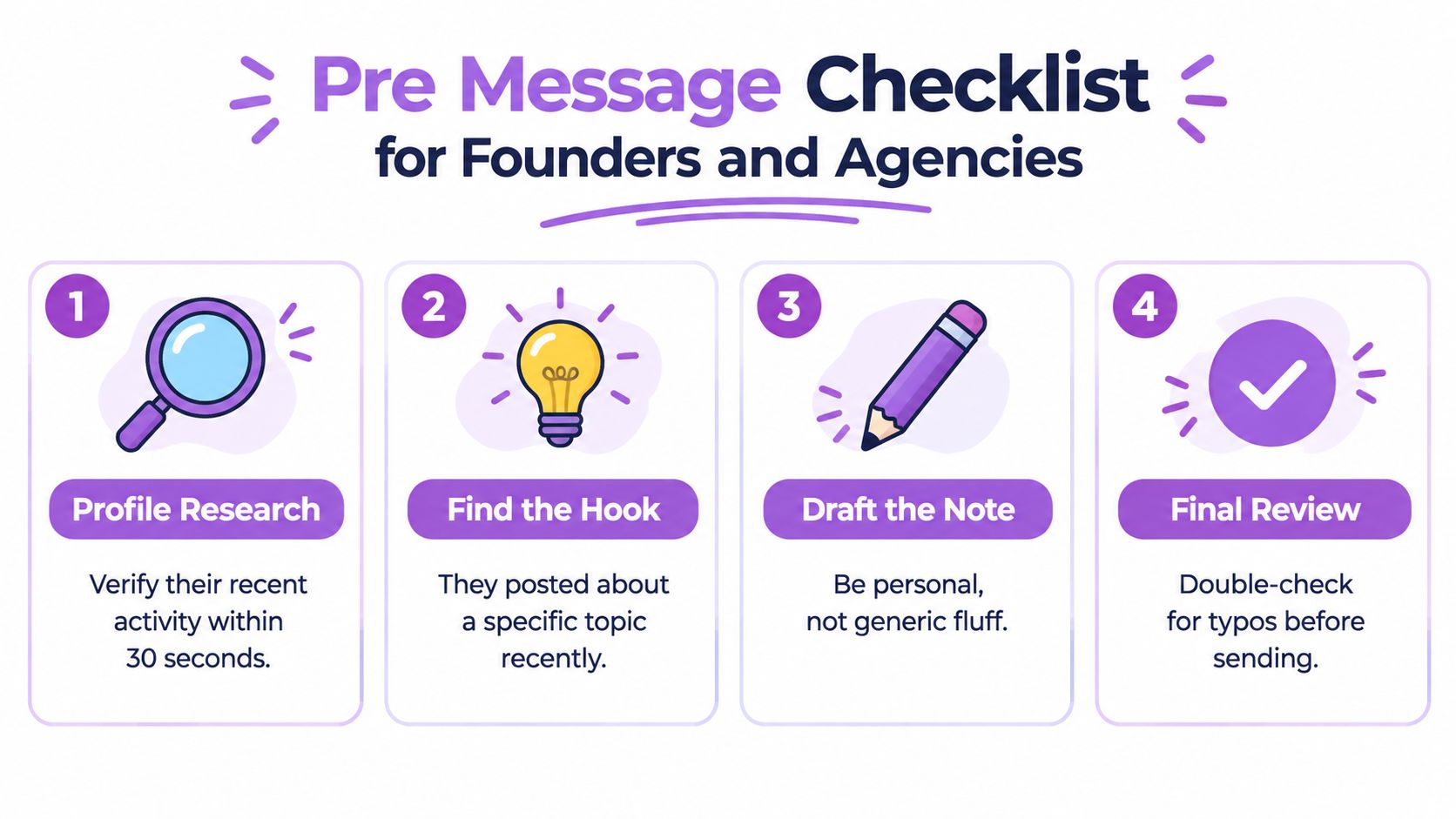
Founder checklist: confirm the person's role, find one real hook, choose the right outreach path, and read the draft out loud before sending.
My agency has tested this across SEO, design, and consulting campaigns. The messages that worked best were never the longest ones. They were the ones where the sender already felt familiar because we had interacted with the prospect's content first, then sent a note that matched the context instead of trying to create one.
Here is the tight workflow I would use:
Profile scan: confirm the person is a fit.
Hook check: find one recent post, job move, or company change.
Message draft: keep it personal and short.
Final review: remove fluff, typos, and anything that sounds like a pitch.
If you are building this into a process, LinkedIn automation tools such as Flowkon's campaign builder can help with pacing and workflow, but the human check still matters. Without that, you are just sending faster, not better.
Five ways to reach out on LinkedIn
The right outreach path depends on your goal and how warm the relationship already is. If you choose the wrong one, you add resistance before the conversation even starts.
1. Connection request with a note
Use this for people you do not know yet. Keep the note short, name the reason for connecting, and avoid pitching in the opening line. LinkedIn limits personalized connection notes to 200 characters according to LinkedIn Help, so every word has to earn its place.
Best use: someone you want in your network before you start a conversation.
2. Direct message
If they are already a first-degree connection, use direct message. It usually works better than trying to squeeze a full conversation into a request note because the channel is already open. For how to message someone on LinkedIn who is not a connection, do not force a DM unless you already have another path in, such as a shared context or an earlier exchange elsewhere.
3. InMail
InMail works when you need to contact a non-connection without sending a request first. LinkedIn says InMail response-rate calculations use replies received within 30 days. That makes it useful for tracking, but it does not make the message itself any easier. The note still has to be clear, relevant, and worth opening.
4. Mutual introduction
Use a shared contact when one is available. It is the least cold option, and it tends to work well for partnerships, senior decision makers, and referral asks. A warm introduction usually lands better than a random name drop because the trust transfer is real.
5. Engage with their content first
This is the slower path, and it often pays off with higher-value accounts. Follow them, leave a thoughtful comment on a relevant post, and let your name become familiar before you ask for anything. For teams that want broader context, these B2B social lead generation tips show how social touches support pipeline without forcing a hard pitch.
For someone who is not a connection, the clean sequence is simple:
Send a short connection request with one real reason to connect.
Wait for acceptance.
Send a first message that thanks them and asks one relevant question.
Follow up once with added value if they do not respond.
The first message should usually stay under 60 words. Senior people skim fast, and long messages get treated like noise.
What senior people actually respond to
CEOs and founders respond to relevance, brevity, and a point of view. They do not need your background story, and they rarely care how excited you are to connect. They care whether the message gives them a clear reason to reply.
The strongest messages do three things:
Name the trigger: role change, recent post, hiring move, company update.
Say why them: one real reason, not fake flattery.
Ask one question: simple enough to answer quickly.
A weak version says, “Loved your background, would love to connect, and I'd be happy to share what we do.” A stronger version says, “Saw your team is expanding into Europe, are you handling outbound locally or centrally?” The second one invites an actual response.
If you want more examples of how social touches support pipeline without turning into spam, the logic behind that approach is close to the one used in practical outreach frameworks. The principle matters more than the wording.
12 LinkedIn message templates that get replies
Read every message before you send it. If a variable is wrong, blank, or too broad, the template stops working. Keep one segment per message, not all twelve sent to the same list.
1. Cold client outreach
Hi {first_name}, saw you lead {job_title} at {company}. I work with teams on {topic}. Are you handling that in-house right now, or with outside support?
Why it works: it opens with a real role-based hook and asks one easy diagnostic question.
2. Someone who visited our website
Hi {first_name}, noticed someone from {company} was on our site. Are you currently looking at {topic}, or was it just a quick browse?
Why it works: it references interest without pretending you know more than you do.
3. Someone who viewed our profile
Hi {first_name}, thanks for checking out my profile. Is there a specific reason you're looking into {topic} right now?
Why it works: it keeps the tone light and gives them a simple way to explain the view.
4. Email bounced or out-of-office reply
Hi {first_name}, my email bounced, so I'm trying you here instead. Is there a better contact for {topic}, or should I follow up with you later?
Why it works: it explains the channel switch and keeps the ask practical.
5. Mutual connection
Hi {first_name}, {mutual_name} suggested I reach out. We work with teams on {topic}. Would it make sense to compare notes sometime?
Why it works: it uses the shared contact as a trust bridge without overexplaining.
6. Partnership
Hi {first_name}, I saw what you're building at {company}. We may overlap on {topic}. Open to a quick conversation about whether there's a fit?
Why it works: it sounds collaborative, not transactional.
7. Referral request
Hi {first_name}, you came to mind for {topic}. Who would you suggest I speak with if I'm trying to solve this properly?
Why it works: it asks for help in a way that's easy to answer and hard to ignore.
8. Asking an expert for advice
Hi {first_name}, I liked your recent post on {topic}. You seem deep in this space. Would you be open to one quick question?
Why it works: it respects their expertise and lowers the commitment bar.
9. Networking
Hi {first_name}, I follow your work in {industry}. I'd like to connect and keep an eye on what you're building. Open to that?
Why it works: it's direct, low-pressure, and doesn't ask for a favor.
10. Podcast or event invite
Hi {first_name}, I'm putting together a discussion around {topic} and thought of you. Would you be open to a guest invite?
Why it works: it leads with relevance and makes the ask feel specific.
11. Re-engaging an old lead
Hi {first_name}, we spoke a while back about {topic}. Has anything changed on your side, or is this still on the back burner?
Why it works: it assumes continuity without being pushy.
12. Post-call follow-up
Hi {first_name}, good speaking today. Based on our call, is the next step still to review {topic}, or would you rather pause for now?
Why it works: it's clean, honest, and easy to answer.
Draft rule: if the message takes more than one breath to read, cut it again.
For agencies, the best connection request template is usually the shortest one. My own experience matches the owner's note in the brief, short, specific, and no pitch. In practice, a message like this wins because it feels human: “Hi {first_name}, I saw you're leading {job_title} at {company}. Always good to connect with people working on {topic/industry}. Would be great to have you in my network.”
The follow up sequence that keeps replies coming
The first touch rarely does the work. A reply usually comes from a follow-up that adds something useful, asks for a smaller commitment, or changes the angle enough to feel worth answering.
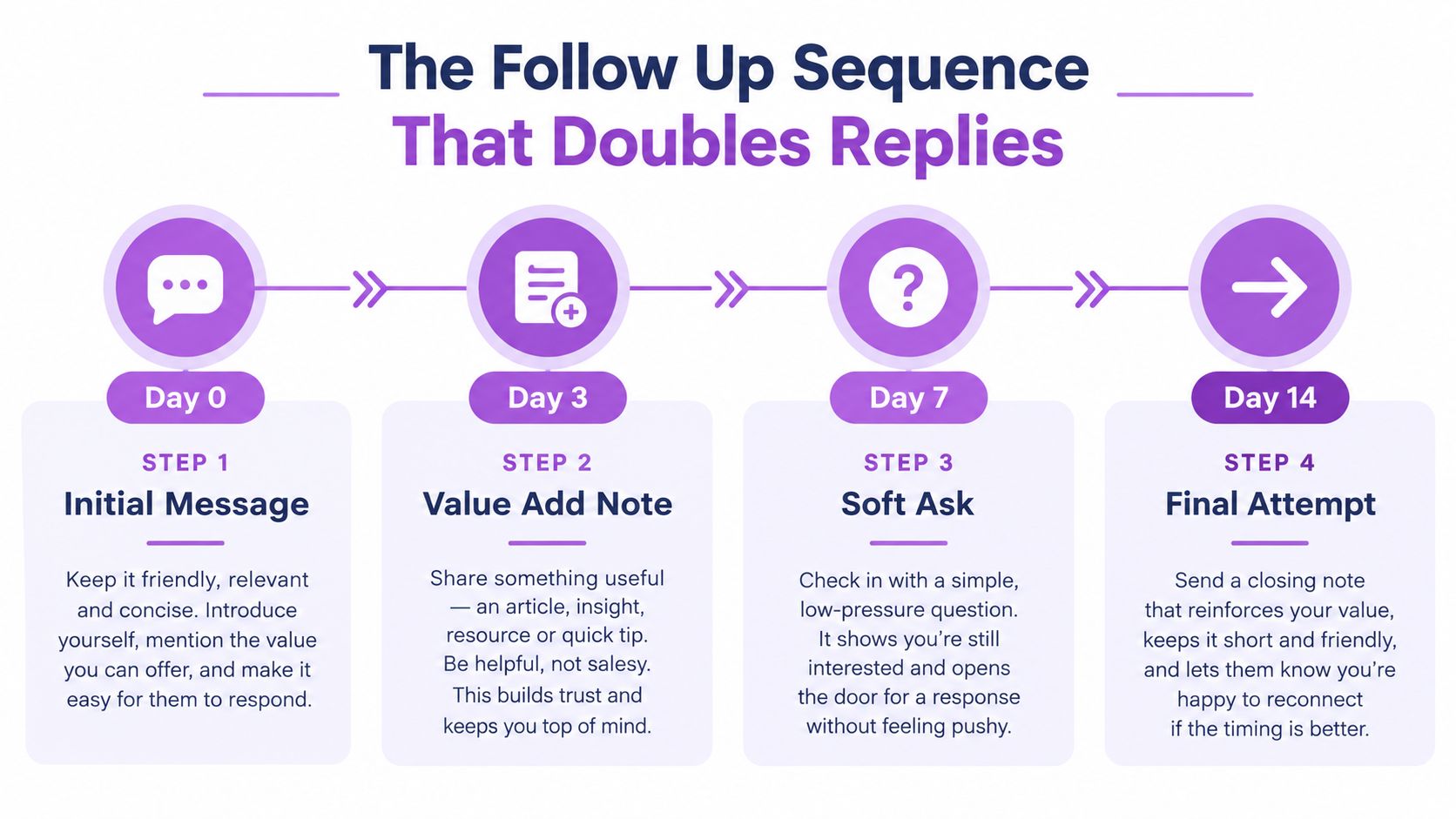
A practical four-step cadence
A good sequence starts before the message. View the profile, engage with a post only if the interaction is relevant, then send the connection request with a short note.
After acceptance, the first message should be light and specific. Thank them, reference the reason for connecting, and ask one question that is easy to answer. If they go quiet, wait, then follow up with something that adds context rather than repeating the same pitch.
Here is the cadence I use most often:
Day 1. Warm the prospect by viewing the profile and reacting to a post only when there is something real to react to.
Day 2. Send the connection request with the short note.
Day 3 after acceptance. Send the first message, thank them, and ask one relevant question.
Day 7. Send one follow-up that adds a useful observation, resource, or clarification.
That timing works because it gives the prospect room to respond without letting the thread go stale. In the campaigns we run, the second follow-up is usually where the extra replies come from, while later touches tend to lose momentum. Use that pattern as a filter, not a reason to push harder.
The wording should change with each step:
First message: “Thanks for connecting. Are you handling {topic} internally?”
Second message: “Quick follow-up, I came across something relevant to {topic}. Want me to send it over?”
Final attempt: “I'll leave this here for now. If it becomes relevant later, happy to revisit.”
For teams that mix LinkedIn with email, the cleanest approach is one campaign flow with both channels planned together. This guide on how to combine LinkedIn and email outreach in one sequence shows how to hand off without making the outreach feel fragmented.
If they reply but are not ready to buy, answer directly, send the relevant asset, and keep the thread moving only if the signal stays warm. If it cools off, stop there.
Mistakes, safety, and how to avoid LinkedIn restrictions
The fastest way to hurt a brand on LinkedIn is lazy targeting, repetitive messaging, and treating every profile like a prospect. Copy and paste the same note to hundreds of people, and the account looks automated long before any tool enters the picture.
LinkedIn's documented limits matter. Connection notes are capped at 200 characters as noted earlier, LinkedIn says members can have up to 30,000 first-degree connections in its networking help documentation, and Recruiter InMail performance is monitored. LinkedIn's policy applies a 13% response-rate threshold once 100 or more InMails are sent in a 14-day assessment window according to LinkedIn's InMail policy.
LinkedIn's User Agreement also prohibits bots and unauthorized automated methods for sending messages, adding contacts, and creating engagement in the agreement itself. Pacing and personalization do not make automation safe by default, and nobody should sell it that way.
A safer operating pattern is straightforward:
Start small: test one narrow audience before you widen the list.
Watch acceptance: low acceptance usually points to targeting, not copy.
Clean up stale invitations: don't leave dead requests sitting there.
Stop on warnings: if LinkedIn flags the account, pause immediately.
Important: a low acceptance rate usually means the list is wrong, not that the message needs another rewrite.
I've seen agencies try to fix bad targeting with more automation. It usually makes the account louder while the outreach stays irrelevant. Better segmentation, better timing, and a stronger reason to connect solve more problems than another sequence ever will.
Scaling outreach without breaking the workflow
Once the process works manually, the key question is how to scale without losing the human feel. Each model has a different cost structure, and pretending they're the same is how teams waste money.

| Model | What it gives you | Trade-off |
|---|---|---|
| Fully manual | Maximum control and the cleanest voice | Hard to scale beyond a small volume |
| In-house SDR team | Process ownership and tighter control | Training and management overhead |
| Automation tool | Sequencing, pacing, personalization, and reporting | Still needs human judgment and good ICPs |
| Outsourced team | Speed and done-for-you execution | Less control over voice and learning |
Manual outreach is the safest place to start. It's slow, but it teaches you what gets replies. Once the pattern is clear, an in-house team can take over if you want tighter control.
Automation is useful when it removes repetitive steps, not when it replaces thinking. Tools can help with dynamic variables, sequencing, inbox handling, and action pacing, but they can't guarantee safety or fix a weak offer. That's the line many teams cross too early.
A platform like Flowkon can run LinkedIn and email sequences, trigger follow-ups after acceptance, and keep reporting in one place. It's one option when you want structure without losing visibility, but the message still has to be right.
For a deeper build-out, this article on tips to build a scalable LinkedIn outreach automation system in 2026 fits well after this one.
If you want a cleaner way to reach out to someone on LinkedIn without guessing, start with qualification, then use the right message path, then follow up once with something useful. That sequence beats random volume every time. If you want help mapping that workflow to your own pipeline, Flowkon is built to run LinkedIn and email outreach in one place, with sequencing, pacing, and reporting tied to the actual campaign.