.webp)

B2B sales prospecting tools help sales teams find decision-makers, verify contact data, enrich lead records, and run outreach across channels like LinkedIn and email. The best option depends on the bottleneck in your workflow, whether that is lead discovery, data enrichment, outreach execution, or intent tracking.
If you're choosing B2B sales prospecting tools right now, the hard part is usually not finding another app. It is removing friction from a process that already feels messy. Manual research takes too long, contact data goes stale, connection requests get ignored, follow-ups slip, and outreach ends up scattered across multiple tools and inboxes. The right stack fixes that by giving each layer a clear job. One platform finds decision-makers, another enriches records, another runs LinkedIn and email outreach, and your CRM keeps the process accountable. This comparison reviews ten options by use case, pricing transparency, data role, automation depth, compliance considerations, and team fit, so you can choose the layer your process is actually missing.
TL;DR
- Choose Flowkon if your buying priority is cleaner LinkedIn and email execution in one place, especially if your team struggles with fragmented outreach, reply handling, and CRM sync.
- Choose LinkedIn Sales Navigator if your team needs a better way to find the right buyers on LinkedIn and wants stronger account research before outreach starts.
- Choose Apollo.io if you want an all-in-one platform for contact data, enrichment, and sequencing before investing in a larger stack.
- Choose ZoomInfo if you need enterprise-grade company and contact intelligence, broader coverage, and support for more complex GTM motions.
- Choose Clay if your main buying concern is data quality, lead enrichment, and personalization before prospects enter sequences.
- Choose Leadfeeder if your website already attracts the right traffic and you want to turn anonymous visits into account-level intent signals.
- Buy based on the missing layer in your workflow: database, enrichment, outreach, or intent. The best option is usually the one that removes the biggest bottleneck first.
Table of Contents
- TL;DR
- Best B2B Sales Prospecting Tools at a Glance
- Prospecting Tools vs. Lead Generation Tools vs. CRM
- LinkedIn and Multichannel Outreach Tools
- Contact and Lead Databases
- Data Enrichment Tools
- Intent Data and Website Visitor Tracking Tools
- Best LinkedIn and Multichannel Outreach Tools
- Best B2B Contact Database Tools
- Best Data Enrichment Tool
- Best Intent Data and Visitor Tracking Tool
- Best for Startups and Founders
- Best for Agencies
- Best for Sales Teams and SDRs
- Best for LinkedIn-First Prospecting
- Best for Email-First Prospecting
- Best for Enterprise Teams
- Define Your Ideal Customer Profile and Channel Mix
- Check Data Accuracy and Compliance
- Look for CRM Integrations
- Compare Pricing and Scalability
- Test with a Free Trial First
- The Core Layers Data, Enrichment, Outreach, Inbox, CRM, Analytics
- Sample Stack for Startups
- Sample Stack for Agencies and Growing Sales Teams
- Set Safe Daily Limits
- Warm Up Your LinkedIn Account
- Personalize Every Message
- Combine LinkedIn with Email
- What are B2B sales prospecting tools?
- What is the best B2B prospecting tool?
- What is the difference between lead generation and prospecting tools?
- Which tool is best for LinkedIn prospecting?
- Are there free B2B prospecting tools?
- How much do B2B prospecting tools cost?
- Is LinkedIn automation safe?
- Which B2B sales prospecting tool is best for small teams?
- What should I look for in a B2B prospecting tool?
- Do I need separate tools for data and outreach?
- How do I choose between LinkedIn prospecting tools and email prospecting tools?
Best B2B Sales Prospecting Tools at a Glance
If you want a quick answer, start by matching the product to the job. Most options in this category solve one of four problems: finding leads, enriching records, running outreach, or surfacing intent. Buyers usually get the best results when they choose for the immediate bottleneck instead of the longest feature list.
What Are B2B Sales Prospecting Tools and How Do They Work?
B2B sales prospecting tools help sales teams find, qualify, enrich, and contact potential buyers faster than manual research does. In practice, they sit at the top of the funnel and help reps work the right accounts with better data and less admin. They are not the same as a CRM, because a CRM stores and tracks the relationship after the lead exists.
These platforms usually do one or more of four jobs. They help you discover prospects, verify contact details, enrich company or person data, and launch outreach across email or LinkedIn. Recent industry coverage shows why the category has grown so quickly, with 68% of B2B companies using at least one prospecting tool and 31% using two or more tools, which makes integration a buying criterion rather than an extra, as noted in industry summaries from Sopro and Worldmetrics.
Practical rule: if a platform does not help you find, verify, enrich, or contact a buyer, it probably belongs somewhere else in your stack.
Prospecting Tools vs. Lead Generation Tools vs. CRM
Lead generation tools are about creating or identifying opportunities. Prospecting tools go one step further and help you qualify, prioritize, and reach those opportunities. A CRM, meanwhile, is the record of what happened after the work starts.
That distinction matters because many teams do not fail from a lack of leads. They fail from weak execution between lead discovery and outreach. The best setups connect the three layers, so the same lead does not get researched twice, messaged twice, or forgotten after reply.
Types of B2B Sales Prospecting Tools by Use Case
LinkedIn and Multichannel Outreach Tools
These products are built for sending connection requests, follow-ups, DMs, InMails, and email sequences in a controlled flow. They matter most when LinkedIn is part of your motion, because manual coordination across channels gets messy fast. Flowkon, HeyReach, Lemlist, PhantomBuster, and Outreach all sit in this category in different ways.
Contact and Lead Databases
Databases help teams find people and companies by role, seniority, industry, region, or company size. They are useful when the problem is list building rather than messaging. Apollo.io, ZoomInfo, and Lusha are clear examples here, and LinkedIn Sales Navigator is often the first layer for finding the right buyer profiles.
Data Enrichment Tools
Enrichment tools clean up weak lead records, fill gaps, dedupe lists, and add context before outreach. Clay stands out in this group because it is more of a workflow layer than a single-source database. This is the point where teams turn a rough list into something ready for sequencing.
Intent Data and Website Visitor Tracking Tools
These tools help you catch buying signals after someone has already shown interest. Leadfeeder is the clearest fit in this list because it identifies site visitors and turns anonymous traffic into account-level intelligence. That is useful when your website gets meaningful traffic, but leads are not flowing through forms.
Benefits of Using B2B Sales Prospecting Tools
The biggest win is time. Manual prospecting forces reps to bounce between LinkedIn, company sites, spreadsheets, CRM tabs, and email tools, which burns hours on work that software can structure better. Good systems compress research, enrichment, and outreach into one workflow.
They also improve targeting. Instead of spraying broad lists, you can filter by role, company size, geography, or intent, then prioritize the right accounts first. That matters because B2B contact data decays quickly, and verified records perform better than stale ones, as explained in UnifyGTM's coverage of B2B data decay and verification.
Personalization is another big gain. With the right stack, you can tailor outreach at scale without writing every message from scratch. The strongest teams use enrichment and trigger data to make messages relevant, then use automation to keep the rhythm consistent.
How We Evaluated the Best B2B Sales Prospecting Tools
The shortlist below uses six practical criteria: data accuracy, ease of use, CRM integration, automation, pricing, and scalability. Those are the filters most teams use when a product has to perform beyond a demo.
I also weighed the specific job each option performs in the stack. Some are better at finding prospects, some are better at enriching records, and some are better at running outreach once the data is ready. The best choice depends less on feature count and more on whether the product fits your channel mix, team size, budget, compliance needs, and operating discipline.
10 Best B2B Sales Prospecting Tools in 2026
Not every team needs the same type of software. Some need better contact data. Others already have data and need a reliable outreach layer. The list below separates products by their primary role, so buyers can compare them by actual use case instead of generic feature volume.
Best LinkedIn and Multichannel Outreach Tools
1. Flowkon
Flowkon fits teams that want LinkedIn and email outreach in one connected workflow instead of stitching separate systems together. It is a cloud-based outreach layer, not a contact database, so its job is execution, reply handling, and CRM sync.
It combines multichannel campaigns, a unified inbox, email finding and verification, and native CRM synchronization with HubSpot, Salesforce, Pipedrive, Zoho, and Monday.com. Reps can run LinkedIn connection requests, DMs, InMails, follow-ups, and email touches in one sequence, then keep replies and lead activity in one place. The published workflow also includes workspaces, role-based permissions, and analytics, which helps agencies and multi-rep teams keep accounts organized without losing oversight.
One thing that sets Flowkon apart from lighter outreach tools is that it treats conversation management as part of prospecting, not as a separate step.
Flowkon is useful when reps split work across separate LinkedIn accounts or manage disconnected inboxes. Its built-in verification and pacing controls are designed to reduce avoidable mistakes, but outreach automation still depends on a clean setup and disciplined targeting. Flowkon offers a 7-day free trial and self-serve signup, so teams can test it against a live workflow before committing.
Pros
- Unified multichannel sequencing: build LinkedIn and email flows in one visual campaign builder.
- Centralized inbox and CRM sync: keep replies and activity aligned with your system of record.
- Verification and pacing: reduce bounce risk and messy execution.
- Agency-friendly governance: workspaces and permissions help with multi-client management.
Cons
- Enterprise pricing requires a sales conversation: there is not a fully transparent public quote for every tier.
- Works best with discipline: automation does not fix weak targeting or poor messaging.
- Some roadmap features may still be rolling out: check current availability before buying.
Website: Flowkon
2. PhantomBuster
PhantomBuster works best for repetitive social automation rather than full outreach orchestration. It can extract data, visit profiles, and send connection requests, which helps teams that already know their workflow and want to scale busywork. The trade-off is that it is more of an automation engine than a complete system.
That makes it useful for operators who are comfortable stitching tools together. If your stack already includes a CRM, an email sender, and a database, PhantomBuster can fill gaps in the social layer. If you want a polished all-in-one workflow, it can feel more technical than you need.
Pros
- Strong for repetitive LinkedIn tasks: useful for scraping, visiting, and basic automation.
- Flexible workflow options: good for experienced operators.
- Works as a supporting layer: fits into a broader stack.
Cons
- Not a full engagement platform: you still need other tools.
- Can become brittle at scale: automation-heavy setups need maintenance.
- Less suitable for teams that want one clean interface: it is better for operators than for simplicity.
Website: PhantomBuster
3. HeyReach
HeyReach fits teams that care about scaling LinkedIn outreach across multiple accounts without turning the process into chaos. It focuses on coordinated outreach, which makes it a strong option for agencies and SDR teams that manage volume across operators or clients.
Its value is control and orchestration. Instead of treating LinkedIn as a side channel, it helps teams structure it as part of a broader motion. If your team is trying to standardize outreach across multiple people, that is where HeyReach earns its place.
Pros
- Built for LinkedIn scaling: useful for multi-account workflows.
- Agency and team friendly: better than single-user tools when governance matters.
- Good for structured outreach: helpful when LinkedIn is the main channel.
Cons
- Still needs supporting tools: you usually pair it with a database and CRM.
- Less useful if email is your primary motion: it is not the best standalone answer there.
- Not ideal if you want deep enrichment: it is an outreach layer, not data infrastructure.
Website: HeyReach
4. Lemlist
Lemlist sits in the email-first and multichannel segment, with a strong reputation for personalized outreach. It is a solid option when the main goal is to send relevant messages at scale and keep campaigns manageable. Teams often choose it when personalization matters more than raw list-building.
Its strength is campaign execution, not data depth. That means it works well if your lists are already good and your team wants to improve sequencing, personalization, and follow-through. It is less compelling if you need a full system from discovery to reply handling.
Pros
- Good for personalized campaigns: useful for targeted email outreach.
- Helpful multichannel support: can sit alongside LinkedIn workflows.
- Practical for smaller teams: approachable for operators who want speed.
Cons
- Needs clean input data: the platform will not fix poor lists.
- Not a database-first product: you need another source for contacts.
- Best when used with a defined process: weak strategy still produces weak outcomes.
Website: Lemlist
5. LinkedIn Sales Navigator
Sales Navigator is often the first product to evaluate if your team is serious about finding decision-makers on LinkedIn. It gives you first-party access to LinkedIn's professional graph, with advanced search, saved lists, and account alerts that improve targeting far more than manual search. It works well for teams that prospect by role, seniority, and company fit.
The catch is that it does not cover the rest of the workflow. You can identify the right people, but if follow-up lives elsewhere, the process becomes fragmented. Many teams pair Sales Navigator with a LinkedIn automation or outreach platform, and Flowkon's LinkedIn automation workflow is one example of that execution layer.
Pros
- First-party LinkedIn data: strong targeting fidelity.
- Great for account research: saved lists and alerts help timing.
- Natural for social selling teams: the interface feels native.
Cons
- Limited if used alone: it does not solve the rest of the workflow.
- InMail capacity can be restrictive: lower tiers need careful use.
- Best with another outreach layer: standalone usage often stalls after discovery.
Website: LinkedIn Sales Navigator
Best B2B Contact Database Tools
6. Apollo.io
Apollo.io is one of the most practical choices when teams want contact data and outreach in the same place. It combines a large B2B database, enrichment, and sequencing, which makes it attractive for startups and mid-market teams that do not want to stitch together five different products. It is a common default for teams that are still building their stack.
The credit system means usage planning matters. If your team runs high-volume campaigns, you need to watch consumption closely and make sure the data fits your region and segment. Apollo is efficient when you want one system to do a lot, but it is not a set-it-and-forget-it buy.
See the deeper comparison at Flowkon vs. Apollo.
Pros
- All-in-one utility: data, sequencing, and integrations in one product.
- Good fit for smaller teams: strong value when budgets are tight.
- Useful for list building and outreach: practical day-to-day utility.
Cons
- Credit management takes discipline: heavy users need oversight.
- Data quality can vary by segment: always verify before launch.
- Can become the center of the stack too early: that is risky if your process is not clear.
Website: Apollo.io
7. ZoomInfo
ZoomInfo makes sense when the team needs enterprise depth rather than a lightweight app. It is built around contact and company intelligence, with broad coverage, intent data, and integrations that support large GTM motions. If your motion involves multiple segments, ABM, or complex routing, ZoomInfo is often on the shortlist.
The trade-off is cost and complexity. It is usually not the first choice for a lean team, because onboarding and governance overhead only pay off when the organization can use the data well. For enterprise buyers, that depth can be the difference between broad outreach and informed account planning.
Pros
- Deep enterprise coverage: strong for larger account strategies.
- Useful intent and org data: good for prioritization.
- Mature integrations: fits bigger GTM stacks.
Cons
- Quote-based pricing: no simple self-serve starting point.
- Heavier onboarding: best suited to teams with process maturity.
- Can be more than smaller teams need: avoid buying sophistication you will not use.
Website: ZoomInfo SalesOS
8. Lusha
Lusha is a straightforward option for teams that want contact details quickly without a heavy implementation burden. Its browser extension makes it easy to grab emails and phone numbers while browsing LinkedIn or company pages, which is why it is popular with smaller teams and individual reps. The experience is simple enough that onboarding usually does not slow the team down.
The limitation is depth. If your motion depends on very broad data coverage or deep enterprise workflows, Lusha can feel light compared with bigger platforms. It is a practical product, just not a complete operating system.
Pros
- Easy to deploy: straightforward browser-based workflow.
- Good for fast lookup: useful during live research.
- Transparent enough for self-serve use: simple for lean teams.
Cons
- Not a full engagement platform: you need outreach tools elsewhere.
- Credit use needs monitoring: heavy volumes require discipline.
- Coverage can vary: always check fit for your segment.
Website: Lusha
Best Data Enrichment Tool
9. Clay
Clay is the most flexible enrichment layer in this list. It is less about being a database and more about being a workflow engine that pulls data from multiple sources, dedupes records, scores leads, and helps personalize outreach at scale. For teams that care about clean inputs and smarter messaging, Clay becomes a force multiplier.
That flexibility comes with complexity. Clay is powerful when someone on the team knows how to design the workflow, but it is overkill if you only need a simple list builder. It works best as infrastructure for advanced prospecting, not as a plug-and-play contact source.
Practical rule: use Clay when your data process is messy enough that a simple database will not fix it.
Pros
- Highly customizable: great for advanced enrichment.
- Strong for personalization: useful when one-to-one messaging matters.
- Works well before sequencing: improves quality before outreach.
Cons
- Learning curve is real: it is not the easiest tool on this list.
- Usage-based pricing adds complexity: planning matters.
- Not ideal for teams that want simplicity: better for operators who like workflow design.
Website: Clay
Best Intent Data and Visitor Tracking Tool
10. Leadfeeder
Leadfeeder is a strong choice when your site is already attracting traffic and you want to turn anonymous visits into account-level visibility. It helps identify which companies are showing up, so your team can prioritize outreach around actual interest instead of guessing. That is useful for teams with content, paid traffic, or active brand demand.
The downside is simple. If your site does not get meaningful traffic, or if your offer does not create much browse behavior, the product will not have much to work with. It is powerful in the right environment and underwhelming in the wrong one.
Pros
- Good for website intent: surfaces in-market accounts.
- Useful for timing: helps reps reach out when interest is fresh.
- Strong for content-led demand: pairs well with active traffic.
Cons
- Depends on website volume: weak traffic means weak signal.
- Not a prospecting database: it is an intent layer, not a contact engine.
- Best with a CRM and outreach process: otherwise signals go unused.
Website: Leadfeeder
B2B Sales Prospecting Tools Comparison
The screenshot below shows a side-by-side comparison view that helps buyers assess workflow fit, contact data coverage, and how each platform supports LinkedIn and email prospecting.
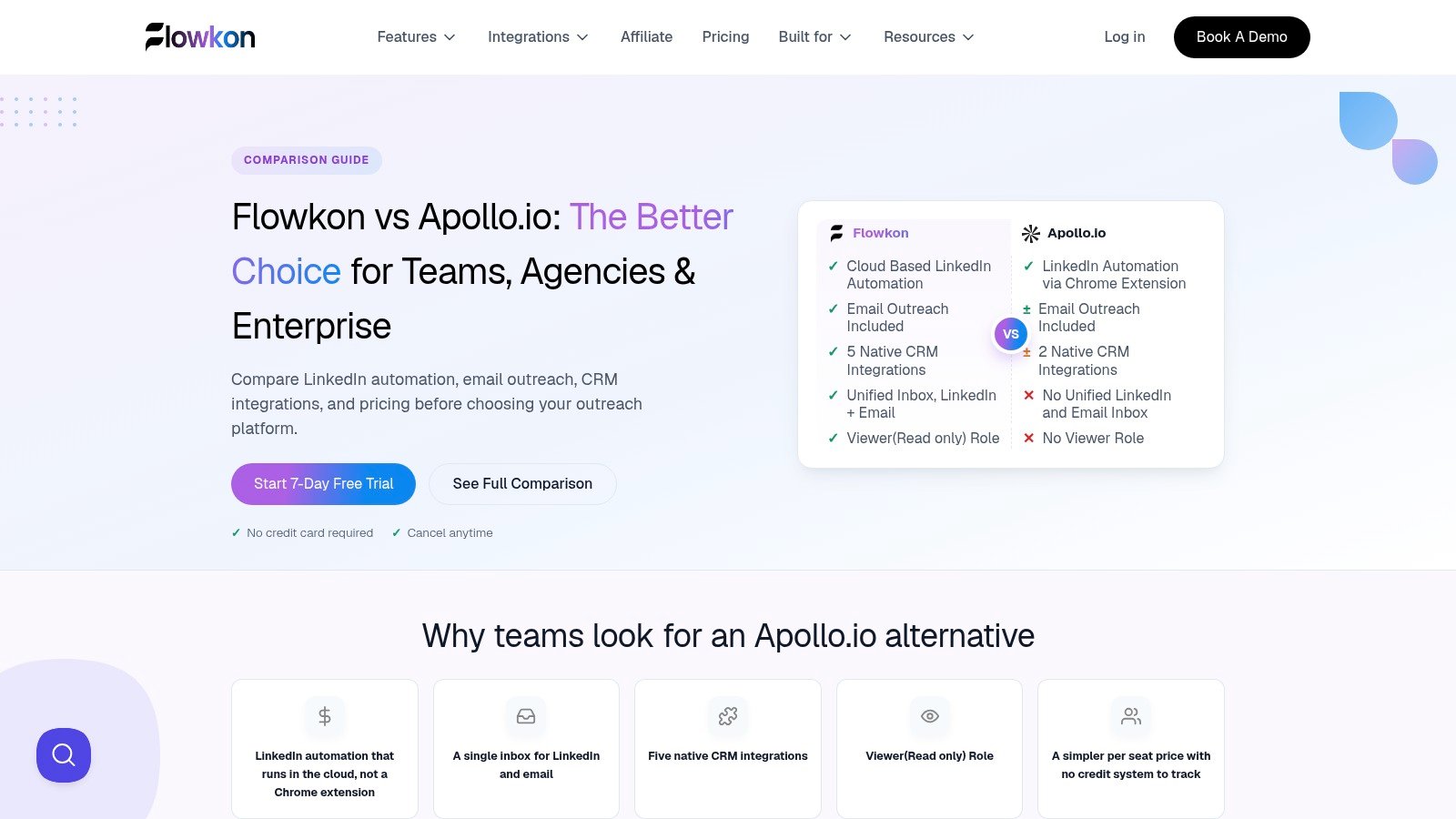
Caption: This B2B sales prospecting tools comparison helps buyers evaluate workflow fit, contact data coverage, and LinkedIn plus email outreach capabilities before shortlisting a platform.
A stack usually breaks into a few jobs: LinkedIn outreach, multichannel sequencing, contact data, enrichment, and visitor intent. The right choice depends on which part of the workflow needs the most control. Founders usually want speed and simplicity. Agencies need account separation and repeatable workflows. SDR teams care about list quality, sequence management, inbox safety, and reply handling. Enterprise buyers look for governance, reporting, security review readiness, and deeper integrations.
ProductCore featuresQuality and UXValue and pricingTarget audienceBest fitFlowkonLinkedIn and email multichannel builder, unified inbox, verified email, CRM syncStrong user experience, visual builder, fast setup7-day trial, Individual, Team, Enterprise by sales quoteSales teams, agencies, founders, recruitersTeams that want LinkedIn and email outreach in one workflowLinkedIn Sales NavigatorAdvanced lead and account search, saved lists, InMails, alertsFirst-party data, native LinkedIn UXSelf-serve plans, limited InMails on lower tiersSellers needing LinkedIn-native prospectingTeams focused on LinkedIn research and buyer discoveryApollo.ioLarge contact database, enrichment, sequencing, dialer, Chrome extensionStrong value, integrated outreachCredit-based model, SMB-friendly tiersSMB and mid-market reps and opsTeams that want contact data and outreach in one productZoomInfo SalesOSExtensive firmographic and technographic data, intent, org chartsEnterprise-grade depthCustom enterprise contracts, often expensiveLarge enterprises and ABM programsEnterprise teams with complex research and routing needsLushaEmail and phone discovery and verification, Chrome extension, APIQuick onboarding, self-serveTransparent self-serve tiers and creditsSmall teams and solo sellersLean teams that need fast contact lookupHunter.ioDomain search, email finder and verifier, bulk operationsReliable verifier, lightweight workflowAffordable plans and pay-as-you-go creditsUsers needing focused email discoveryEmail-first teams that prioritize verificationClayVisual enrichment workflows, AI personalization, dedupe, scoringHighly customizable, steeper learning curveUsage and credit based, better for advanced stacksTeams needing custom data recipes and personalizationTeams that need enrichment and personalization before outreachCognismGlobal contact data, phone-verified records, DNC screening, CRM syncStrong EMEA accuracy, compliance focusSales-led pricing, quote requiredEMEA sellers, phone-centric teamsTeams that need stronger compliance and phone dataSeamless.AIEmail and phone discovery, credits, Chrome extension, exportsUseful for high-volume list buildingCredit model, annual termsHigh-volume list buildersTeams prioritizing scale over workflow depthOutreachMultichannel sequences, unified inbox, AI workflow assistanceStrong enterprise analytics and governanceEnterprise pricing, contact salesLarge sales orgs with process controlsLarge teams that need governance and reporting
This table removes decorative icons and simplifies the comparison so buyers can scan fit, workflow role, and pricing model faster.
Flowkon and Outreach sit in the sequencing layer, but they serve different buyers. Flowkon fits teams that want LinkedIn and email in one motion with lighter setup. Outreach is usually a better fit for larger orgs that need tighter process control, reporting, and governance.
Apollo, Lusha, Hunter.io, Cognism, Seamless.AI, and ZoomInfo sit closer to the data layer. The trade-off is usually coverage versus precision, and self-serve speed versus compliance depth. Teams that rely on phones or operate in regulated markets often look harder at Cognism. Teams that want broad data with quick activation often start with Apollo or Lusha. Hunter stays narrower, which is useful when email verification matters more than broad enrichment.
Clay is different again. It is not a standard contact database. It is the layer that connects sources, cleans lists, and adds custom enrichment before outreach. That makes it valuable for agencies and operators building a more exact workflow, but it asks for more process discipline.
Sales Navigator is the cleanest LinkedIn-native option for account and lead discovery. It works well when the sales motion starts on LinkedIn and the rep needs high targeting fidelity before outreach begins.
ZoomInfo fits enterprise teams with deeper research needs, especially when firmographic coverage, org charts, and intent signals matter. It is usually a heavier investment, so it makes sense when the sales motion is already mature enough to use the data well.
Best B2B Sales Prospecting Tool by Use Case
Best for Startups and Founders
Apollo.io and Lusha are the easiest starting points if you need contact data without a heavy ops burden. If you are founder-led and doing your own outreach, Flowkon is a stronger next step once LinkedIn and email need to work together in one system.
Best for Agencies
Flowkon and HeyReach fit agency workflows best because they handle multi-account execution and governance better than single-user tools. Clay can sit underneath them when list cleaning and enrichment need to be more custom. The key is keeping client workspaces separate and your attribution clean.
Best for Sales Teams and SDRs
Sales Navigator, Apollo.io, and Flowkon are the most practical trio for SDR teams. Sales Navigator finds the right people, Apollo helps fill the list, and Flowkon handles coordinated outreach and conversation management.
Best for LinkedIn-First Prospecting
Sales Navigator is the starting point, and Flowkon is the layer that turns it into a repeatable outreach motion. PhantomBuster and HeyReach can help too, but they are more useful when your process is already defined and you need scale.
Best for Email-First Prospecting
Hunter.io, Apollo.io, and Lemlist are strong here. Hunter gives you cleaner email discovery, Apollo adds data plus sequence support, and Lemlist is useful when email personalization is the centerpiece.
Best for Enterprise Teams
ZoomInfo and Outreach are the most enterprise-ready options in this comparison, especially when governance, reporting, and cross-team coordination matter. Cognism is also worth a look for teams that need a stronger compliance posture in Europe.
How to Choose the Right B2B Sales Prospecting Tool
Define Your Ideal Customer Profile and Channel Mix
Start with your ICP, not the software. If your buyers live on LinkedIn, prioritize Sales Navigator and a LinkedIn outreach layer. If your process is email-heavy, contact accuracy and verification matter more than social automation.
Check Data Accuracy and Compliance
You need to know where the data came from, how often it is refreshed, and whether the workflow fits your compliance requirements. LinkedIn's rules on invitations and connection limits are worth reading directly before you automate anything, especially if your team uses multiple accounts or large-scale outreach, because LinkedIn says invitation abuse and prohibited automation can trigger restrictions, and its help pages also note a 30,000 first-degree connection ceiling and monthly invitation-credit rules for Pages in specific scenarios, as stated in LinkedIn's help documentation.
Look for CRM Integrations
A prospecting platform should push clean data into the CRM, not become a second system of record. If your reps have to copy replies, notes, or activities by hand, the stack is already leaking time. Native sync with HubSpot, Salesforce, Pipedrive, Zoho, or Monday.com is usually the cleanest path.
Compare Pricing and Scalability
Some products are seat-based, some are credit-based, and some are quote-based. That matters because what looks cheap at ten users can get expensive once volume rises. Choose the pricing model that matches how your team operates, not the one that looks simplest on the landing page.
Test with a Free Trial First
A demo can hide friction. A trial shows whether the UI, setup, data quality, and workflow depth hold up under real use. Run one small campaign, track qualified replies, and see whether the product reduces manual work or just moves it around.
How to Build a B2B Sales Prospecting Tech Stack
The Core Layers Data, Enrichment, Outreach, Inbox, CRM, Analytics
A stable stack usually has six layers. You need a source for finding prospects, a way to enrich records, an outreach layer, a place to manage replies, a CRM for truth, and analytics to see what is working. When those layers are separated cleanly, teams move faster and waste less effort.
Flowkon fits the outreach and conversation-management layer, not the database layer. That matters because teams often buy the wrong thing first, then wonder why their contacts are still dirty or why their CRM never feels current. The best stacks keep each layer honest and integrated.
Sample Stack for Startups
A lean stack often looks like Sales Navigator plus Apollo.io or Hunter.io, then Flowkon for outreach, then a CRM like HubSpot. That setup gives a startup enough discovery, verification, and execution without overcomplicating things. If the team is very small, keep the stack simple and only add Clay once list quality becomes a clear issue.
Sample Stack for Agencies and Growing Sales Teams
Agencies and scaling teams usually need Sales Navigator, Clay, Flowkon, and a CRM with tighter governance. That mix supports client workspaces, enrichment, and coordinated sequencing without turning the process into spreadsheet chaos. If you manage multiple clients or brands, the workflow controls matter almost as much as the data.
How to Run Safe and Effective LinkedIn Prospecting
Set Safe Daily Limits
LinkedIn says all members are subject to invitation limits, and it can restrict accounts that exceed them or use prohibited tools. That means pacing matters, especially when multiple reps or accounts are working the same market. Do not treat automation as a license to push volume without restraint.
Warm Up Your LinkedIn Account
New or inactive accounts need a slower ramp than mature ones. Start with natural activity, then layer in outreach carefully. A common mistake is treating account health like a one-time setup instead of a live operating constraint.
Personalize Every Message
Generic connection requests are easy to ignore. Use role, company context, recent activity, or trigger events to make the first touch relevant. Even a short note performs better when it sounds like a person wrote it for that person.
Combine LinkedIn with Email
LinkedIn alone is rarely enough. The best workflows use LinkedIn for visibility and email for persistence, then keep the sequence coherent across both channels. That is where Flowkon's unified campaign structure is useful, because you are not rebuilding the same cadence in two different tools.
How AI Is Changing B2B Sales Prospecting Tools
AI Lead Scoring and Personalization
AI is best at helping reps prioritize and personalize faster. It can clean up research, suggest message angles, and reduce the time spent on repetitive prep. That makes it valuable, but only when the underlying data is decent.
AI Agents and MCP Integrations
The newer wave of AI is moving from assistance to orchestration. Teams are starting to use AI agents to search, summarize, and trigger actions across prospecting systems, which makes the stack more connected. The upside is speed, but the risk is that bad input gets amplified faster too.
What AI Can't Replace
AI cannot replace judgment, relationship-building, or timing. It can help a rep get to the right message faster, but it cannot make the message relevant if the ICP is wrong. It also cannot save a workflow that lacks clear ownership or clean data.
Common Mistakes When Choosing B2B Sales Prospecting Tools
Buying automation before defining your ICP is one of the fastest ways to waste money. If you do not know who you are targeting, automation just helps you send the wrong message faster. That mistake shows up constantly in teams that chase volume before fit.
Trusting vendor data without verifying it is another common error. Contact data degrades, and unverified records waste time and hurt deliverability. Using too many overlapping systems causes the same problem in reverse, because reps stop trusting the stack when every task lives somewhere else.
Ignoring deliverability and account safety is the last big miss. LinkedIn and email both punish sloppy behavior, and no platform can guarantee safety. Good products lower risk, but they do not erase it.
Frequently Asked Questions
What are B2B sales prospecting tools?
B2B sales prospecting tools are software products that help sales teams find potential buyers, verify contact details, enrich lead data, and run outreach. They are used at the top of the funnel to improve targeting, save time, and increase qualified conversations.
What is the best B2B prospecting tool?
The best B2B prospecting tool depends on your workflow. LinkedIn Sales Navigator is a strong choice for finding decision-makers on LinkedIn. Apollo.io is a practical option for teams that want contact data and outreach in one platform. Flowkon is a better fit when your priority is managing LinkedIn and email outreach in one connected workflow.
What is the difference between lead generation and prospecting tools?
Lead generation tools help you capture or identify potential buyers. Prospecting tools help you qualify those buyers, prioritize the best opportunities, and contact them through email, LinkedIn, or other channels. In short, lead generation creates opportunities, while prospecting moves them toward a sales conversation.
Which tool is best for LinkedIn prospecting?
LinkedIn Sales Navigator is the best starting point for LinkedIn prospecting because it gives you first-party search filters, account insights, and lead tracking. If you also need to manage follow-ups across LinkedIn and email, a dedicated outreach platform like Flowkon can help turn discovery into a repeatable process.
Are there free B2B prospecting tools?
Yes, some B2B prospecting tools offer free plans, limited credits, or free trials. Free options are useful for testing workflows, but most advanced features, larger data limits, and automation controls are usually available only on paid plans.
How much do B2B prospecting tools cost?
B2B prospecting tools can range from low-cost self-serve plans to custom enterprise contracts. Pricing usually depends on seats, credits, data access, automation features, and integrations. Small teams may spend modest monthly fees, while enterprise teams often work with annual quote-based pricing.
Is LinkedIn automation safe?
LinkedIn automation is not risk-free. LinkedIn warns that excessive activity and prohibited automation can lead to account restrictions. The safest approach is to keep activity paced, personalize messages, follow platform rules, and use automation carefully as part of a controlled outreach process.
Which B2B sales prospecting tool is best for small teams?
For small teams, the best option is usually the one that removes the biggest bottleneck without adding too much setup. Apollo.io and Lusha are practical for contact data, while Flowkon is useful when a small team needs LinkedIn and email outreach in one place.
What should I look for in a B2B prospecting tool?
Look for data accuracy, CRM integration, workflow fit, pricing transparency, and compliance support. The right choice should match your prospecting channel, team size, and current stack.
Do I need separate tools for data and outreach?
Not always. Some platforms combine data and outreach, but many teams get better results by separating those layers. A dedicated data source, enrichment workflow, and outreach platform can provide more control as the process grows.
How do I choose between LinkedIn prospecting tools and email prospecting tools?
Choose based on where your buyers respond and how your team works. If your market is active on LinkedIn, start with LinkedIn discovery and outreach tools. If email is the main channel, prioritize contact accuracy, verification, and sequencing.
Final Thoughts on Choosing the Right B2B Sales Prospecting Tool
The cleanest way to buy B2B sales prospecting tools is to separate the stack into layers. Use Sales Navigator or a database to find prospects, Clay or another enrichment workflow to improve records, and Flowkon or another engagement platform to coordinate LinkedIn and email execution. If you do that well, you will spend less time moving data around and more time having real conversations.
For founders, the best move is usually a simple stack that keeps research and outreach connected. For agencies, the priority is multi-account control and clear reporting. For SDR teams, consistency and CRM sync matter most. LinkedIn-first teams should start with Sales Navigator plus an outreach layer, email-first teams should focus on verification and sequencing, and enterprise teams should prioritize governance, integrations, and compliance.
Flowkon belongs in the outreach and conversation-management layer, not the database layer. That makes it a good fit when your data source is already set, but your execution is still fragmented. You can test that workflow against a real campaign with the 7-day free trial, then verify current pricing, capabilities, and vendor claims before you roll it into production.
If you want one place to run LinkedIn and email outreach without juggling disconnected inboxes, Flowkon is built for that layer of the stack. It is useful when you already know your ICP and just need cleaner execution, safer pacing, and better visibility into replies and follow-ups. Visit Flowkon to see how the workflow fits your prospecting process.


%20(1).png)




.svg)

