.webp)

If your agency pipeline still depends on referrals, you already know the pattern. A few strong relationships keep things moving; then one quiet month turns into a scramble for leads, follow-ups, and cash flow.
That is the core problem with lead generation for agencies. Referrals are high-trust, but they're not a system. The practical fix is to keep referrals and add a repeatable outbound engine that you can measure, control, and hand to a team without guessing who followed up with whom.
Why Referrals Alone Stop Scaling Your Agency
Agencies rely on referrals because they work. In one 2025 benchmark of more than 100 development agencies, 82% said referrals and word of mouth were their primary new-business source, and another 2025 survey of marketing-services and professional-services firms found 75% naming referrals as their main source of new business (agency sales statistics). That's not a fluke. It's how a lot of agencies grow until the pipeline gets lopsided.
Trust is not volume
Referral leads usually convert better because they arrive pre-warmed. But the supply is capped by the number of clients, partners, and contacts willing to recommend you. When those relationships slow down, growth slows down with them.
A better way to think about it is this, referrals are a channel, not a plan. If you're seeing inconsistent inbound interest, capacity that outpaces pipeline, or too much dependence on one or two anchor accounts, it's time to add outbound.
Practical rule: if you can't explain where next month's meetings will come from without naming a referral source, your agency doesn't have a lead generation system yet.
Outbound doesn't replace referrals. It protects you from the months when referrals underdeliver and gives you a controllable source of conversations. If you want a useful refresher on what “qualified” really means before you start filling the top of the funnel, the practical lead qualification playbook is a solid companion read.
Defining Your ICP Before You Send Anything
Most agency outbound fails because the list gets built before the target is clear. The result is predictable, vague messages sent to people who were never a fit.
Use a simple ICP frame
Write the ideal customer profile down in four parts:
- Niche or vertical, such as SaaS, e-commerce, professional services, or fintech.
- Company size band, because a 12-person team and a 120-person team buy differently.
- Job titles, specifically the people who can move the deal forward.
- Disqualifiers, which stop wasted outreach before it starts.
Here's a working example. A demand-gen agency could target Heads of Growth at 50 to 200 person SaaS companies that already have an in-house team but no paid media function. That is specific enough to shape list building, message angles, and reporting. It's also narrow enough to tell you quickly whether the campaign is working or not.
A written ICP changes more than targeting. It sharpens your first line, your follow-up logic, and the way you review results later. If you're still deciding whether a contact is worth the time, the turning leads into SQLs guide is a useful way to pressure-test qualification criteria.
Good outbound starts with exclusion. The fastest way to burn list quality is to target everyone who might vaguely need your service.
When the ICP is clear, you stop arguing about whether a reply was “good enough” and start asking whether the right people are responding. That makes the whole campaign easier to manage for your own pipeline and for client work.
Building and Enriching a Compliant Prospect List
Once the ICP is defined, list building becomes an operational task, not a guessing game. Strong agency lists usually come from a mix of LinkedIn and Sales Navigator searches, event attendee lists, the client's own network, and imported past contacts.
Compare list sources before you waste time
The next step is enrichment. Don't guess email patterns and hope for the best. Use verified business emails, because a dirty list damages the sender before the first reply ever arrives. If you're looking for a tool-focused example of how enrichment fits into the workflow, Flowkon's lead enrichment feature shows how teams can source, enrich, and prepare prospects before outreach.
Keep suppression handling simple and shared
For email prospecting in the U.S., the CAN-SPAM Act requires a clear opt-out mechanism, and opt-out requests must be honored within 10 business days. The unsubscribe mechanism also has to keep working for at least 30 days after the message is sent, and the FTC says businesses stay responsible for messages sent by vendors on their behalf (FTC CAN-SPAM compliance guide).
That means the workflow matters:
- Put an unsubscribe link in every commercial campaign.
- Use one suppression list across all client campaigns.
- Audit opt-outs before each send so nobody gets re-contacted.
- Offer a stop-all option, not just category-specific preferences.
A smaller verified list beats a bigger dirty one every time.
Running One Combined LinkedIn and Email Sequence
A prospect who sees the same agency on LinkedIn and in email reads a single message faster than two separate ones. In agency work, that matters because scattered client accounts, shared visibility, and manual weekly reporting already create enough noise.
A simple sequence that holds together
Start with a connection request that sounds human. A few days later, send a LinkedIn follow-up. Then move to email with a short reference to the LinkedIn touch, and continue with timed follow-ups from there. The goal is a single story across channels, not maximum inbox coverage.
A workable day-by-day flow looks like this:
- Day 1, LinkedIn connection request.
- Day 3 or 4, LinkedIn follow-up.
- Day 5 or 6, email touchpoint.
- Later follow-ups, spaced out with the same tone and context.
Sample connection note:
Hi Sarah, I liked your recent post on pipeline quality. The way you framed qualification around fit and timing stood out.
Sample first email:
Hi Sarah, I noticed your team is hiring on the growth side, which usually means the pipeline has to support a bigger motion. Worth a conversation if you're comparing ways to keep that consistent?
The first message should open a conversation, not push a service deck. Keep the tone consistent, and let each touch add one more piece of context.
A cloud-based multichannel builder handles the delays and variables automatically. The guide on how to combine LinkedIn and email outreach in one sequence walks through the full setup.
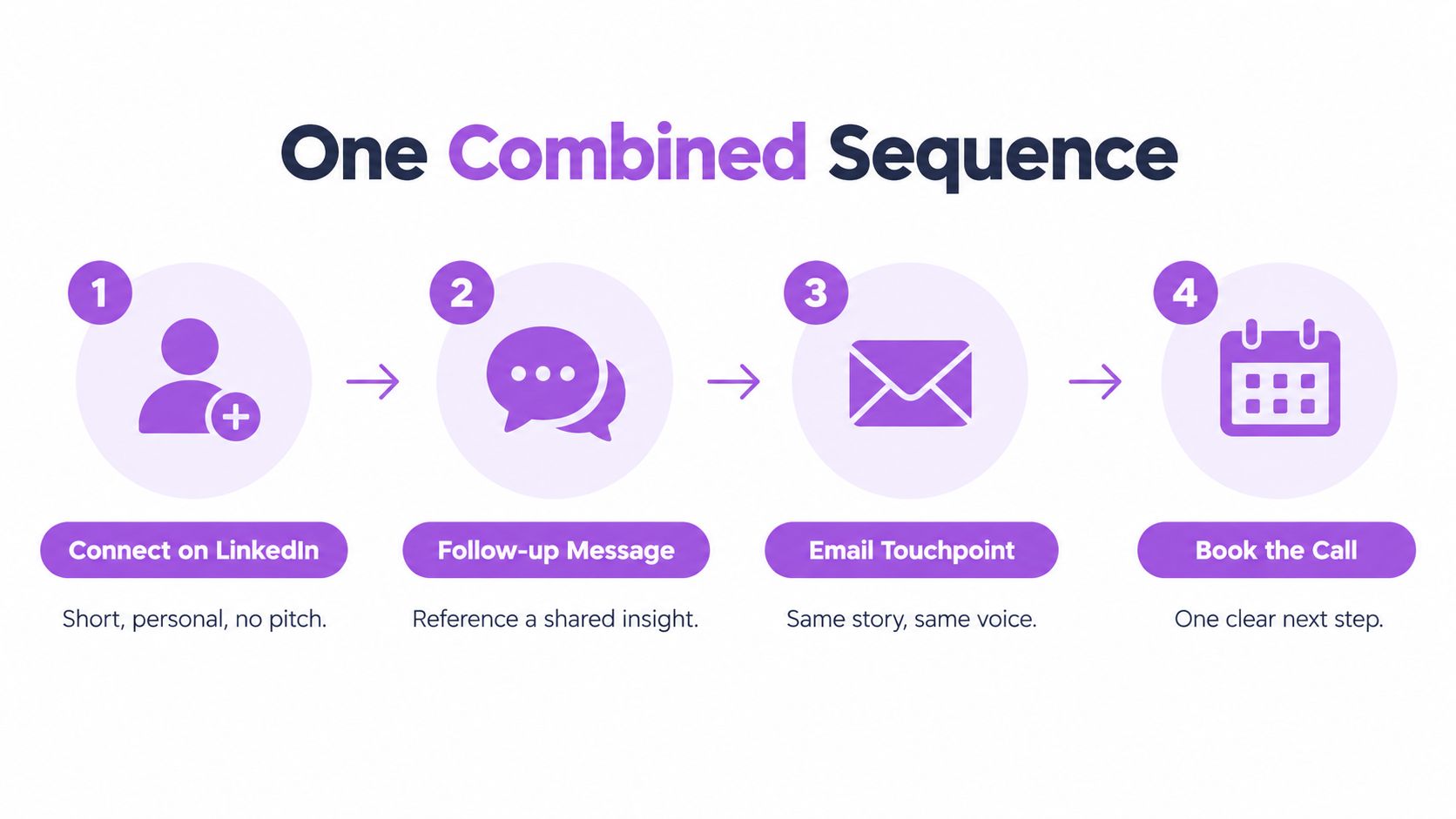
One sequence beats two disconnected ones. The prospect should feel like they're hearing from one team with one point of view, not two tools competing for attention.
Personalization That Goes Beyond the First Name
First-name tokens don't feel personal anymore. They feel automated, because they are. Real personalization starts with something specific about the person's role, timing, or business situation.
What actually changes reply quality
Personalized variables matter when they point to a real fact, not a filler token. If a lead just announced a new hire, launched a new product line, or reshaped the growth team, the message should reflect that context. That's where enrichment and buyer context help, because they tell you which decision-makers are worth contacting first.
Flowkon's Buyer Intelligence and enrichment layer fit here because they help surface context before the first message goes out. That lets you prioritize better-fit prospects and avoid sending the same angle to everyone.
A simple example is segmenting one client audience into two groups. Referral partners need a different message from end clients. Partners want co-marketing, trust, and alignment. End clients care more about pipeline, implementation load, and outcomes. If you send both groups the same pitch, you'll get generic replies or none at all.
Use campaign analytics to see which messages earn the strongest responses, then tighten the weak spots. Don't expect a magic lift from personalization alone. Relevance earns replies, and relevance comes from segmenting well.
Separate the audience before you write the copy. If the segment is wrong, even a strong message lands like noise.
Keeping Client LinkedIn Accounts Safe
This is the part agencies get wrong fastest, because they're not sending from their own account. They're working inside a client's risk envelope.
LinkedIn's policy explicitly prohibits third-party tools and browser extensions that automate activity or scrape LinkedIn data, and members using prohibited tools can face restriction or shutdown (LinkedIn User Agreement guidance). That means no tool, workflow, or pacing trick can promise safety. It can only reduce risk.
Safer pacing beats aggressive volume
The practical protections are straightforward:
- Warm up the account before pushing volume.
- Use built-in sending limits instead of spikes.
- Keep pacing steady rather than launching a burst campaign.
- Review replies by hand where judgment matters.
Safe limits do cap maximum volume, and that's intentional. A slower campaign that stays alive all year is better than an aggressive one that burns the account in a month.
The email side needs the same discipline. Gmail's bulk-sender rules apply around 5,000 messages to personal Gmail accounts in 24 hours, and Google says bulk senders should keep the spam rate below 0.1% and avoid reaching 0.3% or higher (Gmail sender guidelines). If you're running multiple client streams, watch domain-level volume, not just one mailbox.
One G2 reviewer reported getting LinkedIn alerts as soon as a campaign launched with another tool and said Flowkon felt much less risky by comparison. That's a customer report, not a guarantee, but it matches how paced outreach should feel.
A short video walkthrough of the pacing mindset is worth keeping handy:
Managing Multiple Clients and Reporting Without Spreadsheets
Agency lead generation gets messy here. The campaign can work, but the operating layer starts to fray once several client accounts are active at the same time.
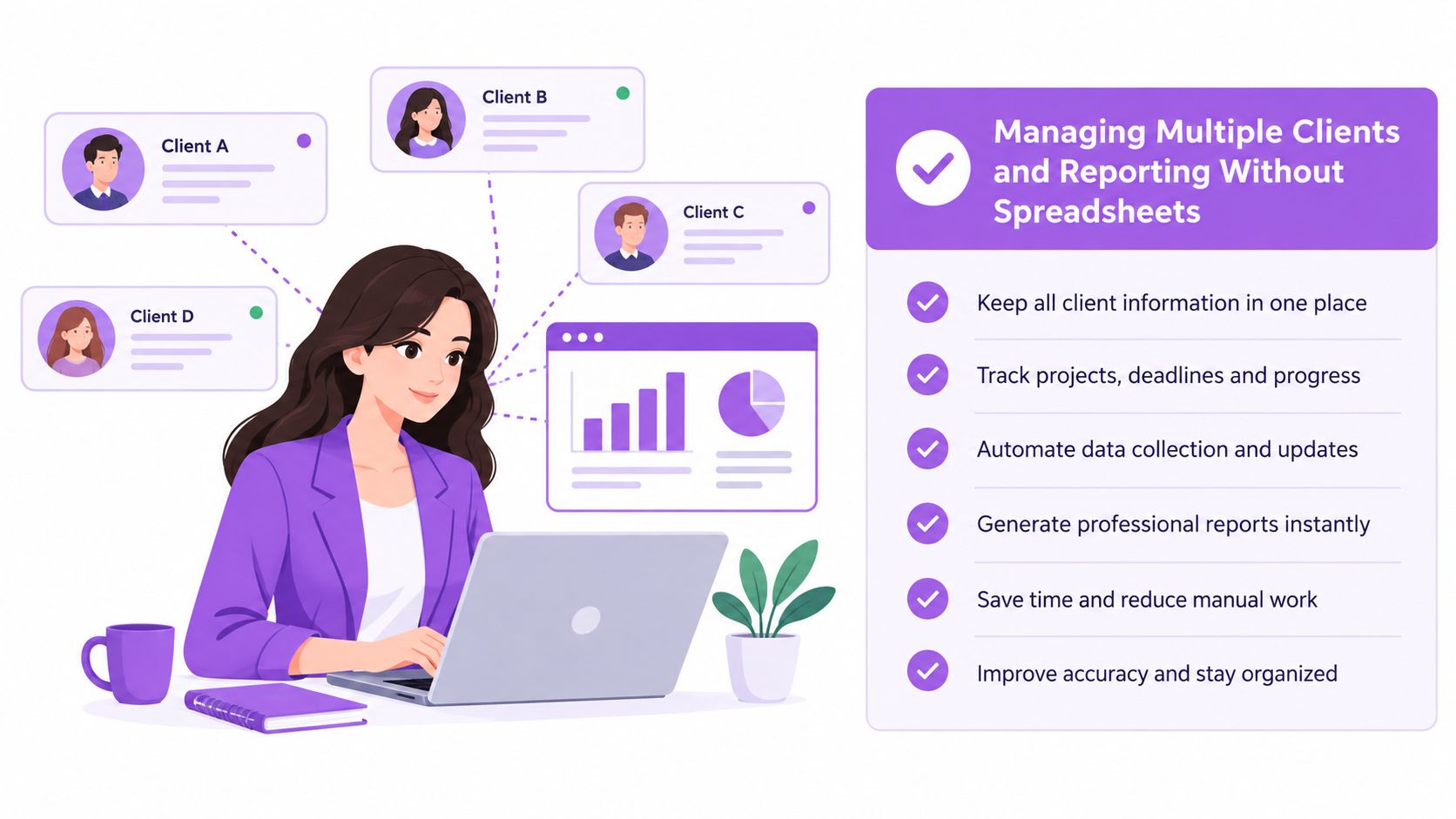
One workspace, separate accounts, clearer control
The clean setup is straightforward. Keep each client in its own workspace or account, give role-based access so people only see what they need, and centralize replies in a unified inbox. LinkedIn DMs, InMails, and email replies all land in one place, and SDRs step in only when a prospect responds.
Sync qualified leads back to the client's CRM, whether that's Salesforce, HubSpot, monday.com, Zoho, or Pipedrive. That removes manual entry and keeps the lead where the client already works. It also makes handoff easier when the agency is running more than one campaign at once.
A reviewer on G2 described managing several clients from one platform as easier to oversee, and another agency founder reported nearly 5X pipeline growth after scaling outreach across multiple LinkedIn accounts, with the product profile showing a 5.0 average across 34 reviews on G2. These are reviewer claims, not guarantees. One honest limitation also surfaced, an initial learning curve during campaign setup, and a wish for more customizable reporting.
The two mistakes show up quickly. One is aggressive, unplanned sending that puts a client's LinkedIn account at risk. The other is inconsistent manual follow-up and reporting spread across inboxes, spreadsheets, and CRM tabs. Both waste time and make the agency look less controlled than it should.
For a fuller look at the multi-client setup, see how agencies can manage multiple client LinkedIn accounts without chaos.
A weekly workflow that actually holds up
- Monday, review active campaigns, reply volume, and any account warnings.
- Tuesday, update prospect lists and enrich new records.
- Wednesday, check message performance by segment.
- Thursday, sync qualified leads into the CRM.
- Friday, share live results with clients through read-only Viewer access instead of building a manual report.
Manual reporting looks cheap until your team spends half a day rebuilding the same numbers every week.
With reporting handled, the weekly cadence becomes a 30-minute check instead of a half-day rebuild.
Ready to build a steadier agency pipeline?
If you want to turn referrals into a more predictable system, start with a 7-day free trial. You can also visit the Flowkon to see how multichannel outreach, enrichment, inbox management, and client reporting fit together in one place.





.svg)

