.webp)

%20(1).png)
Managing LinkedIn for one client is usually not that difficult. The problems start when an agency is handling five, ten, or twenty client accounts at the same time.
Every client has a different audience, offer, messaging style, campaign schedule, and outreach goal. For agencies running LinkedIn and email outreach for multiple clients, having a centralized system can make it much easier to keep this work organized. As an agency takes on more clients, it also has to keep track of multiple LinkedIn accounts, campaign sheets, message templates, inboxes, reports, and approval processes.
Agencies rarely struggle with sheer volume alone. They struggle to keep accounts, campaigns, conversations, and reporting separated, consistent, and easy for the team to manage. A repeatable system fixes this. Instead of treating every client as a separate manual project, agencies can build one system that keeps accounts, campaigns, conversations, and reporting organized.
Why Managing Multiple Client LinkedIn Accounts Gets Complicated
Managing one or two LinkedIn accounts is usually straightforward. You know which account is associated with which client, what is happening with the campaigns, and what needs to be done.
The complexity increases when your agency gets more clients. You and your team could be working across multiple accounts, campaigns, prospects, messages, and reports throughout the day.
That is where little mistakes can occur. A prospect could be added to the wrong campaign, messages can get mixed up, or someone could spend their time looking for the appropriate account or conversation.
More spreadsheets and manual tracking won't solve the problem. Learn more about building a scalable LinkedIn outreach system. As the agency expands, there should be a distinct process, workspace, and owner for each client.
The Biggest Challenges Agencies Face at Scale
Once the agency starts to scale up and accept more clients, it becomes increasingly difficult to handle the increased workload. The more clients you have, the more LinkedIn accounts, campaigns, prospects, and conversations you must manage.
- Managing multiple LinkedIn accounts: Switching between different client accounts may cause missed messages, wrong actions, or confusion regarding who owns what.
- Keeping campaigns organized: Every client has a unique audience, message, and objective. Without a clear structure, campaigns can easily get mixed up.
- Maintaining consistent outreach: Teams need to keep connection requests and follow-ups running regularly across every client, which becomes difficult to manage manually.
- Tracking campaign performance: If you have more than one campaign going on at a time, it can be time-consuming to track acceptance rates, replies, and other results for each client.
- Handling client communication and approvals: Agencies should also keep clients updated, receive approvals, and handle client requests without affecting the campaign or slowing it down.
How to Build a Scalable LinkedIn Account Management Process
Managing multiple LinkedIn accounts becomes much easier when there is a clear process behind it. Instead of treating every client account differently, start by defining how your team will handle accounts, campaigns, prospects, and approvals.
Give each client a dedicated owner and keep their campaigns, messaging, and prospect lists organized in one place. This makes it easier for team members to know what they are responsible for and reduces the chances of work getting mixed between clients.
The process should also define how your team handles day-to-day tasks, including connection requests and follow-ups, checking and responding to replies, reviewing campaign performance, and keeping clients updated.
The idea isn't to add more spreadsheets or have to remember more things as the number of clients increases. Its focus is to establish a process that functions consistently as the agency grows.
Centralize Multiple Client Accounts in One Dashboard
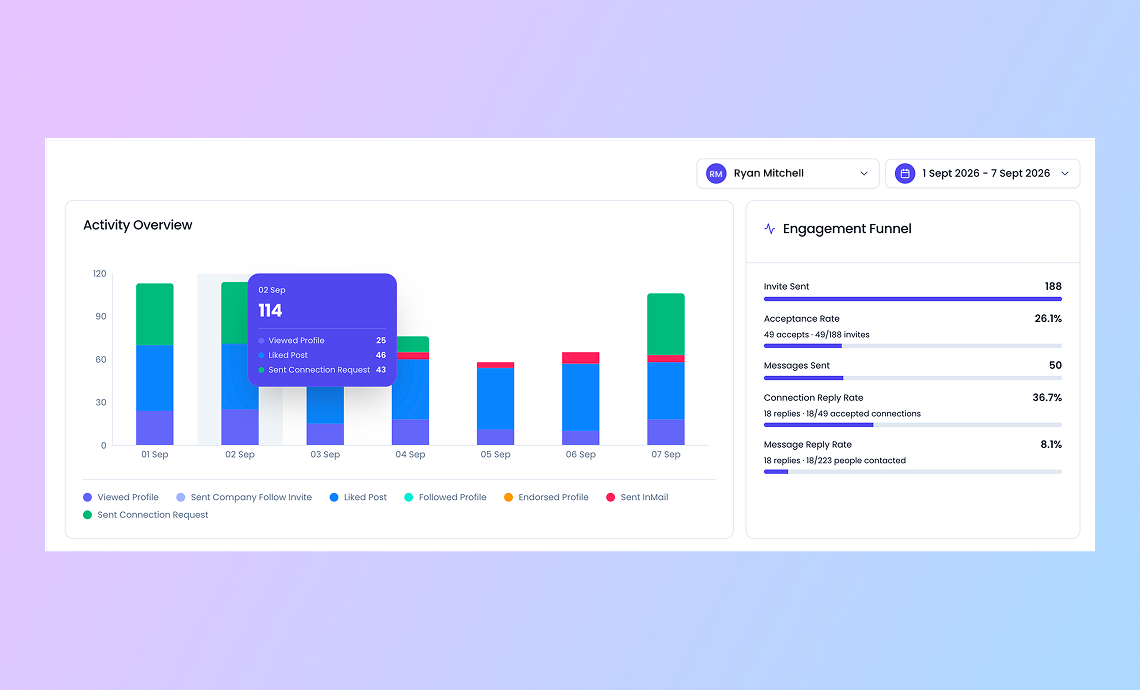
When an agency is managing several LinkedIn accounts, constantly switching between different tools and logins can become a problem. It takes time to find the right client account, check campaign activity, or see which prospects need attention.
Keeping everything in one dashboard makes this much easier. Your team can see each client account, active campaigns, prospects, conversations, and performance without jumping between different places.
Create Separate Campaigns and Workflows for Each Client
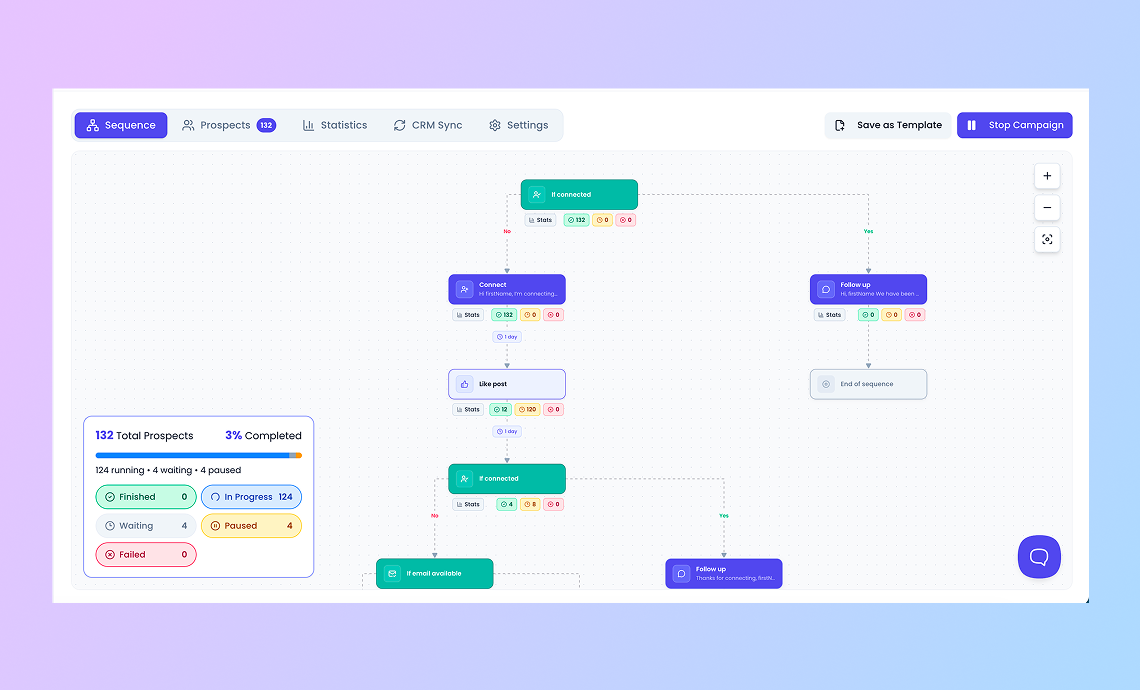
Each client has unique prospects, offers, and approaches. If you're running the same campaign for everyone, your communications can sound more generic, and it may be difficult to measure campaign success.
Make individual campaigns for each client and keep their messaging, prospect lists, follow-ups, and goals separate. For example, one client may need a quick connection campaign, while another may need multiple follow-ups over a couple of weeks.
Having a clear workflow for each client is also a plus. Your team should be aware of who is following up with new prospects, who is replying to them, when follow-ups are sent, and when a campaign should be modified.
Set Up Clear Roles and Permissions for Agency Teams
As more people start working on client accounts, it becomes important to decide who can access and manage each account. Giving everyone access to everything can lead to accidental changes or work being done on the wrong client.
Set clear roles for your team based on what they need to do. For example, some team members may manage campaigns and prospects, while others may only need to handle conversations or check campaign results.
This keeps client accounts better organized and gives everyone a clear idea of what they are responsible for.
Maintain Safe and Consistent LinkedIn Activity
When managing multiple LinkedIn accounts, it's important to keep activity consistent and avoid unnecessary changes that could put accounts at risk.
Your team should review campaigns, monitor activity, and make changes when needed. Consistent processes also help prevent accidental changes and keep outreach aligned with each client's campaign.
For more guidance, see these practical LinkedIn automation safety practices.
How LinkedIn Automation Can Reduce Agency Workload
A lot of agency time goes into repetitive LinkedIn tasks. Sending connection requests, following up with prospects, checking replies, and moving prospects through different campaign steps can take up a big part of the day.
When you are doing this for several clients, the workload grows quickly. Your team has to repeat the same tasks across different accounts while also making sure nothing gets missed.
LinkedIn automation can handle many of these repetitive steps based on the workflow you set for each client. Connection requests and follow-ups can run automatically, while your team can focus more on replies, interested prospects, and conversations that need a personal response.
This doesn't mean the whole process should be left to automation. Your team still needs to review campaigns, monitor activity, and make changes when needed.
Why Agencies Need a Unified Inbox for Client Conversations
When an agency manages several client accounts, conversations can quickly become difficult to keep track of. Your team may be handling LinkedIn messages, InMails, and emails for different clients at the same time.
Checking each client account separately makes it easy to miss a reply or take too long to respond. It can also be difficult to know which team member is already handling a conversation.
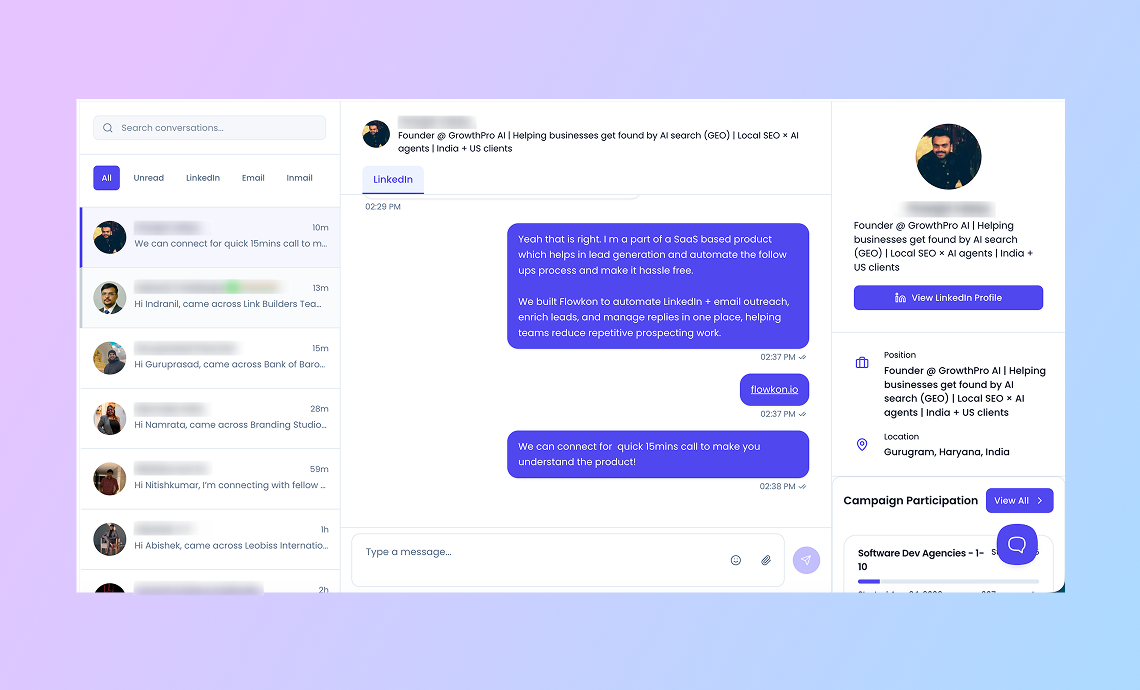
A unified inbox gives your team one place to keep track of these conversations. They can see messages and InMails, manage replies, and stay on top of client conversations without constantly switching between accounts.
Common Mistakes Agencies Should Avoid
Managing multiple client accounts becomes difficult when there is no clear process behind it. A few common mistakes can create more work for the team and lead to problems with client accounts.
- Using the same campaign for every client: Every client has a different audience and goal. Reusing the same messaging and workflow can make outreach less relevant.
- Relying too much on spreadsheets: Spreadsheets can work for a few clients, but they become difficult to maintain as accounts and campaigns increase.
- Ignoring conversations: Sending connection requests and follow-ups is only part of the job. Replies, InMails, and emails also need regular attention.
- Not tracking performance: If your team isn't checking campaign results for each client, it becomes difficult to know what is working and what needs to change.
- Adding more clients without improving the process: Taking on more accounts without a proper system can quickly create confusion. The process should grow with the agency, not become another problem to manage.
How Flowkon Helps Agencies Manage Multiple LinkedIn Accounts
Managing multiple client accounts can get messy when your team is switching between different tools, campaigns, and spreadsheets. It becomes harder to keep track of what is running for each client.
Flowkon enables agencies to have a single place for managing client LinkedIn accounts, campaigns, prospects, and conversations. Your team can manage client activity in one workspace rather than switching between tools or maintaining multiple spreadsheets for each client. Each client can have its own accounts, campaigns, prospects, and workflows, making it easier to keep work separated and organized.
The inbox also consolidates LinkedIn messages, InMails, and email into a single location. This allows your team to follow up with prospects and manage conversations without having to switch between accounts or platforms.
With all accounts centralized, agencies can spend less time on manual account management and reduce the risk of mixing up client activity. This allows teams to spend more time on outreach, follow-ups, and building meaningful conversations with prospects.
Final Takeaway: Scale Client Outreach Without the Chaos
Managing multiple LinkedIn accounts doesn't have to mean adding more spreadsheets, logins, and manual work. The key is having a clear process for each client and keeping accounts, campaigns, prospects, and conversations organized.
As the agency grows, the objective isn't just to manage more accounts. It's to ensure your team can keep up with that growth without losing sight of what happens in each client's account. As you grow your client base, there is a lot that can be done to streamline workflows, manage accounts efficiently, and establish a dependable outreach strategy.
With the right process and tools like Flowkon, agencies can scale their LinkedIn outreach while keeping day-to-day work simple and manageable.
Manage Multiple Client LinkedIn Accounts From One Place
Stop juggling client accounts, spreadsheets, campaigns, and inboxes. With Flowkon, agencies can organize client accounts, create separate multichannel campaigns, automate follow-ups, and manage conversations from one workspace.
Start your 7-day free trial and simplify your agency LinkedIn outreach.




.png)



.svg)

